
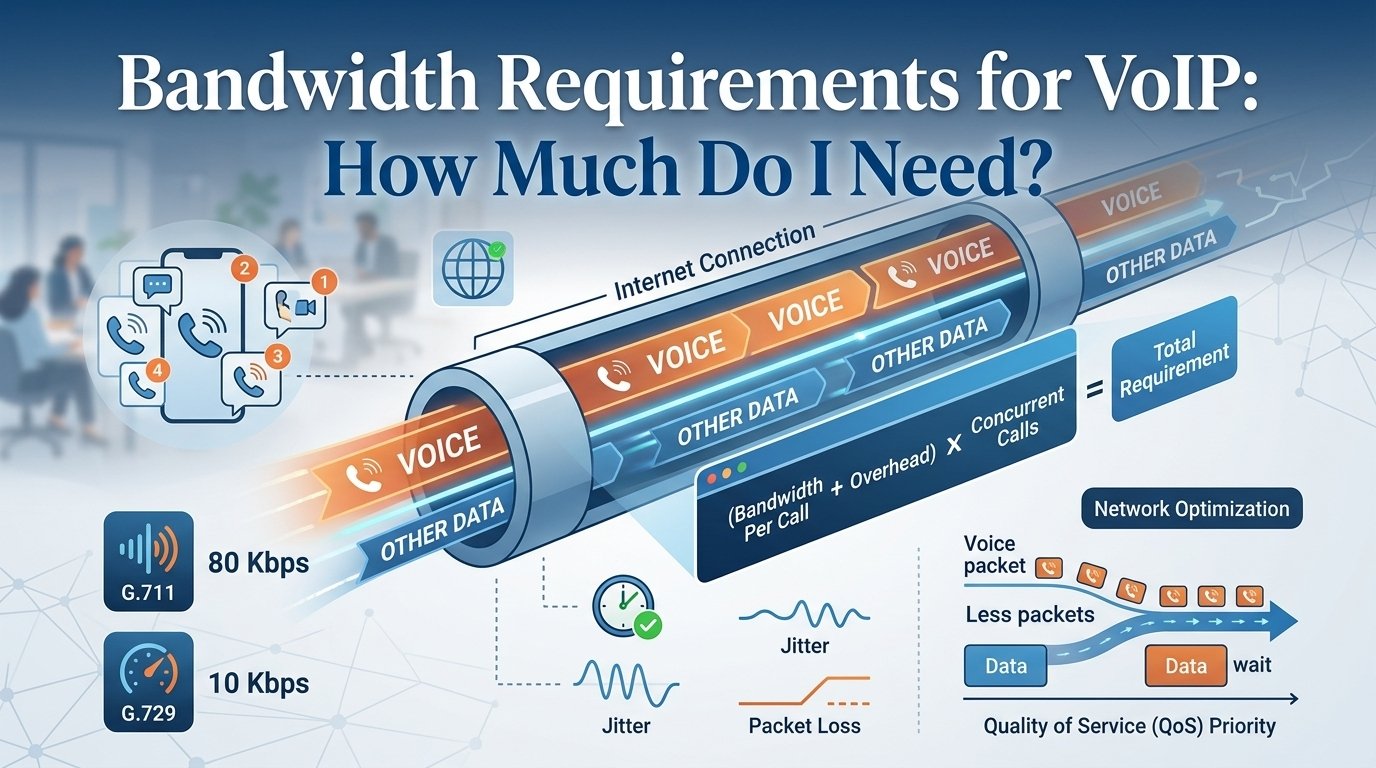
For reliable VoIP calls, plan for roughly 100 Kbps of upload and download bandwidth per simultaneous voice call as a practical baseline. Actual usage depends on the codec, packet size and network overhead. For example, a G.711 call can use about 87 Kbps over Ethernet, while compressed codecs such as G.729 can require considerably less.
Bandwidth Requirements for VoIP refer to the amount of data capacity needed on an internet connection to facilitate high-quality voice calls without interruptions. For most businesses, a standard high-definition voice call consumes approximately 85 to 100 Kbps of bandwidth in both upload and download directions.
To ensure optimal performance, your network must account for the number of concurrent calls and the specific codec used for data compression. Calculating these needs accurately prevents common issues like jitter, latency, and dropped calls, allowing for a professional communication experience across your entire organizational infrastructure.
What Is Bandwidth and How Does VoIP Use It?
Bandwidth represents the maximum data capacity of an internet connection, often compared to a water pipe where a wider diameter allows for greater flow. In the context of VoIP, this capacity determines how many simultaneous, high-quality conversations a network can sustain. Because voice communication relies on the real-time transmission of digital packets, any network congestion caused by heavy downloads or video streaming can lead to audio lag and degradation.
As the business world shifts toward cloud telephony to reduce costs and support remote work, proper network provisioning has become essential. With the global VoIP market projected to reach $102.5 billion by 2026, the demand for reliable, data-intensive communication is growing rapidly. To maintain high-quality voice and video services, businesses must prioritize their internet infrastructure and ensure their service providers can handle the increasing load required for modern professional growth.
Bandwidth Requirements for VoIP : Calculating How Much You Need
1. Identify the Codec Used
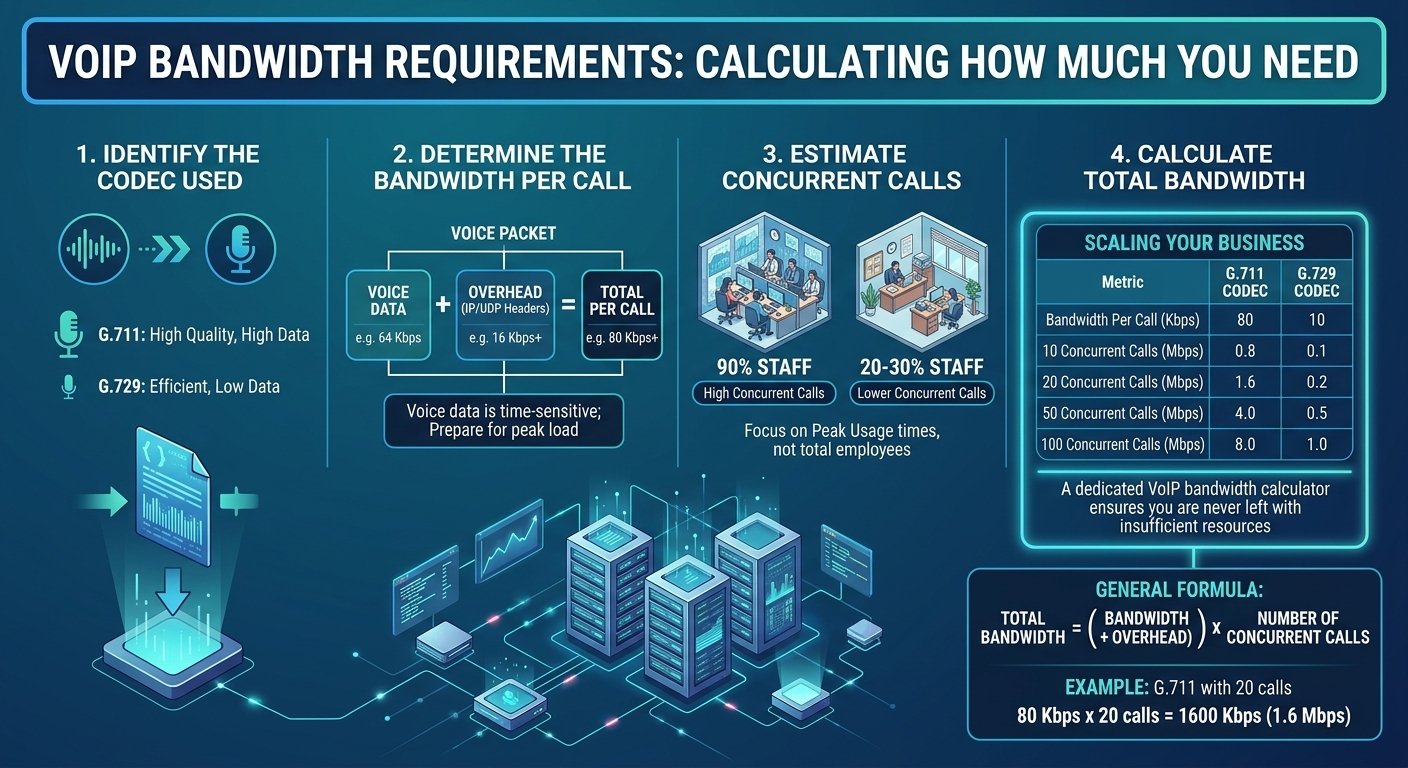
A codec is a software algorithm that compresses your voice into a digital format for transmission and سپس decompresses it at the other end. Different codecs offer different levels of audio quality and data consumption. For instance, the G.711 codec provides high-quality audio but uses more data, while the G.729 codec is designed for efficiency and consumes much less bandwidth. Knowing which codec your system defaults to is essential for any voip bandwidth calc process.
2. Determine the Bandwidth Per Call
Each call consists of the actual voice data plus the “overhead.” Overhead includes the necessary routing information, such as IP and UDP headers, which tell the data packets where to go. While the voice data might only be 64 Kbps, the total bandwidth per call often reaches 80 Kbps or more once the overhead is included. Accurate voip stats show that neglecting this overhead is a common mistake that leads to underestimated network needs.
3. Estimate the Number of Concurrent Calls
You do not necessarily need enough bandwidth for every single employee to be on the phone at the same time, unless that is a common occurrence in your office. Instead, look at your peak usage times. For a call center, the number of concurrent calls might be 90% of the total staff. For a standard administrative office, it might only be 20% to 30%. This estimation is a vital component of any voice over ip bandwidth calculator.
4. Calculate Total Bandwidth
Once you have the codec data and the number of simultaneous calls, you can find your total requirement. Use the following table to visualize how these numbers scale as your business grows. This vertical representation shows the difference between the high-quality G.711 and the compressed G.729 options.
| Metric | G.711 Codec | G.729 Codec |
| Bandwidth Per Call (Kbps) | 80 | 10 |
| 10 Concurrent Calls (Mbps) | 0.8 | 0.1 |
| 20 Concurrent Calls (Mbps) | 1.6 | 0.2 |
| 50 Concurrent Calls (Mbps) | 4.0 | 0.5 |
| 100 Concurrent Calls (Mbps) | 8.0 | 1.0 |
To work out your VoIP bandwidth requirement, follow this general formula:
Total Bandwidth = (Bandwidth Per Call + Overhead) x Number of Concurrent Calls.
For example, let’s assume a business uses the G.711 codec and needs to support 20 concurrent calls.
Total Bandwidth = 80 Kbps × 20 = 1600 Kbps.
This means the business would need 1.6 Mbps of bandwidth for 20 concurrent VoIP calls using the G.711 codec. Using a voip bandwidth calculator helps automate this math, especially when accounting for fluctuating overhead.
How Much Bandwidth Does VoIP Require?
There is no single answer to how much bandwidth is required because every network environment is unique. A small startup with three employees has vastly different needs than a multinational corporation using megapath voip solutions. Beyond the raw numbers of the calls, you must also consider the “background noise” of your network. Other applications like cloud storage backups, video conferencing, and even automated software updates compete for the same bandwidth voip.
To maintain high voip performance, many experts recommend having at least 15% to 20% more bandwidth than your calculated maximum. This buffer accounts for unexpected spikes in traffic or temporary network inefficiencies. If your internet connection is shared between guest Wi-Fi and office operations, your requirements will be even higher. Many businesses choose to implement Quality of Service (QoS) settings on their routers, which ensures that even if the network is busy, voice packets are given the “right of way” over other types of data.
How Internet Speed Can Affect Call Quality
-
Latency (Delay)
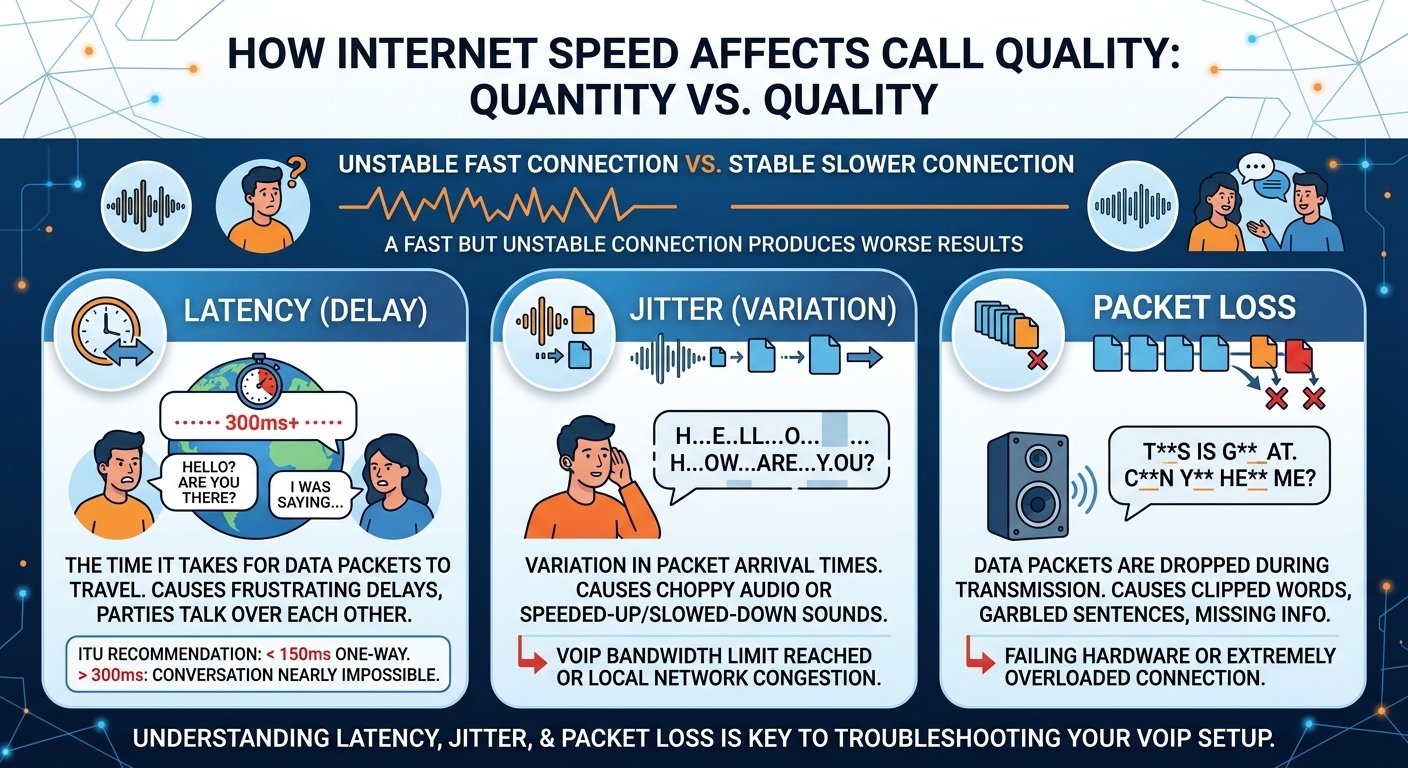
Latency is the measure of time it takes for a data packet to travel from your device to the destination and back. In a voice conversation, high latency manifests as a frustrating delay where both parties end up talking over each other because they don’t realize the other person has started speaking. According to the International Telecommunication Union (ITU), a one-way latency of less than 150 milliseconds is required for a high-quality user experience. If your latency exceeds 300 milliseconds, the conversation becomes virtually impossible to maintain effectively.
-
Jitter
Jitter refers to the variation in the time it takes for packets to arrive. Because packets are sent individually, they might take different paths through the internet. If they arrive at irregular intervals, the receiving device has to wait for them, resulting in choppy audio or sounds that seem to speed up and slow down. High levels of jitter are a clear indicator that your voip bandwidth usage is reaching its limit or that there is congestion on your local network that needs to be addressed.
-
Packet Loss
Packet loss occurs when data packets are dropped entirely during transmission. In a standard email, this isn’t a problem because the system just asks for the missing part to be sent again. However, in a real-time voice call, there is no time to re-send data. If a packet is lost, a tiny “hole” is left in the audio. This results in clipped words, garbled sentences, and missing information. Excessive packet loss is usually a sign of a failing hardware component or an extremely overloaded internet connection.
How To Test Your Internet Speed
Before you commit to a new service provider or add more lines to your office, you must perform a voice over ip speed test. This test measures the actual performance of your network under real-world conditions. It provides a baseline that tells you if your current infrastructure can handle the load or if you need to upgrade your hardware. A regular voip bandwidth test should be part of your quarterly IT maintenance routine to ensure that performance has not degraded over time.
1. Prepare the Network Environment
To get the most accurate results from a voip bandwidth test, you need to eliminate as many variables as possible. This means running the test during a period of low activity if you want to see the “best case” scenario, or during a peak period to see how the system performs under stress. Close unnecessary applications and tabs, pause all large data transfers, stop high-definition streaming, and disconnect non-essential devices from the network.
2. Choose the Right Device
The device you use for the test can significantly impact the results. Testing over a Wi-Fi connection is rarely accurate for professional planning because wireless signals are subject to interference from walls, other electronics, and even microwave ovens. Connect directly to the router via Ethernet using a computer with a capable network card, run the test through a dedicated VoIP bandwidth tool, and repeat the process three times to calculate an accurate average.
3. Test Multiple Locations
For businesses with large offices or multiple branches, a single test at the main router is not enough. You need to know how the bandwidth is distributed throughout the building. If the warehouse has poor connectivity compared to the front office, the staff there will experience frequent call drops. Test at both the main internet entry point and individual workstations to compare results and identify potential bottlenecks in your internal wiring or switches.
How Low Bandwidth and Poor Internet Speed Can Negatively Affect Your Business
Ignoring your voip bandwidth requirements can have a domino effect on your entire operation. While it might seem like a minor technical detail, the quality of your phone system is often the first impression a customer has of your company. If that impression is marred by static, echoes, and dropped calls, it reflects poorly on your professional standards. In an era where 92% of all customer interactions happen over the phone, maintaining a high-quality connection is a vital business strategy.
1. Decreased Productivity
When communication tools fail, work slows down to a crawl. Employees who have to repeat themselves constantly or call customers back because of a dropped line lose valuable time. This frustration also impacts morale. No one wants to work with tools that make their job harder. Over time, the cumulative effect of these small delays can lead to hundreds of lost man-hours every year, directly affecting your company’s bottom line and operational efficiency.
2. Customer Dissatisfaction
In a competitive market, customer experience is everything. If a client calls with an urgent problem and the call is choppy or disconnected, their frustration will only grow. They may feel that your business is unreliable or behind the times. Frequent technical issues during calls can drive customers toward competitors who offer a smoother communication experience. Reliable voip performance is therefore not just a technical requirement, but a cornerstone of your customer retention strategy.
3. Security Risks
Surprisingly, poor internet speed can also pose a threat to your security. Many modern security systems, including real-time monitoring and encrypted backups, require a stable and fast connection. If your bandwidth is completely consumed by poor-quality voice traffic, your security software might fail to sync or update properly. Furthermore, slow speeds can affect the performance of encrypted tunnels, potentially leaving your data more vulnerable to interception or cyber-attacks during transmission.
Read More: Dfference Between SIP and VoIP: The Future of Business Phones Explained
Final Words: Optimize Your VoIP Call Bandwidth Requirements
Mastering your VoIP bandwidth requirements is a continuous process of assessment and optimization. As your business grows and you add more users or transition to high-definition video conferencing, your data needs will inevitably increase. By understanding the relationship between codecs, concurrent calls, and network overhead, you can build a communication infrastructure that is both resilient and scalable. Regularly testing your connection and prioritizing voice traffic through Quality of Service settings will ensure that your team can communicate clearly with clients and colleagues, regardless of how busy the network becomes.
Quick rule: Budget approximately 100 Kbps upload and 100 Kbps download per simultaneous VoIP call when you don’t know the exact codec and network overhead. Then multiply that figure by your expected maximum number of concurrent calls and leave additional capacity for other internet traffic.
FAQs
-
How much bandwidth do I need for VoIP?
The amount of bandwidth you need depends on the number of simultaneous calls and the codec used. Generally, you should allocate about 100 Kbps per call for both upload and download to ensure high quality. For example, if your office regularly has 10 people on the phone at once, you would need at least 1 Mbps of dedicated bandwidth just for your voice services, though having a higher buffer is always recommended for stability.
-
Can I run VoIP on a standard home internet connection?
Yes, most modern home fiber or cable connections have more than enough speed to handle several VoIP calls. However, the stability of a home connection can be an issue if other family members are gaming or streaming 4K video at the same time. Using a wired Ethernet connection instead of Wi-Fi can help significantly in maintaining call quality.
-
What is the difference between G.711 and G.729 codecs?
G.711 is an uncompressed codec that provides the best audio quality but uses more bandwidth (about 80-100 Kbps per call). G.729 is a compressed codec that uses much less data (about 24-30 Kbps per call) but may result in slightly lower audio fidelity. G.729 is often used in environments where bandwidth is limited or expensive.
-
How does upload speed affect my VoIP calls?
Upload speed is just as important as download speed for VoIP because voice communication is two-way. While you download the other person’s voice, you must upload your own. If your upload speed is too low, the person on the other end will hear you as choppy or garbled, even if they sound perfectly clear to you.
-
What is a good ping for VoIP?
For the best VoIP experience, your ping (latency) should ideally be under 100 milliseconds. Anything under 150ms is generally acceptable. Once you cross the 200ms mark, you will notice significant delays in the conversation, leading to people accidentally interrupting each other.
-
Does VoIP use a lot of data?
Compared to video streaming, VoIP uses very little data. A one-hour voice call typically uses about 30MB to 90MB of data. However, for businesses making thousands of calls a month, this can add up, so it is important to have an unlimited data plan or monitor your usage if you are on a metered connection.
-
How can I prioritize VoIP traffic on my network?
You can prioritize voice traffic by enabling Quality of Service (QoS) settings on your office router. QoS allows you to tell the router that voice packets are more important than other data. This ensures that even if someone is downloading a large file, your phone calls remain clear and uninterrupted.
-
What happens if my bandwidth is too low?
If your bandwidth is insufficient, you will experience a variety of audio issues. These include jitter (choppy audio), latency (delayed responses), and packet loss (missing words). In severe cases, the connection will fail entirely, and calls will be dropped or will not connect at all.
-
Is fiber internet better for VoIP than cable?
Fiber is generally better because it offers symmetrical speeds, meaning the upload speed is just as fast as the download speed. Cable internet often has high download speeds but much lower upload speeds, which can become a bottleneck for businesses with many concurrent VoIP users.


