
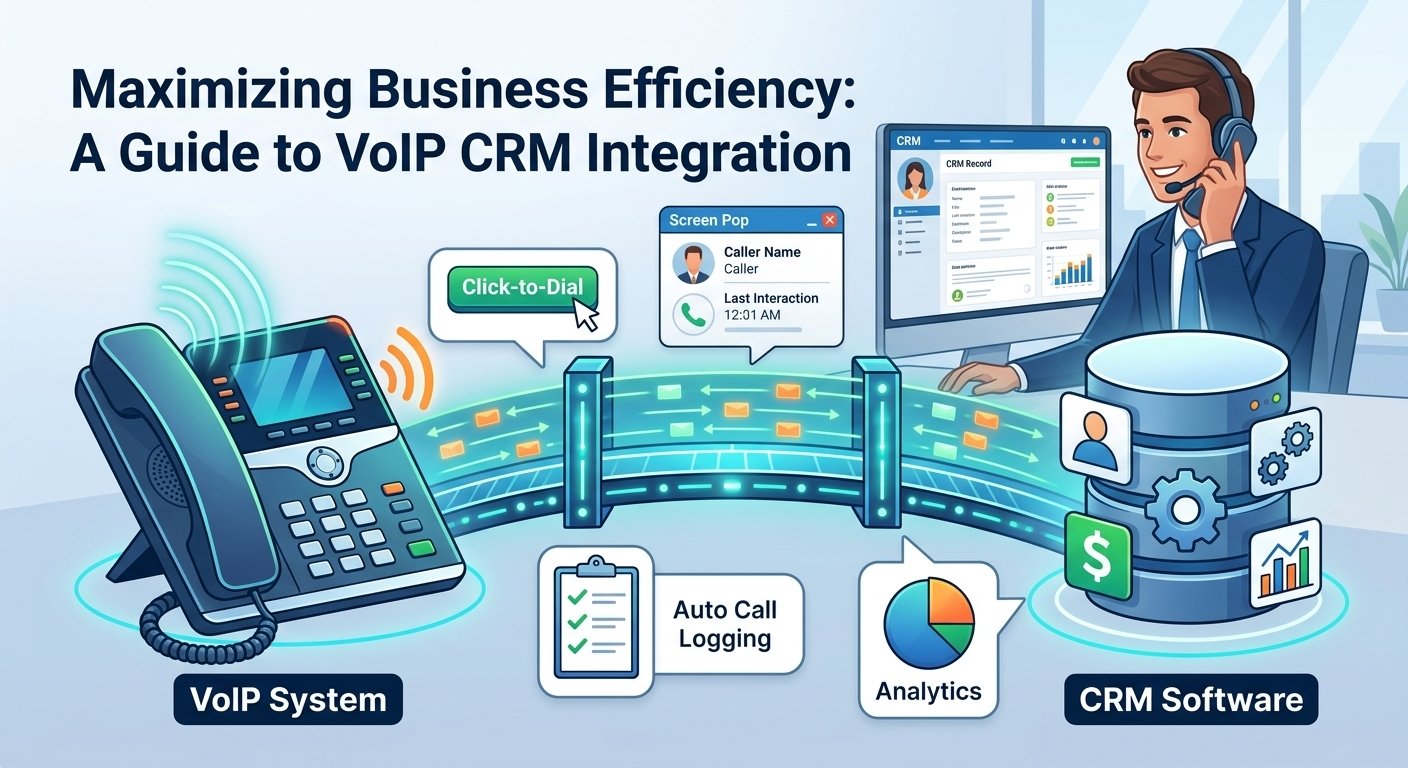
To integrate VoIP with a CRM, first choose a VoIP provider that supports your CRM or offers an API. Connect the two platforms through the provider’s integration settings, authorize access, map contacts and call data, then test features such as click-to-call, automatic call logging, contact pop-ups and call notes. For custom setups, you may need an API, webhook or third-party connector such as Zapier.
VoIP CRM integration is the seamless connection between your Voice over Internet Protocol phone system and your Customer Relationship Management software. This technology allows data to flow bi-directionally, ensuring that every phone interaction is logged, tracked, and utilized to improve customer service. By merging these two critical business tools, companies can automate call logging, enable click-to-dial functionality, and provide agents with real-time caller insights via screen pops.
What Does a VoIP CRM Integration Mean?
In April 2026, KPMG surveyed 300 executives and found that 87% of leaders call front-office integration a critical priority. Only 5% have actually achieved it. This staggering gap highlights a significant opportunity for businesses that are ready to modernize. The connectors are mature, and installing one takes an afternoon. Yet 19 out of 20 companies still haven’t managed to integrate their phone system and customer relationship management platform as one. This lag often results from a lack of technical awareness rather than a lack of available tools or budget.
When you integrate VoIP with a CRM, you create a connection between your business phone system and customer database. For example, an incoming phone number can be matched with an existing CRM contact, allowing the agent to see relevant customer information when the call arrives.
How a CRM System Is Used in a Call Center
-
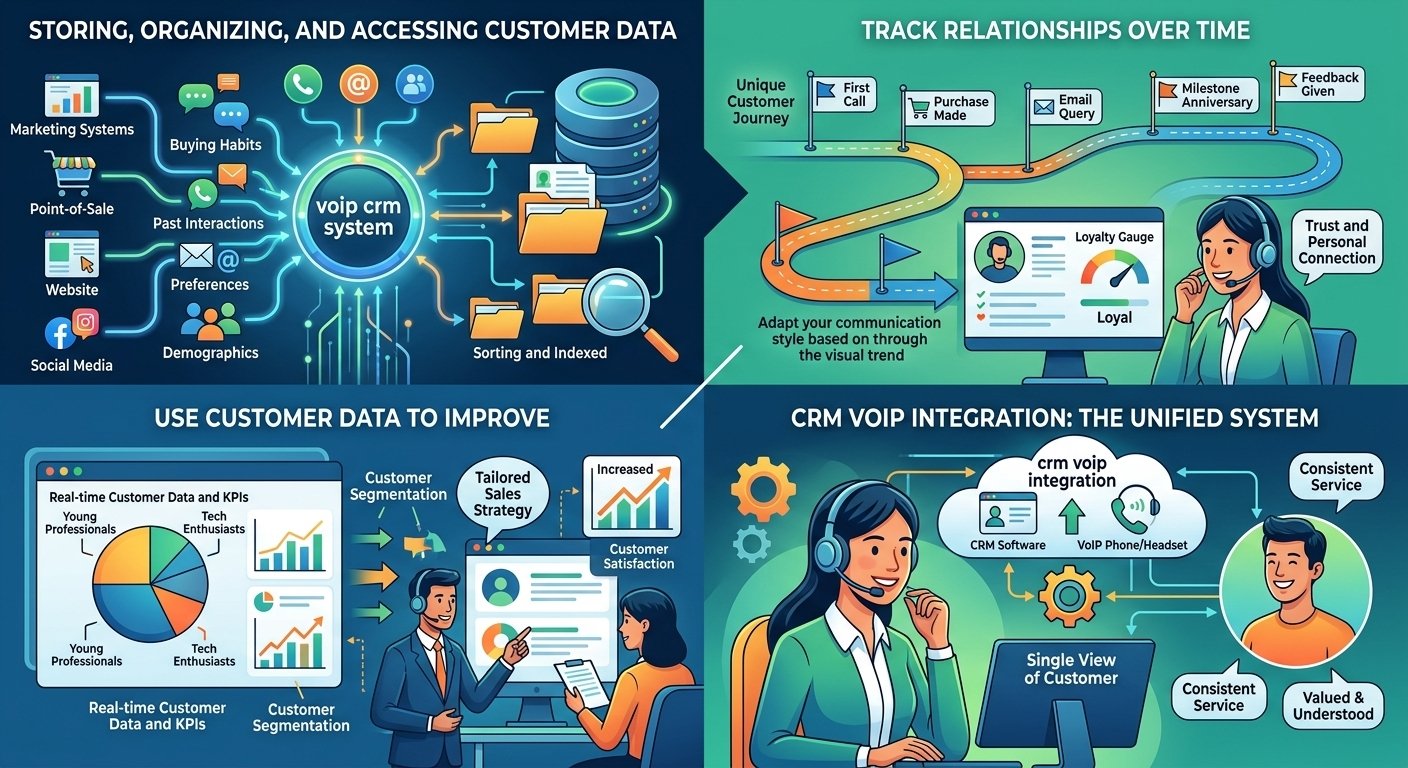
Storing, Organizing, and Accessing Customer Data
Businesses hold vast volumes of valuable customer data including buying habits, past interactions, preferences, demographics, and much more. Call centers can use this information to improve and personalize customers’ calling experiences effectively. However, so much data can easily become disorganized, siloed, and lost without a proper voip crm system. The software pulls customer data from across your channels and departments including marketing systems, point-of-sale systems, your website, social media, and your call center software.
-
Track Relationships Over Time
A robust crm with voip integration gives you full visibility into every unique customer journey. You can see all of your interactions with your customers over time including calls, emails, texts, and chats, as well as purchases, milestones, and feedback. This is useful because it can help you understand and strengthen customer relationships through deep contextual knowledge. Call center agents can spot trends, identify patterns, and gauge what stage of loyalty or churn customers are in and adapt their communication strategy in response. By utilizing voip and crm together, the history of the relationship becomes a tool for building trust and ensuring that the customer feels the company is paying attention to their specific needs.
-
Use Customer Data To Improve
By giving you access to real-time customer data and KPIs, these systems are instrumental in your continuous improvement strategy. For example, they provide the data you need to segment customers based on common characteristics such as demographics, buying habits, and interests. They can tell you which leads are interested in which types of products. Outbound sales teams can use this data to tailor sales strategies for each segment, boosting conversions, satisfaction, and loyalty throughout the sales cycle.
The Value of CRM Integration With a Phone System
The process of connecting these two technologies provides a more personalized service that is difficult to match with standalone tools. While some companies try to cobble together solutions and workflows manually, those that adopt a crm with voip integration can automate the process of syncing valuable data. This empowers agents with timely insights they can use to provide exceptional service. Ultimately, with this integration, both the phone system and the database become more powerful and useful for the entire team.
Modern providers like Salesforce and various VoIP leaders offer pre-built connectors that make this transition smooth. These integrations act as business communications superpowers that enhance customer experiences and employee collaboration. When the phone system understands the CRM data, it can make routing decisions that save time. For instance, a high-value client can be automatically routed to their dedicated account manager based on the record stored in the database, ensuring a premium experience.
The Advantages of CRM-VoIP Integration
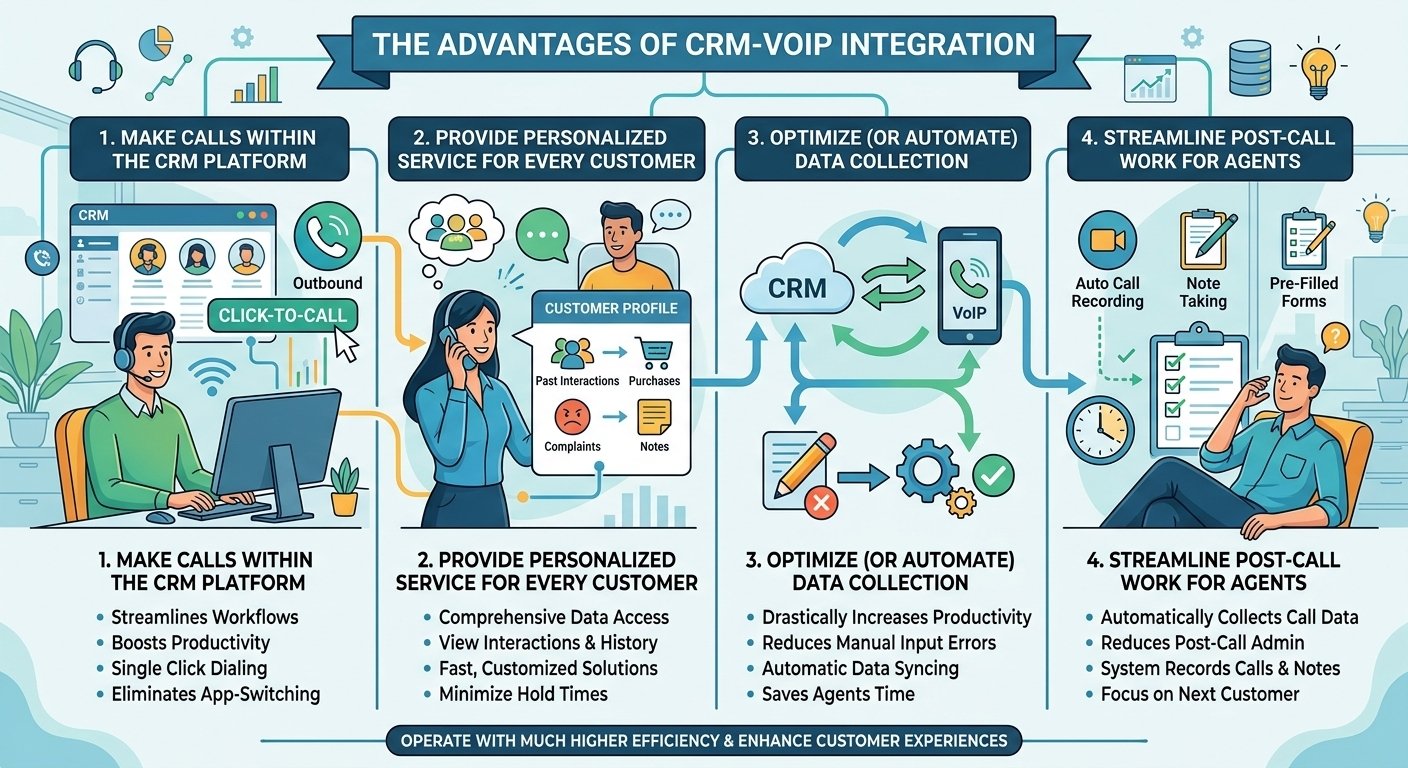
1. Make Calls Within the CRM Platform
Click-to-call functionality streamlines your agents’ workflows and boosts productivity significantly. Instead of bouncing back and forth between your call center software and your database application, agents can call customers from within the platform in a single click. This is a game-changer for agents who make lots of outbound calls. With no need for tedious app-switching or manual dialing, agents can efficiently connect with more leads and customers throughout their workday.
2. Provide Personalized Service for Every Customer
The voip crm integration places comprehensive customer data at your agents’ fingertips at all times. Whether they’re calling a customer from the software or the interface, they can immediately view data like past interactions, complaints, purchases, and more. Leveraging this accessible data, your team can provide fast, personalized experiences and customized solutions. Agents don’t need to put customers on hold while they hunt for information in different tabs or physical files.
3. Optimize (or Automate) Data Collection
Manually inputting customer data and transferring it from your phone software to your database is a timely task that’s prone to error. Telephony integrations optimize or completely automate data collection to improve accuracy and save agents valuable time. Essentially, the data automatically syncs with your call center software and vice versa. There is no need to input the same phone number or contact name into each system separately, which drastically increases agent productivity.
4. Streamline Post-Call Work for Agents
After every call, agents need to update customer records to reflect what was discussed. It may only take a couple of minutes after each call, but those minutes add up and eat away at productivity over the course of a week. The crm and phone integration streamlines post-call work by automatically collecting call data and adding it to the file. The system can proactively record calls, take notes, and pre-fill forms, reducing the volume of manual work required.
Why CRM-VoIP Integration Matters
If you are unconvinced whether these integrations are worth the effort, consider the current state of customer expectations. According to Salesforce’s State of the Connected Customer report, 80% of customers consider their experience with a company to be of equal importance to the products and services it provides. Integration is the key to providing this high-quality experience consistently. Without it, your agents are working with one hand tied behind their back, lacking the information needed to meet these modern standards.
According to Zendesk’s CX Trends 2024 report, customers are likely to reach out via phone or email for simple questions, but they are almost twice as likely to reach for the phone for complex questions. When a customer calls with a complex issue, they expect the person on the other end to be an expert who knows their history. The voip crm software makes it easier for your agents to provide the answers they are looking for by presenting the entire history of the account the moment the phone rings.
How To Integrate a CRM With a VoIP System
Because integration is a widely acknowledged best practice, many providers make it easy to connect these vital systems. In fact, integrating the two systems isn’t too different from installing a browser extension in many cases. Your provider will often be willing to help you figure out how to integrate the tools and offer support along the way. The process typically involves using an application programming interface which acts as a set of rules that allow different applications to communicate.
- Clean the CRM data: Normalize phone numbers to E.164 and merge duplicates. This single step determines whether the integration looks competent on day one, because formatting and duplicates drive screen pops and caller matching.
- Decide logging rules and dispositions: Set the loggable-call thresholds and the two-layer disposition taxonomy from the sections above. Write them down. This step keeps the timeline readable at day 30.
- Confirm authentication and permissions: Establish single sign-on, which roles get the softphone, and who can access recordings. Do this before the pilot, because permission changes mid-rollout erode trust.
- Map fields and agree on where call data lands: Verify which CRM fields the integration writes, what updates last-contacted, and who owns the mapping going forward.
- Pilot with one team: Run for two weeks, then review the actual activity records the pilot generated. Adjust rules before rolling wider.
The Future of CRM Integration
The future of these systems lies in deeper automation and artificial intelligence. McKinsey reports that 71% of consumers expect businesses to personalize their interactions, and 76% feel frustrated when this doesn’t happen. The value of getting personalization right will only increase as AI begins to analyze call recordings in real-time to suggest the best responses to agents. We are moving toward a world where the phone system doesn’t just store data but actively helps the agent solve problems.
As we look forward, the crm integration with phone system will become even more predictive. Systems will be able to analyze the sentiment of a caller’s voice and match them with an agent who has the highest success rate with similar personalities. This level of sophistication is only possible when your communication tools and your customer data reside in the same ecosystem. Businesses that fail to adopt these integrations now will likely find themselves unable to compete with the efficiency of AI-driven competitors in the near future.
Read More: What Is SIP Trunking? Working and Benefits
Final Words
Integrating VoIP with a CRM can make customer-facing workflows more efficient by connecting call activity with the customer information your team already uses. Features such as click-to-call, screen pops, automatic call logging and contact synchronization can reduce repetitive work and give sales and support teams more context during conversations. Before integrating the two systems, check compatibility, permissions, data mapping and the specific features supported by your VoIP provider and CRM.
Frequently Asked Questions
-
How much does VoIP CRM integration cost?
Costs vary by provider, but VoIP CRM integrations usually range from $25 to $50 per user/month. CloudTalk offers CRM integrations starting from its Essential plan at $29 per user/month, which is a competitive rate for small to medium businesses looking to scale their operations efficiently.
-
What are some must-have features for VoIP CRM integration?
For softphone integration with CRM, look for call logging, click-to-call, contact sync, call recording, real-time caller ID, analytics, and workflow automation. These features ensure that your team can handle high call volumes without losing the personal touch that keeps customers coming back.
-
How do I choose a VoIP provider?
Consider pricing, CRM compatibility, call quality, support, global coverage, and features like IVR and analytics. It is vital to check if they have a native integration with your specific CRM to avoid the need for expensive custom development or complex third-party middleware.
-
What is CRM in voice process?
It means using a CRM to manage and track voice-based customer interactions, improving efficiency and personalization in calls. This process ensures that every spoken word is documented and used to build a better understanding of the client’s needs and preferences over the long term.
-
What is a CRM phone system?
It’s a CRM with calling. In other words, a CRM phone system integrates calling features with CRM software to manage, track, and log customer calls in one place. This creates a unified environment where agents never have to leave their primary workspace to handle a phone call.
-
How to integrate VoIP into CRM?
Choose a VoIP provider, ensure CRM compatibility, use built-in integrations or APIs, then configure call routing and settings. Most providers offer a step-by-step wizard that guides you through the authorization process, making it possible to be up and running in just a few minutes.
-
What is an example of a CRM or calling system?
Examples include Salesforce and HubSpot for CRM, and RingCentral for VoIP calling systems. These platforms are designed to work together, offering robust APIs that allow for the deep synchronization of data and communication features needed for modern business environments.
-
How to integrate IVR with CRM?
To enable IVR integration with CRM, choose a VoIP provider that supports both IVR and CRM integration. Then configure call flows to route based on CRM data or lead status. This allows the system to recognize a “VIP” caller in the IVR and route them to a priority queue automatically.


