What Is a Power Dialer?
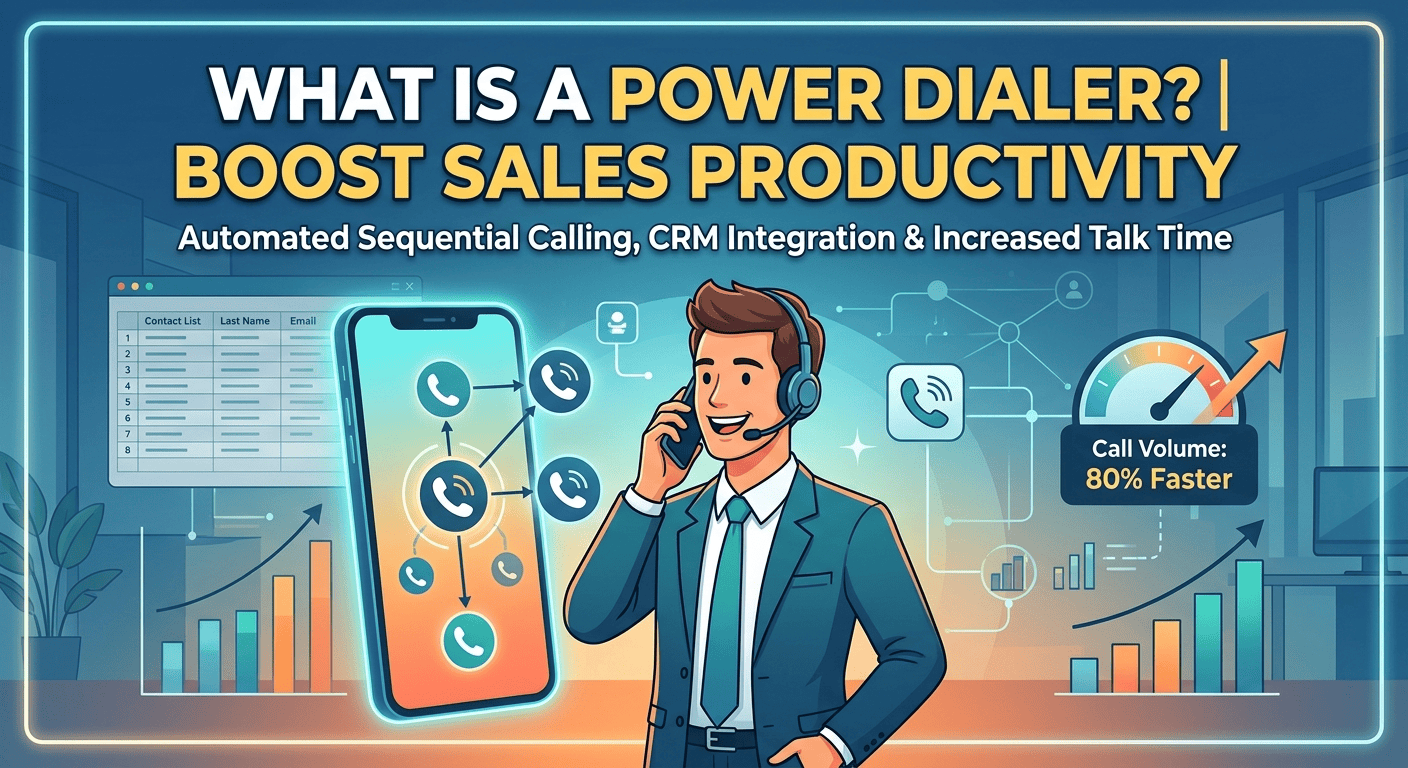
A power dialer represents a significant advancement in outbound communication technology, specifically designed to bridge the gap between manual effort and high-volume automation. At its core, this system functions by taking a pre-loaded contact list and automatically calling the next number the moment an agent becomes available. This sequential approach ensures a steady workflow for sales representatives, removing the friction of searching for contacts or physically inputting digits into a phone. It is a focused solution for businesses that need to maintain a high level of outreach without sacrificing the quality of the initial connection.
The primary objective of using this technology is to maximize the amount of time agents spend in live conversations. In a traditional manual environment, a significant portion of the workday is consumed by administrative tasks, such as navigating spreadsheets or waiting for rings that never connect. By automating these mechanical steps, companies can ensure their staff stays in a productive state, handling objections and closing deals rather than managing lead lists. This level of operational efficiency is essential for modern sales departments looking to scale their outreach in a competitive landscape.
How Does a Power Dialer Work?
The working of power dialer is straightforward but extremely effective for establishing momentum. Once a person using a power dialer uploads a contact list, the system starts dialing. Intelligently, it detects whether a call is answered by a machine, human or if it is busy. When the line is busy, the software moves the call automatically to the next contact on the list. This cycle continues until a live prospect answers, at this point the agent is instantly connected to start the conversation without any delay or silence.
1. Import or Select a Contact List
The agent or administrator selects the contacts that should be called.
2. The Dialer Calls a Contact
When the agent is available, the system automatically dials the next number according to the configured list or workflow.
3. The Call Is Handled
If the prospect answers, the agent can begin the conversation. Some platforms may also detect busy signals, unanswered calls, or voicemail.
4. The Agent Records the Outcome
The call result can be logged manually or automatically, depending on the software and CRM integration.
5. The Dialer Moves to the Next Contact
Once the agent is ready, the system continues to the next number.
Tania Cardenas, their Senior Sales and Operations Manager, reported that after implementing the power dialer, her team was able to contact 80 percent of their leads within five minutes of the lead being generated.
The rapidness of the response is a crucial factor in the success of sales. Contrarily, when more time passes from initial lead capture the likelihood of conversion decreases significantly.
Power Dialers Differ vs Auto Dialers
| Feature | Power Dialer | Auto Dialer (Predictive/Robo) |
| Connection Logic | Dials only when an agent is free and ready | Dials based on algorithms that guess availability |
| Dialing Ratio | Maintains a strict one-to-one dialing ratio | Often dials multiple lines simultaneously |
| Prospect Experience | Immediate human voice upon answering | Frequent “telemarketer delay” or silence |
| Call Abandonment | Eliminates the risk of abandoned calls | High risk of prospects hanging up before connection |
| Ethical Impact | More ethical and brand-friendly approach | Can be perceived as aggressive or spam-like |
| Best Use Case | High-touch industries like Real Estate and SaaS | Mass outreach, robocalls, and basic messaging |
Power Dialers vs Predictive Dialers
| Feature | Power Dialer | Predictive Dialer |
|---|---|---|
| Dialing approach | Typically dials one contact per available agent | Can dial multiple contacts based on predicted agent availability |
| Agent availability | Agent is generally available before the call is placed | Algorithm predicts when agents will become available |
| Calling speed | High | Very high |
| Abandoned-call risk | Generally lower | Higher if a person answers before an agent is available |
| Agent preparation | Limited between automated calls | Usually limited |
| Best suited for | Sales and outbound teams wanting controlled automation | High-volume outbound operations |
| Call pacing | Based on agent readiness/workflow | Algorithmically adjusted |
Key Components of Power Dialer Software
Today, several components are integrated in a system in order to support the entire lifecycle of sales. The core is the dialing engine, but it is often supported by lead management modules that allow for advanced segmentation. This means agents can prioritize calls based on lead score, time zone, or last interaction date. The user interface is typically designed to be clean and intuitive, providing the agent with all necessary prospect information the moment the call connects to ensure they are prepared for the interaction.
-
Automated sequential dialing engine for uninterrupted workflows.
-
Integrated contact management for easy list organization.
-
Live call monitoring and coaching tools for sales managers.
-
Customizable call disposition buttons for quick outcome logging.
-
Advanced reporting modules for tracking individual and team performance.
Who Should Use a Power Dialer?
Organizations managing a high volume of prospects and complex sales processes are the ideal candidates for power dialer technology. While beneficial for teams of any size, the return on investment is most significant when scaling operations that require a steady pace of proactive outbound communication. Companies prioritizing “speed to lead” can use this automation to remove the mechanical burden of dialing, allowing sales professionals to dedicate their time to building relationships and persuading potential clients.
-
Best use cases for sales teams
For outbound sales, these tools allow individual representatives to process large prospect lists at a speed that would normally require multiple staff members. This efficiency is essential for cold outreach and maintaining a productive, energized sales floor throughout the day. Typical applications include immediate follow-up on website or webinar leads, re-engagement campaigns for former or dormant customers, scheduling appointments for specialized account executives, and distributing limited-time promotional offers across a large database.
-
Best use cases for call centers
In a call center environment, power dialers help maintain high agent occupancy and consistent performance for proactive tasks such as satisfaction surveys or account updates. The system prevents agents from being overwhelmed by managing call flow sequentially, which helps maintain morale in high-pressure roles. Furthermore, sectors like debt collection and fundraising utilize these systems to manage vast amounts of data and maintain regulatory compliance through automated call logging and detailed audit trails.
When a power dialer is not the right fit
There are situations where a high-volume automated approach might not be the best strategy. For instance, in high-ticket enterprise sales where each prospect requires hours of research before a five-minute call, a sequential dialer would be too fast. In these cases, a preview dialer or manual dialing is better because it gives the rep time to personalize their approach for each specific contact. Quality of preparation takes priority over the quantity of calls in these highly specialized sales cycles.
Furthermore, if your lead list is extremely small and high-value, automation might cause you to burn through your prospects too quickly. Calling the same few people repeatedly through an automated system can appear aggressive and damage the brand reputation. If you are dealing with a “niche” market where every relationship is sensitive, a more deliberate and manual touch is usually required to ensure that each communication is perfectly timed and tailored to the individual’s needs.
Key Features of Power Dialer Software
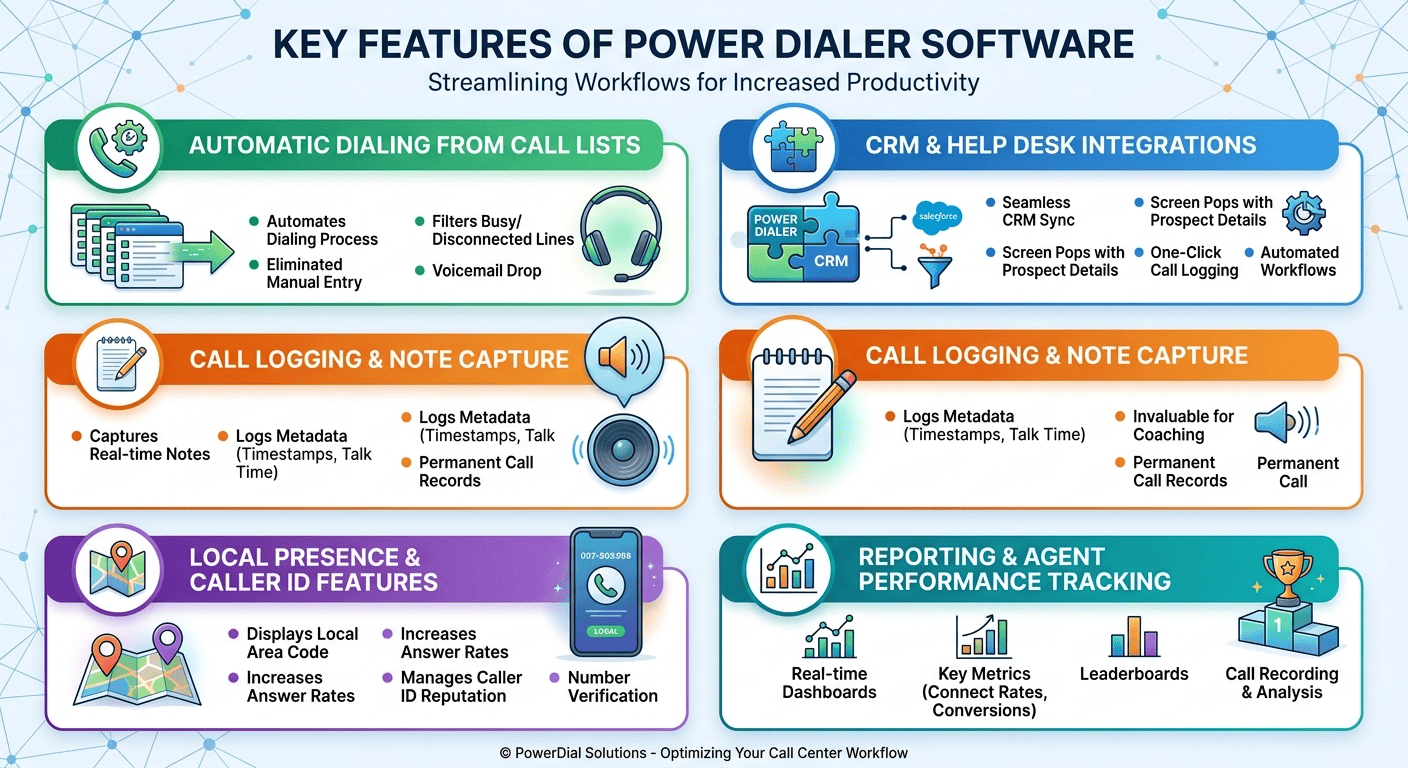
Effective power dialer software should prioritize simplifying the agent’s daily workflow while providing managers with deep, actionable insights. The most successful systems act as an invisible layer of technology. It integrates directly with existing databases to eliminate manual data entry and facilitates sophisticated sales strategies like lead scoring and automated follow-ups. By focusing on ease of use and seamless CRM synergy, businesses can ensure high adoption rates and more productive conversations.
1. Automatic dialing from call lists
The primary function of this software is to automate the dialing process, which eliminates choice paralysis and maintains high momentum for sales representatives. By automatically filtering out unproductive connections like busy signals or disconnected lines, agents can focus their energy solely on live prospects. This efficiency is further enhanced by voicemail drop features, allowing reps to leave professional, pre-recorded messages with a single click and move immediately to the next call.
2. CRM and help desk integrations
A seamless connection between the dialer and a CRM is essential for maintaining a clean pipeline. It reduces the manual wrap-up time typically required after a call. Integrated systems allow for direct synchronization with platforms like Salesforce or HubSpot, providing automatic screen pops with prospect details and one-click logging of call dispositions. This synergy also ensures legal compliance by synchronizing “Do Not Call” lists and enables the triggering of automated workflows based on specific call outcomes.
3. Call logging and note capture
Built-in tools for capturing notes and metadata during a call provide a permanent record that is invaluable for long-term relationship building and team collaboration. Beyond manual notes, the system automatically logs timestamps, phone numbers used, and total talk time, creating a granular data set for managers. This information is critical for quality assurance and evidence-based coaching, helping managers identify specifically where agents might need to improve their scripts or delivery.
4. Local presence and caller ID features
To overcome the hurdle of low answer rates, local presence features display a caller ID that matches the area code of the prospect, which can significantly increase connections. Furthermore, advanced software helps manage a company’s caller ID reputation by monitoring for “Spam” or “Telemarketer” flags from carriers. By rotating and verifying outgoing numbers, the system ensures that legitimate business calls successfully reach their intended targets without being filtered out.
5. Reporting and agent performance tracking
Real-time dashboards and historical reports are necessary for managers to steer their teams toward success by tracking call volumes, connect rates, and conversion ratios. These tools provide transparency into individual performance, allowing for the use of leaderboards to foster healthy competition and the identification of agents who need extra support. Additionally, features like call recording and detailed outcome analysis offer the resources needed for ongoing training and the refinement of sales strategies.
Pros and Cons of Power Dialers
Implementing an automated dialing system involves balancing technological efficiency with the personal touch expected by modern consumers. While these tools significantly boost activity levels, their success remains dependent on the quality of the sales strategy and lead lists. Understanding the trade-offs is essential for setting realistic ROI expectations and managing a motivated workforce.
| Pros | Cons |
| Increased call efficiency and volume | Reduced preparation time for agents |
| Maximization of lead value | Risk of generic or impersonal interactions |
| Significant reduction in agent burnout | Vulnerability to technical dependencies |
| Improved staff motivation and retention | Potential for spam flagging and reputation damage |
| Consistent and timely lead outreach | Risk of repetitive, mechanical workflows |
Power Dialer vs. Other Dialing Methods
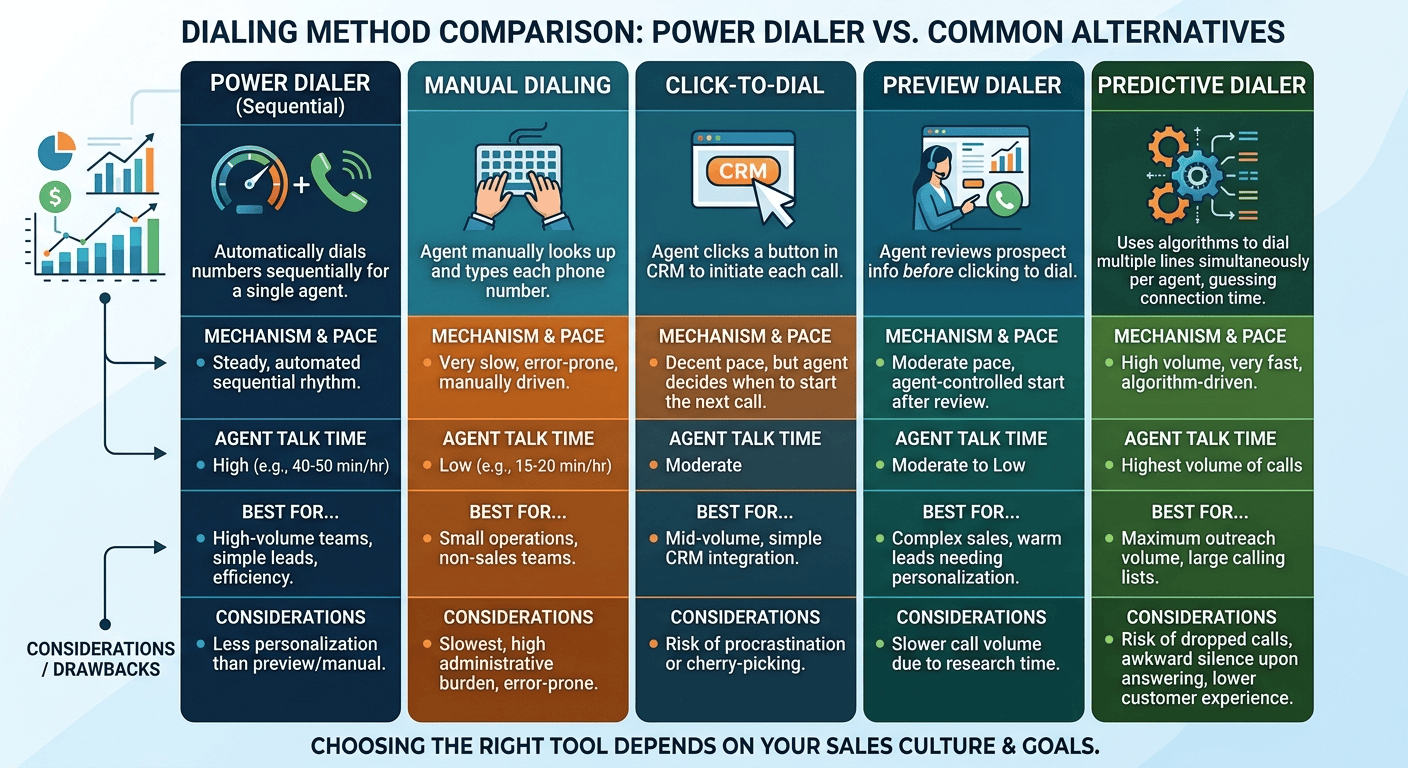
Choosing the right tool requires a clear understanding of the alternatives. Each dialing method has its own strengths and is suited for a different type of sales culture. Whether you are looking for pure speed, maximum personalization, or something in between, knowing the difference will help you choose the right software for your specific business goals. Let’s look at how the sequential approach compares to other common methods.
1. Power dialer vs manual dialing
Manual dialing is the most basic approach, where a rep looks at a list and types the number into their phone. While it requires no special software, it is incredibly slow and prone to errors like misdials. In a manual environment, a rep might only spend 15 to 20 minutes of every hour actually talking to prospects. The sequential dialing software solves this by automating the mechanics, allowing that same rep to spend 40 to 50 minutes of every hour in live conversations.
2. Power dialer vs click-to-dial
Click-to-dial allows an agent to click a number in their CRM to start a call. This is faster than manual dialing and prevents errors, but it still requires the agent to decide when to make the next call. This can lead to “cherry-picking” or procrastination. The power dialer software is superior for high-volume teams because it maintains a steady, automated rhythm that keeps the agent focused on the next task without hesitation.
3. Power dialer vs preview dialer
A preview dialer shows the agent the prospect’s information before the system dials. The agent reviews the data and then clicks a button to start the call. This is great for complex sales, but it is much slower than a power dialing system. The power method is preferred for teams that have a high volume of relatively simple leads where speed and volume are more important than deep pre-call research.
4. Power dialer vs predictive dialer
Predictive dialers dial multiple numbers at once for every agent, using algorithms to guess when a connection will happen. While this provides the highest volume, it often results in “dropped calls” or a silence when the prospect answers. A power dialer is generally seen as more professional because it only dials when an agent is actually free, ensuring a human greets the prospect immediately. This results in a better customer experience and a higher level of trust.
Legal Considerations
To stay compliant in outbound calling, businesses must strictly follow the Telephone Consumer Protection Act (TCPA) by scrubbing lead lists against the National Do Not Call Registry and securing explicit consent.
Abandoned call rates (calls that connect but reach no agent) are regulated as well, with the FCC setting a 3% threshold.
Operationally, companies can reduce legal risk by using power dialers to eliminate dropped calls and adhering to local calling hours between 8 a.m. and 9 p.m. It is also vital to maintain internal “do not call” lists, provide accurate caller ID information, and follow international regulations like GDPR when contacting prospects outside the United States.
How to Choose the Right Power Dialer
Selecting the right provider requires a balance of features, price, and support. Start by identifying your “must-have” features, such as specific CRM integrations or local presence capabilities. Then, look for vendors that offer a free trial so your agents can test the interface. A tool that is too difficult to use will only cause frustration and lower productivity in the long run.
-
Features to look for
CRM integration is paramount for data accuracy. You should also look for voicemail drop, local presence, and call recording for training purposes. Real-time reporting and compliance controls like time-zone awareness are also critical. Ensure the system is easy to use and has a clean interface that won’t overwhelm your agents during a busy shift.
-
Questions to ask vendors
Ask about their uptime statistics and what kind of technical support they offer. You should also inquire about how they handle TCPA and GDPR compliance. Understanding their pricing structure—whether it’s per user, per minute, or both—is essential for calculating your total cost of ownership. Finally, ask about their onboarding process to ensure your team can get up and running quickly.
Read More: What is the Best Time to Call Italy?
Final Words
Adopting a power dialer is a strategic move that can dramatically improve the productivity and revenue potential of any outbound sales team. By automating the mechanical tasks of dialing and logging, these tools allow your agents to do what they do best: talk to prospects and close deals. While the transition requires careful planning and a focus on compliance, the long-term benefits of increased call volume and better data management are undeniable. As the sales landscape continues to evolve, those who leverage intelligent automation will be best positioned to succeed and grow.
Power Dialer FAQs
-
How does a power dialer help sales teams?
A power dialer helps sales teams by automating the dialing process, which eliminates manual errors and significantly reduces the idle time between calls. This allows representatives to focus entirely on live conversations, leading to higher call volumes and more opportunities to close deals.
-
What’s the difference between a power dialer and an autodialer?
An auto dialer is a broad term for software that automates outbound dialing. A power dialer is one type of automated dialer that generally calls contacts sequentially according to agent availability. Predictive dialers use a different approach by placing calls based on algorithms that estimate when agents will become available.
-
What should sales teams look for in power dialer software?
Sales teams should prioritize features like deep CRM integration, local presence caller ID, and automated voicemail drop. These features help maintain data accuracy, improve answer rates, and save agents time on repetitive tasks like leaving messages.
-
What’s the difference between power dialer and predictive dialer?
A power dialer generally places calls when an agent is available, while a predictive dialer can place multiple calls based on expected agent availability.
-
Are power dialers illegal?
No, they are legal, but they must be used according to regulations like the TCPA in the US. This includes respecting the Do Not Call registry, sticking to permitted calling hours, and having proper consent for certain types of marketing calls.
-
Is Power Dialer free?
Most professional-grade power dialer software requires a paid subscription, though many vendors offer free trials. Costs are usually structured per user or per minute of talk time, depending on the provider and the features included.
-
Which dialer is best for calling?
The best dialer depends on your sales model. For high-volume outbound sales that require a professional touch, a power dialer is often the best choice. For low-volume, high-value accounts, a preview or manual dialer might be more appropriate.
-
What are the best power dialers?
Some of the most popular and highly-rated options include Nextiva, Dialpad, and CloudTalk. The best choice for your team will depend on which one integrates most effectively with your existing CRM and meets your specific budget and volume requirements.
-
Power Dialer vs Predictive vs Preview vs Manual Dialing
| Feature | Power Dialer | Predictive Dialer | Preview Dialer | Manual Dialing |
|---|---|---|---|---|
| Dialing | Automated sequential | Algorithm-driven | Agent-approved | Agent controlled |
| Typical call volume | High | Very high | Moderate | Low |
| Pre-call research | Limited | Limited | High | High |
| Agent control | Moderate | Lower | High | Highest |
| Abandoned-call risk | Lower | Higher | Low | Low |
| Best suited for | Outbound sales teams | High-volume operations | Complex/high-value leads | Small, highly personalized lists |