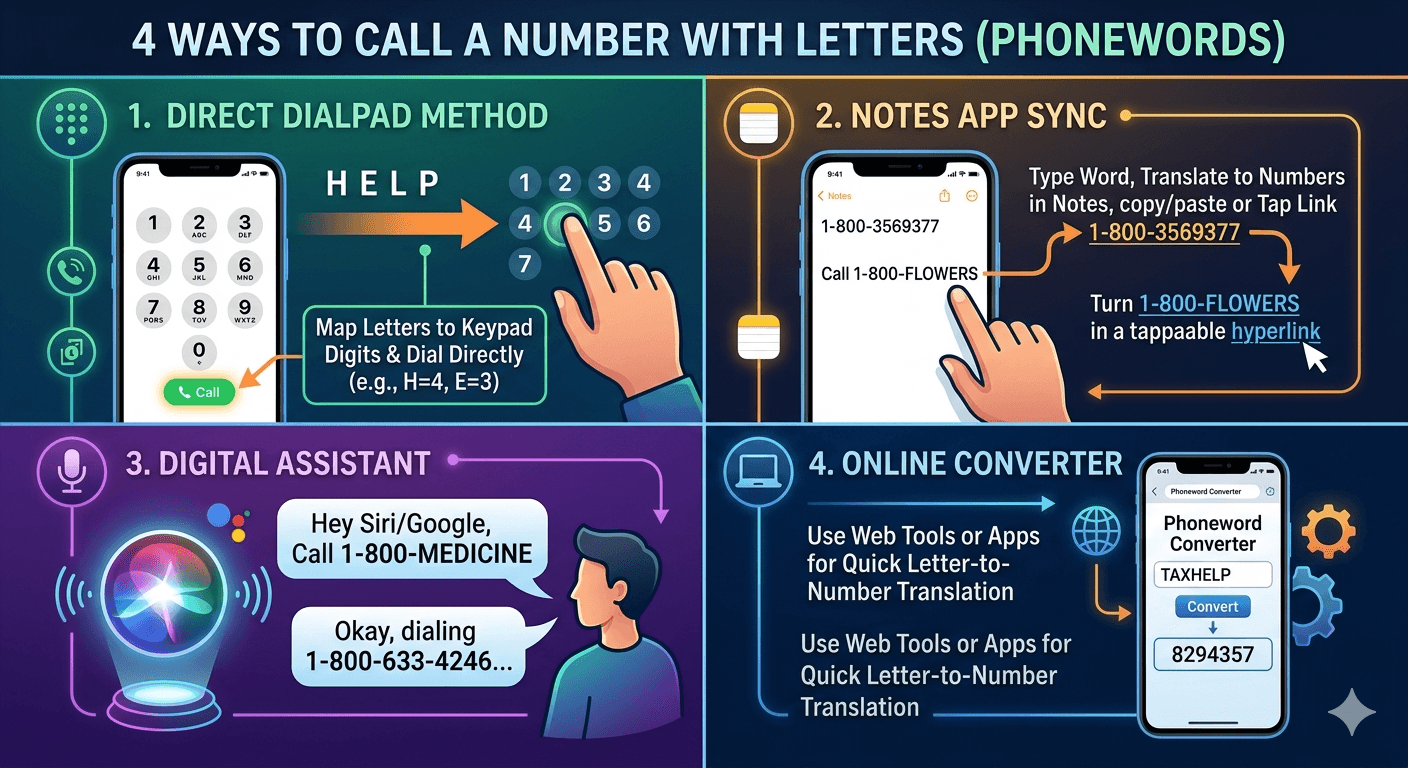
Learning how to dial a phone number with letters is a practical skill for anyone navigating the world of vanity numbers frequently used by major businesses and service providers. Most modern smartphones, including iPhones and Android devices, do not feature a dedicated alphabetic keyboard within the standard phone app dialer. Instead, they rely on the international standard mapping that assigns specific letters to the digits 2 through 9. To dial these alphanumeric strings, you simply press the number corresponding to each letter shown on your screen’s keypad. For instance, the letters A, B, and C map to the number 2, while W, X, Y, and Z map to the number 9.
What is a Phone Number with Letters?
A phone number with letters, often referred to as a vanity number or a phoneword, is a telephone number that incorporates words or acronyms to make it easier for consumers to remember. Instead of a random string of ten digits, a business might use a combination like 1-800-FLOWERS or 1-800-CONTACTS. These are not just marketing gimmicks; they are functional tools designed to improve brand recall and customer engagement.
The concept behind how to dial a phone number with letters relies on a standardized system called the ITU-T E.161. This international standard defines the layout of the basic telephone keypad and dictates which letters are assigned to which numbers.
According to research conducted by the Direct Marketing Association, vanity numbers can increase advertisement response rates by up to 33% compared to numeric-only numbers.
This is because the human brain is significantly better at remembering words and patterns than long sequences of abstract digits. When you see a word on a billboard, your mind registers the service instantly, making the process of how to call a number with letters a vital bridge between marketing and communication.
How to Call a Number with Letters on iPhones?
While smartphones are incredibly advanced, their phone applications are designed for speed and simplicity, which often means the letters on the dialpad are small or subtle. Whether you are using the latest iOS version, the underlying logic of how to dial a number with letters remains the same. You are essentially translating an alphabetic string into its numeric equivalent based on the standard keypad layout.
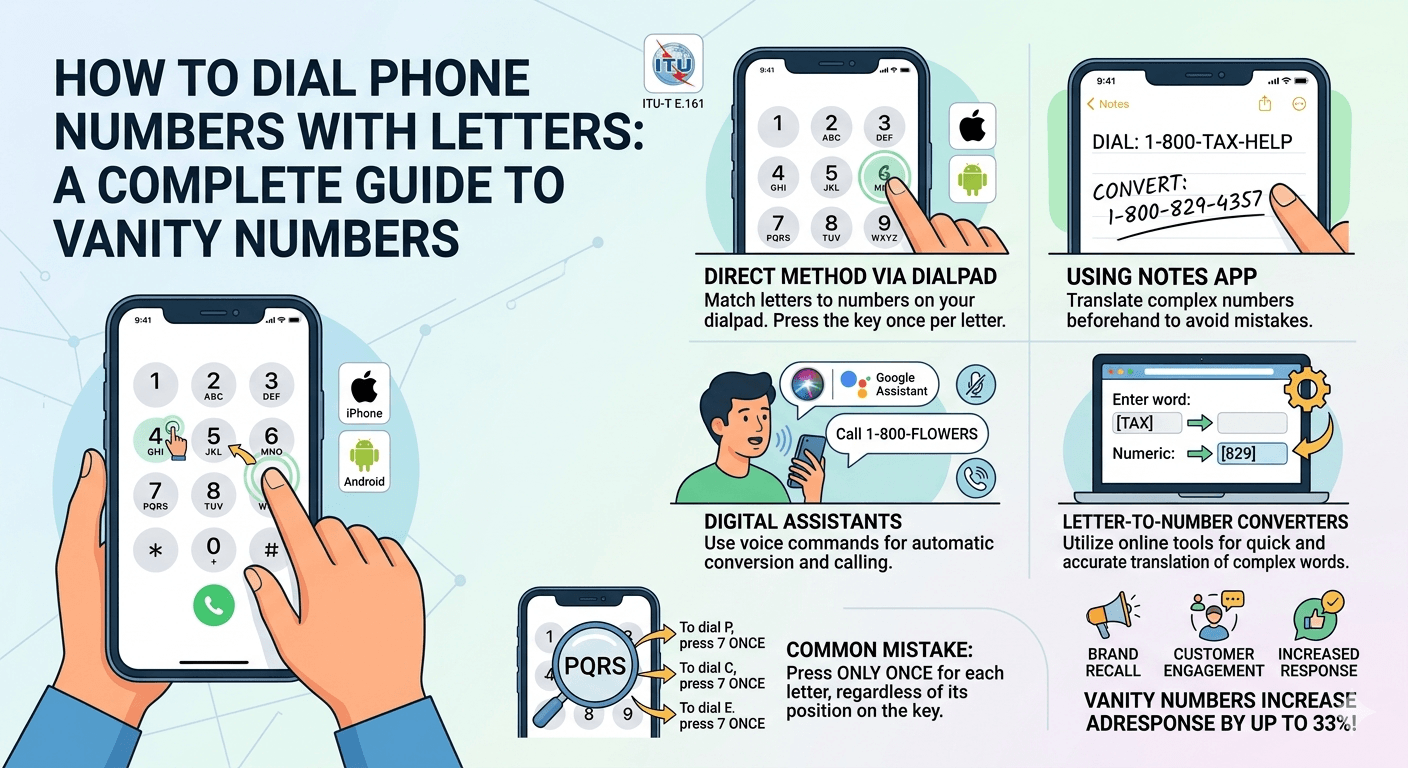
1. Direct Method via Dialpad
The most common way to handle this is the direct entry method. When you open your phone app, you will see the standard 3×4 grid of numbers. If you look closely at each number button from 2 to 9, you will see three or four small letters printed underneath or beside the digit. This is your primary tool for how to dial a phone number with letters.
To use this method effectively, follow these steps:
Open the Phone or Dialer app on your mobile device.
Identify the word you need to dial, such as HELP.
Look at the keypad: H is on the number 4, E is on the number 3, L is on the number 5, and P is on the number 7.
Press the sequence 4-3-5-7 in order.
Press the green call button to initiate the connection.
2. Using Notes App
If you find it difficult to look back and forth between an advertisement and your dialpad, using the Notes app as a middleman is a great strategy for how to enter letters on phone keypad sequences. This method is particularly helpful if the word is long or if you are worried about making a mistake mid-dial.
By typing the word into your Notes app first, you can visualize the number without the pressure of an active dialer screen. Some users prefer to write out the numeric translation directly above the word. For example, if you are trying to figure out how to call letters in a sequence like 1-800-TAX-HELP, you can type it out and then manually convert it to 1-800-829-4357 before copying the digits into your dialer. On many modern smartphones, the device might even recognize the sequence as a clickable link if you format it correctly, allowing you to bypass the manual dialpad entirely.
3. Leverage Your Phone’s Digital Assistant
For those who want a truly hands-free experience, your phone’s digital assistant is the most advanced way to manage how to call a number with letters. Both Siri and Google Assistant are programmed to recognize phonewords and can perform the translation for you instantly. This is exceptionally useful while driving or when you are multitasking.
To use this feature, simply activate your assistant and say, Call 1-800-FLOWERS. The assistant’s software accesses a database and the standard ITU mapping to convert those letters into the correct digits. It then initiates the call for you. This removes the manual work involved in how to dial a phone number with letters and ensures that you do not accidentally hit the wrong digit while trying to read small letters on a screen.
4. Use an Online Letter-to-Number Converter
If you are dealing with a complex vanity number and want to be 100% sure before dialing, you can use an external resource. Numerous websites offer a phone dial with letters converter where you can type in any word and receive the numeric string instantly. This is a common practice for businesses that are setting up their own vanity numbers, but it is also a helpful tool for consumers.
An external link to a resource like the ITU-T standards can provide deeper technical insight into why our phones are mapped this way. Using a converter is often the fastest way for people who struggle with the small print on their digital dialpads to understand how to call phone numbers with letters without the frustration of manual translation.
Common Mistakes to Avoid While Calling a Number with Letters
Even though the process of how to dial a phone number with letters seems straightforward, there are several common pitfalls that can lead to a failed call or a wrong number. One of the most frequent errors is confusing the letters with the numbers they represent. For example, some people accidentally press the number of times a letter appears on a key (similar to old T9 texting) rather than just pressing the key once.
Another mistake involves the letters Q and Z. On many older or non-standard keypads, these letters were sometimes omitted or placed in unusual locations. However, on modern smartphones, Q is always on 7 and Z is always on 9. Additionally, ensure you are not trying to dial symbols or spaces. When learning how to dial numbers with letters, remember that only the letters themselves translate to digits; any dashes or spaces used in the branding are purely for visual clarity and should be ignored during the dialing process.
Guide on How Dial Letters on Android
Android devices offer a variety of ways to interact with the dialer, depending on the manufacturer’s overlay, such as Samsung’s One UI or Google’s Pixel UI. While the core functionality of how to dial a phone number with letters is consistent, some Android-specific features can make the process even more intuitive. Many Android dialers have a smart search feature built directly into the keypad.
When you start typing numbers on a phone with an Android operating system, the software often looks through your contacts and suggests names that match the letters associated with those numbers. This same logic can sometimes be used to identify businesses. Understanding how to do letters on phone interfaces for Android requires a quick look at the settings of your specific dialer app, as some allow for enhanced T9 searching which simplifies the task of how to dial a name on phone contact lists.
How to dial letters on Android
To master how to dial letters on Android, you should first open your default phone application. Most Android dialpads clearly display the letters beneath the numbers. If you are looking at how to call a number with letters in it, you should follow the standard mapping:
2: ABC
3: DEF
4: GHI
5: JKL
6: MNO
7: PQRS
8: TUV
9: WXYZ
Simply tap the number that corresponds to the letter you need. Android’s haptic feedback often makes this feel more tactile, helping you keep track of your progress. If you are wondering how to type letters on phone dialers for a contact search, simply use the keypad to “spell” the name, and the contact should appear at the top of the screen.
Dialing letters (phonewords) on Android
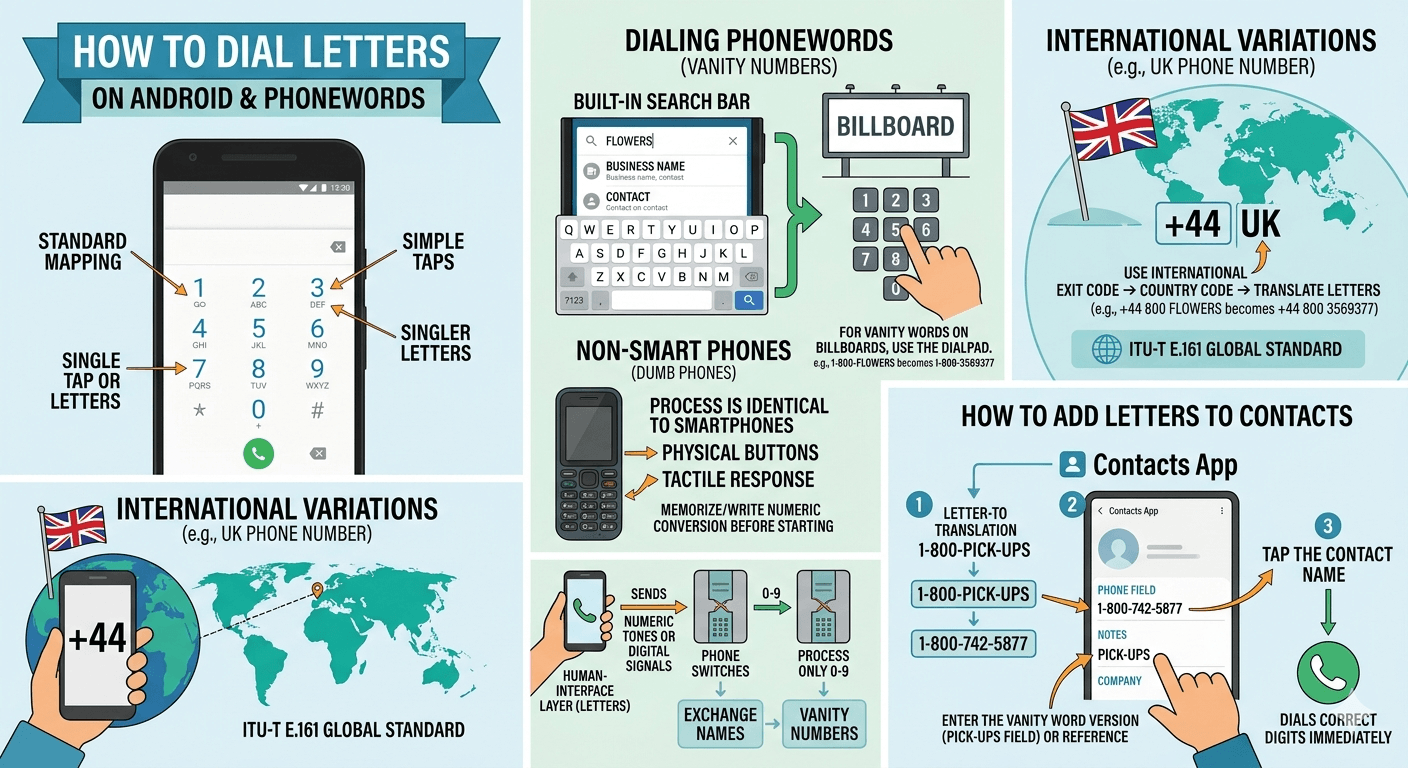
Dialing phonewords on Android is a seamless experience if you use the built-in search bar at the top of the phone app. Instead of using the 10-key dialpad, you can often tap the search bar and use the full QWERTY keyboard to type the name of a business or a contact. If the business has registered its vanity number correctly in Google’s database, the number will appear automatically.
However, if you are manually entering a phoneword from a billboard, you must use the dialpad. The trick to how to call a number that has letters is to treat each letter as a single tap on its parent number. Do not double-tap the 2 key to get a ‘B’—just tap it once. The phone network only cares about the final string of digits, not the specific letter you were thinking of when you pressed the button.
Dialing numbers on non-smart phones
If you are using a feature phone or a “dumb” phone, the process of how to dial a phone number with letters is actually the original way these phones were intended to be used. Before the era of touchscreens, T9 predictive text and manual letter entry were the norms. On these devices, the letters are physically printed on the plastic buttons.
The logic remains identical to modern smartphones. Because these devices often have smaller screens, it is even more important to memorize or write down the numeric conversion before you start. Many older users find phone letters to numbers translation easier on these devices because the physical buttons provide a clear, tactile response that touchscreens sometimes lack. Regardless of the device age, the universal mapping of telephone numbers with letters ensures that the system works across all generations of hardware.
UK Phone Number and International Variations
When dealing with international calls, such as a UK phone number, the rules for how to dial a phone number with letters remain the same, but you must be mindful of the country code. For the UK, this is +44. If you see a British vanity number, you would first enter the international exit code (like 011 in the US), then the country code, and then translate the letters as usual.
It is rare to see vanity numbers in the UK compared to the US, but they do exist. Most UK business numbers start with 0800 or 0808. If a UK company uses letters, you apply the same ITU-T E.161 mapping used globally. This consistency is what allows global commerce to function without needing a different how to dial letters on a phone guide for every country you visit.
Why Do Letters in Phone Numbers Work?
You might wonder how do letters in phone numbers work from a technical perspective. The phone network itself does not “see” letters. Every switch and server in the telecommunications infrastructure only recognizes numeric tones or digital signals representing digits 0-9. The letters are purely a human-interface layer.
When you are figuring out how to call letters on phone apps, you are performing a translation that the hardware has simplified for you. Historically, this system was created so that people could remember exchange names (like “PEnnsylvania 6-5000”). Over time, this evolved into the modern vanity numbers we see today. The dialpad with letters is a bridge between human memory and machine processing, making the task of how to call letters a necessary skill in a world where brand names are everything.
How to add letters to phone number contacts
If you want to save a vanity number in your contacts so you never have to remember how to dial a phone number with letters again, you should save it as the numeric version. While some phone operating systems allow you to type letters into the “Phone” field of a contact card, the dialer may not always recognize them when you hit the call button.
The best practice is:
Translate the letters to numbers (e.g., 1-800-PICK-UPS to 1-800-742-5877).
Open your Contacts app and create a new entry.
Enter the numeric string in the phone field.
Enter the vanity word version (like PICK-UPS) in the “Notes” or “Company” field for your own reference.
This ensures that when you tap the name, the phone dials the correct digits immediately.
Numbers with letters on phone marketing strategies
Businesses spend millions of dollars securing the perfect vanity number because they know customers struggle with how to dial a phone number with letters less than they struggle with remembering a string of ten random digits. A memorable number like 1-800-BATTERY is a powerful asset.
According to a study by ResponseTap, calls to vanity numbers are 50% more likely to result in a conversion than calls to standard numeric lines in certain industries. This is because the caller already has the brand name in mind as they are dialing. Understanding how do phone numbers with letters work from a business perspective helps you appreciate why you see them on almost every television commercial and billboard in the country.
How to call with letters using third-party apps
If your default dialer is confusing, there are third-party apps designed specifically to help with how to dial a phone number with letters. Apps like “Vanity Dialer” or specialized contact managers can provide a larger interface or an automatic conversion tool. These are particularly useful for individuals with visual impairments who find the standard dialpad letters too small to read.
These apps often include a feature where you can type the word using a standard keyboard, and the app instantly places the call to the corresponding numeric sequence. This is the ultimate solution for anyone who frequently finds themselves asking how do you type in letters on a phone number without wanting to do the mental math of translation.
Read More: Why Do My Phone Calls Keep Failing? 10 Effective Ways
Final Thought
Mastering how to dial a phone number with letters is an essential modern skill that simplifies communication with businesses and services. By understanding the universal keypad mapping defined by the ITU-T E.161 standard, you can easily translate any vanity number into its numeric equivalent. Whether you choose to dial directly using the letters on your keypad, use a digital assistant like Siri or Google, or convert the word beforehand in a notes app, the process is designed to be user-friendly. Vanity numbers remain a staple of marketing because they bridge the gap between easy-to-remember words and the numeric requirements of our global telecommunications infrastructure. With the steps and tips provided in this guide, you can confidently call any alphanumeric number on both iPhone and Android devices.
Frequently Asked Questions
How do I dial the letters in a phone number?
To dial the letters in a phone number, you simply use the numbers on your phone’s keypad that correspond to each letter. For example, if you need to dial the letter “A,” you press the number 2. The standard mapping is: 2 (ABC), 3 (DEF), 4 (GHI), 5 (JKL), 6 (MNO), 7 (PQRS), 8 (TUV), and 9 (WXYZ). You only need to press the number once for each letter, regardless of where the letter falls in the group. This is the fundamental way to handle how to dial a phone number with letters.
How do you call a number if it has letters?
Calling a number with letters involves translating those letters into digits. Look at your phone’s dialpad and find the small letters printed on the number keys. Press the digit that contains the letter you want. For example, to call 1-800-TAXES, you would dial 1-800-829-37. The phone network only recognizes the numbers, so the letters act as a mnemonic device to help you remember the sequence.
How do I type a letter in a phone?
In the context of dialing a phone number, you don’t actually type the letter itself into the dialer. Instead, you press the number key that represents that letter. If you are trying to search for a contact within your phone app, you can use the dialpad’s T9 functionality by tapping the numbers once for each letter of the person’s name. If you need to type actual letters for a text message, you should switch to your phone’s full QWERTY keyboard.
How to dial a number with letters on iPhone?
On an iPhone, open the Phone app and select the Keypad tab. You will see letters under each number from 2 to 9. To dial a word, identify which number each letter belongs to and tap those numbers in order. iPhone does not allow you to type letters directly into the dialer field, so you must use the numeric keypad to represent the letters you see in the vanity number.
Can I Dial Phone Numbers with Letters in All Phones?
Yes, you can dial phone numbers with letters on almost any telephone in the world, including landlines, feature phones, and all modern smartphones. The letter-to-number mapping (ITU-T E.161) is a global standard. While the visual design of the keypad may vary, the association of letters to specific numbers remains consistent, allowing you to use vanity numbers anywhere.
How to Dial Letters on an Android Phone?
To dial letters on Android, open your Dialer or Phone app. Most Android keypads display the letters clearly under the numbers. Tap the number associated with each letter of the word you are trying to call. Many Android phones also have a “Smart Dial” feature where typing the numbers associated with a contact’s name will automatically bring up that contact’s info, making it even easier to find who you are looking for.
How do you dial letters in a phone number if the word is longer than 7 digits?
If a vanity number has more than seven letters after the area code (like 1-800-CALL-COLLECT), you usually only need to dial the first seven letters. The telephone system typically ignores any extra digits dialed after the necessary number of digits for a connection is reached. Simply dial the numbers corresponding to the first seven letters, and the call will go through.
Why do phone numbers have letters on the keypad?
Letters were originally added to keypads to help users remember “exchange” names before all-number dialing became the standard. Today, they are primarily used for vanity numbers (phonewords) which are easier for customers to remember than long strings of digits. This makes the keypad a versatile tool for both technical dialing and human memory.
Does dialing letters cost more than dialing numbers?
No, dialing a vanity number that contains letters costs exactly the same as dialing a numeric number. The letters are simply a visual representation of numbers. The cost of the call is determined by your service provider and the type of number (such as a toll-free 1-800 number or a standard local number), not by whether you used letters to remember the sequence.