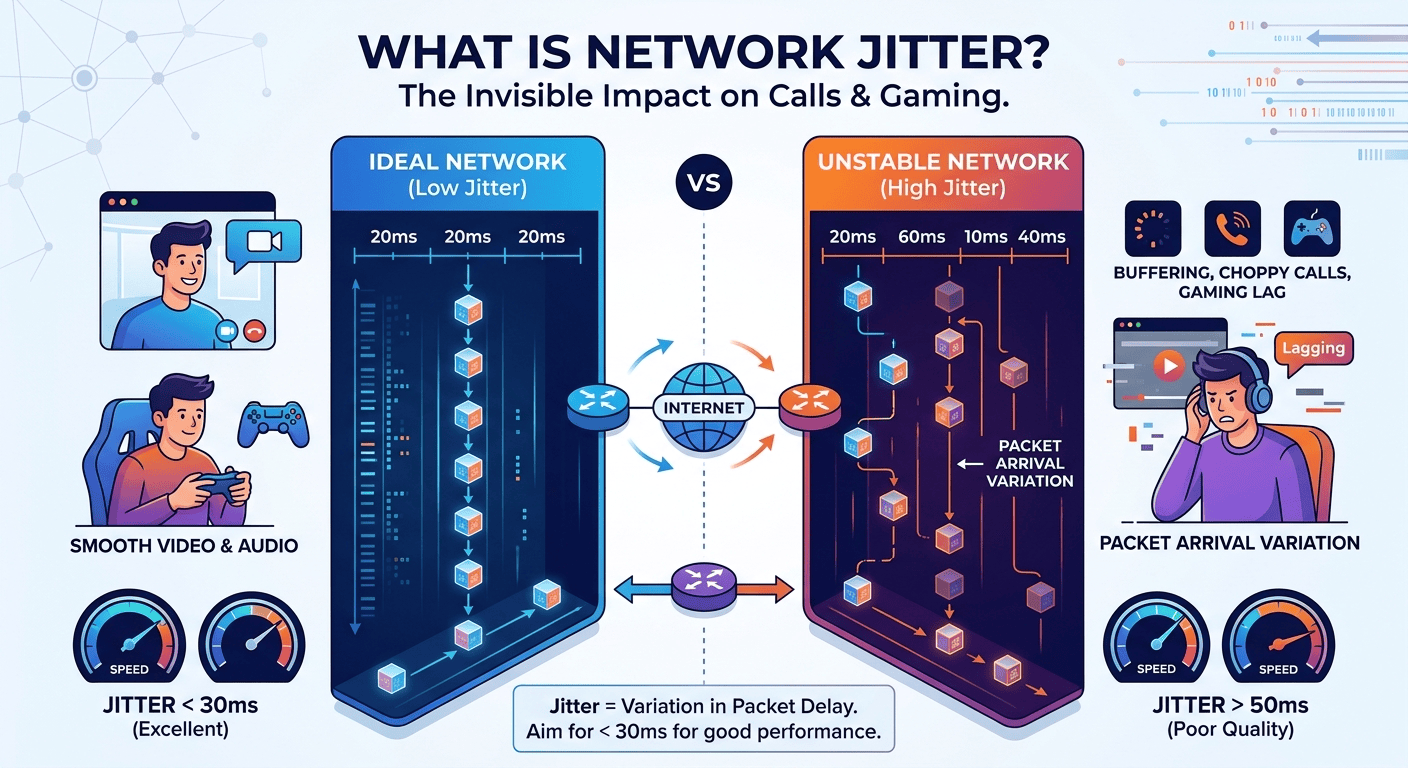
Jitter refers to the variation in the delay of data packets as they travel across a network. When you perform a connection check, you might see high speeds, but if the timing between those packets is inconsistent, your real-time applications like video calls or gaming will suffer from stutters and lag. Ideally, data packets should arrive at a steady, predictable interval. When the network is unstable, this timing fluctuates, leading to what is jitter on speed test metrics. Minimizing this variation is essential for maintaining a clear and professional digital communication experience.
What is jitter?
To define jitter in networking, one must look at how data moves in small chunks called packets. Every time you send an email or stream a movie, that information is broken down into these packets and sent across the internet to a destination. These data would arrive in a continuous stream with identical spacing between them. However, in networking, jitter refers to the deviation from this ideal timing. When packets arrive at irregular intervals, the receiving device has to wait or reorder them, leading to noticeable delays.
The jitter meaning often gets confused with simple speed, but it is strictly about the timing of the delivery. In computer networks, jitter occurs when there is network congestion or route changes that force packets to take different paths. This results in a “packet jam” where some data arrives too early and some arrives too late. Jitter in internet is simply the measurement of that timing inconsistency, usually expressed in milliseconds. Lower numbers indicate a more stable and reliable connection.
The Difference Between Jitter and Latency
While they are closely related, latency and jitter represent two different aspects of network performance. Latency, often called ping, is the total time it takes for a data packet to travel from the source to the destination and back. It is a measurement of delay. On the other hand, network jitter is the variation in that delay over time. If your latency is high but stable, you might experience a constant delay, but if your jitter is high, the delay is unpredictable, which is much harder for software to manage.
A study by the University of California regarding network traffic found that congestion at the router level is responsible for nearly 60% of packet delivery variance.
This highlights that while latency might be caused by the physical distance between you and a server, jitter is often a result of local or provider-side traffic management issues. When you test jitter internet performance, you are looking for a steady ping. A connection with 50ms latency and 2ms jitter is often better for gaming than a connection with 20ms latency and 30ms jitter because the former is predictable and smooth.
How Does Network Jitter Impact VoIP calls?
Voice over Internet Protocol (VoIP) is incredibly sensitive to what is jitter in voip environments. Because voice communication happens in real-time, the human ear is very good at detecting even small gaps in audio. When network jitter is present, the audio traffic arrive out of order or at different times, causing the conversation to sound robotic, garbled, or full of static. In severe cases, the packets may arrive so late that the system simply discards them, leading to dropped words or disconnected calls.
To mitigate this, many VoIP systems use a jitter buffer, which intentionally delays the incoming packets slightly to reorder them before the user hears the audio. However, if the what is jitter on speed test value exceeds the buffer’s capacity, the audio quality will inevitably degrade. For businesses that rely on clear communication, monitoring what is jitter in computer networks is vital for maintaining professional standards. High jitter for voip can lead to frustrated clients and inefficient internal meetings, making it a priority for IT departments to solve.
What is an acceptable amount of jitter?
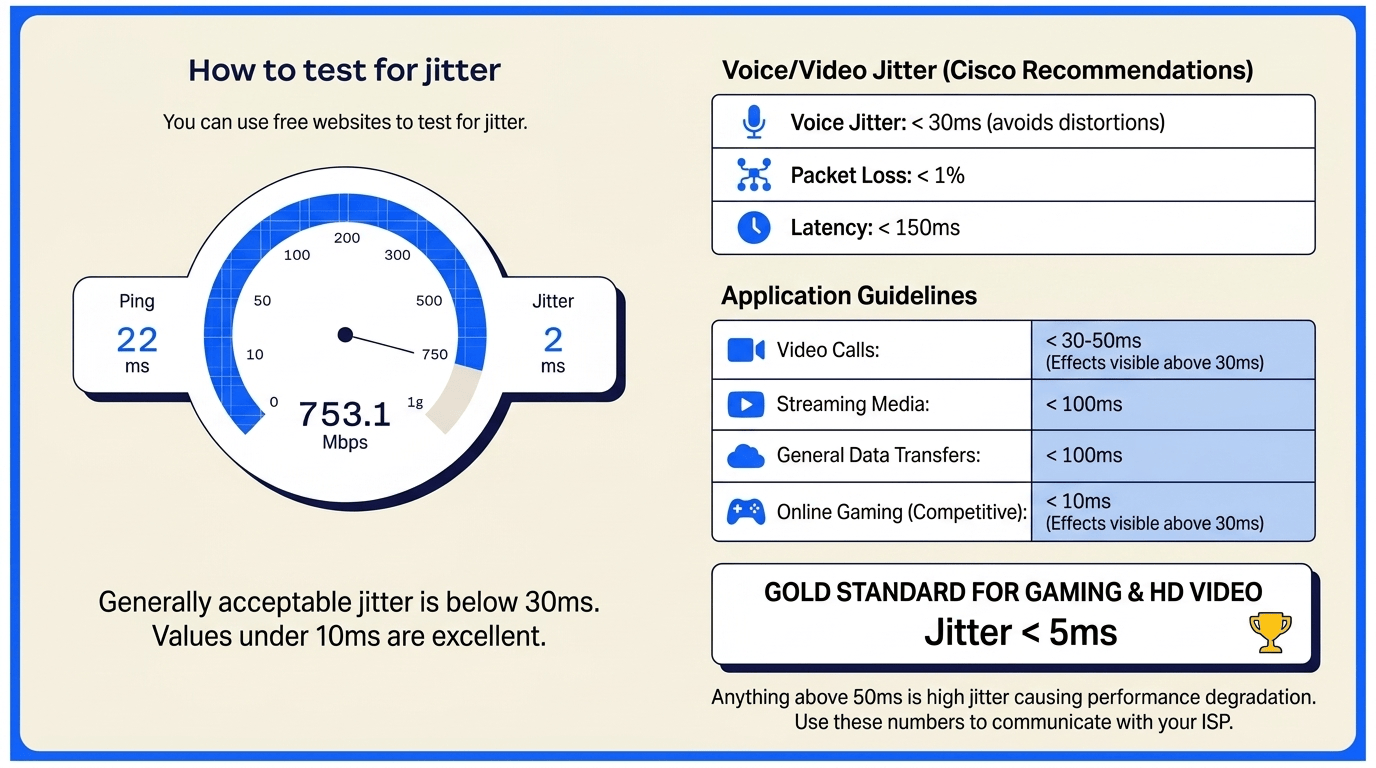
When performing an internet jitter test, you need to know what numbers to look for to determine if your connection is healthy. Generally, an acceptable jitter level for most applications is below 30ms. If your speed test with jitter shows a value under 10ms, your connection is considered excellent and you likely will not notice any issues. Once the number climbs above 30ms, you will start to see the effects in video conferencing and online gaming. Anything above 50ms is considered high jitter and will cause significant performance degradation.
According to Cisco’s technical recommendations for a high-quality voice experience, the jitter level should stay below 30 milliseconds to avoid audible distortions. Additionally, the packet loss should be less than 1%, and the overall latency should stay under 150ms. If you are a gamer or a professional using high-definition video, aiming for a what is a good jitter speed of less than 5ms is the gold standard. Knowing what is acceptable jitter helps you communicate more effectively with your internet service provider when reporting connection problems.
How to fix jitter
If you have identified that your connection is suffering after a ping and jitter test, there are several practical steps you can take to stabilize it. Fixing jitter involves identifying the bottleneck in your network and ensuring that data signals have a clear, unobstructed path. While some causes of jitter are out of your control, such as issues with your ISP’s infrastructure, many common problems can be solved by adjusting your home or office setup. Following a systematic approach will help you lower those numbers and improve your overall experience.
-
Upgrade your internet plan
Sometimes the root cause of what is jitter on speed test results is simply a lack of bandwidth. When your internet plan is too slow to handle the number of devices in your home, the router struggles to prioritize the stream, leading to congestion. If multiple people are streaming 4K video while you are trying to hold a video conference, the network will naturally experience higher jitter. Upgrading to a higher-tier plan, especially one that offers fiber optic technology, can provide the headroom needed to handle simultaneous high-bandwidth activities without causing packet delays.
-
Use wired connections if possible
One of the most effective ways to fix net jitter is to move away from Wi-Fi. Wireless connections are inherently prone to interference from other electronic devices, physical obstacles like walls, and even neighboring Wi-Fi networks. This interference causes traffic to be lost or delayed, resulting in high jitter. By using an Ethernet cable to connect your computer or gaming console directly to the router, you eliminate the unpredictability of wireless signals. A wired connection provides a much more stable environment for data transmission, which is why professionals always prefer it.
-
Purchase a high-quality router
The hardware responsible for directing your traffic plays a massive role in what is jitter on speed test outcomes. Older or budget-friendly routers often have weak processors that cannot handle high volumes of traffic efficiently. This leads to a backup of data, which creates jitter. Investing in a modern, high-quality router with a powerful CPU and advanced features can significantly reduce the internal latency of your network. Look for routers that support the latest Wi-Fi standards and have dedicated processing power for handling multiple streams of data at once.
-
Optimize quality of service (QoS) settings
Quality of Service, or QoS, is a feature found in many modern routers that allows you to prioritize certain types of traffic. If you are wondering how to improve net jitter for specific tasks, this is often the answer. You can configure your router to give priority to VoIP calls or gaming traffic over background downloads or software updates. This ensures that even if the network is busy, the most time-sensitive packets are sent first. Setting up QoS effectively creates a “fast lane” for your most important applications, keeping the jitter levels low where it matters most.
-
Update your network firmware
Manufacturers frequently release firmware updates for routers and modems to fix bugs and improve performance. Sometimes, a high jitter on network result is caused by outdated software that isn’t managing traffic as efficiently as it could. Regularly checking for and installing these updates can resolve underlying issues that contribute to network instability. Most modern routers allow you to check for updates through their web interface or a dedicated mobile app. Keeping your hardware’s software current is a simple but often overlooked step in maintaining a healthy network.
-
Reduce excess bandwidth usage
High network jitter often occurs when the network is being pushed to its absolute limit. If you are experiencing issues during an important meeting, check to see if there are other devices on the network performing heavy tasks. Large file downloads, cloud backups, and high-definition streaming can all consume significant portions of your available bandwidth. By pausing these activities, you free up the network for your real-time packets. This reduces the “packet jam” in the router’s queue and allows for a smoother flow of information, immediately lowering the jitter.
-
Try a jitter buffer
In some cases, especially with VoIP and streaming, you can use software-based solutions like a jitter buffer to manage the problem. A jitter buffer works by collecting incoming packets and holding them for a very short period before passing them to the application. This small delay allows the system to reorganize packets that arrived out of sequence or wait for slightly delayed ones. While this adds a tiny amount of latency, it significantly improves the smoothness of the audio or video. Many professional VoIP applications have these settings built-in to help mitigate the effects of an unstable link.
-
Invest in a reliable VoIP provider
If you have tried everything on your end and still see what is jitter on speed test issues during calls, the problem might lie with your service provider. Not all VoIP or communication platforms are built the same. Some providers have more robust infrastructure and better routing protocols that are designed to handle network fluctuations more gracefully. Investing in a premium service often gives you access to better servers and more efficient data handling, which can compensate for minor issues in your local internet setup and provide a more professional experience overall.
What Causes Network Jitter?
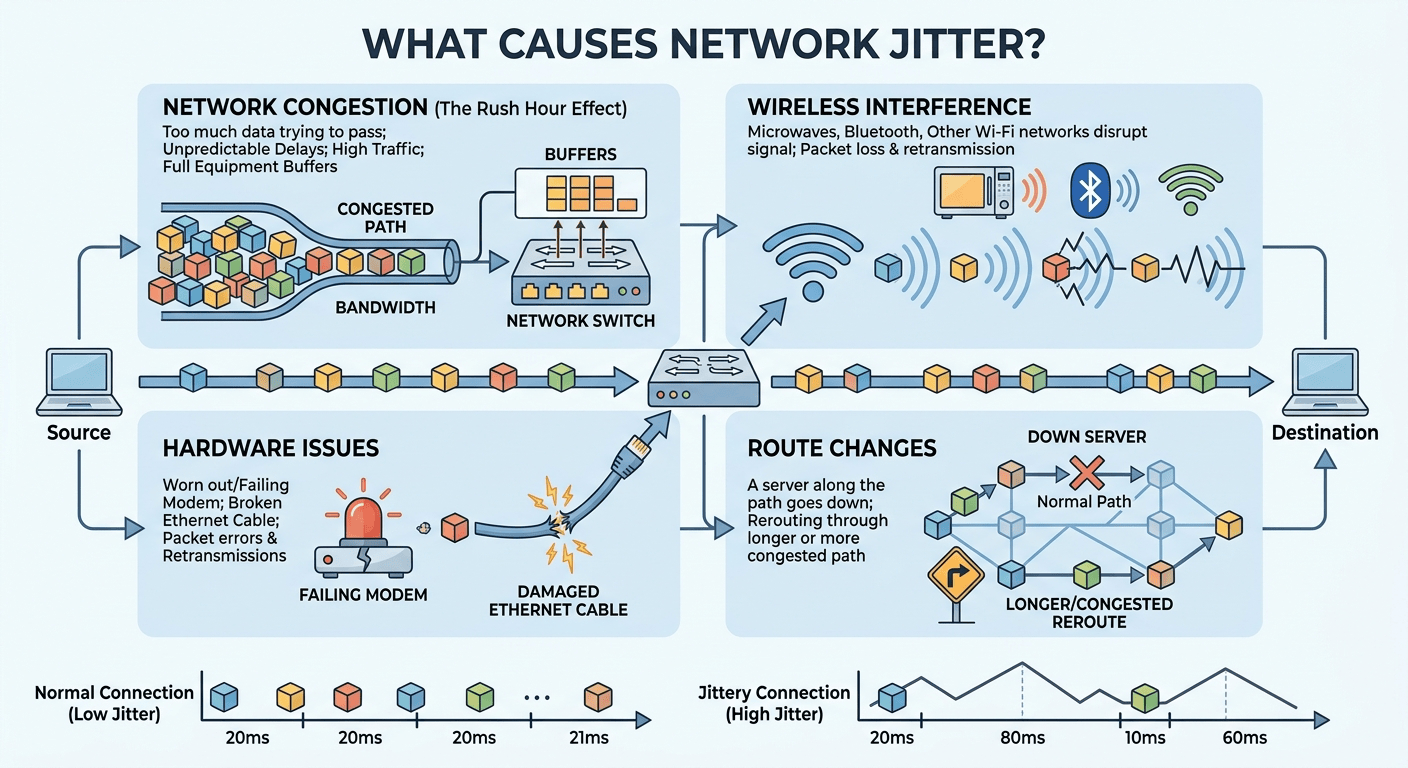
There are several factors that contribute to what causes network jitter, ranging from hardware limitations to external traffic issues. The most common cause is network congestion. Just like a highway during rush hour, when too much data is trying to pass through the same point at once, delays become unpredictable. This congestion can happen within your home network, at your internet service provider’s local hub, or even at the major exchange points of the internet backbone. When the buffers in network equipment become full, they start delaying or even dropping packets.
Moreover, wireless interference from microwaves, Bluetooth devices, and other Wi-Fi networks can disrupt the signal, leading to what is jitter in internet connections. Additionally, hardware issues such as a failing modem or a damaged Ethernet cable can introduce errors that force packets to be retransmitted, adding to the variation in timing. Route changes also play a role; if a server along the path of your data goes down, your packets might be rerouted through a longer or more congested path, causing a sudden spike in jitter.
Using Software Adaptation & Advanced Codecs
For businesses that cannot afford the interruptions caused by high jitter, using a robust platform like Zoom can make a significant difference. Zoom is engineered to handle fluctuating network conditions by using advanced codecs and dynamic bandwidth adjustment. This means that if your link experiences jitter, the software can automatically lower the video resolution or adjust the audio stream to maintain a continuous setup without dropping the call. This resilience is particularly important for customer-facing roles where professional communication is paramount.
By leveraging a global network of data centers, Zoom ensures that your data takes the most efficient path possible, which naturally reduces the likelihood of encountering congestion. Furthermore, their Contact Center solution provides detailed analytics that can help IT managers identify if a specific user is experiencing high jitter on network. This level of visibility allows for proactive troubleshooting, ensuring that agents always have the best possible line to serve customers. Reducing jitter isn’t just about the hardware; it’s also about choosing the right software partners.
Final Thought
Navigating the complexities of what is jitter on speed test results is essential for anyone who relies on a stable internet connection for work or play. While download and upload speeds get all the marketing attention, jitter is the silent metric that determines whether your online experience feels smooth or frustratingly disjointed. By understanding that jitter is the variation in packet arrival times, you can better diagnose why your video calls are stuttering even when your “speed” looks high. Fortunately, most jitter issues can be resolved through simple steps like using wired network, prioritizing traffic with QoS, or keeping your hardware updated. Maintaining a jitter level below 30ms will ensure that your digital communication remains clear and reliable, allowing you to focus on your tasks without the distraction of network lag.
Jitter FAQ
-
What causes high jitter?
High jitter is primarily caused by network congestion, where too many data packets are competing for the same path. It can also be triggered by electromagnetic interference in wireless connections, outdated hardware like old routers, or problems with your internet service provider’s infrastructure. When packets are delayed or take different routes to reach their destination, the timing becomes inconsistent, leading to high jitter readings on a speed test.
-
How does jitter differ from latency?
Latency is the total time it takes for data to travel from point A to point B, while jitter is the variation in that travel time. You can think of latency as the speed of a train and jitter as the consistency of its schedule. If a train always arrives 10 minutes late, it has high latency but low jitter. If the train arrives anywhere from 5 minutes early to 20 minutes late, it has high jitter, which makes planning much harder.
-
How does internet speed affect jitter?
Internet speed itself does not directly cause jitter, but a lack of bandwidth can lead to it. If your connection is slow and you try to perform multiple high-bandwidth tasks at once, the network becomes congested. This congestion forces the router to queue packets, and the varying time they spend in that queue creates jitter. Therefore, a faster connection often provides more “room” for packets to move freely, which can help keep jitter levels low.
-
What is a good jitter on a speed test?
A good jitter measurement is generally anything below 30ms for standard internet use. For more demanding tasks like competitive gaming or professional-grade video conferencing, you should aim for a jitter of less than 10ms. If your test results show jitter consistently below 5ms, your connection is exceptionally stable and ideal for any real-time application.
-
How do you fix jitter?
To fix jitter, start by switching from a Wi-Fi connection to a wired Ethernet cable to eliminate wireless interference. You should also restart your modem and router, update their firmware, and check for any background applications that might be hogging bandwidth. If the problem persists, configuring Quality of Service (QoS) settings on your router to prioritize your most important traffic can help stabilize the packet flow.
-
Is 21 jitter bad?
A jitter of 21ms is not considered bad; it is actually within the acceptable range for most internet activities. While it is not perfectly “smooth,” you likely won’t notice any issues during voice calls or video streaming. However, if you are a professional gamer or using high-end telepresence hardware, you might prefer to see that number drop below 10ms for optimal performance.
-
Is 0.5 jitter good?
Yes, a jitter of 0.5ms is excellent. This indicates that your network connection is incredibly stable and that data packets are arriving at their destination with almost perfect timing. With such a low jitter value, you will experience seamless audio, video, and real-time interactions, provided your overall latency is also within a reasonable range.