
Calilio is a cloud business phone system that lets people make calls, send business messages and manage customer conversations over the internet. It combines virtual phone numbers, a shared Callbox, call-management tools and plan-dependent AI features in a web and mobile environment. A company can use it for everyday business calling or a more structured sales and support operation.
This Calilio overview explains the service, its current subscription options, international number coverage and practical setup. The key buying distinction is between the monthly user subscription and the separate cost of phone numbers, communications usage and metered extras.
Calilio Customer Rating

G2: 4.7/5 from 94 reviews on its Calilio listing. Customer feedback later in this guide covers usability, support and number-related concerns.
Calilio: Quick Overview

| Buying point | What to know |
|---|---|
| Product | Cloud business phone system using VoIP |
| Main workspace | Calls, messages, voicemail and conversation history in Unified Callbox |
| Entry subscription | Standard: $12/user/month equivalent billed annually; $15 on monthly billing |
| Advanced subscription | Premium: $28/user/month equivalent billed annually; $35 on monthly billing |
| Enterprise | Custom pricing and deployment discussion |
| Team limits | Standard supports up to 10 users; Premium has no advertised user-count cap, with paid seats |
| Numbers | Advertised virtual numbers in 100+ countries; availability and capabilities vary |
| International calling | Supported at applicable destination rates; the subscription is not unlimited global calling |
| Evaluation | Request a demonstration and confirm any evaluation or refund conditions |
What Does Calilio Do?
Calilio provides a business-number workspace instead of asking staff to use their personal mobile numbers for customer calls. An owner creates the company account, adds numbers and assigns them to individual employees or a shared team. Members work from the same account environment, helping the next person understand the previous interaction.
VoIP means voice over internet protocol. Your internet connection carries the audio, while Calilio connects calls to supported telephone destinations. A desk phone is not required for its app-based workflow. A stable connection and correctly configured microphone permissions remain important.
For a small service business, the practical appeal is keeping calls and follow-up information together. For a sales team, it is organising outreach and outcomes. Those are different requirements, so the right package depends on the work rather than the company’s headcount alone.
How Does Calilio Work?
- Create a workspace. This holds the company’s users, billing, numbers and conversation records.
- Add a business number. Choose an available virtual number or request an eligible number transfer.
- Assign access. Give the number to the person or team responsible for answering it.
- Use the web or mobile app. Make calls and handle supported messaging from the business number.
- Manage follow-up. Review the shared conversation history and the reporting available in your plan.
For example, imagine three employees sharing an enquiry number. One answers a new caller and adds a note. A colleague handling the next interaction can review that history before responding. The business should also decide who owns missed calls, so a shared inbox does not leave every employee assuming someone else will return them.
Calilio Pricing and Plans in 2026
Calilio’s published pricing uses Standard, Premium and Enterprise. Annual prices below are monthly equivalents with an annual commitment, not month-to-month charges. Figures are in US dollars before applicable extras.
| Plan | Annual monthly equivalent | Monthly billing | Main buying distinction |
|---|---|---|---|
| Standard | $12/user/month ($144/user/year) | $15/user/month | Up to 10 users; basic business telephony |
| Premium | $28/user/month ($336/user/year) | $35/user/month | Advanced routing, sales and supervisor tools |
| Enterprise | Custom quote | Custom quote | Discuss deployment, support and commercial requirements |
Premium’s “unlimited users” wording removes the advertised team-size limit. It does not mean that one licence buys unlimited employee accounts.
What the included usage covers
| Allowance | Standard | Premium |
|---|---|---|
| Outgoing call minutes | 200 | 1,000 |
| Incoming call minutes | 100 | 500 |
| Outgoing SMS | 100 | 500 |
| Incoming SMS | 100 | 500 |
These bundles apply to eligible outgoing calls/messages to US or Canadian numbers and incoming traffic on US or Canadian numbers. Confirm how allowances are allocated to your account. Traffic outside the bundle, or beyond its limits, uses the applicable tariff and wallet balance.
Example: five paid users
Five Standard seats at the annual rate equal $60 per month in subscription terms, or $720 for the year. Five Premium seats equal $140 per month in subscription terms, or $1,680 for the year. On monthly billing, the same seat counts cost $75 and $175 respectively. These calculations exclude additional numbers, usage, taxes and metered features.
Build a budget from the team’s actual inbound and outbound minutes, text volume, destinations and recording needs. A low seat price can be attractive for light usage, while a call-heavy operation should compare the complete monthly bill.
Phone Numbers, Countries and International Calling
Calilio advertises virtual numbers across more than 100 countries, including local, mobile and toll-free options where offered. That is number availability, not a promise that every country offers every number type or identical functionality.
Its current homepage and pricing cards advertise a complimentary first eligible local number in the USA, Canada or UK, subject to account verification. Some older comparison/help materials mention only the USA and Canada. Confirm the included number and its eligibility in your order, particularly for a UK number.
International calling is a separate capability. A company can use a supported business number to call eligible overseas destinations at the relevant rates. Buying a local number abroad does not make all international calls free.
Check the number before paying
- Confirm the country, area code and available number type.
- Ask whether it supports inbound voice, outbound voice, SMS and MMS separately.
- Check any identity, address or business-document requirements.
- Confirm rental, inbound rates, outbound destination rates and messaging charges.
- Ask whether the exact existing number can be ported and what the transfer involves.
A voice-enabled number should not be assumed to support texting. Similarly, business messaging support does not establish that a third-party service will accept the number for verification codes.
Calling Features and Team Workflows
Calilio’s feature catalogue includes number sharing, forwarding, voicemail, call records, notes and tags. Its plan documentation places call transfer, IVR menus, business-hours rules and live monitoring in Premium and Enterprise. Standard should therefore be evaluated as a simpler calling package.
Shared number and conversation handling
Number sharing lets employees handle the same business line. Callbox keeps the interaction history together, so staff can review previous contact. Establish ownership for unanswered calls and agree what notes should be added after an important conversation.
Routing and supervisor tools
Premium adds structured call handling and live supervision. Listening, whispering and barging serve different coaching situations: observing a call, advising the employee or joining the conversation. During a demonstration, ask to see the permissions and the exact workflow your supervisor would use.
Outbound sales tools
The advertised power dialer and call dispositions support organised outreach. A disposition records the result, such as a follow-up being needed. Ask the provider to demonstrate how a contact list is processed, how unanswered calls are handled and where outcomes appear afterwards. Do not assume a power dialer provides predictive or simultaneous multi-line dialing.
AI, Call Recording and Analytics
Calilio advertises AI transcription, call summaries, sentiment analysis and other call-report insights. Its plan guide reserves AI summaries and sentiment analysis for Premium and Enterprise. Limited transcription allowances on an entry plan should not be read as access to the entire advanced analytics suite.
Recording, storage and AI processing need separate budget checks. The current pricing cards list finite included recording, storage, transcription and AI voice-agent allowances. Confirm how each is measured, which features your account can enable and what happens after the allowance is used.
For a useful evaluation, use a representative conversation with your team’s accents, customer questions and terminology. Compare the generated summary with the actual discussion. Check whether the next employee can identify the agreed action and whether a supervisor can find the calls that require attention.
AI results should be reviewed before being relied on for a customer commitment. A sentiment label can help prioritise review, but it cannot explain every context or replace a manager’s judgement.
Calilio Web and Mobile Apps
Calilio’s official device information identifies desktop access through a web browser and mobile apps for iPhone and Android. Staff can work from the business-number environment without relying on an office-only phone setup.
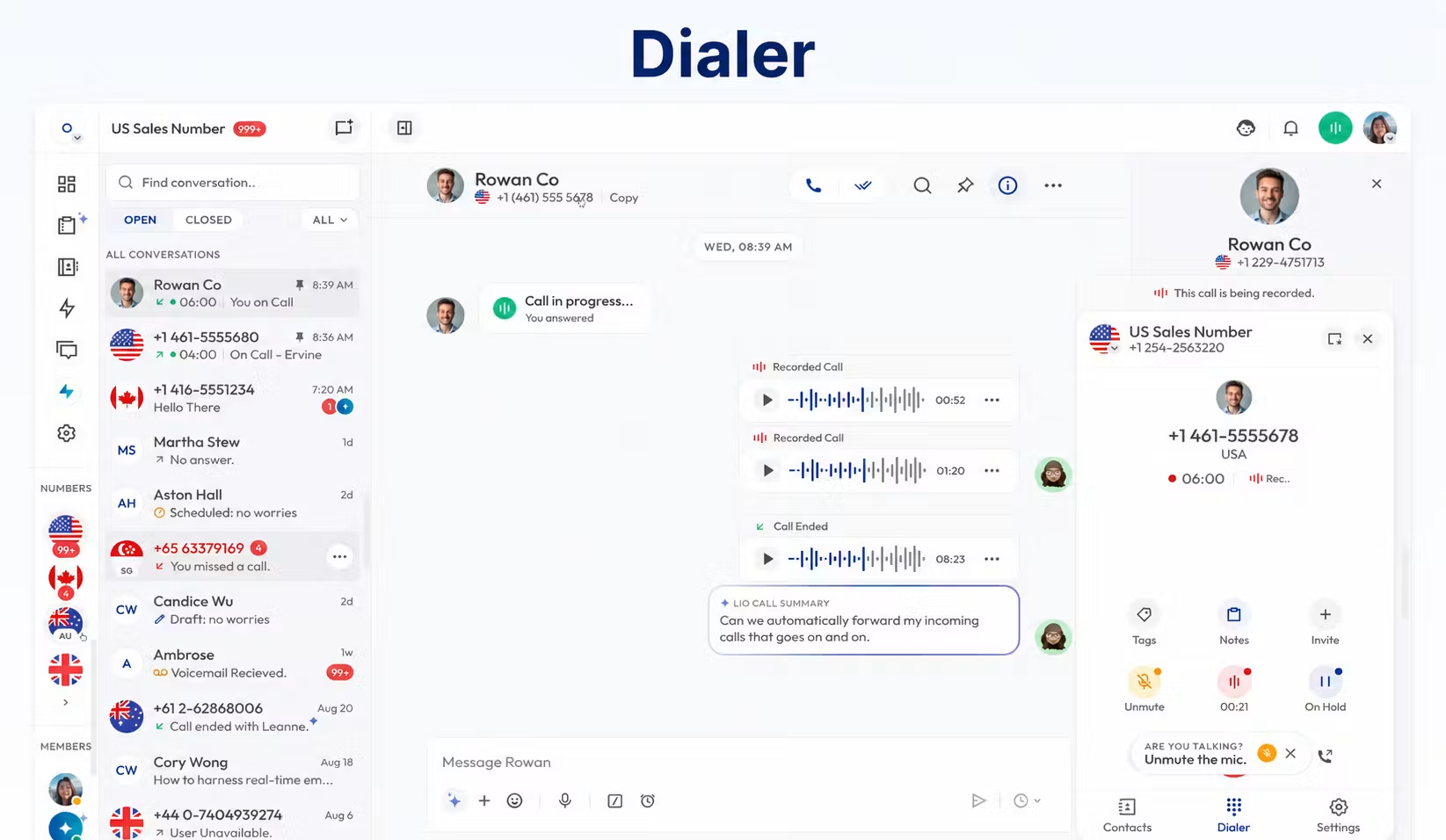
Test the app on the devices employees actually use. Check microphone access, headset audio, incoming-call notifications and the behaviour when switching between Wi-Fi and mobile data. For a browser user, also verify that daily work does not accidentally close the calling session.
A remote worker should have a reliable headset and connection. Before a wider rollout, try incoming and outgoing calls from the office, home and a mobile connection. This practical test is more useful than assuming that one successful call proves every location is ready.
CRM Integrations and Business Apps
Pipedrive and Pabbly Connect have dedicated Calilio integration documentation. Calilio’s Pipedrive page advertises call logging and click-to-call, while explicitly marking unified contact management and bidirectional contact syncing as coming soon. An integration name alone does not establish complete two-way synchronisation.
Pabbly Connect provides an automation route between Calilio and supported applications. Confirm the available triggers, actions, fields and any separate automation subscription. Show the provider the precise workflow: for example, a completed call should create a record against the correct customer, with an assigned follow-up.
Calilio’s plan guide marks several other connectors as coming soon, including Salesforce, Zoho, HubSpot and Slack. API and webhook access is also marked coming soon in current plan materials. Do not base a purchase on a required future connector without confirmation that it is available in the proposed account.
Our guide to integrating VoIP with a CRM explains the workflow questions to ask before choosing a connector.
Messaging: What to Confirm
Calilio offers business SMS and advertises MMS and advanced messaging tools. Available capabilities depend on the selected number, destination and plan. Saved replies and bulk messaging are among the advanced tools described in its plan materials.
Messaging costs can involve segments rather than a single charge for every visible message. Longer text, character encoding and attachments may affect usage. Before starting an outreach programme, confirm sender registration, approval requirements, per-message charges and who will manage replies.
Ask for a demonstration using the exact number type you intend to buy. A working text sent from a different country or number type does not validate your intended deployment.
How to Get Started with Calilio
- Map the calling requirement. List users, shared lines, destinations and the features each team needs.
- Choose a plan. Use Standard for an eligible basic setup; evaluate Premium when transfers, menus, business hours or supervision are required.
- Verify the number. Check documentation, availability, messaging support and porting eligibility.
- Create the workspace. Add users, assign numbers and establish who manages billing and communications.
- Configure the workflow. Set greetings, voicemail and the routing supported by the package.
- Run a pilot. Test calls, texts, shared history, app notifications and any CRM connection.
- Review the bill and results. Confirm tariffs, wallet behaviour and metered feature usage before expanding.
Keep an existing service active until a port is confirmed and tested. Agree a clear migration date, and tell employees where to report an unanswered call, missing message or incorrect customer record.
Reliability, Support and Account Controls
Call quality depends partly on the connection and device setup. Ask Calilio how incidents are communicated, which support channels apply to your package and how urgent calling failures are escalated. A support-hours claim is not the same as a contractual response time.
The plan documentation describes Enterprise options including a dedicated account manager, developer support, audit logs and data history. Ask to see these controls in the proposed deployment. Do not treat an enterprise plan name as proof of a particular certification or regulatory approval.
For recordings and customer data, establish who can access, export and delete information. Request the relevant privacy, retention and contractual information for your business. Include account closure and data export in the discussion so that migrating later does not become an unexpected operational problem.
Who Should Use Calilio?
| Business | Recommended starting point | Why |
|---|---|---|
| Solo user or basic startup | Standard | Evaluate simple calling and shared records with a small paid-user count |
| 5-person sales team | Premium if advanced calling is needed | Transfers, routing and sales tools may matter more than headcount |
| Medium business | Premium | Evaluate departmental workflows and full usage costs |
| Enterprise or international operation | Enterprise proposal | Validate countries, controls, support and integrations in the actual deployment |
| Dedicated contact center | Premium or Enterprise pilot | Test queue behaviour, coaching, reports and required agent workflows |
| Budget-conscious SMB | Compare complete monthly cost | Measure usage beyond included bundles before choosing |
Calilio merits consideration when a team wants an app-based phone workspace and its required numbers are available. A business needing extensive native integrations, specialist contact-center functions or a heavily regulated deployment should compare requirements carefully before committing.
Calilio Pros and Cons
| Strength | Limitation to assess |
|---|---|
| Shared Callbox and business-number access | Follow-up still needs employee ownership and processes |
| Published entry and advanced seat prices | Numbers, usage and metered extras affect the total |
| International virtual-number offering | Country coverage does not guarantee SMS or every number type |
| Premium routing, supervision and AI tools | Several important features require the higher plan |
| Pipedrive and Pabbly integration routes | Some connector functions and other integrations are coming soon |
| Browser and mobile access | Notifications and audio depend on devices and connection quality |
Calilio Alternatives Worth Comparing
Compare Calilio with providers that solve your actual requirement. RingCentral is worth examining for a broader employee communications environment. KrispCall belongs on the shortlist for a business evaluating shared telephony and international numbers. Dialpad is another candidate when AI-assisted calling is central to the evaluation.
Use the same sample users, countries, minutes, messages and workflow in each quote. Then compare the complete recurring cost and the tasks employees can perform. Our business VoIP provider comparison provides a starting point for that shortlist.
Frequently Asked Questions
Is Calilio a VoIP service?
Yes. It delivers business calling over an internet connection, with virtual-number and communications-management tools.
Does Calilio provide only USA and Canada numbers?
No. It advertises virtual numbers in more than 100 countries. The included-number offer and US/Canada usage bundles are narrower benefits; check your exact country and number type.
Does Calilio support global calling?
It supports international calling to eligible destinations at applicable tariffs. Global calling should not be confused with an unlimited international allowance.
Is Calilio free?
Ongoing business service uses paid subscriptions. A complimentary number, limited bundle or account credit is not a free ongoing phone plan. Request the current demonstration and evaluation conditions.
Can I keep my existing number?
Porting is offered for eligible numbers. Confirm the exact number, documents and transfer timing before cancelling the current provider.
Does Standard include IVR and call transfers?
The plan guide places those features in Premium and Enterprise. Choose the plan against the call routes your team needs.
Is every Calilio number SMS-enabled?
Do not assume so. Confirm SMS and MMS support for the specific number before purchasing it.
Final Verdict: Is Calilio Worth Considering?
Calilio is worth considering for businesses that want cloud calling, a shared communications workspace and a choice between basic and more advanced telephony packages. Premium is the more relevant evaluation for teams needing routing, coaching or richer AI reports.
The strongest purchase decision combines a working pilot with confirmed number capabilities and a complete cost estimate. Verify the must-have features today, then choose the smallest package that actually supports the work.
Source notes: Calilio pricing and tariff pages, official features and device pages, Calilio Helpdesk plan and setup guides, Pipedrive/Pabbly integration documentation, and G2 customer listings.
Customer Reviews: Calilio Feedback on G2
In an organic July 15, 2026 G2 review, Lucy B. praised forwarding, recording and international calling, and described IVR, the power dialer and summaries as time-saving tools. An organic June 14, 2026 review by Claire G. highlighted routing, analytics, conversation summaries and helpful support.
The G2 product-review summary also highlights ease of use and affordability, while identifying number availability as a recurring concern. An October 28, 2025 reviewer reported that an Irish number did not support the SMS capability they expected and described a partial-refund dispute. This is the reviewer’s account; it reinforces the value of confirming messaging support and refund conditions before purchase.
Use these customer experiences to shape your demonstration: test the interface, support response, exact number capabilities and the workflows that matter to your team.
Affiliate disclosure: VoIPCalling.com may earn a commission when you purchase through affiliate links in this article, at no additional cost to you.