Calilio combines business calling, messaging, virtual numbers and customer conversation history in a shared cloud workspace. Its core tools help employees communicate from business numbers; more advanced functions support call routing, sales campaigns, supervision and conversation review.
The important distinction is between a feature being advertised, being available in your selected plan and having enough included usage for your team. This guide explains what the main Calilio tools do, how they fit together and what to verify before choosing a subscription.
Calilio Customer Rating

G2: 4.7/5 from 94 reviews. The feedback section at the end covers useful calling tools and reported integration and number-capability concerns.
Calilio Features: Quick Overview

| Feature group | What it helps you do | Buying check |
|---|---|---|
| Business calling | Make and receive calls from a business number | Number availability, call rates and caller ID |
| Unified Callbox | Review calls, messages and voicemail together | Shared visibility and employee permissions |
| Number sharing | Give several employees access to one number | Answering strategy and follow-up ownership |
| Inbound routing | Direct calls to the intended person or team | Exact IVR, business-hours and transfer entitlement |
| Messaging | Handle SMS/MMS and repeat replies | Number capabilities, segments and registration |
| Outbound campaigns | Work through contact lists and record outcomes | Premium power-dialer workflow |
| Recording and AI | Review audio, transcripts and conversation insights | Allowances, extra charges and access |
| Administration | Manage users, roles and account settings | Who can change numbers, billing and recordings |
| Integrations | Connect calling activity to business tools | Working connector actions versus coming-soon functions |
Business Calling and Virtual Numbers
Business calling from web and mobile
Calilio delivers VoIP calling through its web and mobile environment. Employees use their assigned business number for customer calls instead of exposing a personal mobile number. The team needs a suitable internet connection, working audio permissions and the correct number assignment.
Example: a consultant answers on the mobile app while away from the office, then reviews the conversation from the web workspace later. Test incoming calls and missed-call notifications on both devices, particularly when the phone is locked.
Virtual numbers and porting
Calilio advertises virtual numbers in more than 100 countries and number porting for eligible numbers. A local, mobile or toll-free number can serve different business purposes. Availability, identity documents, address requirements and message support vary by country and number type.
If you want to keep an existing customer-facing number, confirm porting eligibility and the required records first. Keep the old service active until the transfer has completed and incoming calls have been tested.
International calling
Calling a destination is a separate capability from buying a number there. Calilio supports international calling at applicable tariffs, while its included call/SMS bundles are geographically narrower. Obtain the rates for your actual destination list rather than assuming every overseas call is included.
Unified Callbox: Calls, Messages and Voicemail in Context
Unified Callbox is Calilio’s central conversation workspace. Official documentation describes calls, SMS/MMS and voicemail together, with customer context available to authorised teammates. This is useful when different employees handle successive interactions with the same caller.
The business benefit comes from continuity. One employee can answer an enquiry, add the relevant context and make the next action understandable to another colleague. Shared history can help, but the team still needs a rule for assigning callbacks and marking work complete.
In a demonstration, ask an employee to find a previous interaction, return a call and locate a voicemail. Check whether a second employee sees the information they need, and whether sensitive conversations remain limited to authorised users.
Calilio Dashboard and Daily Workflow
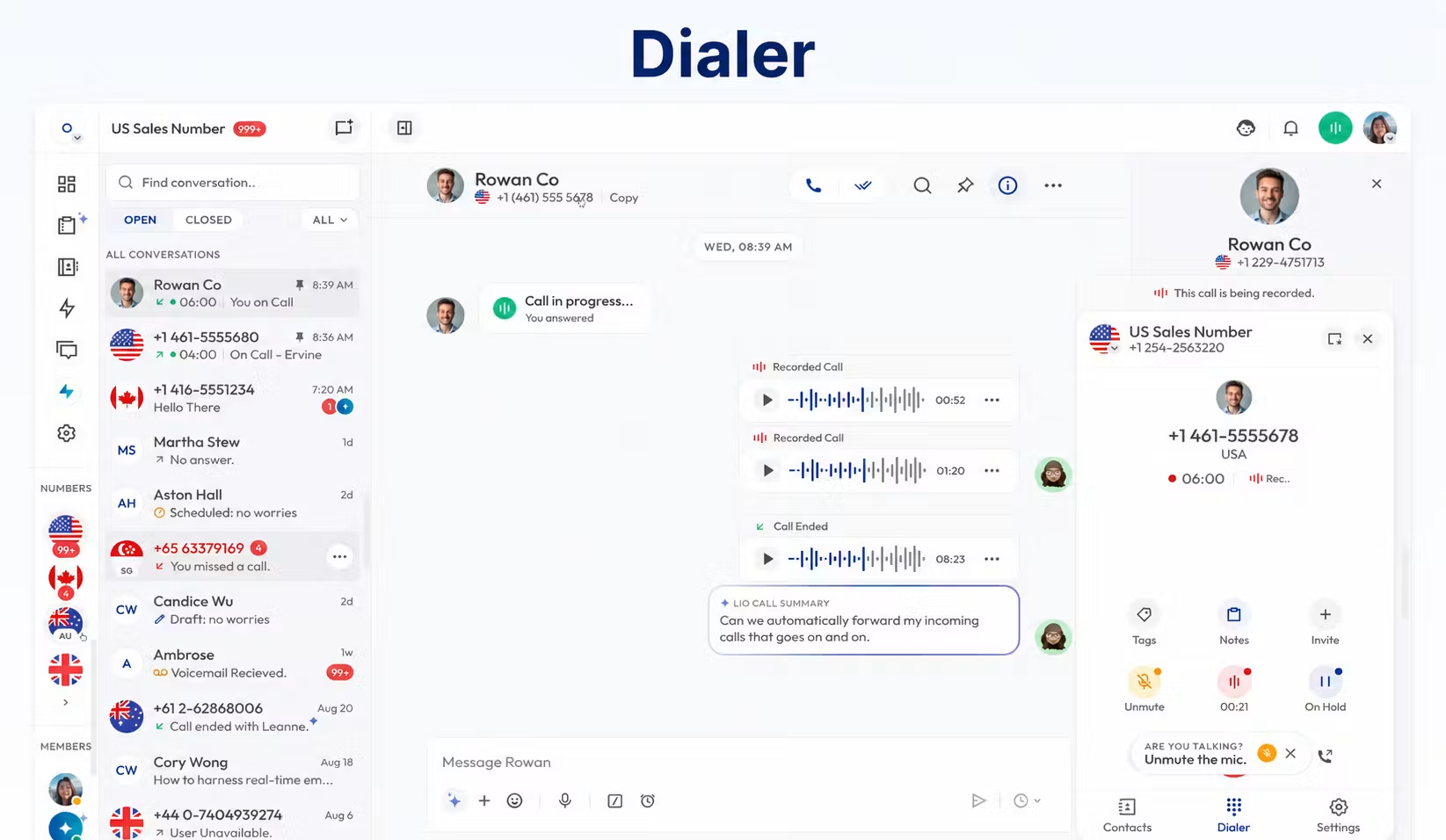
A useful daily workflow is: review new enquiries, answer or return the call, record the outcome, then assign any follow-up. Ask the demo to show these steps in one customer conversation rather than moving through unrelated product screens.
Number Sharing and Team Access
Calilio’s number-sharing documentation describes assigning the same business number to several employees. Team members can handle calls or messages from that number, giving customers a consistent company contact point.
Number sharing answers the access question: who can use the line? It does not by itself answer the routing question: who rings first, who is the backup and what happens if no one answers? Configure both together.
Example: three people share an enquiry number, but only one owns the callback after an unanswered call. This avoids every employee assuming a colleague has already handled it. Demonstrate shared access on the actual devices the team will use.
Inbound Calling: Ring Strategies, Forwarding and Transfers
| Tool | How it works | Useful example |
|---|---|---|
| Simultaneous ring | Assigned agents ring at the same time | A small enquiry team can let an available person answer |
| Sequential ring | Agents ring one after another in an order | Try the account owner before a backup colleague |
| Round-robin strategy | Rotate distribution among assigned agents | Share incoming work across a team |
| Call forwarding | Redirect a call to another configured destination | Route calls to an alternative number when needed |
| Call transfer | Move an active conversation to another person | Hand a caller to the colleague handling their account |
| IVR / phone tree | Let a caller select a route from a menu | Separate bookings from customer support |
| Business hours | Apply handling according to the configured schedule | Use different handling outside staffed hours |
Calilio’s current pricing lists simultaneous, sequential and round-robin ring strategies. Its sequential-ring documentation describes a configurable order and ring time before moving to the next employee. Test the whole chain: long ring durations can leave the caller waiting even when the rules are technically working.
Forwarding redirects where a call goes; transferring moves a conversation already being handled. An IVR introduces a caller menu, while business hours determine when a route applies. These are related tools with different jobs.
Plan conflict to confirm: the main pricing and Helpdesk place IVR, business hours and transfers in Premium, but ring-strategy pages say IVR is included across plans. Obtain written confirmation of the entitlement in your actual offer rather than assuming Standard includes the full workflow.
Voicemail, Hold and Availability Tools
Calilio advertises voicemail, customised greetings, hold, call blocking and Do Not Disturb. These support the moments when an employee cannot immediately complete a conversation. Voicemail captures an enquiry; hold gives time to check information; availability settings help define how calls should be handled.
Voicemail transcription and voicemail-to-email are also advertised. Check the transcription allowance and the notification behaviour in the selected offer. A notification is useful only when an employee owns the return call.
Test: call while the intended employee is unavailable, leave a message, then verify where it appears and who receives a notification. Confirm the fallback for a caller who waits through the entire ring sequence.
Business Messaging: SMS, MMS, Saved Replies and Bulk SMS
SMS and MMS conversations
Calilio provides messaging within the communications workspace. SMS handles text, while MMS supports multimedia where the chosen number and route allow it. Verify incoming replies as well as outgoing delivery using the actual number you intend to buy.
Budget SMS in segments, not simply visible messages. Length and character encoding can affect how many segments a text uses. Ask about sender registration and approval for the destination before planning customer outreach.
Saved replies
The canned-response documentation describes creating saved text with a title and shortcut, then inserting it during a conversation. The main pricing places Saved Replies in Premium, so verify the package entitlement rather than relying on a general feature description.
Example: save an opening-hours answer or an appointment-preparation message. Employees should personalise it when the customer’s situation differs and keep information such as prices or policies up to date.
Bulk and scheduled messaging
Calilio advertises bulk SMS and scheduled messages; bulk SMS appears in the Premium package. These tools serve different needs: bulk sending reaches several contacts, while scheduling controls the delivery time.
Before a campaign, confirm the available workflow, charges, sender approval and reply handling. Start with a small test group. A sending tool does not establish that every number supports messaging or that the recipient list is ready for outreach.
Outbound Sales Tools: Power Dialer and Call Outcomes
Calilio’s Premium power dialer works through a prepared contact list sequentially. The official page describes CSV import, campaign creation, preview and post-call time, a campaign number and custom call dispositions.
A disposition is a structured outcome such as a completed conversation, no answer or a required follow-up. Consistent outcomes help a manager understand the work without relying entirely on free-text notes.
Example: a sales team imports an approved lead list, assigns the campaign and records an outcome after each attempt. Demonstrate how callbacks, pauses, failed calls and multiple agents are handled. Confirm that important context remains attached to the customer record.
The useful comparison is the complete workflow: preparation, dialing, outcomes and follow-up. A faster dialing sequence adds little value if staff have to reconstruct the conversation manually afterward.
Recording, Transcripts and AI Call Reports
Call recording and storage
Recordings preserve the audio for authorised review. Storage retains that audio for later access; it is a separate billing consideration. Decide who can listen, how long the business needs records and which calls should be recorded.
Calilio’s pricing and Helpdesk currently disagree on included recording/storage minutes. The pricing lists 100 minutes for Standard and 1,000 for Premium; the Helpdesk lists 300 and 1,500. Confirm the account’s allowance, overage charges and retention settings in writing.
Transcription and conversation insights
The transcription page describes automatic transcription and manual transcription from recordings, with access through Callbox. AI call reports can include a summary, reason, conclusion and sentiment insights. These provide a way to review conversations without replaying every recording.
Transcription is not the same as a summary: the transcript represents speech as text, while the summary condenses the conversation. Sentiment is an automated interpretation rather than proof of what a customer feels. Check names, dates and commitments against the recording before acting.
The current pricing shows limited transcription usage on both tiers, while the Helpdesk associates richer AI reports with Premium. Verify each tool separately, including its allowance, rate and availability. Do not describe all AI tools as unlimited simply because the feature appears in a package.
AI Voice Agent
The current pricing lists AI Voice Agent allowances of 10 minutes/user/month on Standard and 100 on Premium, followed by usage charges. Request a live demonstration of the actual tasks it can perform, handoff behaviour and the proposed price.
Start with a defined, limited task and a clear fallback to a person. An allowance on a pricing page does not establish that the agent can complete every customer request or replace a staffed support operation.
Live Monitoring: Listening, Whispering and Barging
Calilio describes live supervision tools in Premium. Listening lets a supervisor review the active conversation; whispering provides guidance to the employee without the caller hearing that guidance; barging lets the supervisor join the conversation.
Demonstrate each mode and establish who can use it. A support team may need coaching during a difficult conversation, but supervisors should have a clear process for intervening and appropriate access to recordings and reports.
For a contact center, test supervision alongside the agent’s daily work, caller routing and reporting. A list of monitoring tools alone does not confirm the full deployment is suitable.
Notes, Tags, Contacts and Reporting
Calilio advertises call notes, tags, contact import and analytics. Notes capture details that the next employee needs. Tags organise conversations or contacts. Imports help create a usable contact list without entering each record individually.
Keep structured outcomes separate from explanatory notes: an outcome says what happened; a note says what the colleague needs to know. Agree consistent labels so reports remain interpretable.
Basic and richer reporting differ by plan. Ask the demo to show unanswered calls, durations and outcomes for your sample workflow, then verify what can be filtered or exported. A report is valuable when it leads to a defined action, such as assigning overdue callbacks.
Roles, Permissions and Billing Controls
The Helpdesk distinguishes Owner, Admin and Member roles. Owners and admins handle administrative work, while members have more limited access to daily calling and messaging tasks. Role permission and plan entitlement are separate: an administrator’s authority does not make an unavailable package feature included.
Its role guide describes restricted member access to subscription settings, recording controls and live monitoring. Assign access according to the job, and demonstrate what an ordinary employee can see before enabling shared numbers widely.
The documentation also describes low-balance alerts and auto-recharge controls for administrators. Decide who monitors wallet funds and who may authorise spending. The service’s terms state that a zero wallet balance prevents calls and outgoing messages.
CRM and Automation: Check the Exact Action
Calilio publishes integration pages for Pipedrive and Pabbly Connect. The Pipedrive page describes call logging and click-to-call, while marking unified contact management, two-way contact syncing and calling directly from Pipedrive as coming soon. API and webhook access also remain marked coming soon in Enterprise pricing.
A connector name does not establish a complete workflow. Ask the demonstration to show the intended contact, completed call, written CRM activity and any recording link. Confirm the required plan and whether a separate automation subscription is necessary.
Our guide to connecting VoIP with a CRM explains how to define these checks. Treat the proposed functions as available only after they have been verified.
Which Features Should Your Business Prioritise?
| Business | Priority tools | Likely plan discussion |
|---|---|---|
| 5-person startup | Shared numbers, Callbox, voicemail and notifications | Standard if all essential functions are confirmed |
| 20-person sales team | Power dialer, dispositions, CRM logging and review | Premium |
| 50-person remote company | Mobile answering, routing, roles and reporting | Premium or Enterprise |
| Medium business | Departmental routing, transfers and access control | Premium or Enterprise |
| 100+ person international business | Country-specific numbers, rates and support scope | Enterprise proposal |
| Dedicated contact center | Agent workflow, supervision and actionable reports | Premium/Enterprise pilot |
| Budget-conscious SMB | The smallest set of tools that completes daily tasks | Compare total cost, including usage |
| Enterprise-grade operation | Contracted support, controls and required integrations | Negotiated proposal; verify commitments |
Headcount does not settle the package choice. A small business with complex inbound routes can require more advanced features than a larger business making occasional calls.
Pricing and Limits That Matter to Feature Buyers
| Plan | Monthly billing | Annual billing |
|---|---|---|
| Standard | $15/user/month | $144/user/year; $12 monthly equivalent |
| Premium | $35/user/month | $336/user/year; $28 monthly equivalent |
| Enterprise | Custom | Custom |
Annual billing requires a yearly subscription payment. Compare the subscription with the number and usage charges, AI minutes, recording/storage, messaging registration and any integration costs. Standard has a 10-user cap; Premium’s advertised uncapped member count still uses paid seats.
Confirm the included number country, especially because the current cards mention UK/US/Canada while parts of the Helpdesk still describe US/Canada only. Ask which communication routes the bundle covers; it should not be treated as unlimited global calling.
Important Boundaries Before Deployment
Calilio’s Terms of Service exclude emergency-service calling and contain no default uptime commitment. Keep an alternative emergency-calling method and negotiate any availability or support requirement that the business must have.
A free demonstration and the conditional subscription-refund policy are different offers. Agree evaluation terms before paying or moving the main number. Verify number capabilities and every essential feature with your actual devices, then keep the old service active until any port is confirmed.
Frequently Asked Questions
What are Calilio’s main features?
Business calling, messaging, virtual numbers, Unified Callbox, number sharing and plan-dependent routing, campaigns, recording, AI and supervision tools.
Are all Calilio features included in Standard?
No. Its main pricing and Helpdesk place several advanced tools in Premium. Some feature pages conflict on routing entitlement, so confirm the actual offer.
What is the difference between number sharing and simultaneous ring?
Number sharing assigns access to several employees. Simultaneous ring determines how an incoming call rings those assigned employees.
Does Calilio support SMS on every virtual number?
Do not assume so. Confirm SMS/MMS capability for the exact number, destination and registration status.
Does Calilio include AI transcription?
The current pricing shows limited transcription allowances. Confirm the tool, usage rate and plan because richer reports are described separately.
Can I use Calilio’s API now?
Enterprise pricing marks API and webhook access coming soon. Confirm actual availability before planning a custom integration.
Which tools matter most for sales teams?
A working campaign dialer, clear call outcomes, reliable CRM logging and manageable follow-up. Verify the whole workflow rather than the dialer alone.
Final Recommendation
Evaluate Calilio from the work your team needs to complete. Shared conversations and basic calling can suit a simple setup, while structured sales and support operations should examine routing, campaigns, supervision and reporting in the appropriate package.
Have the provider demonstrate each essential task, resolve conflicting entitlement descriptions and supply a complete quote. Choose the plan that delivers the workflow today with acceptable usage limits.
Source notes: Calilio pricing; official feature, Callbox, number-sharing, ring-strategy, forwarding, saved-reply, power-dialer and transcription pages; Helpdesk plan and role guides; integration materials; Terms of Service; G2 reviews; and Trustpilot’s Calilio listing.
Customer Reviews: Tools Users Found Useful
Lucy B.’s July 15, 2026 G2 review highlighted forwarding, recording, international calls, IVR, power dialing and summaries, while asking for more integrations and number coverage. Claire G.’s June 14, 2026 review praised routing, analytics, summaries and helpful support, and also wanted more integrations.
Andrew M.’s October 28, 2025 G2 review reported that an Irish number did not provide the SMS support he expected and described a partial-refund dispute. This is his account of that purchase. Use the feedback to shape a demonstration of the exact number, message capability and connector action required by your business.
Affiliate disclosure: VoIPCalling.com may earn a commission when you purchase through affiliate links in this article, at no additional cost to you.