AT&T Business Fiber is our starting recommendation for a permanent office that wants strong uploads and flexible internet-contract terms. Verizon Fios is a strong alternative—and its current 500 Mbps standalone reference can be cheaper. For fixed wireless, compare Internet Air with Verizon 5G Business Internet at the actual service address before choosing a winner.
This AT&T Internet vs Verizon guide covers business internet, not residential offers or employee smartphone plans. The useful comparison is Fiber against Fios, and Internet Air against a suitable fixed wireless service. Portable connectivity and enterprise circuits require separate consideration.
Affiliate notice: VoIPCalling.com may earn a commission through the AT&T product links below, at no additional cost to you.
AT&T vs Verizon: Quick Overview

| Buying factor | AT&T Business | Verizon Business |
|---|---|---|
| Wired office access | Business Fiber. Our starting choice where its quote and availability fit. | Fios Business Internet. A strong fiber alternative. |
| Primary fixed wireless | Internet Air for Business. Approved service address only. | 5G Business Internet. Qualify the address and available tier. |
| Upload-heavy work | Symmetrical Fiber tiers suit this requirement. | Fios is also suitable; compare the specific upstream profile. |
| Portable work | Separate Wireless Broadband or appropriate phone plan. | Request a suitable hotspot/data or flexible-use service. |
| Main buying check | Local access, bundle cost and backup compatibility. | Local access, Fios term/equipment and wireless reception. |
Our overall starting choice: AT&T Fiber for a suitable permanent office. This is an editorial shortlist recommendation, not a nationwide speed or reliability ranking. Verizon can be the better purchase when its actual connection or full quote better matches the requirement.
G2 Customer Review Snapshot

Individual AT&T customer example: 5/5 on G2. Belinda C., Practice Administrator, May 1, 2026, described dependable internet and phone service. The general listing does not identify Fiber or Internet Air.
This is an individual score rather than an aggregate business-internet rating. We have not assigned Verizon a score from an unrelated mobile, fleet-management or software listing. Recommendations below assess service fit and published terms, without claiming firsthand network tests.
Fiber Pricing: AT&T Business Fiber vs Verizon Fios
| Service tier | AT&T reference | Verizon reference |
|---|---|---|
| 300 Mbps | $60; $40 with eligible Business wireless. | $69; $64 with Auto Pay and paper-free billing. |
| 500 Mbps | $100; $60 with eligible Business wireless. | $99; $94 with Auto Pay and paper-free billing. |
| Around 1 Gig | $140; $90 with eligible Business wireless. | $149; $144 with Auto Pay and paper-free billing; up to 940/880 Mbps. |
The AT&T references use current online offers and applicable eligibility conditions. The cited Fios prices require an auto-renewing two-year term and add equipment charges and fees. The table uses “+ taxes” as shorthand; obtain the complete written quote.
Both providers can be sensible purchases. At 300 Mbps, AT&T has the lower published standalone reference. At 500 Mbps, Verizon’s cited billing-discount rate is lower than AT&T’s standalone rate. An eligible AT&T wireless bundle changes the comparison, but the wireless subscription has its own cost.
Compare current AT&T Fiber offers with Verizon Fios Business offers for your exact suite. Do not substitute a residential promotion or assume the same eligibility applies through every ordering channel.
A small price gap can disappear in the complete bill
Illustratively, $100 versus $94 differs by $72 over twelve months before extras. Equipment, installation or a service you need can outweigh that difference. It is useful arithmetic, not a complete quote or a recommendation to choose purely on price.
For each proposal, request charges over the period you expect to occupy the premises. Include activation, equipment, required bundles, taxes, fees and cancellation obligations. A lower internet line may still produce a higher overall spend if it requires services you do not otherwise need.
Fixed Wireless Pricing: Internet Air vs Verizon 5G
| Service | Without eligible mobile bundle | With qualifying mobile service |
|---|---|---|
| AT&T Internet Air Standard | $50. | $30 with eligible Business wireless. |
| AT&T Internet Air Premium | $80. | $60 with eligible Business wireless. |
| Verizon 5G Business Internet 100 Mbps | $65 with current offer. | $35 with eligible smartphone plan and special savings. |
| Verizon 5G Business Internet 200 Mbps | $85 with current offer. | $55 with eligible smartphone plan and special savings. |
Air hardware is sold separately. Its offer includes AutoPay/paperless conditions and a $10 monthly new-customer credit for 36 months; the rate itself can change. Verizon’s cited offers also add fees and an Economic Adjustment Charge. Its advertised bundle promotion ends December 31, 2026, with new-customer and qualifying-line conditions.
Internet Air has the lower cited entry charge here, but price does not establish the stronger connection. A maximum 100 Mbps tier and a service without an advertised speed cap describe different offer structures. Actual uploads, reception and busy-hour results determine suitability.
Use Internet Air inquiry and Verizon 5G Business Internet to qualify the location and confirm the total charge. Keep required mobile bills in the calculation.
Fiber vs Fixed Wireless: Which Is More Reliable?
For a permanent office with frequent uploads and meetings, start with an available suitable fiber service. Fiber avoids reliance on indoor cellular signal and local tower capacity for its access connection. This is an access-type assessment rather than a guarantee that one provider never has outages.
Fixed wireless can still serve a business well when local performance meets the workload. An address qualifying for an offer does not prove that every equipment position inside the office performs equally. Follow gateway placement guidance and validate actual applications.
Reliability also depends on equipment, office Wi-Fi and power. Test with Ethernet before diagnosing a carrier fault. If wired work is stable but one room loses Wi-Fi, improving internal coverage may solve the problem without changing providers.
Assess normal working hours, not only a quiet evening test. Run outgoing calls, a meeting and a typical upload together. Watch for interrupted audio, frozen video or delayed transactions. The right connection keeps essential work usable when traffic overlaps.
Uploads, Calling and Cloud Work
Both AT&T Fiber and suitable Fios tiers belong on an upload-heavy office shortlist. Neither brand alone establishes a practical advantage without the proposed speed profile and local service being known.
Size the connection around simultaneous outgoing traffic. Backups, cloud synchronization, meeting video and large file transfers can compete with voice traffic. Schedule nonurgent bulk transfers when practical and review the router’s traffic-management options.
Published capacity is not the same as the result over office Wi-Fi. A slow access point, overloaded router or older client device can limit results. Test the access connection first, then the complete internal network.
An internet subscription also does not automatically include a complete phone system or contact center. Confirm calling licences, numbers, routing and recovery requirements separately. Internet changes should be checked with your calling provider before migration.
Contracts, Rate Guarantees and Equipment
AT&T Fiber advertises no annual internet contract. That flexibility is useful when a lease, workload or business location may change. It does not guarantee that promotional pricing stays unchanged, or remove a separate equipment agreement.
For Fios, distinguish the listed service-price guarantee from the two-year commitment. A protected rate for a stated period is not an agreement to provide every future bill at an unchanged total. Equipment and other charges need their own review.
Verizon’s cited 5G offers include a ten-year price guarantee and a select router with a monthly payment arrangement. Ask what remains payable if the service changes or ends. Do not describe equipment as free ownership merely because it appears with the offer.
Before signing, obtain the renewal procedure, relocation rules, return requirements and any termination calculation. Keep a copy of the accepted proposal rather than relying on a promotional screenshot.
Backup and Business Continuity
AT&T’s eligible 1 GIG-and-higher Fiber integrated backup requires the appropriate gateway and coverage. Published restrictions include static-IP and AT&T VoIP services not failing over. Power is required. Confirm every essential application rather than assuming the backup preserves all functions.
For Verizon, request an explicit continuity design if a second connection is needed. Ask who supplies the failover router, which services survive and what staff must do during recovery. A second internet subscription alone does not establish automatic switching.
A second carrier can help reduce dependence on one access network when the design addresses shared failure points. Keep the router, switching equipment, access points and essential terminals powered appropriately. Verify that a cellular recovery path has usable reception during the intended workload.
Test primary-link failure and restoration with calls, payments and VPN sessions running. Record interruptions and reconnection steps. An advertised backup feature is useful when the complete office workflow can recover.
Fixed Location vs Portable Internet
Internet Air receives tower-fed internet without a new fiber or cable access line, but it is fixed at its approved service address. It cannot travel with the business. Do not confuse a wireless access method with permission to move the gateway.
AT&T’s separate Wireless Broadband can serve portable hotspot/router needs with unlimited data in up-to-25, 50 or 100 Mbps tiers. It is a different purchase from both Air and an employee smartphone subscription. Confirm compatible equipment and allowed uses.
For Verizon portable needs, request a service explicitly designed for the devices and changing locations involved. Do not assume the ordinary fixed business gateway can be carried to a temporary site.
For pop-up operations and emergency mobile access, qualify coverage at the actual destinations, device capacity and data-management rules. Specify portability in the inquiry so the quote does not accidentally become an address-restricted primary office service.
AT&T Internet vs Verizon: Pros and Cons Compared
| Provider | Strengths | Limitations |
|---|---|---|
| AT&T | Fiber upload proposition; flexible Fiber internet commitment; separate fixed and portable options. | Address eligibility; Air device cost and reception; integrated backup restrictions. |
| Verizon | Fios alternative; competitive standalone reference at some tiers; defined wireless maximum tiers. | Fios term and equipment; wireless offer eligibility and variable local performance. |
Neither company wins every tier or every building. The strongest proposal combines suitable local access, a complete cost you accept and a recovery arrangement that supports the applications you use.
AT&T Internet vs Verizon: Clear Winners by Business Need
| Overall requirement | Winner or shortlist | Reason |
|---|---|---|
| Permanent wired office with strong upload needs | AT&T Fiber: our starting recommendation. Compare Fios. | Good fit for the access requirement; judge actual quote and availability. |
| Lower published standalone 300 Mbps entry charge | AT&T Fiber. | Lower cited starting reference. |
| 500 Mbps fiber without an AT&T mobile bundle | Verizon Fios on listed internet price. | Lower cited reference; include equipment and commitment. |
| Fiber unavailable from AT&T but Fios available | Verizon Fios. | Select a suitable available wired service. |
| Lowest cited entry fixed-wireless charge | Internet Air Standard on price. | Validate device cost and practical performance. |
| Fixed wireless with defined maximum download tiers | Verizon 5G to evaluate. | Its tier structure suits that purchasing preference. |
| Portable hotspot/router work | A permitted portable service. | AT&T Wireless Broadband is an option; fixed gateways are unsuitable. |
| Medium business with several sites | Compare each site and recovery design. | Local access and critical applications vary. |
| Enterprise with contractual performance requirements | Equivalent dedicated/managed proposals. | Compare SLAs, security, routing and escalation rather than SMB entry bills. |
Recommendations follow the connection need. A small creative office can generate more outgoing traffic than several larger retail locations. Employee count alone should not select a speed tier or provider.
Installation, Security and Customer Support
For a wired connection, confirm the installation date, building access, suite number, landlord permissions and responsibility for internal cabling. Keep the existing service until the new connection has passed a normal working-day check. A nearby business being connected does not establish availability in your unit.
For fixed wireless, qualify the actual address and place the gateway according to the provider’s guidance. Test more than one permitted indoor position if reception is weak. Ask for relocation approval before changing premises; do not assume a successful connection at another site means use there is allowed.
Keep guest access separate from business devices, update gateway credentials and document who manages the network. Ask whether advertised security features cover the plan you are buying or require an upgrade. Built-in filtering does not remove the need for endpoint protection and account security.
Before signing, ask support how to escalate a complete outage, who manages equipment replacement and whether any service credits apply. Save recovery instructions offline. A support channel is useful only if staff know how to reach it during the incident.
Request an AT&T Quote for the Correct Product
Use the inquiry route that matches the connection you need. Give your full service address, essential applications, current service and preferred start date. For mobile internet, explicitly request the appropriate portable broadband service.
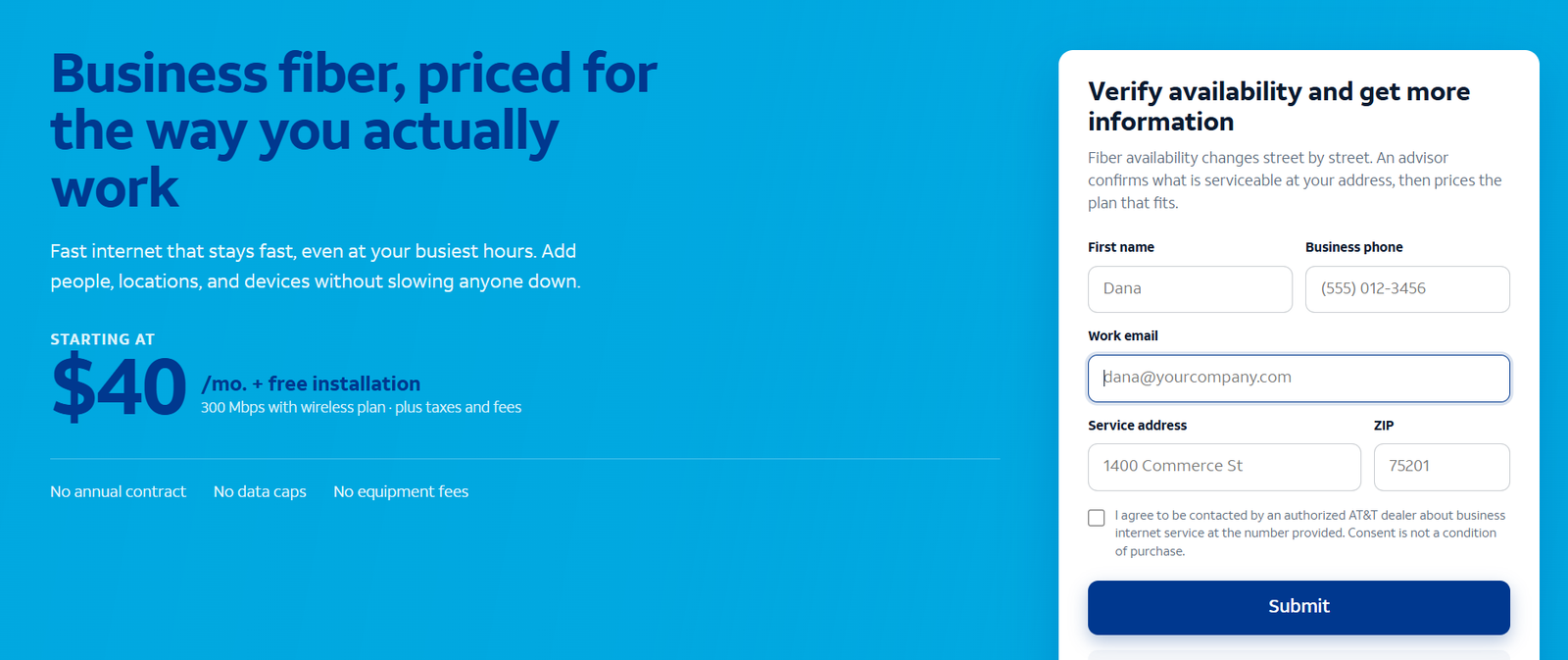
Typical response expectation: 24–48 business hours after submission through the supplied referral route. This is an expectation, not a guaranteed installation or response deadline. The screenshot above is a sample; use the linked product page to submit your inquiry.
Frequently Asked Questions
Is AT&T or Verizon better for business internet?
AT&T Fiber is our starting recommendation for a suitable permanent office, while Fios is a strong alternative. Compare actual access, total charges and contract terms. Fixed wireless needs local application checks before a winner can be selected.
Is Verizon cheaper than AT&T?
It depends on the service and tier. The cited Fios 500 reference is lower than AT&T’s standalone 500 Mbps reference, while AT&T’s 300 Mbps entry reference is lower. Bundles and extras change the result.
Should I choose fiber or 5G?
Start with suitable fiber for a permanent upload-heavy office. Evaluate fixed wireless when its local performance and installation arrangement meet the requirement.
Does the discounted internet price include a smartphone plan?
No. A mobile bundle reduces the eligible internet charge; include the separately paid phone service in the overall budget.
Can Internet Air be used on the road?
No. Use it at the approved address. Request a suitable portable broadband product for changing locations.
Will backup preserve every call?
Do not assume it. Verify the exact calling service, addressing, power and failover design, then test recovery.
Do U.S. internet prices apply abroad?
These offers concern eligible U.S. premises. International connectivity requires a separate availability assessment and location-specific proposal.
AT&T Internet vs Verizon Customer Reviews: What the Evidence Can Tell You
Positive AT&T example: Belinda C., 5/5 on G2, May 1, 2026. She reported dependable internet and phone service and no particular dissatisfaction. The listing does not identify which of the AT&T products discussed here she uses.
The same general G2 listing also contains older critical feedback about customer support. Neither a positive review nor a broad carrier complaint establishes the performance of a new circuit in your building.
For a more useful local assessment, ask nearby businesses using the same access service about installation, busy-hour uploads, outage follow-up and unexpected bill changes. Match the product and location before using a review to make a purchase decision.
Final Recommendation
Choose AT&T Fiber first for a suitable permanent office where flexibility and uploads matter. Compare Verizon Fios closely when its available service or complete quote is better for the premises. AT&T is not the lowest-priced option at every speed tier.
For primary fixed wireless, evaluate Internet Air and Verizon 5G at the approved location. Portable work requires a separately suitable plan. Obtain equivalent quotes and test essential applications and recovery before changing providers.
AT&T, Verizon and their product names are trademarks of their respective owners. VoIPCalling.com is an independent publisher.
Affiliate disclosure: VoIPCalling.com may earn a commission if you purchase through it, at no additional cost to you.