
The best Uniden Voice over Cloud alternatives depend on what your Australian business needs to replace. Start with MaxoTel for a local hosted PBX with desk-phone options, VoIPline Telecom for visual call routing, or Aussie Broadband if you want a proposal for both business internet and managed phones. Compare KrispCall for a customer-facing team that shares a business number through apps, RingCentral RingEX for calling and collaboration across offices, and Dialpad Connect if transcripts and call summaries are a priority.
Uniden Voice over Cloud brings the phone system, business numbers, desk phones, cordless devices, apps and optional NBN into one buying decision. It also sells AI call handling. A company can replace its calling app, move the whole PBX or change its connectivity as separate projects. Decide which services need to move and which should stay in place before comparing a monthly seat price.
What Are You Replacing In Uniden Voice Over Cloud?
Uniden Voice over Cloud is an Australian hosted business phone service. Its published Business phone plan starts at A$84.90 per month for three users on a 36-month term. Hardware and business internet can add to that figure. Uniden also lists a one-user plan that combines a business number with NBN on a no-lock-in basis. Check the terms on your own account. The quoted rate for a longer plan, the terms of a legacy agreement and the price of a new app-only plan may differ markedly.
Cloud PBX, Apps And Call Routing
A hosted PBX answers and routes public calls. It also handles features such as menus, ring groups, queues, transfers, voicemail and rules for opening hours. Map your current call routes from the caller’s perspective. If the caller presses one for sales, identify which users ring and where the call goes when everyone is busy. Then test how an employee returns the call and which number the customer sees. Give the same call flow to the Uniden Voice over Cloud competitors you evaluate.
Check for differences between personal users and shared endpoints. A workplace may have five employees, two cordless phones for receiving stock and one common-area desk phone. Those eight endpoints do not necessarily correspond to eight licences or five. A provider may charge by user, device or feature. Ask what works when an employee has both a desk phone and an app, and separately price any shared station that needs to make or receive calls.
Desk Phones, Cordless Phones And Site Equipment
Uniden lists its EVOC2 desk phone and a range of cordless DECT, office and conference devices. Some premises may also use a paging system, a door intercom or an analogue adapter. Write down the manufacturer, model, firmware and whether the device is leased, rented or owned. Ask the replacement provider if it can provision the exact device and support the features your team uses. A phone’s ability to place a SIP call tells you little about whether its transfer keys, line status indicators or cordless handover will work on the new service.
Where staff depend on physical phones, bring one desk set and one cordless base to the pilot. Include buttons for hold, call pickup and transfer. Check who can reset and provision the units, whether they can retain speed-dial settings and how you will regain access if a handset is tied to the old account. Treat a compatible hardware list from Uniden Voice alternatives as a starting point for this test.
Business NBN And Inbound Number Services
Your NBN service may sit on the same bill as the phone system, while inbound 1300 or 1800 calls may be handled through a separate route. Identify the service owner for each component. List all numbers the public can dial, local numbers used for callbacks and any destination numbers that sit behind an inbound service. Ask if porting a number affects any services you plan to retain. When comparing Uniden Voice competitors, request the voice, internet and number charges as separate line items even if you expect to buy them from one supplier.
AI Reception, Transcription And Call Summaries
Uniden promotes an AI receptionist that can answer and route calls, as well as app features for handling call information. An AI-generated summary helps staff after a call. An AI receptionist answers a caller and can take action before staff join. Compare the service your workflow needs and ask for its own line item. For example, if an after-hours caller needs to book a service, a transcript alone will leave the work for the next shift. Ask shortlisted Uniden Voice over Cloud alternatives to demonstrate booking, live transfer and the fallback when the system cannot resolve the request.
Compare Six Uniden Voice Over Cloud Alternatives
Each row describes a different buying use case. Australian dollar rates use A$, and KrispCall’s subscription reference uses US$. Ask for a common GST basis and confirm any currency conversion before comparing totals. Review scores refer to the profiles listed in the first column. They describe customer experiences on those profiles and help you decide what to ask during a pilot.
| Provider | Best Fit | Buying Consideration | Pricing And Evaluation |
|---|---|---|---|
| Local Hosted PBX And Desk Phones | Check the exact handset models, number inclusions and calling costs. | From A$9.95/User/MonthEveryday PAYG. Two-user minimum. Charges for usage and hardware can apply.Compare MaxoTel Phone Plans | |
| Visual Call Routing For Reception And Service Teams | Confirm device licences, number porting and call-flow permissions. | A$10.90/User/MonthPAYG Starter. Includes GST and one device licence. Calls cost extra.View VoIPline Hosted PBX Plans | |
| Managed Phones And Business Internet | Verify Nexgen’s installation and support scope and how it relates to the NBN order. | Request A Business QuoteQuote the phone system, devices, setup and any internet service separately.Explore Aussie Broadband Phone Systems | |
| Shared Customer Calling For App-First Teams | Confirm Australian number eligibility, calling charges, messaging and feature tier. | US$32/User/MonthAdvance, billed annually. Confirm +61 number charges and Australian usage.Start A 7-Day KrispCall Free Trial | |
| Calling And Collaboration Across Multiple Offices | Confirm tier, supported handsets, routing and any inbound number usage. | A$53.99/User/MonthAustralian Premium reference before GST, annual billing, one-user view. Multi-site admin is listed on this tier.View Australian RingEX Pricing | |
| App Calling With Transcripts And Call Summaries | Confirm Australian number eligibility and quote any AI receptionist separately. | Check AUD PricingSelect AUD and a billing term. Confirm seat minimums and AI charges.View Dialpad Connect Plans |






Which Uniden Voice Over Cloud Competitor Fits Your Business?
1. MaxoTel For Local Hosted PBX And Desk Phones
MaxoTel is a close Uniden Voice alternative for a small office that still relies on physical phones and wants an Australian hosted system. Its Everyday PAYG offer starts at A$9.95 per user per month with a two-user minimum. Calls are charged as used. MaxoTel also lists included-call options and offers both bring-your-own and purchased devices on relevant plans. Use the PAYG reference to compare a small, low-usage office and request a second quote with the actual handsets and calling allowances you need.
Ask MaxoTel to demonstrate the tasks your reception relies on. Start with a live transfer, have a colleague pick up a parked or held call if your workflow uses that feature, and call back from a softphone. For a business with several common phones, ask whether they require personal licences or have a separate device option. A premises replacing a cordless base should verify the exact unit and coverage as part of the quote.
- Best fit. Small and midsize offices comparing local support, desk phones and a hosted PBX.
- Check first. Confirm handset and cordless compatibility, included Australian number types, and billing for Australian mobiles and 13 or 1300 calls.
- Useful evaluation. Compare a PAYG quote and an included-calls quote using the same devices, features and traffic.
2. VoIPline Telecom For Visual Call Flows And Flexible Devices
VoIPline Telecom offers a hosted PBX with a drag-and-drop call-flow editor and a Webphone. PAYG Starter is A$10.90 per user per month including GST on its Australian pricing page. The published example combines a user and one device licence. Calls on that plan are billed separately. Ask how extra devices and special numbers are priced when you need an employee to work from a desk phone, a mobile and a remote location.
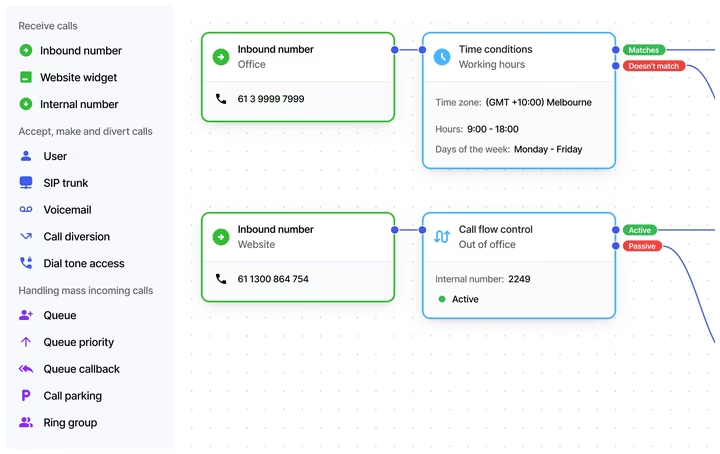
VoIPline is a relevant Uniden Voice over Cloud alternative if an administrator needs to edit business hours and queue routes without waiting for a technician. Ask them to create a holiday schedule and add a temporary branch destination. Then have a colleague check that the normal morning route returns when the schedule ends. A visual editor is most helpful if the person who will maintain it understands how to test and recover their own changes.
- Best fit. Service desks and multi-site reception teams that want to see and edit call routing.
- Check first. Price user and device licences, then verify voicemail, overflow, number eligibility and call recording requirements.
- Useful evaluation. Build a pilot route with your own business hours, a queue and a backup destination.
3. Aussie Broadband For Hosted Phones And Business Internet
Aussie Broadband’s hosted PBX page presents business phone systems offered through Nexgen, which it owns. Options range from desk phone deployments to app-based calling. It also sells business connectivity. This makes it one of the Uniden Voice competitors to evaluate if the decision includes office internet, onsite handsets and a provider-led setup. Request a tailored quote for the addresses you will use and confirm who handles installation.
A plan from a single group can still include separate contracts and support teams. Ask who accepts the initial ticket for a whole-office calling outage and who can make a temporary change to number routing. If you want to keep your existing NBN, have Aussie Broadband confirm voice-only terms and what it can diagnose on another supplier’s circuit. If you are changing both, compare the order sequence and decide which service will be tested first.
- Best fit. Businesses seeking a coordinated desk-phone, cloud PBX and connectivity proposal.
- Check first. Verify support by site, equipment ownership, install lead times and whether a second access or mobile fallback option is available.
- Useful evaluation. Request itemised quotes with your existing internet and with new business internet.
4. KrispCall For Shared Customer Conversations In An App
KrispCall offers a shared calling workspace for teams that want colleagues to see the same customer call and message history. It markets Australian virtual numbers. Ask which local or inbound number categories are available for your account and whether your specific number can port. Confirm Australian messaging and inbound or outbound usage independently. The free number allowances on the published subscription page refer to US, UK and Canadian numbers.

The Advance plan is US$32 per user per month on annual billing and is the more relevant comparison when a team needs transfers and recording. The VoIPCalling offer provides Starter features for evaluation and a choice of US, UK or Canadian test number. Use it to evaluate the app. For an Australian rollout, confirm the required number, any paid feature tier, and costs for Australian calling and messaging before purchase.
- Best fit. App-first sales and service teams that share a customer number and need access to past conversations.
- Check first. Agree on local or 1300 reachability, calling rates, SMS capability and the way any physical office devices will be handled.
- Useful evaluation. Give one teammate a missed call and see whether another can find the customer history and return the call from the right number.
5. RingCentral RingEX For Multi-Site Calling And Collaboration
RingCentral RingEX combines business calling with collaboration features on the applicable plan. It maintains an Australian pricing page and an Australian list of supported desk-phone families and models. The Australian RingEX Standard plan lists A$45.99 per user per month on annual billing before GST in the one-user view and includes multi-level IVR. The Premium tier lists multi-site administration at A$53.99 per user per month before GST on the same basis. Seat count and plan choices can change the quote. Ask RingCentral to match your number ranges, reception setup and compatible devices to the proposed plan.

RingEX is an Uniden Voice over Cloud alternative for businesses that want employees at several offices to use the same app and administration. Ask how the main number routes when sites have different office hours. Include a shared reception phone and the staff who need to answer calls for another location. If you rely on a DECT device for warehouse mobility, compare the exact supported model with the current unit and confirm how roaming and extension management will work.
- Best fit. Multi-site businesses buying calling, team messaging and meetings on a common platform.
- Check first. Confirm model support, the plan required for menus and queues, Australian number allowances and inbound 1300 or 1800 usage.
- Useful evaluation. Compare an office phone, a user app and a remote receptionist on the proposed Australian plan.
6. Dialpad Connect For Transcription And Call Summaries
Dialpad Connect combines calling, messaging and meetings. Its published plan features include real-time transcripts and call summaries. Dialpad has an Australian porting guide for geographic, toll-free and mobile number categories. Give the carrier your number inventory before requesting a deployment. Choose AUD and the relevant billing term when comparing Dialpad’s pricing page, then request a quote that covers any required Australian numbers and usage.
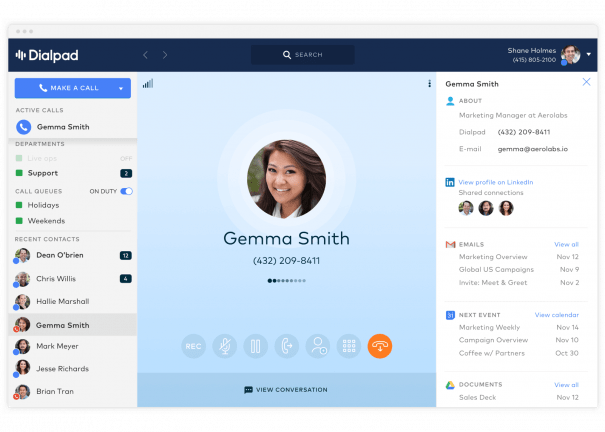
Dialpad belongs on a shortlist of Uniden Voice alternatives when staff need the details and follow-up actions from business calls. Run sample calls with industry terms, names and addresses, then check what teammates can do with the summary and who can view it. If you also need an automated receptionist to take bookings or send calls to the right department, quote Dialpad’s AI Agent capabilities separately from staff transcription and summaries.
- Best fit. Teams that rely on app-based calling and want to capture call details and follow-up actions.
- Check first. Verify device support, number eligibility, seat minimums, recording and transcription permissions, and AI feature pricing.
- Useful evaluation. Test realistic Australian calls, a human transfer and the workflow staff use to retrieve notes.
Shortlist Uniden Voice Alternatives By How Your Team Answers Calls
A Shop Or Clinic With Shared Desk Phones
Start with MaxoTel, VoIPline Telecom and Aussie Broadband if staff work mainly onsite and share a reception position. Write an example call that arrives at the public number, needs to reach a colleague and returns to reception when that person is busy. Include one after-hours call and a callback from an authorised device. This exposes whether the provider’s default hosted plan covers the actual handoffs, whether staff need separate logins and how callers will hear the business name or greeting.
Look at what happens during the busiest part of the shift. Someone answering two lines may watch line-status keys and use a dedicated transfer button. If the proposed handset places these actions behind several menus, have the people who will use it try the new process before purchase. Ask Uniden Voice over Cloud competitors to configure an example set of line keys and show how an employee takes over when the main desk is unattended.
A Warehouse Or Workshop That Uses Cordless Voice
Ask the vendor to identify which cordless base, handsets and repeaters its proposal includes. Confirm how many handsets it supports, how staff transfer a caller and what they do if a device leaves coverage. Large floor areas, shelving, metal doors and the location of the base can affect usability. Walk a test call from the loading area to the least accessible part of the premises and record where sound drops or coverage fails.
Ask which vendor will investigate cordless coverage after installation. The provider may support the PBX while a separate party installs or manages the equipment. If calls must continue during an internet or power outage, plan and test backup routing to an approved alternate destination. This is an important difference between Uniden Voice alternatives if one company scopes the whole site and another offers only cloud licences.
A Mobile Sales Or Service Team With A Shared Number
Compare KrispCall, Dialpad and RingEX if most staff take calls through apps. Ask users to test notifications when their phones are locked, callbacks that display the company number and the handoff of a conversation to a teammate. Set up an example where a customer leaves voicemail and then calls back while a different employee is on duty. Have the second employee find the original context, take ownership and record the outcome.
A shared workspace can simplify customer history. You still need to decide who sees missed calls, notes and recordings, and whether staff can use a personal device. Ask Uniden Voice competitors to quote the roles, shared numbers, mobile app features and any CRM integration on the same plan. Where text messages are part of the workflow, check the exact Australian number type and both send and receive behaviour.
A Business That Uses An AI Receptionist After Hours
Use three short tests with each provider. Ask to book an appointment, request a live transfer and describe a problem the assistant cannot resolve. See what information is collected, where it is sent and whether a person can take over without the caller repeating everything. Check how the assistant responds to an unclear address or overlapping speech, and what happens when the booking system is unavailable. For this workflow, test an inbound answering product from Uniden Voice over Cloud competitors separately from any tool that only takes staff call notes.
Define which calls will go to automation and which should go directly to a person or a recorded message. Ask who can change prompts and update the business’s hours, services or transfer numbers. Request the pricing unit for AI handling, any included allowance and the rate after it is used. During the pilot, verify where transcripts and recordings are kept, who can access them and how the proposed settings fit your company’s privacy and retention policies.
Compare The Full Cost Of A Hosted Phone System
A monthly price for one employee only covers part of a typical deployment. Build a list of personal users, shared phones, cordless devices, published numbers and any call recording or AI requirements. Ask whether licences and features are tied to one user, one device or the whole account. Give shortlisted Uniden Voice alternatives the same list and ask for a quote using the same currency, GST basis and billing period.
Price Calls, Numbers And Devices Separately
Ask for the expected monthly cost with ordinary and busy traffic. Use your existing call detail records to estimate outgoing fixed-line and mobile calls. List inbound 1300 and 1800 traffic alongside calls your team makes to 13 or 1300 numbers, because the charges may differ. Include forwarded calls, international destinations, any SMS and number rental. Confirm whether the business must pay for an additional number when a person has one shared desk phone and a personal app.
Include the handsets and their installation, any headsets, and the setup of call flows. Ask what you own at the end of a term and whether there are return, replacement or buyout fees. A provider may include a device in ongoing rental or sell it outright. Ask Uniden Voice over Cloud competitors to quote both structures if available. Existing Uniden hardware costs also belong in the comparison if you still owe rental or need to replace a model that cannot be reused.
Worked Example For Eight Staff And Six Handsets
Consider an eight-person business that wants six desk phones and keeps its existing NBN circuit. Both hypothetical options cover the numbers and call flows the team has already tested. The amounts are before GST. Replace them with your own figures, including any internet changes or unusual usage.
- Option A With Purchased Phones. Eight voice users at A$27 per month cost A$216. Six handsets at A$150 cost A$900 upfront. Setup costs A$220 and number transfers cost A$80, so upfront cost is A$1,200. The 12-month total is A$3,792.
- Option B With Rented Phones. Eight users at A$23 cost A$184 per month. Six desk phones at A$12 add A$72 and required shared numbers and features add A$18, bringing the recurring bill to A$274. Setup and transfers cost A$240 in total. The 12-month total is A$3,528.
The rental proposal costs A$264 less over 12 months. At 24 months the purchased option costs A$6,384, compared with A$6,816 for rental, assuming those charges continue and the phones need no replacement. The totals cross during month 17. Compare the break-even point with your expected move or renewal, and use the contract terms for any exit costs. If a rental includes replacements or support visits, ask what those services would cost with owned equipment.
Keep Business Internet And AI Visible In The Quote
Request one total for voice alone and one for the combined setup if you plan to move NBN. Keep internet plan, installation, routers and failover on separate lines. For each address, verify access availability and who supports the office network, upstream connection and cloud phone system. Ask what happens when calls fail while other internet traffic still works. If the voice supplier and network supplier are different, find out who will take responsibility for tracing a call issue.
Quote AI reception, staff summaries, retention and call recording by the unit the supplier actually bills. A per-user rate for employee transcription and a per-minute rate for automated answering can produce different monthly costs. Ask each of the Uniden Voice competitors to calculate a normal week and a busy week using your call volume. If a cheap introductory price ends before your planned evaluation period, include the regular rate in the first-year total.
How To Switch From Uniden Voice Over Cloud
1. Match The Account, Numbers And Contract Terms
Start with your latest bill, number inventory and any equipment agreement. Include all local numbers, direct-dial ranges, mobiles where relevant, and 13, 1300 or 1800 services. Note which are used for outbound caller ID or direct routing, which accept texts and which point to another number. Ask the business account holder to confirm the legal name, account number and service address so the port request matches existing carrier records.
Consult ACMA’s guide to keeping or porting your number and have the receiving provider confirm that it will accept the requested numbers. Agree on which services should stay active and who will handle any contract notice. If you have an older fixed-term Uniden agreement or rented hardware, ask for the actual outstanding amount and return terms. Keep the numbers active until the gaining provider confirms the transfer.
2. Test The Devices And Build A Working Call Flow
Use a temporary number or a small pilot group before moving the main number. Reproduce your business-hours greeting, holiday rules, voicemail, menu and overflow path. Test desk phones, a cordless base and mobile apps if all are used. Check transfers, hold and shared line notifications with staff at their usual locations. Ask Uniden Voice over Cloud alternatives to state which features will depend on an equipment or service upgrade before your order is accepted.
If you have a lift phone, alarm, intercom, fax or other specialised endpoint, ask its maintainer and your telecom provider for a supported setup and test procedure. Confirm Triple Zero support, location requirements and the provider’s approved verification process for the service. Include a backup calling method during power or network outages in the rollout plan and make sure employees know how to use it.
3. Schedule Number Ports And Internet Changes
List the owner, port category and planned window for each group of numbers. The provider may handle a single geographic number, a number block and a 1300 service as separate changes. Decide how to check inbound calls while each stage is in progress. If you are switching NBN as well, try to accept the new connectivity before moving the main voice number, so staff can isolate a problem to the phone system or the internet service.
Arrange a fallback route that can be activated by an authorised person. It may be a secondary destination or a temporary number customers can reach. Ask whether it must be configured before cutover and what is possible if only some numbers port. Capture the phone system administrator’s contact, the old and new provider contacts and your internal decision maker. For any issue, log when it began, the affected number and whether incoming and outgoing routes are both involved.
4. Validate The Live Service And Close Old Account Items
Once the new provider confirms completion, place calls to the public number from an outside mobile and a landline where available. Test each menu and priority queue, and call back so you can verify the business caller ID. Check your branch numbers, inbound services, transfer rules and text inbox if it was part of the order. Spot-check both ordinary and after-hours behaviour. Keep a short record of the calls that worked and the ones that needed changes.
Ask the old provider to confirm which line items were affected by porting and which are still active. Close or keep each item according to the accepted plan. Check any retained NBN and equipment, and reconcile the first bills against the agreed seat, number and hardware counts. Store support contacts and current call-routing documentation where managers can reach them during an outage or after a staff change.
Frequently Asked Questions
What Are The Best Uniden Voice Over Cloud Alternatives In Australia?
MaxoTel, VoIPline Telecom and Aussie Broadband are close comparisons for hosted office phones. KrispCall suits app-first teams sharing customer calls. RingCentral RingEX fits multi-site collaboration, and Dialpad Connect is a candidate for teams that value call transcripts and summaries.
Can I Keep My Number When Leaving Uniden Voice Over Cloud?
Usually, you can request to port an active number if the new provider accepts it. Ask the carrier to confirm your geographic numbers, 1300 or 1800 services and any direct-dial ranges. Keep the existing service active until the new routing is confirmed.
Can I Use My Uniden Desk Phones With Another Provider?
It depends on the exact model, who owns it, and how the new service provisions it. Ask for written confirmation, including support for line keys, transfers and cordless bases where relevant. Pilot one device before ordering replacements or changing the account.
Can I Keep My NBN And Switch Only The Phone System?
Yes, if your contract lets you retain NBN separately and the new voice provider supports calling over that connection. Confirm the pricing for retained internet and ask who investigates router, network and call quality issues after the switch.
Which Alternatives Have An AI Receptionist?
Dialpad markets an AI receptionist capability for Australia. Ask for its scope and price for inbound answering and ordinary call summaries. Test live calling, transfers and booking with your own scenarios and confirm the supported plans, number routing and escalation options.
How Do I Compare Quotes With Per-User And Per-Device Charges?
List every employee, handset and shared station. Ask providers to quote your devices, numbers, calls and required features on a common tax and contract basis. Include purchase or rental and setup in the first-year total.
Choose The Best Uniden Voice Replacement For Your Setup
For a desk-phone deployment, start by giving MaxoTel, VoIPline or Aussie Broadband your model list and test calls. For an app-led team, compare KrispCall, RingEX or Dialpad based on whether you need shared customer conversations, multi-site administration or call summaries. If keeping your existing number matters, obtain acceptance from shortlisted providers before ordering equipment or changing the current service.
Request an itemised quote from the strongest Uniden Voice competitors and have the staff who will take calls run the pilot. Compare what is included, which hardware works, and how the team handles calls after hours or during an outage. The best Uniden Voice alternative is the one that passes those tests and fits the full cost of switching.
Affiliate Disclosure. VoIPCalling may earn a commission if you purchase through a sponsored link. This comparison uses published provider information and linked customer review profiles.