

The best Vonex alternatives depend on whether you are replacing ONdesk employee calling, an ONsip connection to an existing PBX, Lineshare capacity or a Teams Voice arrangement. For shared customer conversations, start with KrispCall, followed by Calilio for departmental routing and supervision. RingCentral RingEX and Zoom Phone suit broader workplace-calling evaluations, Dialpad Connect emphasises transcription and follow-up, and SIPcity supplies an Australian business SIP candidate.
Those products solve different problems. A per-user application is not automatically a replacement for a trunk connected to a PBX, and a one-call SIP plan is not an equivalent quote for a busy office. The useful comparison starts with your current configuration, required functions and complete cost.
Vonex already publishes menus, hunt groups, voicemail and other cloud-phone functions. Switching should address a demonstrated gap, such as the customer workspace, integration fit, administration model or commercial terms. Do not assume that a feature advertised by a competitor is absent from your existing service.
This guide compares six candidates, with relevant master-sheet partners first and one Australian specialist for retained-PBX requirements. It covers pricing, capacity, contract commitments, devices, numbers and migration. Suggested team sizes are evaluation scenarios. Our analysis draws on published information and customer feedback, without claiming firsthand deployments or independent call-quality measurements.
Choose A Vonex Replacement By The Required Improvement
- Share Customer Calls And Follow-Up: evaluate KrispCall, confirming the paid tier for transfers and recording.
- Route And Supervise Department Calls: demonstrate Calilio Premium with Australian numbers and usage specified.
- Standardise Office Calling: compare RingEX's Australian plan and the tiers required by reception.
- Work Within An Existing Zoom Environment: qualify Zoom Phone's Australian regional service.
- Reduce Manual Call Documentation: test Dialpad Connect's transcription and summaries with representative conversations.
- Keep The Existing PBX: obtain a supported SIPcity proposal at the required simultaneous-call capacity.
7-Day Free Trial For VoIPCalling Customers: our exclusive KrispCall partner offer provides an application-evaluation starting point. Confirm number and feature requirements before scheduling a port.
Start A 7-Day KrispCall Free TrialIdentify Which Vonex Service You Are Replacing
ONdesk, ONsip, Lineshare and Teams Voice require different replacement specifications. Find the service name on your invoice and record the current numbers, employees, simultaneous calls, equipment and additional functions. If several products appear together, separate them before requesting competing quotes.
ONdesk Is A Hosted Employee Phone System
ONdesk supplies the hosted PBX. Vonex's published pricing update lists Lite at A$10.25, Traveller and Freedom at A$29.95, and Business at A$34.95 per extension monthly. Lite is PAYG, while the higher calling propositions have different inclusions. The September 2026 service summary states that its prices include GST.
The current summary allows mixed plans on one PBX, with contract terms applied to the extension and plan selected. Consequently, a business does not necessarily need to put every employee on its most expensive configuration. Understand the existing mix before comparing it with a uniform per-user application quote.
ONsip Provides SIP Trunking For Customer-Owned Equipment
The published ONsip summary describes a SIP trunk used with compatible customer equipment. Lite is A$11 monthly and Business is A$39.95, with a twelve-month minimum term in the document. It distinguishes chargeable calling from included standard Australian destinations. Confirm the actual configuration and capacity rather than applying an ONdesk licence price to this service.
Lineshare Prices Shared Call Capacity
Lineshare is described as sharing a selected number of lines across handsets. Its public page shows, for example, a four-line Standard reference of A$108 monthly and a four-line Unlimited reference of A$228 monthly. Obtain the current service summary and written quote for the intended plan, usage and term.
The number of employees is therefore not enough to compare Lineshare with a per-user platform. Include peak external conversations and how queues, transfers and forwarding consume capacity. A team with many low-usage employees can have a different cost profile from a smaller team making calls continuously.
Teams Voice Includes A Platform Dependency
If employees must remain in Microsoft Teams, identify that requirement explicitly. Replacing the carrier connection is different from moving everyone into another calling application. Ask which Microsoft licences and supported connectivity arrangement are needed, and price that architecture separately.
Vonex's October 2025 announcement describes joining the MaxoTel group. If organisational independence is a reason for moving, check ownership and carrier dependencies before treating different group brands as independent fallback services. This guide focuses on other service approaches rather than ranking MaxoTel as an independent Vonex competitor.
Compare Six Vonex Competitors For Australian Businesses
The comparison separates employee platforms from a business SIP option. US-dollar references remain in US dollars. Australian number availability, portability, taxes and destination allowances require confirmation for the account you intend to purchase.
| Provider | Best Fit | Buying Consideration | Pricing & Trial |
|---|---|---|---|
| Shared Customer Conversations | Starter up to 5 users. Advance adds transfers and recording; transcripts/summaries are add-ons. | US$12/user/monthStarter US-dollar reference, annual billing; US$15 monthly. Advance US$32 annually billed, US$40 monthly. Confirm Australian numbers, allowances and tax.7-Day Free Trial for VoIPCalling CustomersStart a 7-Day KrispCall Free Trial | |
| Department Routing And Supervision | Premium for transfers, IVR, business hours and live supervision. Country conditions affect bundled usage. | US$28/user/monthPremium US-dollar reference, billed annually. US$35 monthly. Quote Australian numbers, destination rates and tax.Demo AvailableRequest a Calilio Demo | |
| Australian Office Calling And Administration | Essentials entry tier, up to 49 users. Standard adds multi-level IVR and on-demand recording. | A$22.99/user/monthAustralian Essentials displayed annual-payment reference. A$25.99 monthly payment. Published minimum including GST A$303.47 over 12 months. Confirm payable total.Free Trial Available. New subscribers, up to 5 users and 2 phones, 50 domestic minutes/user. Hardware-return conditions apply.Start A RingEX Free Trial | |
| Calling In An Existing Zoom Workplace | Specify Australia/New Zealand calling plan, number types and devices. | Request Current Phone PricingRequest Australian regional pricing for users, numbers, usage, devices, add-ons and GST.Confirm Current Phone Evaluation TermsExplore Zoom Phone For 1–50 Users | |
| Transcription And Follow-Up Work | Pro for key CRM integrations. Connect differs from Dialpad Support and Sell. | Request Australian Connect PricingRegional prices vary. Confirm AUD quote, billing period, users, numbers, usage and GST. Default USD figures are not AUD quotes.14-Day Connect Free Trial. Confirm Regional Eligibility And Paid-Plan Scope.Start A 14-Day Dialpad Connect Trial | |
SIPcity  | Australian SIP With A Retained PBX | Australian business eligibility; 1 concurrent call at the reference price. Resolve conflicting billing/cancellation wording. | A$17.50/monthPublished monthly SIP reference including GST, 1 local number and 1 concurrent call. Confirm current plan terms and exclusions.Confirm Written Billing And Evaluation TermsCheck SIPcity Australian Plans |





All six rows have verified product scores and provider logos. SIPcity's G2 sample contains only two reviews, so it offers much less evidence than the other profiles. Use the service boundary, written terms and pilot results alongside ratings.
1. KrispCall For Shared Conversations And Call Ownership
KrispCall is our first partner option when the desired change concerns how colleagues handle customer conversations together. Evaluate the shared workspace for the full enquiry cycle: an incoming call, an unanswered attempt, a callback and the next action assigned to a colleague.
Suggested Team: two to five employees sharing a service, consultancy or agency number. Starter supports up to five users; Advance supports up to fifty. A team can need an upgraded feature tier before reaching a user limit, so establish the workflow first.
Starter lists US$12 per user monthly billed annually or US$15 monthly. Advance is US$32 annually billed or US$40 monthly and adds transfers and recording. Transcription and summaries are add-ons. Its free-number inclusion names the US, Canada and UK; an Australian number needs separate rental, documentation and porting checks.
Reason To Evaluate: ask a second employee to return a missed enquiry and explain what happened without consulting a separate spreadsheet. Check the information available, ownership of the next step and any required CRM record. A common workspace is valuable only if it improves the actual handoff.
Plan Boundary: the pricing page publishes calling allowances while other comparison and FAQ text retains PAYG wording. Request the Australian route eligibility, inbound conditions and overages in writing. Do not assume every destination or number type is covered by the platform subscription.
A business keeping its PBX should not assume this application account supplies a compatible replacement trunk. A business changing the employee workflow can evaluate it separately from the carrier layer. Our KrispCall review provides further setup and buying context.
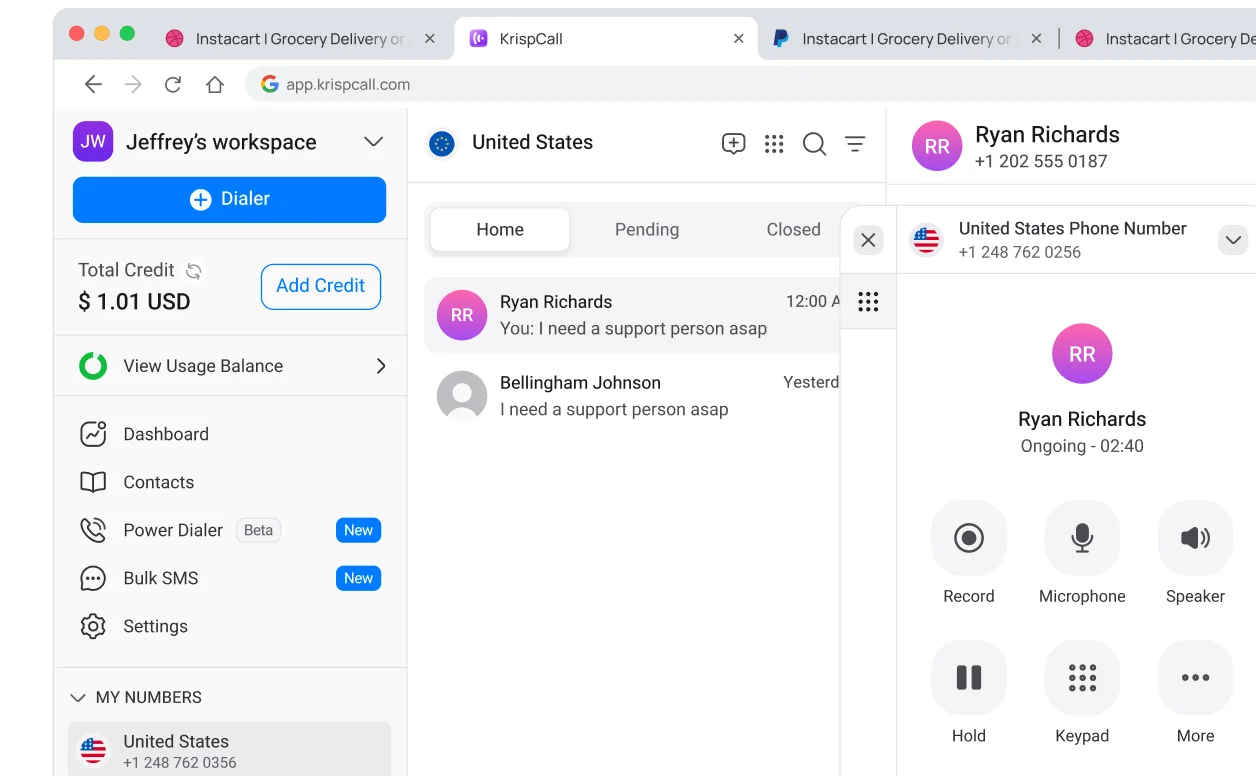
VoIPCalling customers can access an exclusive seven-day KrispCall free trial through our partner link. The partner offer is separate from a public subscription-refund policy.
2. Calilio For Department Routing And Live Assistance
Calilio is a relevant candidate when the business wants departmental routing and manager assistance within a team application. It is particularly useful to demonstrate the exception cases: the chosen department is busy, the intended employee is absent or a supervisor needs to help.
Suggested Team: five to twenty customer-facing employees across sales, support or accounts. This is an editorial scenario. A smaller organisation can still need structured routing, while a larger operation may need a more specialised contact-centre configuration.
Premium costs US$28 per user monthly with annual billing or US$35 monthly. The published comparison places transfers, IVR, business-hours routing and live listening, whispering and barging in Premium. Standard's entry price should not be used to quote the complete workflow described here.
Reason To Evaluate: demonstrate an enquiry reaching the wrong department and being transferred with enough context for the next colleague. Have the supervisor locate the interaction and use the assistance tools permitted by the proposed configuration. Confirm who takes responsibility when a call ends without resolution.
Plan Boundary: obtain Australian number rental and calling costs separately from country-conditioned bundle claims. Recording, storage, transcription and other usage allowances also matter. If a CRM is essential, test the exact data written to it and identify any third-party service required.
Do not describe Calilio as an automatic replacement for every ONsip or Lineshare configuration. The relevant comparison is the new employee workflow and its total cost. Our Calilio review expands the plan and application checklist.
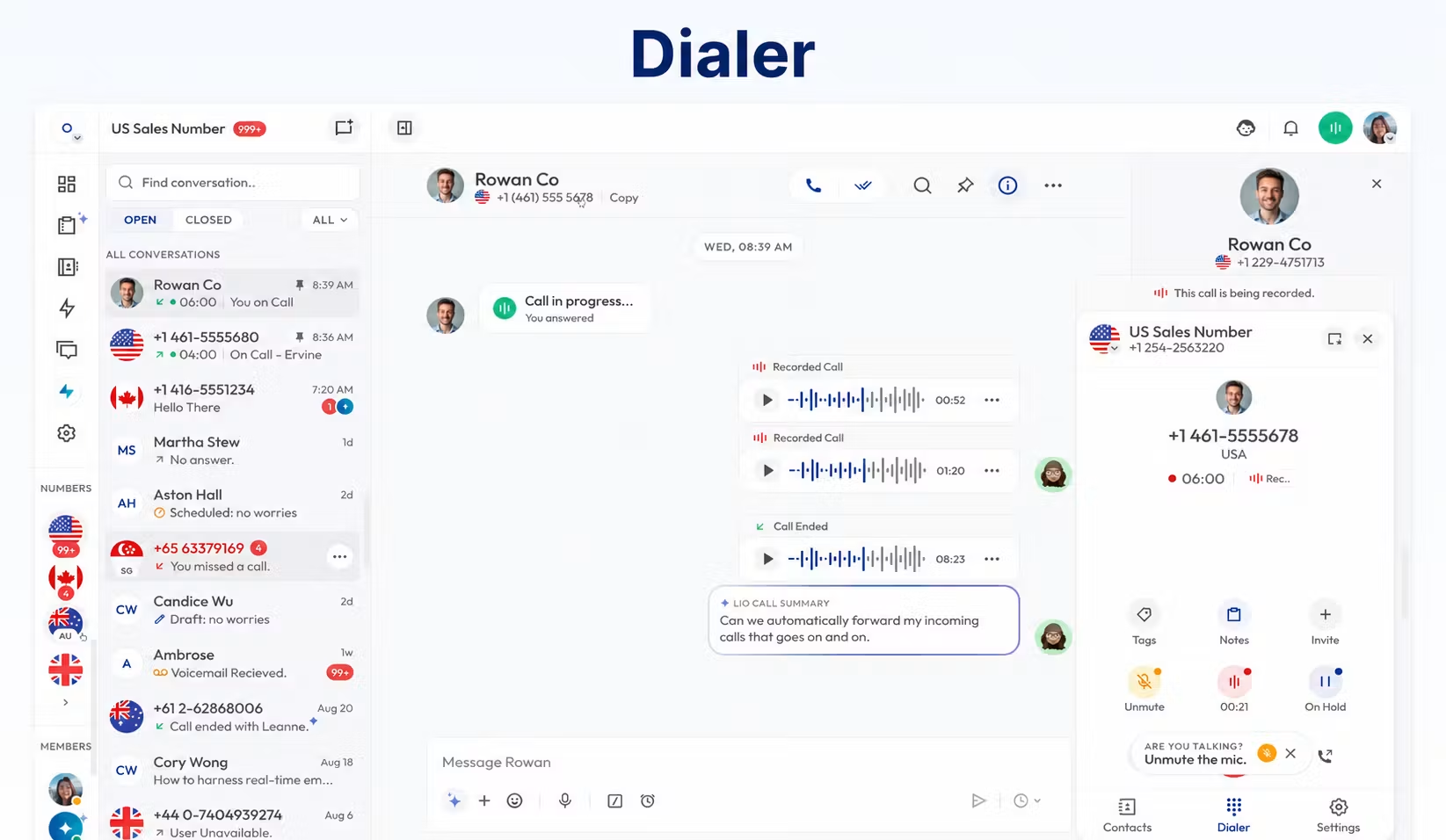
Demo Available: request a demonstration based on your call flow. A demonstration or testing credit does not establish a time-limited free trial.
3. RingCentral RingEX For Australian Office Calling
RingCentral RingEX is worth evaluating when the requirement concerns employee calling across an office rather than only a shared customer inbox. Its Australian pricing reference makes it possible to discuss a local plan instead of applying US pricing to Australian service.
Suggested Team: ten to forty employees needing reception coverage, individual calling and consistent administration. Include a receptionist and an administrator in the pilot. A phone application that works well for an occasional caller may still create difficulties for someone handling the main number all day.
Essentials displays A$22.99 per user monthly with annual payment, or A$25.99 with monthly payment. The page separately states a minimum including GST of A$303.47 over twelve months. Confirm the payable total on the order. Essentials supports up to forty-nine users and includes 250 outbound minutes per user.
Reason To Evaluate: test employee onboarding, device assignment, absence coverage and removal of a departing colleague. Map every reception and reporting requirement to the proposed tier. Multi-level IVR and on-demand recording appear in the Australian Standard plan.
Plan Boundary: entry employee calling is not a complete contact-centre quote. Verify advanced queue handling, integrations and devices separately. A number being portable does not mean existing Vonex-rented equipment becomes yours or can be reprovisioned.
The qualified Australian free trial covers new subscribers, up to five users and two desktop phones, with fifty domestic minutes per user. Trial hardware has return conditions. Confirm the actual offer before requesting equipment.
4. Zoom Phone For A Familiar Workplace Environment
Zoom Phone is a candidate for organisations already working in Zoom and considering telephone calling in that environment. Familiarity may help training, but telephone service still needs its own number, licence, destination and administrative specification.
Suggested Team: ten to fifty distributed employees, or a larger organisation standardising across offices. Use the audience-specific routes below. The number of employees affects procurement, while reception complexity and call capacity affect the configuration.
Zoom describes an Australia/New Zealand regional calling model in its pricing materials. Request a current Australian quote covering users, numbers, devices, add-ons and GST. Do not use a US/Canada review-page price as an Australian amount or assume a meetings subscription includes the required phone service.
Reason To Evaluate: have office and remote employees handle calling in their normal working routine. Test absence coverage, voicemail ownership and the device-change experience. Ask the administrator to make a representative change without relying on the sales demonstrator.
Plan Boundary: verify each Australian number and the functions tied to additional products. Zoom Phone differs from Zoom Contact Center. Moving from Vonex Teams Voice into Zoom also changes the employee application; it is not simply changing the carrier behind an unchanged Teams experience.
No Australian Phone trial duration is assumed. Obtain the current evaluation terms and confirm that the configuration demonstrated matches the paid proposal. Number-porting approval must precede any final public-number cutover.
5. Dialpad Connect For Documentation And Follow-Up
Dialpad Connect is relevant when employees spend substantial time documenting conversations. Its published proposition combines calling, messaging and meetings with transcription and summaries. Evaluate the work saved after corrections and customer-record updates, rather than assuming an AI label creates value.
Suggested Team: ten to thirty consultants or service employees who repeatedly turn conversations into notes and next steps. These sizes are illustrative. The required Australian number configuration and integration plan remain central to suitability.
The Australian pricing URL can show USD figures with a separate AUD selector, and the supplier states that regional pricing varies. This guide therefore requests an Australian Connect quote rather than relabeling the default amount. Obtain the billing period, required seats, number costs, usage and GST treatment together.
Reason To Evaluate: use a conversation containing Australian names, dates, technical terms and a customer commitment. Compare the transcript and summary with the recording. Have the employee correct mistakes, create the required follow-up and measure the total effort.
Plan Boundary: Pro is advertised for key CRM integrations and broader support. Dialpad Support and Dialpad Sell are separate products; their demonstrations and entitlements should not be attributed automatically to Connect. Confirm the precise licence behind every required capability.
Dialpad advertises a fourteen-day Connect trial. Confirm regional eligibility and the eventual paid configuration. Our Dialpad review provides further product and pricing context.
6. SIPcity For A Retained Business PBX
SIPcity is included for Australian businesses evaluating SIP trunking for an existing PBX. Its published service also describes cloud PBX feature access. Establish which setup is proposed, because retaining your own system and adopting the supplier's hosted functions involve different responsibilities.
Suggested Team: a business with a maintained PBX and an understood peak call load. Australian business eligibility requires an ABN, ARBN or ACN. The plan should not be recommended as a residential household product just because the monthly reference appears low.
The monthly reference is A$17.50 including GST, with one local number and one concurrent call. Request the cost and support scope for the required capacity. Several employees sharing a business number may need more than a single active external call.
Reason To Evaluate: compare the carrier connection while preserving menus, extensions and equipment that already meet the business requirement. Have the PBX maintainer approve the supported configuration, fault responsibilities and testing plan.
Plan Boundary: the public page describes monthly billing and a one-month term, while its cancellation section also refers to annual prepayment. Resolve the applicable terms in writing. No free-trial period is claimed here, and the two-review G2 sample provides limited evidence.
The verified official link is confined to the comparison table for readers inspecting this non-partner service. A hosted application subscription should not be used as the price benchmark for this retained-PBX configuration.
Compare Users, Lines And Numbers Separately
Users describe access, lines describe call capacity, and numbers describe how callers reach you. A quote that changes one quantity without explaining the others can look cheaper while serving a different workload. Build a service inventory before comparing totals.
Consider an illustrative office with twenty employees, six regular outbound callers and four external conversations at its busiest observed time. A Lineshare arrangement may be priced around selected shared capacity, while an application provider may require paid accounts for every employee needing access. Neither model is automatically cheaper; price the intended access and the tested workload.
Ask how capacity is counted during transfers, forwarding and queueing. A receptionist can be connected to one caller while another waits and colleagues make outbound calls. Establish whether the proposed configuration permits that pattern and what callers experience when capacity is exhausted.
For SIP trunking with a retained PBX, document the model, software version, maintainer, trunk authentication and approved caller identification. Ask both parties to confirm interoperability. A statement that two services use SIP is insufficient evidence that the configuration will work unchanged.
For hosted replacement, document the tasks moving to the new supplier or your own administrator. These include provisioning phones, changing schedules, controlling recording access and managing departures. Lower subscription charges may coincide with additional work that someone must own.
When a supplier proposes a different architecture, ask for both the reason and the migration implications. A platform change can be worthwhile, but it should be an informed operating decision rather than an accidental consequence of comparing headline prices.
Check Whether Teams Must Remain The Calling Application
If the requirement is to keep Microsoft Teams as the employee calling interface, specify that before shortlisting applications. Moving to KrispCall, Calilio, RingEX, Zoom Phone or Dialpad Connect can involve a different employee workflow. An integration mention does not establish that the supplier replaces the particular Teams carrier arrangement you currently use.
Vonex's Teams page describes its voice proposition and required compatible licences, but it also retains promotions ending in October 2022. Do not treat those promotions as current benefits. Ask for a fresh service specification and separate Microsoft licensing from carrier, configuration and support costs.
For an unchanged Teams requirement, have the Microsoft administrator and receiving supplier identify the supported connectivity design, number move and licence prerequisites. Do not assume an ordinary SIP account can be attached directly without the required architecture.
Run two separate evaluations if the business is undecided: one preserves the Teams experience and changes the supported telephony arrangement; the other assesses a different calling application. Compare training, administration, integrations and complete cost for each. This prevents application familiarity from hiding missing telephony components.
Compare The Complete Australian Calling Bill
The cheapest Vonex alternative is the eligible configuration with the lowest complete cost for your workload. Employee access, call capacity, numbers, usage, equipment and commitment all affect that result. Currency and tax treatment must remain visible throughout the comparison.
Use The Existing Plan Mix As A Baseline
Take an illustrative five-extension ONdesk group containing two Lite extensions and three Traveller extensions. Using the published monthly references, the subscription calculation is two times A$10.25 plus three times A$29.95, or A$110.35 monthly before any chargeable Lite calls and other applicable items.
That figure is a baseline calculation, not a final account quote. It shows why pricing all five existing employees as Traveller, or treating Lite as the price of an included-calling plan, can distort the comparison. Apply the real extension mix and confirm the current contract and any applicable discounts.
Keep Overseas Subscription References In Their Own Currency
Five KrispCall Advance seats have a published annual-billing monthly equivalent of US$160; five Calilio Premium seats have a corresponding US$140 reference. Those platform examples exclude separately applicable Australian numbers, usage, add-ons and tax. They are not comparable to A$110.35 simply because all three figures use a dollar sign.
Ask how annual prepayment, tax and currency conversion are handled. Compare the functions the business needs, then obtain the final quote. A higher application cost may still be justified by better follow-up, but that benefit needs a practical demonstration.
Include Costs That Do Not Appear In A Licence Headline
- Access And Capacity: employee licences, trunks, simultaneous calls, shared devices and minimum commitments.
- Numbers And Traffic: number rental, porting, outbound routes, 13/1300 calls, toll-free traffic and forwarding legs.
- Equipment: phones, headsets, adapters, shipping, configuration and remaining rental obligations.
- Functions: required feature tiers, recording, storage, transcription and integration services.
- Implementation: onboarding, installer work, training and temporary overlap between services.
- Exit: the current contract settlement and the conditions of the new agreement.
Vonex's current ONdesk summary identifies app and additional call-handling charges that can depend on the configuration. Ask for an itemised account comparison, rather than assuming every demonstrated function is included on every extension. Run the same schedule for a normal month and a busier month.
Review Contract And Hardware Obligations Before Porting
Moving a number does not by itself settle a contract or transfer ownership of rental equipment. Obtain a written exit statement for the actual services, extensions and devices you intend to leave. Do not calculate a guaranteed saving until unresolved exit costs are included.
The September 2026 ONdesk summary distinguishes short-term service from hardware-rental plans requiring thirty-six months. It states that rented handsets remain Vonex's property. Its cancellation section describes a maximum charge of seventy-five percent of remaining monthly access fees and equipment-return conditions. Your applicable agreement and written settlement determine the account-specific position.
Ask for the contract end date, remaining commitment, required notice and instructions for returning each device and power supply. Check how individual extension terms apply if only part of the account is changing. A public plan summary does not prove that every existing extension has the same remaining term.
For the new supplier, distinguish cancellable monthly billing from an annual-payment monthly equivalent. Confirm minimum seats, renewal, number rental and hardware conditions. A successful trial demonstrates some functionality, but it does not establish the eventual cancellation rights or recurring bill.
Keep a record of requests, approvals and service closure. After the port, reconcile remaining numbers, internet services, equipment and the final invoice. Treat that as a separate account-management task rather than assuming a completed number move ends every charge.
Separate Office Calling From Call-Centre Procurement
Vonex's published ONdesk and ONsip summaries exclude telemarketing, call-centre functions and similar uses. That is a meaningful buying boundary. If your actual operation falls into those categories, obtain an expressly suitable service rather than assuming a standard office plan becomes appropriate because it has a queue.
Specify inbound volumes, outbound activity, dialling methods, concurrent conversations and supervision. Include the routes being called, the caller IDs to be presented and any required recording. A vendor should confirm both technical capability and permitted use for the proposed account.
KrispCall and Calilio are relevant to sales and support workflows, but their ordinary subscription headlines still need qualification for the intended operation. RingEX and Zoom Phone employee products differ from their contact-centre propositions. Dialpad Connect should not inherit capabilities demonstrated under Dialpad Sell or Support.
Ask the manager to demonstrate queue outcomes and required reports. Distinguish a missed call, an abandoned queue interaction and a transferred conversation in the actual reporting. If staffing, quality evaluation or specialised campaign functions matter, include them explicitly in the proposal.
The objective is to buy the appropriate product and usage agreement. Do not upgrade based solely on the phrase call centre, and do not retain an unsuitable service merely because ordinary calls work during a small test.
Qualify Australian Numbers And The Porting Scope
Confirm the specific numbers before committing to a replacement. New-number availability, existing-number portability, outbound caller identification and messaging are separate requirements. A country appearing on a coverage page does not establish all of them for every number type.
Inventory geographic numbers, mobile numbers, 13, 1300 and 1800 services and associated ranges. Record their purpose and current routing. Identify any numbers tied to specialised equipment, an internet service or another account component so the consequences of a partial move can be investigated.
Provide a current bill and accurate account-holder information through the receiving provider's approved process. Ask whether numbers must move together, which documents are required and whether resubmission attracts additional charges. Resolve conflicting account information before setting a cutover date.
Do not cancel the existing public-number service while arranging the port. Obtain an indicative schedule, activation window when confirmed and an escalation route for the day of the move. Timing depends on the actual order rather than another business's experience.
Forwarding can help colleagues evaluate a new application, but it may add charges and does not prove that the number has ported. After activation, test incoming calls from several networks, outgoing caller ID and the intended menus, voicemail and overflow destinations.
Test The Busy-Day Experience And Support Process
Start with an evaluation number, representative employees and the devices you intend to use. Define the required results before the pilot. Record failed calls and unexpected behaviour with timestamps, routes and devices so the supplier can investigate.
- Reception: answer several calls, transfer a caller and check the fallback when a colleague is unavailable.
- Shared Follow-Up: miss an enquiry, assign it and have another employee return it using the available context.
- Capacity: reproduce the expected combination of inbound calls, outbound calls and queueing.
- Devices: restart a desk phone, test headset controls and use the mobile application on intended networks.
- Administration: add an employee, change a schedule and remove access for a departing colleague.
- Records: inspect recordings, summaries, permissions and the customer-record outcome.
- Billing: reconcile representative traffic with the quoted allowances and charges.
Test support while the issue is small. Check who accepts the request, what diagnostic information they need and which plan provides the relevant support channel. Distinguish help with the application from responsibility for the local network, handset or separately maintained PBX.
Discuss internet loss, power failure and emergency-calling arrangements through the provider's approved process. Agree a practical alternative contact method. Do not place an unscheduled emergency-number call as part of a routine product trial.
Separate local Wi-Fi, firewall and headset problems from platform problems during diagnosis. Equally, do not dismiss repeated unresolved issues because the product has a high aggregate review score. The pilot should validate the configuration your business is actually buying.
Make The Decision And Assign Migration Responsibilities
Choose the option that resolves a defined problem while preserving essential behaviour. KrispCall and Calilio deserve evaluation when shared customer work is central. RingEX and Zoom Phone fit broader workplace comparisons. Dialpad Connect is relevant where documentation consumes time, while SIPcity requires a separately qualified retained-PBX proposal.
Staying with Vonex can remain reasonable when the current plan mix, supported equipment and complete bill meet the requirement. Ask whether a targeted adjustment resolves the issue before commissioning a rebuild. A change of provider should have an evidenced operational or commercial benefit.
Before cutover, assign the port, phone configuration, call-flow rebuild, training and urgent support to named owners within your organisation and suppliers. Export permitted records and prepare greetings, schedules, user assignments and fallback destinations. Have the people answering calls approve the new flow.
Agree a realistic contingency. A completed number port may need another process to reverse, so do not assume an immediate automatic return to the old carrier. Identify what can be changed quickly and what depends on supplier action.
After activation, validate public numbers, caller identification, transfers, voicemail and required records. Monitor the first working period and compare a subsequent invoice with the order. Then reconcile old-service closure and equipment returns separately.
Frequently Asked Questions
What Are The Best Vonex Alternatives For Small Businesses?
KrispCall and Calilio are relevant for shared customer calling, RingEX and Zoom Phone for workplace calling, Dialpad Connect for documentation workflows, and SIPcity for Australian business SIP requirements. Compare the current Vonex product, actual numbers, devices, paid functions and complete cost before choosing.
Which Alternative Is A Direct Replacement For ONsip?
A supported SIP trunk for your existing PBX is the appropriate service category. SIPcity is the candidate assessed here, subject to interoperability, capacity and written terms. A per-user phone application should not be assumed to replace an unchanged ONsip-connected PBX.
Is A Per-User Phone Plan Cheaper Than Lineshare?
Not necessarily. Lineshare and employee subscriptions price different quantities. Compare the paid access needed by employees, peak simultaneous calls, number rental, calling allowances and required functions. A low-usage office and a continuously calling team can reach different results.
Can I Keep My Australian Vonex Number?
Potentially yes, if the receiving provider accepts the number and approves the port request. Confirm the number type, account details, documentation and associated range. Keep the existing service active during the receiving provider's process and test inbound calls after activation.
Can I Keep The Handsets Supplied By Vonex?
Do not assume rented phones become yours when the service or term ends. The current ONdesk summary states that rental handsets remain Vonex property. Obtain account-specific ownership and return instructions. For phones you own, ask the receiving supplier to confirm the exact model and configuration.
Can I Switch Before A Vonex Contract Ends?
Obtain a written exit statement before deciding. Porting eligibility does not establish that leaving is free. Check the applicable agreement, remaining extension commitments, cancellation calculation, final access charges and equipment requirements, then include the settlement in the migration cost.
Which Vonex Alternatives Have A Free Trial?
VoIPCalling customers have an exclusive seven-day KrispCall partner trial; Dialpad advertises a fourteen-day Connect trial, and RingEX publishes a qualified Australian free trial. Confirm the exact product, usage, feature and equipment conditions. Calilio's demonstration is a different evaluation format.
Should A Call Centre Use An Ordinary Office Phone Plan?
Only when the supplier expressly permits the intended use and the configuration meets the operational requirements. Vonex's published ONdesk and ONsip summaries exclude call-centre and telemarketing uses. Obtain an appropriate product and usage agreement rather than relying on a standard office-calling headline.
What Customer Feedback Suggests You Should Test
Vonex, Trustpilot, August 3, 2025, 1/5: a reviewer complained about billing continuing after a cancellation request and difficulty resolving the matter. This is an individual account, not a finding about every cancellation. It supports a practical check: obtain closure instructions, retain confirmations and reconcile the final invoice.
KrispCall, G2, September 24, 2026, 5/5: a reviewer praised live monitoring for coaching while reporting extra navigation and some delay when joining calls. The useful evaluation question is whether the supervisor can locate the relevant conversation quickly under realistic load.
These paraphrased examples concern different products and situations. They can identify questions for support, administration and supervision, but they do not establish a universal winner or measured performance at your premises. Verify the intended configuration and use your own pilot results alongside customer feedback.
Affiliate Disclosure: VoIPCalling may earn a commission when you purchase through our partner links. Recommendations consider service fit, verified plan boundaries and the business requirements discussed in this guide.