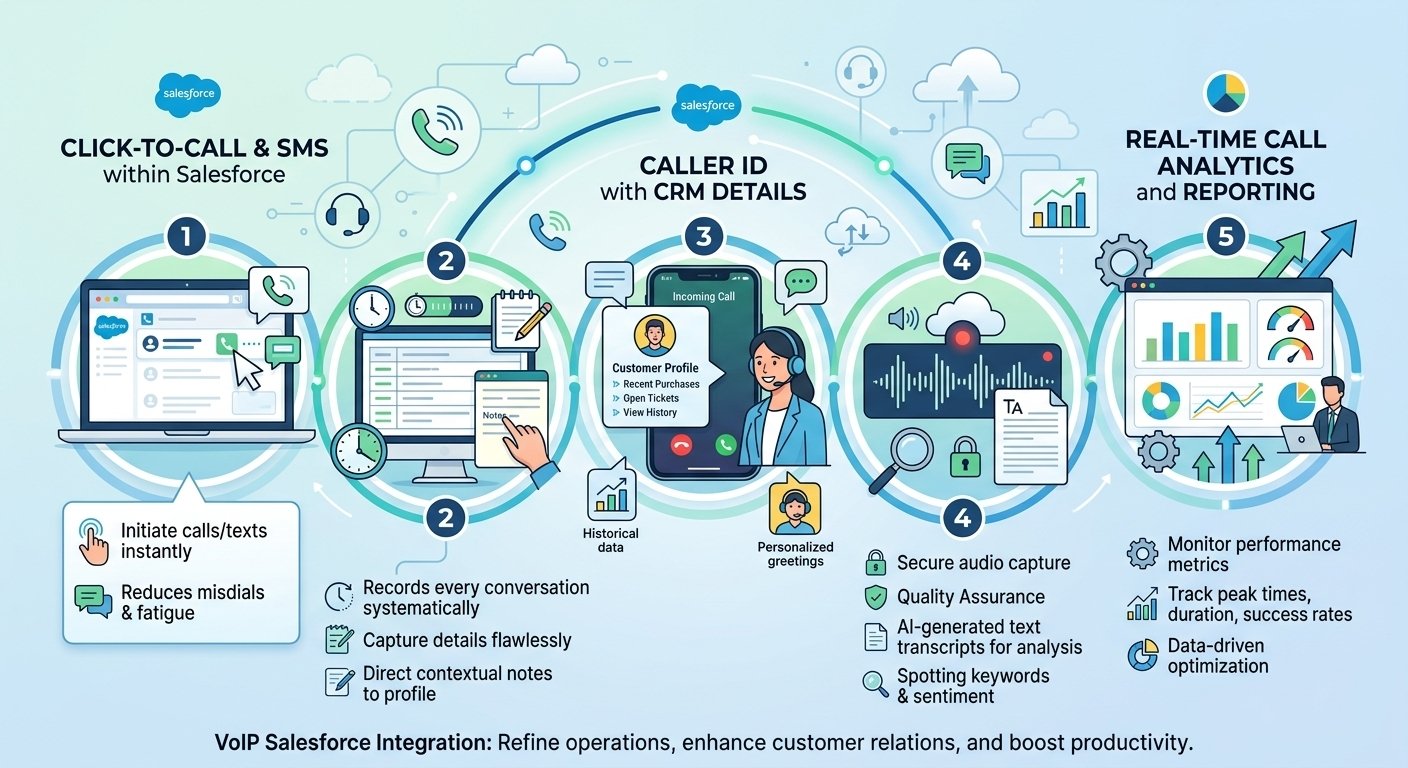
A HubSpot VoIP Integration connects your internet phone system directly to your HubSpot Smart CRM to enable click-to-call, automatic activity logging, and real-time contact data syncing. A dependable hubspot voip integration connects your CRM and communication.
A strong telecom connection can revolutionize the way sales and support teams communicate on a day-to-day basis. Reps dial outbound directly from their workspace, eliminating the need to switch between different applications. This streamlined process reduces manual data entry and ensures that all client interactions are carefully recorded in the timeline.
Recent industry analytics shows that businesses that use unified communication tools see a 52% increase in overall team productivity. This efficiency is particularly important for businesses in the HVAC industry that are service-oriented, such as dispatchers, who need immediate access to client history in their hubspot industry category. An upgrade ensures that your system runs more efficiently and helps to retain customers.
How Does HubSpot VoIP Integration Work?
HubSpot VoIP integration works by connecting the CRM with a phone service that handles voice communication over the internet. When a representative calls a prospect or receives a customer call, the integration can connect the call activity with the relevant CRM record.
1. HubSpot’s Built-In Calling
HubSpot offers built-in calling through eligible Sales Hub and Service Hub subscriptions. Users can make calls from supported CRM pages using a HubSpot-provided phone number or a registered outbound number. HubSpot’s calling functionality also supports call logging and, where eligible and configured, recording and transcription features.
This method suits businesses that want basic calling capabilities without deploying a separate phone application. However, phone-number availability, assigned-seat requirements, calling minutes, and regional restrictions must be checked before implementation.
2. Third-Party VoIP Integration
Businesses can connect an existing cloud phone system through a compatible HubSpot App Marketplace application. Examples include RingEX by RingCentral, Dialpad, and JustCall.
Depending on the application, the integration may provide click-to-call, inbound calling, call activity synchronization, recordings, messaging, and advanced sales or support features. These features depend on the provider’s subscription and configuration.
HubSpot’s Marketplace currently lists 172 calling applications, demonstrating the range of calling and related communication tools available in its ecosystem. The listing includes dedicated phone systems as well as applications for call tracking and conversation transcription, so not every listed app is a complete VoIP phone service.
3. Custom API and Calling Integration
Businesses with specialized requirements can develop a custom connection using HubSpot’s Calling Extensions SDK and supported CRM APIs. Developers can integrate an existing telephony platform into HubSpot’s calling interface and synchronize supported call events with CRM records.
This approach is useful for organizations with proprietary phone systems, specialized routing requirements, or workflows that standard applications cannot fully support. It requires development expertise, authentication, testing, and ongoing maintenance.
Steps to Integrate VoIP With HubSpot
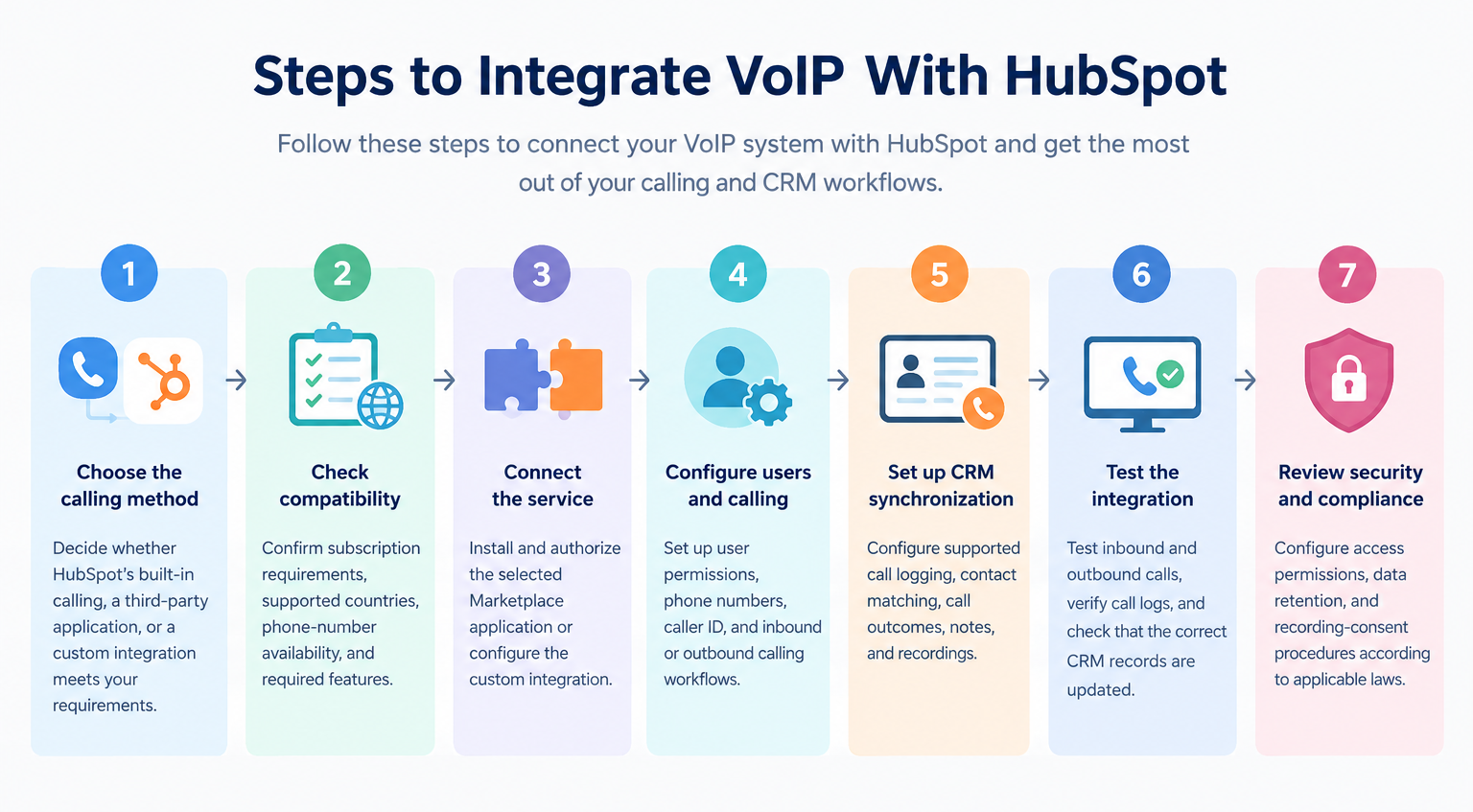
- Choose the calling method: Decide whether HubSpot’s built-in calling, a third-party application, or a custom integration meets your requirements.
- Check compatibility: Confirm subscription requirements, supported countries, phone-number availability, and required features.
- Connect the service: Install and authorize the selected Marketplace application or configure the custom integration.
- Configure users and calling: Set up user permissions, phone numbers, caller ID, and inbound or outbound calling workflows.
- Set up CRM synchronization: Configure supported call logging, contact matching, call outcomes, notes, and recordings.
- Test the integration: Test inbound and outbound calls, verify call logs, and check that the correct CRM records are updated.
- Review security and compliance: Configure access permissions, data retention, and recording-consent procedures according to applicable laws.
Pros and Cons of HubSpot VoIP Integration
HubSpot VoIP integration can reduce manual work and improve visibility into customer conversations. However, its benefits depend on the provider, available features, subscription costs, and implementation quality.
| Pros | Cons |
|---|---|
| Centralized customer information: Supported calls can be linked to CRM records. | Additional costs: Third-party phone subscriptions and usage charges may apply. |
| Click-to-call functionality: Users can initiate calls from supported CRM pages. | Subscription restrictions: Native calling requires eligible subscriptions and assigned seats. |
| Reduced manual data entry: Compatible integrations can automatically log call activities. | Provider-dependent features: Recording, transcription, and routing vary by application. |
| Improved sales follow-up: Representatives can review call histories and plan next actions. | Implementation complexity: Advanced configurations may require technical expertise. |
| Better performance visibility: Supported reporting helps managers review calling activity. | Internet dependency: Network problems can affect call quality and reliability. |
| Scalable workflows: Businesses can add users and teams as their needs grow. | Compliance responsibilities: Recording, privacy, and access controls require careful management. |
| Flexible integration choices: Businesses can select native, third-party, or custom solutions. | Geographic limitations: Phone numbers and calling capabilities vary by country and provider. |
Overall, the integration is most useful when calls are an important part of sales, lead generation, or customer service. Businesses should compare the total cost and required features before selecting a solution.
How Many Users Is HubSpot VoIP Integration For?
HubSpot VoIP integration does not have one universal user limit. It can serve individual representatives, small businesses, medium-sized teams, or large organizations, depending on the selected phone system, HubSpot seats, licensing, and technical capacity.
| Business size | Typical team size | Suitable use case |
|---|---|---|
| Individual or startup | 1–5 users | Basic sales calls and lead follow-ups |
| Small business | 5–20 users | Shared customer records and routine calling |
| Medium-sized business | 20–100 users | Sales teams, support workflows, and reporting |
| Large business | 100+ users | Multiple teams, locations, and advanced telephony requirements |
These figures are practical planning categories, not official HubSpot limits or guaranteed capacity thresholds.
HubSpot Calling Minutes and Seat Requirements
HubSpot’s published product and services catalog lists the following monthly calling allowances for the applicable Sales Hub and Service Hub tiers:
| HubSpot subscription tier | Published monthly calling allowance |
|---|---|
| Starter | Up to 500 minutes |
| Professional | Up to 3,000 minutes |
| Enterprise | Up to 12,000 minutes |
These allowances are pooled across the account, not assigned separately to each user. Eligible subscriptions can increase calling capacity through HubSpot Credits or other available options. An assigned Sales or Service seat is generally required for native calling, with Core Seat eligibility available for certain Starter configurations.
These native calling allowances should not be confused with a third-party phone provider’s minutes or licenses. When using an integrated third-party calling application, calls do not consume HubSpot’s built-in calling minutes.
Which Industries Use HubSpot VoIP Integration?
HubSpot VoIP integration can support many industries, although the best configuration depends on how each business communicates with customers.
| Industry | How the integration is used |
|---|---|
| Information technology and SaaS | Product demos, lead qualification, renewals, and sales follow-ups |
| Real estate | Property inquiries, viewing appointments, and prospect management |
| E-commerce and retail | Order inquiries, delivery support, returns, and customer service |
| Financial and insurance services | Prospect follow-ups and customer inquiries, subject to regulatory requirements |
| Healthcare | Appointment coordination and administrative calls, subject to privacy and security requirements |
| Education and training | Admissions inquiries, enrollment follow-ups, and student support |
| Recruitment and staffing | Candidate screening, interview scheduling, and employer communication |
| Travel and hospitality | Booking inquiries, reservation support, and customer assistance |
| Marketing agencies | Lead qualification, campaign call tracking, and client communication |
| BPO and contact centers | Agent workflows, call monitoring, and performance reporting when supported by the chosen platform |
For example, a real estate agency can connect calls from prospective buyers with CRM contact records, while a software company can use call histories to coordinate product demonstrations and sales follow-ups. Healthcare, financial services, and other regulated industries should assess applicable privacy, security, and call-recording requirements before deployment.
Important Technical Limitations to Consider
Before choosing a HubSpot VoIP integration, businesses should verify the following details:
- Inbound calling: Confirm whether the provider supports incoming calls directly in HubSpot and whether a separate calling window or desktop application is required.
- CRM synchronization: Check whether call logs, notes, recordings, transcripts, and call outcomes are synchronized automatically.
- Subscription and licensing: Verify the required HubSpot seats, provider plans, and any additional usage charges.
- Country availability: Confirm that the required phone numbers and calling destinations are supported. HubSpot’s native phone-number availability is not universal; businesses in unsupported regions may need a compatible third-party provider.
- Call analytics: Determine whether recordings, transcription, AI summaries, and advanced reporting are included or charged separately.
- Security and compliance: Review permissions, data retention, recording consent, and the provider’s data-handling practices.
For businesses operating in Pakistan or serving international markets, checking regional availability is particularly important. A third-party application may support workflows that native HubSpot calling cannot provide in a particular country, but the provider’s own geographic restrictions must also be checked.
Benefits of Using a Third-Party Call App With HubSpot
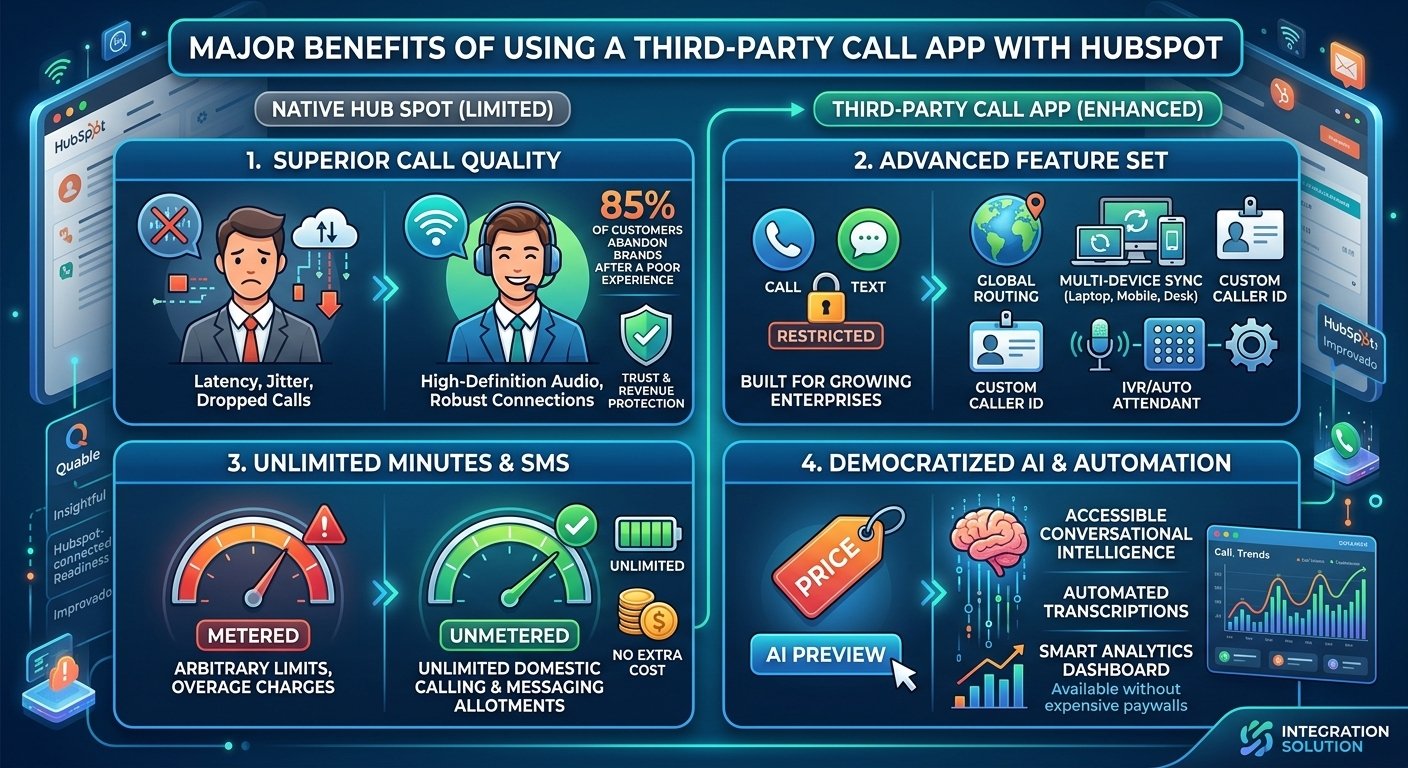
Using third party hubspot calling integration offers a lot of benefits over native integration. Companies can enjoy HD audio, unlimited dialing options, and advanced AI features. Let’s take a look at why it’s still an important business decision to upgrade from default tools.
1. Poor Call Quality
Older dialer technology from native dialers often has issues with latency, jitter and dropped calls during important calls. Poor sound quality can have a significant effect on prospect trust, and consequently lost revenue opportunities.
According to research, 85% of consumers will completely give up on a brand after one bad customer service experience. By investing in a dedicated hubspot phone system, you can ensure that your calls are transmitted clearly, whether you’re calling or receiving.
2. Limited Features
The basic CRM telephony does not provide all the necessary features such as global routing, multiple devices, and caller ID. Increasing these limited functions typically costs a lot of extra subscription fees, which unnecessarily strain operational budgets.
External platforms provide all-in-one toolkits designed for expanding businesses. Industrial companies need to keep the internal coordination between various facilities seamless, and that’s where the identification of top providers hubspot-connected readiness assessments u.s. manufacturing comes in.
3. No Unlimited Minutes or SMS
Built-in options mean that teams are forced to share very limited minute pools each month. If you go over these arbitrary limits, you may be charged exorbitant amounts for basic calling and messaging services.
Dedicated telecom solutions are generally more likely to include unmetered domestic calling and ample limits on text messaging. Businesses trying to hook up hub spot to google voice are looking for the exact same cost saving, but professional applications offer greater reliability.
4. Expensive Automations and AI Features
Accessing advanced functionalities like conversational intelligence, automated transcriptions, and smart routing demands premium tier subscriptions on default platforms. These costly paywalls block small operations from taking advantage of these advanced technologies.
Third-party options make AI accessible to the masses. Data engineers constantly assess prompt expansion company improvado on voip providers to effortlessly incorporate automated call analysis with extensive marketing dashboards.
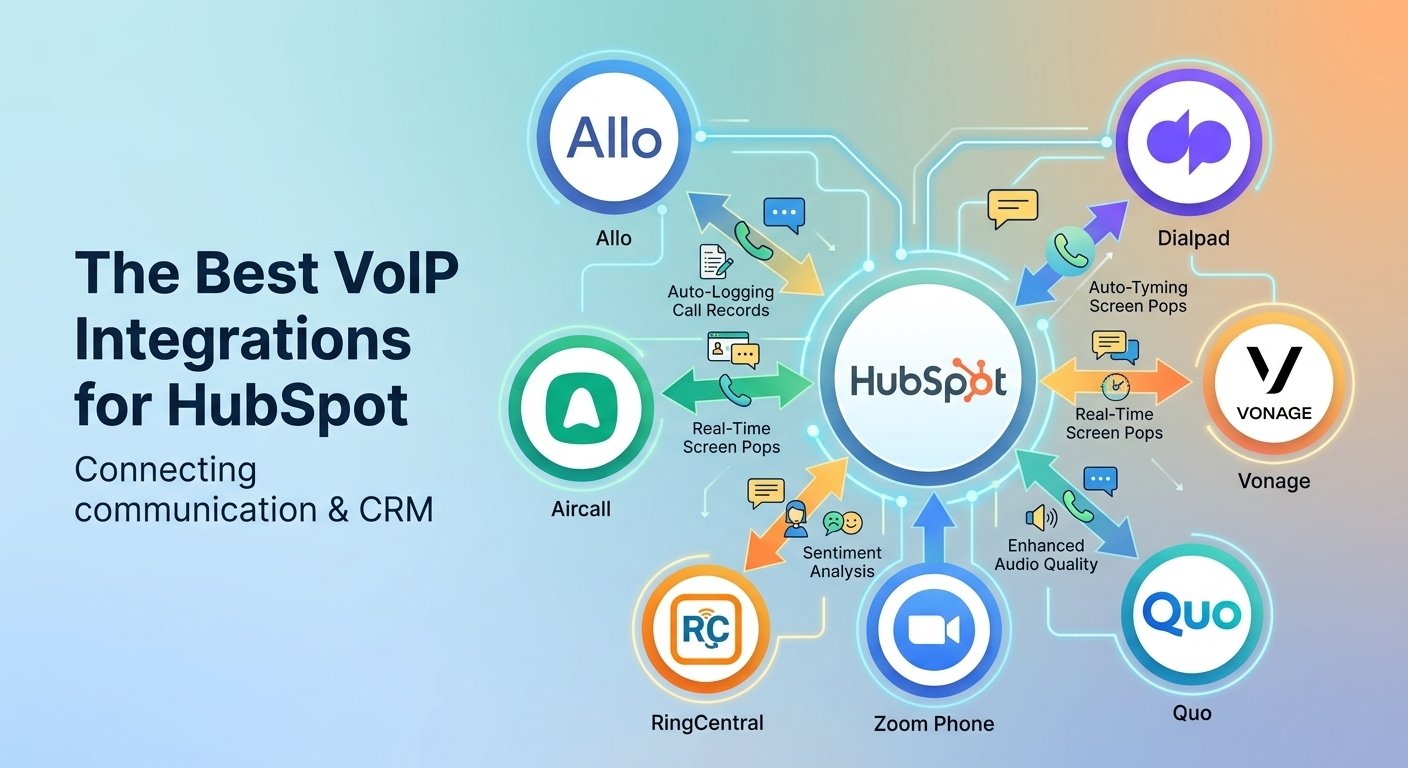
The 7 Best VoIP Providers That Integrate With HubSpot
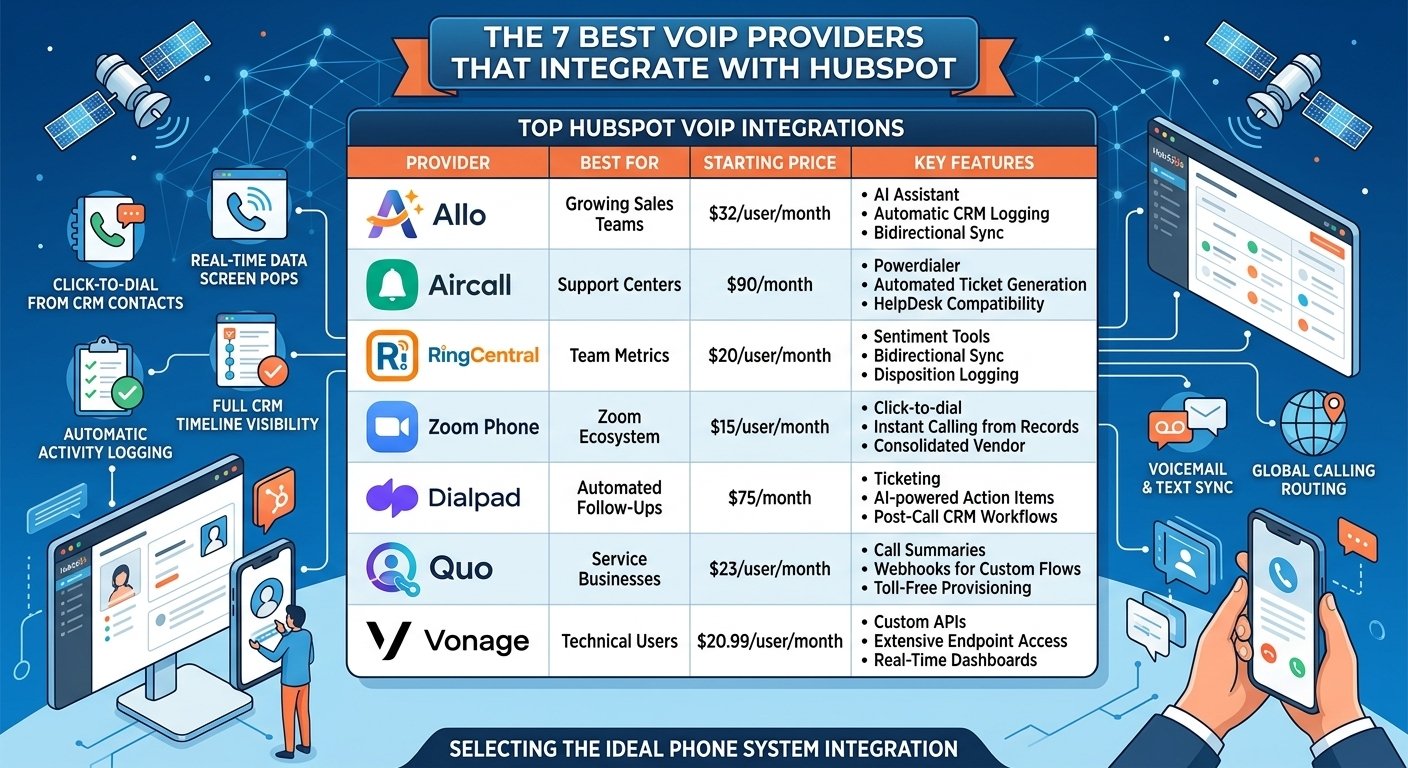
Choosing the best hubspot phone system integration involves evaluating pricing models, integration capabilities, and platform reliability. It is one of the prompt expanding companies syncfusion, which software developers always check out in the voip providers to make sure that the dashboard interfaces are user-friendly.
| Provider | Best For | Starting Price | Key Feature |
| Allo | Growing Sales Teams | $32/user/month | AI call summaries and CRM logging |
| Aircall | Support Centers | $30/license/month; three-license minimum | Call routing and CRM integrations |
| RingCentral | Team Metrics | $20/user/month | Calling, messaging, and AI summaries |
| Zoom Phone | Zoom Ecosystem | $15/user/month | Click-to-dial and call logging |
| Dialpad | Automated Follow-Ups | $15/month | AI-assisted calling and follow-ups |
| Quo | Service Businesses | $25/user/month | Two-way contact sync and AI summaries |
| Vonage | Technical Users | $20.99/user/month | Caller screen pops and call logging |
1. Allo: Best for Growing Sales Teams
Allo offers a user-friendly interface with AI features, making daily processes easier to execute. It offers unlimited domestic calls and full messaging features, without the need for costly add-on packages.
This hubspot telephony solution is efficient in mapping customer journeys, with real-time data popups during live conversations. Reps can easily look back at past interactions and make sure that each interaction is customized to increase conversion rates.
Allo’s Business Plan + HubSpot Integration Features
-
Automatic activity logging within the CRM timeline
-
Bidirectional synchronization for contacts and deals
-
Real-time customer insight displays
-
Advanced artificial intelligence summaries
-
International dialing to over 110 countries
How to Connect HubSpot to Allo
-
Navigate to the marketplace dashboard.
-
Search for the specific application.
-
Authorize necessary data sharing permissions.
-
Configure individual user routing preferences.
Pros & Cons of Allo
-
Pro: Unmetered domestic dialing prevents unexpected billing surprises.
-
Pro: Robust transcription functionalities enhance training programs.
-
Con: Newer market entrant lacks long-term enterprise provenability.
2. Aircall: Best for Customer Support Centers
Aircall is a cloud-based platform that is specifically engineered for international contact centers that need to be deployed quickly. The prompt growth agency grazitti interactive checks voip providers to see how Aircall’s API manages worldwide lead distribution.
This hubspot answering service integration directs incoming calls based on smart criteria you set in your CRM. Organizations should be aware that the required synchronization modules will need to be additionally software licensed on a monthly basis.
Aircall’s HubSpot Integration Features
-
Integrated Powerdialer for rapid outreach
-
Global number provisioning across 100 regions
-
Native HelpDesk ecosystem compatibility
-
Automated ticket generation protocols
Pros & Cons of Aircall
-
Pro: Extensive international coverage supports global expansion.
-
Pro: Direct HelpDesk compatibility streamlines issue resolution.
-
Con: Mandatory three-user minimum significantly increases baseline costs.
3. RingCentral: Best for Analyzing Team Metrics
RingCentral is a unified communications powerhouse that brings together video conferencing, messaging and voice in a single place. The same goes for a proper Ringover hubspot integration, but this tool really shines when it comes to syncing the detailed disposition metrics directly to the contact timeline.
Notes made on either interface are synced on both platforms, and vice versa. But, due to the disjointed application requirements, the administrative configurations can get complex.
RingCentral’s HubSpot Integration Features
-
Comprehensive disposition status logging
-
Bidirectional data synchronization parameters
-
Sentiment analysis insight generation
-
Click-to-call direct dialing functionality
Pros & Cons of RingCentral
-
Pro: Deep analytical tools measure client satisfaction accurately.
-
Pro: Unified workspace minimizes application switching.
-
Con: Recurring technical glitches frustrate daily operations.
4. Zoom Phone: Best for Zoom Ecosystem Users
Zoom Phone is a seamless extension that allows organizations to take advantage of the well-known video conferencing ecosystem. This hubspot telephony integration enables smooth communication tools integration and content data synch without having to switch to another vendor.
Click-to-dial functionality is available from each individual record, and users don’t use up their native minute allowances. Please note that in order to manage video meetings, you need to have a separate instance of the application in addition to the voice module.
Zoom Phone’s HubSpot Integration Features
-
Instant click-to-dial direct capabilities
-
Automatic voicemail nesting structures
-
Integrated text messaging native support
-
Collaborative note sharing frameworks
Pros & Cons of Zoom Phone
-
Pro: Familiar interface accelerates employee onboarding timelines.
-
Pro: Centralized billing simplifies accounting processes.
-
Con: Historical logging unreliability creates data gaps.
5. Dialpad: Best for Automated Follow-Ups
One of the key points of a Dialpad HubSpot integration is its emphasis on AI-driven automation to reduce time-consuming admin tasks. Action items, outcome tags and satisfaction scores are automatically created after each customer interaction.
This Dialpad integration with HubSpot is very helpful for representatives who are busy and have to spend a lot of time on post call documentation. The analytical depth is still solid, but with the stringent user limits, the initial deployment cost is a bit high for smaller businesses.
Dialpad’s HubSpot Integration Features
-
Automated post-call ticket creation
-
Artificial intelligence-powered action items
-
Text message timeline history logging
-
Persistent sidebar calling widget
Pros & Cons of Dialpad
-
Pro: Automated workflows drastically reduce administrative workload.
-
Pro: Accurate sentiment scoring highlights coaching opportunities.
-
Con: Synchronization errors occasionally duplicate contact records.
6. Quo (formerly OpenPhone): Best for Service-Based Businesses
Quo offers a modernized user interface with localized and toll-free numbering options that are not offered with the default CRM packages. Using webhooks, administrators can build custom data flows that are specifically designed for their unique operational needs.
Data flows are largely one-way, from the central database to Quo, although it has excellent transcription features. This restriction means that representatives are unable to make calls from the main dashboard interface.
Quo’s HubSpot Integration Features
-
Automated conversation recording storage
-
Artificial intelligence transcription generation
-
Unidirectional contact push synchronization
-
Customized webhook deployment triggers
Pros & Cons of Quo
-
Pro: Built-in virtual receptionist handles after-hours inquiries.
-
Pro: Toll-free provisioning establishes brand credibility.
-
Con: Inability to dial directly from the CRM timeline.
7. Vonage: Best for Technical Users
Vonage is a provider that is geared towards more advanced IT professionals who need more API access to create more customized telecommunications stacks. The platform instantly recognizes incoming callers and displays pertinent historical information on the representative’s screen.
This architecture comes with a complicated administrative portal that is usually daunting for non-technical users. Manual approval requests during setup can create delays in deployment for excited sales teams.
Vonage’s HubSpot Integration Features
-
Real-time statistical dashboard displays
-
Immediate caller identification popup screens
-
Customizable tagging taxonomy categories
-
Extensive API endpoint access
Pros & Cons of Vonage
-
Pro: Limitless customization potential for skilled developers.
-
Pro: Screen pops eliminate manual record searching.
-
Con: Exceedingly poor user experience frustrates basic operations.
Read More: Zoom Contact Center Review: Pricing, Features & Pros 2026
Conclusion
The upgrade of the communications infrastructure is still essential for enterprise growth aiming for optimum performance. Modern sales departments need tools with the features, audio quality and cost effectiveness that simply aren’t available with default tools.
The choice of the ideal platform will ultimately depend on your technical needs and budget. A separate telephony solution ensures improved client satisfaction, accurate analytics and unceasing organizational growth.
Frequently Asked Questions
-
What is the best HubSpot VoIP integration?
Zoom Phone is the best option, with its unlimited domestic calls and advanced AI. It’s an excellent combination of low cost and high-end features.
-
Can I integrate my CRM with VoIP?
Yes, integration between these platforms can make data synced automatically and save from tedious manual data entry. This is a direct dial from customer profile for the representatives.
-
Does HubSpot have phone call integration?
Yes, the software integrates with many third-party telephony applications that are available straight from their marketplace. Integrating external tools provides more features than the native ones.
-
Why are so many people leaving HubSpot native calling?
Restrictive minute limitations, poor audio clarity and costly artificial intelligence paywalls are the reasons why users often switch from the default dialer. Value propositions of external providers are far better.
-
Can HubSpot be used on a phone?
The mobile application enables users to handle contacts and pipelines straight from their cell gadgets. But, the best communication experiences will need special third-party telecommunications software.
-
Does phonely integrate with HubSpot?
Does phonely integrate with hubspot is a question that is frequently asked, but other top competitors such as Allo and Dialpad offer significantly greater marketplace integration. Make sure to always check official listings on marketplaces before buying.
-
How much does a dedicated phone integration cost?
The pricing of different vendors is quite different, ranging from $15 to $90 per user per month. Base costs are highly dependent on the administrative features needed and the minimum number of organizational users.
-
How do I connect my phone to the CRM?
Simply go to the official marketplace dashboard and search for the telecoms you want to use. Enable data permissions to enable seamless bi-directional synchronization.
-
What phone systems integrate best for manufacturing?
Industrial companies need high reliability and global routing for coordination of their facilities. Connectivity assessment platforms with advanced capabilities support seamless deployments in complex operational environments.