This JustCall vs RingCentral comparison covers pricing, features, integrations, AI, apps and practical buying considerations in 2026. For readers comparing RingCentral vs JustCall, the key questions are total team costs, CRM workflows and calling and texting allowances. It compares JustCall’s communications and SalesPro options with RingCentral RingEX, while keeping RingCX contact-centre requirements separate from an employee phone subscription.
JustCall is the stronger starting point to evaluate for CRM-centred sales outreach, calling campaigns and customer messaging. RingCentral is the stronger starting point for a business-wide phone system that connects employee calling, meetings, messaging and administration. The best choice depends on whether your main problem is customer-facing productivity or communications across the whole organisation.
Customer Ratings at a Glance

TrustRadius: JustCall 4.3/10 from 22 reviews and ratings · RingCentral RingEX 8.8/10 from 543 reviews and ratings.
JustCall’s displayed sample is much smaller. Use the feedback to identify questions for your pilot alongside the product and pricing comparison.
JustCall vs RingCentral: Quick Overview
| Buying question | ||
|---|---|---|
| Annual starting reference | Team: $29/user/month; minimum two licences | Core: from $20/user/month |
| Primary fit | Sales outreach and customer conversations connected to a CRM | Calling and collaboration across the business |
| Outbound campaigns | Power dialling on Pro; broader campaign access requires the appropriate plan | Do not assume an employee RingEX plan includes a specialist campaign dialler |
| AI evaluation | Transcription, review and coaching tools vary by package | Employee assistance plus specialist AI products |
| Number allocation | Two qualifying numbers per account: one JustCall and one Sales Dialer | Core reference includes one number per user |
| Trial | Explore JustCall’s 14-day trial | Explore RingCentral’s 14-day trial |
JustCall vs RingCentral Pricing: Plans and Total Team Costs

JustCall pricing in US dollars
| Plan | Annual billing reference | Monthly billing reference |
|---|---|---|
| Team | $29/user/month | $39/user/month |
| Pro | $49/user/month | $69/user/month |
| Pro Plus | $89/user/month | $109/user/month |
| Business and SalesPro | Request a quote | Request a quote |
Team, Pro and Pro Plus require at least two licences. The current pricing page lists a higher minimum for Business, so confirm the requirement in that quote. Calling, messaging and feature entitlements depend on the selected plan and region.
A single active user still needs two Team licences: $58/month equivalent at the annual reference, or $78 with monthly billing, before extras. For a ten-person team, Team’s annual base-seat illustration is $290/month equivalent; Pro is $490. Neither amount includes every possible number, add-on or usage charge.

RingCentral RingEX pricing
RingCentral’s published Core reference starts at $20 per user/month when paid annually. Ten seats therefore represent a $200 monthly-equivalent base, or $2,400 over twelve months before extras. Obtain the current price for a higher package or customer engagement bundle when your requirements exceed Core.
Compare the package that does the work
JustCall Team versus RingCentral Core is an entry-price comparison, not proof that the packages provide equivalent sales automation. If your decision depends on a power dialler, CRM workflow or coaching tool, first identify the paid plan that preserves it.
Separate licence cost, additional numbers, usage, AI products, implementation and equipment. Then compare the same term and payment schedule. A lower starting price can lose its advantage if the required workflow needs additional software or licences.
JustCall vs RingCentral Cost for Five or Ten Users
These calculations use the annual US-dollar licence references above. They exclude taxes, additional numbers, usage and add-ons. Compare the required features as well as the base price: Team, Pro and RingEX Core are not identical packages.
| Product and plan | Five users | Ten users |
|---|---|---|
| JustCall Team | $145 | $290 |
| JustCall Pro | $245 | $490 |
| JustCall Pro Plus | $445 | $890 |
| RingCentral RingEX Core | $100 | $200 |
For a five-person sales team, price the dialler, CRM connector and coaching configuration actually demonstrated. For a ten-person office, separate employees who only need calling and collaboration from agents who need advanced customer-contact tools. Include minimum users, renewal terms and any separate supervisor licences in your JustCall vs RingCentral monthly cost comparison.
JustCall vs RingCentral Calling Features: Sales Outreach vs a Business-Wide Phone System
JustCall offers inbound handling as well as outbound calling. Its wider feature set includes IVR, queues, routing, call dispositions and sales diallers. RingCentral supplies phone-system tools such as IVR menus, forwarding, shared lines, visual voicemail and switching calls between devices.
Where JustCall deserves attention
If representatives repeatedly work through a lead list, the useful workflow includes importing contacts, dialling, recording the outcome and arranging the next action. JustCall’s Sales Dialer is designed around that work rather than only providing a keypad.
Paid-plan distinction: JustCall’s help centre describes Pro as supporting unlimited power/auto dialler campaigns. Predictive and dynamic campaign balances can carry over from the trial, but unlimited creation across those types requires SalesPro. A trial demonstration does not establish permanent entitlement on Team or Pro.
Where RingCentral deserves attention
If reception, finance, managers and customer-facing staff all need calling, RingCentral’s broader employee communications proposition is relevant. Test transfers between departments, answering rules and the ability to continue a conversation from another device.
For either provider, reproduce a main-number flow with business hours, a department menu, overflow and voicemail. JustCall should not be dismissed as outbound-only, and RingCentral should not be judged as a specialist campaign dialler simply because it supports outbound calls.
JustCall vs RingCentral Integrations: Test What Reaches the Customer Record
JustCall supports CRM and business-tool connections including HubSpot, Salesforce, Pipedrive, Zoho and Zendesk. Its APIs and webhooks provide other integration routes. RingCentral also offers an app gallery and APIs for connected calling, messaging and business workflows.
Our assessment: put JustCall high on the shortlist when representatives spend their day in the CRM and need call outcomes and follow-ups linked to customers. Put RingCentral high on the shortlist when those workflows sit within a broader employee communications deployment.
Ask each provider to show a call from the contact record, an incoming customer match, a missed call and a completed call with notes. Verify that each activity reaches the correct record and remains visible to the next team member.
Check the specific connector and tier. A standard CRM integration and an embedded Salesforce CTI experience are not necessarily the same entitlement. Also ask how failed synchronisations are identified and retried.
Our guide to integrating VoIP with a CRM explains useful implementation questions.
JustCall vs RingCentral AI Features, Transcription and Sales Coaching
JustCall AI
JustCall offers transcription and summaries, with more advanced review, scoring and assistance tools across its portfolio. Its Pro Plus pricing card lists real-time agent assist, call scoring, script compliance and sentiment analysis. AI Voice Agent is a separate pricing choice rather than a fully included receptionist to assume at the entry licence price.
RingCentral AI
RingCentral offers employee assistance such as notes, summaries and action items, alongside specialist products for reception and conversation intelligence. Ask which capabilities belong to your RingEX package and which need an additional product.
Choose by the result: a sales manager may need consistent coaching against a rubric, while a consultant may simply need an accurate record of the next action. Compare those outputs directly rather than choosing the provider with the longest AI list.
Use the same sample call with a customer name, date, price and follow-up commitment. Check transcript accuracy, speaker attribution and whether the saved summary preserves the commitment. For scoring, ask the system to explain a low result so a manager can judge whether it is useful.
If you want an AI agent to answer customers, test an unexpected question and a request for a human. Review how it captures information, transfers context and handles a failed handover.
Mobile and Desktop Apps: Match the Interface to the Role
JustCall supports desktop and mobile customer communications, while its help centre recommends managing Sales Dialer settings through the web portal. RingCentral provides Windows, macOS, Android and iOS app access. The best app experience depends on what each employee needs to do.
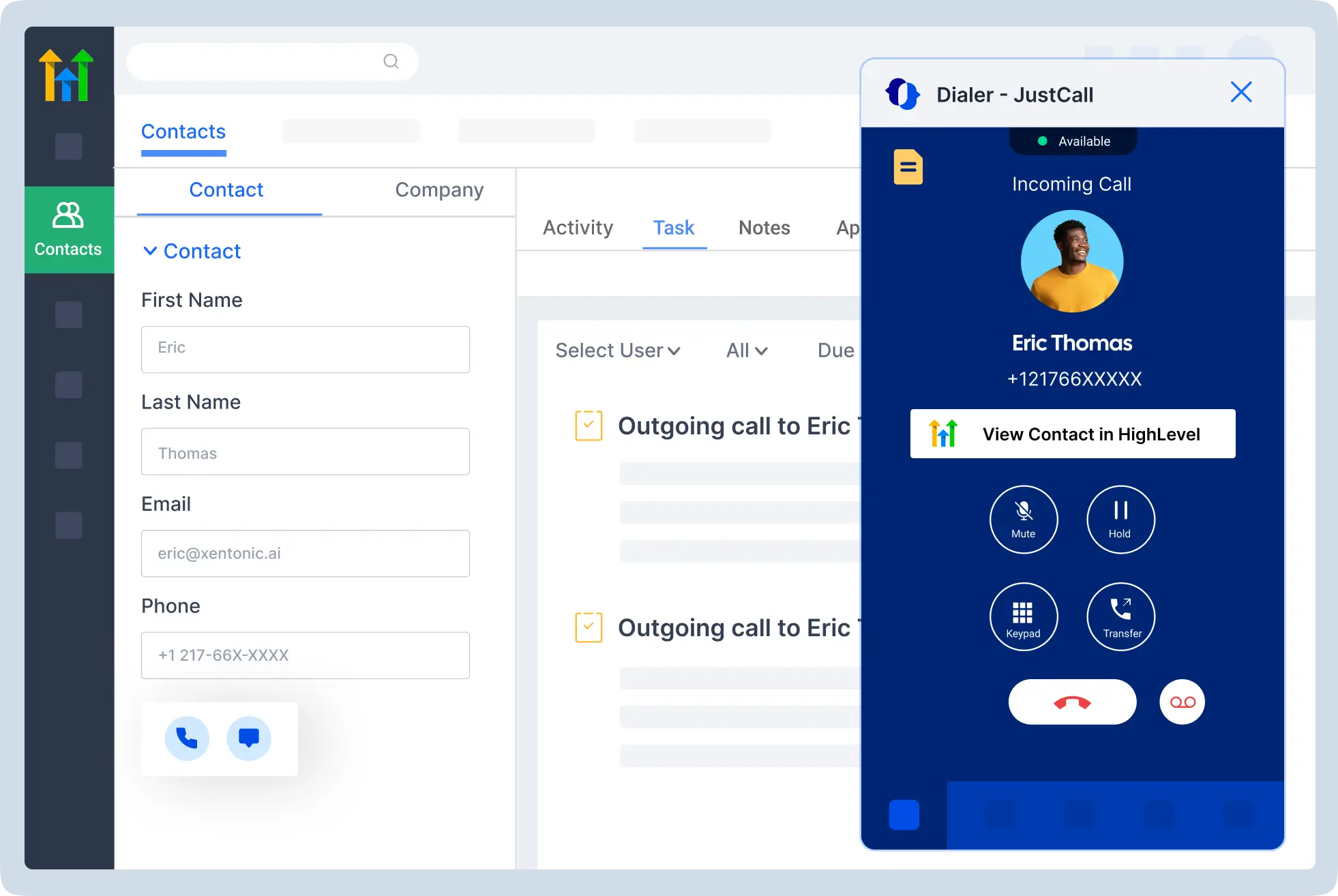

Have a representative log an outcome, send a follow-up and find the previous conversation. Have another employee answer an incoming call, transfer it and return a voicemail from mobile. Those tasks reveal different strengths.
Test notifications with the phone locked, the business caller ID and behaviour on ordinary office Wi-Fi or mobile data. Where a user runs a CRM extension and a calling app together, check which interface owns the call and whether the activity appears twice.
JustCall vs RingCentral Business Texting and Team Collaboration
A customer SMS conversation and an internal team message serve different jobs. In your JustCall vs RingCentral SMS comparison, check included segments, eligible countries and numbers, registration fees, carrier charges and overage rates. A long text can consume multiple segments, so compare the actual messages your team sends.
For sales follow-up, demonstrate a missed-call response, a scheduled message and a CRM-triggered workflow. Confirm which JustCall SMS automation features belong to the quoted tier. For RingCentral, identify whether your workflow uses RingEX business texting, an add-on or a separate customer-engagement product. Neither unlimited calling nor internal messaging implies unlimited customer SMS.
For inbound support, test who owns a reply, how another agent finds the conversation and what happens when the original agent is offline. For wider team collaboration, compare employee messaging and video meetings separately from customer-facing SMS. Include consent and opt-out handling in the workflow demonstration.
JustCall vs RingCentral International Calling: Region, Number Availability and Usage Are Separate
Both providers support international calling. JustCall’s bundles and billing regions determine the included usage; they are not a promise of unlimited calls to every country. RingCentral’s US offering includes external calls within the US and Canada, with international rates or bundles for other destinations.
JustCall’s current fair-use wording ties included outbound calling to the selected region and excludes international calls, premium-rate and shared-service numbers, toll-free traffic and external forwards. Confirm the policy for your exact plan, including Sales Dialer usage.
For JustCall, do not combine US, UK and Australian bundle assumptions into one subscription. Its regional billing guidance states that one subscription uses one selected region and its applicable benefits.
Build a destination list with landline/mobile splits and expected minutes. Ask both providers to price the same traffic, including forwarding and toll-free use. Then verify any overseas local number independently: being able to call a country does not prove you can obtain a number there or deploy local service.
For a sales team calling several countries, the cost of completed conversations can matter more than the advertised licence price. For an office that rarely calls abroad, geographic inclusions may carry less weight.
JustCall vs RingCentral Reliability: Pilot the Workflow You Depend On
RingCentral advertises 99.999% reliability for its communications service. JustCall’s Business and SalesPro materials reference an enterprise-grade SLA. Ask for the applicable document and scope rather than treating an unverified uptime comparison as established fact.
A customer-facing pilot should test more than whether a single call connects. Check a queued inbound call, a transfer, a recording and the CRM update. Each is part of the workflow that the business may depend on.
Run calls during the busiest normal period and on the devices employees will use. Distinguish a provider interruption from local Wi-Fi, headset or browser problems before drawing conclusions.
Agree a fallback for internet loss, a process for recording failures and a clear route for urgent incidents. For sensitive customer data, review access and retention in the exact product configuration, including any connected CRM or AI service.
JustCall vs RingCentral Customer Support: Ask About Setup and Escalation
JustCall’s higher-package cards describe personalised onboarding and dedicated phone support options. RingCentral offers support during the trial and resources for deployment and administration. Confirm the entitlement for the package you will actually purchase rather than assuming the support level shown in a sales demonstration applies to every tier.
Ask who owns a failed CRM integration, an incomplete recording or a number-porting problem. A calling provider and a CRM vendor may each see only part of the incident, so the escalation route should be clear.
Submit a realistic configuration question during the trial. Assess whether the answer identifies the cause and next action. For a larger rollout, request a migration contact, training responsibilities and a handover to your internal administrator.
Small Businesses: JustCall for Customer-Facing Teams, RingCentral for the Whole Office
Choose JustCall for evaluation when a small sales or support team needs repeatable customer-contact workflows. A recruiting agency, for example, may value CRM-linked calls, candidate follow-ups and recorded outcomes more than a wider meeting platform.
Choose RingCentral for evaluation when the business wants calling and collaboration across multiple roles. A small professional services firm may prioritise reception transfers, employee messaging, meetings and consistent administration.
JustCall’s seat minimum matters to a solo user or a very small team. Its two qualifying included numbers are account-level allocations—one for JustCall and one for Sales Dialer—not two numbers for every employee. RingCentral’s Core number reference is per user.
If the business only needs a main number and occasional calls, specialised coaching or campaign software may not justify the cost. Conversely, a lower-cost employee phone plan may leave a busy outbound team doing manual work that a dialler could reduce.
JustCall vs RingCentral Larger Businesses: Avoid Buying the Wrong Licence for Every Employee
RingCentral is a strong candidate for communications across departments and sites. Its higher packages provide administrative and analytics options. JustCall deserves evaluation for larger customer-facing teams when campaign management, CRM activity and coaching drive the specification.
JustCall’s licensing guide states that plan changes apply account-wide, and active administrators also count as paid seats. Ask how that affects a mixed team before budgeting a different tier for each employee on one account.
For a full contact centre, compare the relevant JustCall offering with RingCentral RingCX. An employee RingEX package is not automatically equivalent to agent supervision, sophisticated routing or outbound campaign management.
Test permissions, routing ownership and the report managers use. A practical deployment separates the needs of campaign representatives, customer-service agents and employees who simply need business calling, then confirms how transfers and customer history work between them.
Switching Between JustCall and RingCentral
When switching from JustCall to RingCentral—or switching from RingCentral to JustCall—ask the receiving provider to confirm portability for every business number. Local, international and toll-free numbers can have different requirements. Keep the old service active until the port finishes and inbound and outbound calls pass your checks.
Pilot the mobile and desktop apps with remote workers on their normal networks. Test call forwarding, transfers, headset selection, CRM logging and missed-call notifications. Before rollout, agree recording exports, access permissions, cancellation notice and fallback routing.
JustCall as a RingCentral alternative makes most sense when its customer workflows match the job you need done. A business seeking broader employee communications should test RingEX accordingly; advanced contact-center requirements need a separate RingCX evaluation.
JustCall vs RingCentral: Pros and Cons
| Assessment | JustCall | RingCentral |
|---|---|---|
| Strengths | Customer-contact workflows, CRM connections and sales-dialler options | Business-wide calling and collaboration with integration and administration options |
| Price considerations | Higher entry reference, seat minimum and region-specific usage | Lower Core entry reference, but required upgrades and specialist tools add cost |
| Feature limitations | Trial campaign capabilities do not all remain unlimited on lower paid plans | Do not treat RingEX as a substitute for specialist sales/contact-centre tools |
| Pilot priorities | Campaign entitlement, call outcomes, recordings and CRM synchronisation | Routing, reporting, app workflows and package entitlements |
The disadvantages are decision factors rather than a claim that either provider is unsuitable in every case. Match the product to the job and price the required configuration.
JustCall vs RingCentral: Frequently Asked Questions
Is JustCall or RingCentral better for a small business?
Evaluate JustCall for CRM-centred sales and customer messaging, and RingCentral RingEX for business-wide calling and collaboration. The better choice depends on daily workflows, required integrations and the complete team price.
How do JustCall and RingCentral compare on pricing?
The annual US-dollar references are $29 per user/month for JustCall Team, $49 for Pro and $89 for Pro Plus, compared with RingEX Core starting at $20. Compare equivalent billing terms and required functions, not only entry prices.
Which costs less for five or ten users?
At those annual references, JustCall Team costs $145 for five users or $290 for ten per month equivalent. RingEX Core costs $100 or $200. JustCall Pro costs $245 or $490. These calculations exclude taxes, usage and add-ons and do not imply identical features.
What minimum user requirements and add-on fees should I compare?
JustCall Team, Pro and Pro Plus require at least two licences. Confirm custom-plan and RingCentral quote requirements. Budget for additional numbers, international and toll-free traffic, SMS fees, AI, specialist diallers, onboarding and renewal pricing.
Which is better for outbound sales and inbound support?
Test JustCall for lead-list calling, dispositions and CRM follow-up. Test both platforms for IVR, queues, overflow and transfers. Compare advanced customer-contact functions against the appropriate product; RingEX alone should not be treated as a full RingCX contact-center licence.
How do their dialers and sales coaching tools compare?
Separate power, predictive and dynamic dialling from ordinary outbound calling. Confirm JustCall Pro versus SalesPro entitlements and the RingCentral product required for campaign work. Check call monitoring, recording retention, supervisor permissions and coaching tools in the written quote.
Which offers better CRM integration for my team’s workflow?
Use your actual HubSpot, Salesforce, Pipedrive or other CRM to test contact matching, click-to-call, notes and follow-up. Confirm plan access and the difference between a standard connector and embedded calling. The better integration is the one that completes your workflow reliably.
How do business texting allowances and automation features compare?
Check SMS segments, regional allowances, registration, overages and number eligibility. Demonstrate scheduled or automated follow-ups and shared handling. Internal team messaging is separate from customer SMS, and calling allowances do not establish texting limits.
What AI features are included, and which cost extra?
Compare transcription, summaries, scoring, agent assistance and AI reception individually. JustCall and RingCentral package these capabilities differently. Ask for the included features, usage limits and separate product charges for the exact plan being purchased.
How do international calling rates and phone number availability differ?
Request rates for your destinations and landline/mobile traffic, including forwarding and toll-free usage. Then check whether you can buy or port a local number in each country. Calling coverage, number availability and included allowances are separate questions.
Can I transfer existing business numbers between providers?
Portability depends on the country and number type. Ask the receiving provider to validate the numbers and required documentation. Do not cancel the old service until the transfer is complete and calls have been tested.
Do JustCall and RingCentral offer a free trial or demo?
Both advertise evaluation options. Confirm current duration, eligible features, included usage, card requirements and cancellation terms. Request a demonstration of any dialler, AI or CRM feature that is unavailable in the trial account.
Final Recommendation: Choose by Role and Paid-Plan Entitlement
Choose JustCall when the required dialling, messaging, CRM and coaching workflow provides enough value to justify the complete price. Use the trial to test a real campaign, then identify the plan that preserves the features. Our JustCall review covers the broader offering.
Choose RingCentral when employee communications, call handling and connected business workflows are the main requirement. Test the department flow and administration, then confirm any additional specialist tools. Read our RingCentral review for more detail.
Ask for written confirmation of number allocation, usage exclusions, dialler entitlement, AI tools and support. Those differences are more useful than declaring a universal winner. If neither fits, compare other business VoIP providers.
JustCall vs RingCentral Customer Reviews: Strengths and Friction to Test
JustCall — TrustRadius
An incentivized 9/10 review dated June 11, 2024 valued call recordings, dispositions and data exports for a lead-generation team, while wanting a longer export range.
An incentivized 3/10 review dated November 21, 2024 praised HubSpot workflows and call-volume visibility but reported connectivity, recording and support problems. These older experiences are reasons to test the current configuration, rather than proof that the same issues affect every present-day customer.
RingCentral RingEX — TrustRadius
An incentivized 7/10 review dated October 1, 2026 liked call queues, administration and helpful support. It also described difficulty finding abandoned queue calls and confusion with reporting tools.
An incentivized 10/10 review dated September 24, 2026 described deployment across 180 dental-support sites and good voice quality with correct network setup. It criticised first-line support and built-in analytics and mentioned using advanced support.
These examples are paraphrases of individual customer experiences. They suggest practical pilot tasks around recordings, integration behaviour, reporting and escalation.
Affiliate disclosure: VoIPCalling.com may earn a commission if you purchase through an affiliate link in this article, at no additional cost to you. Recommendations reflect the product differences and business requirements discussed above.