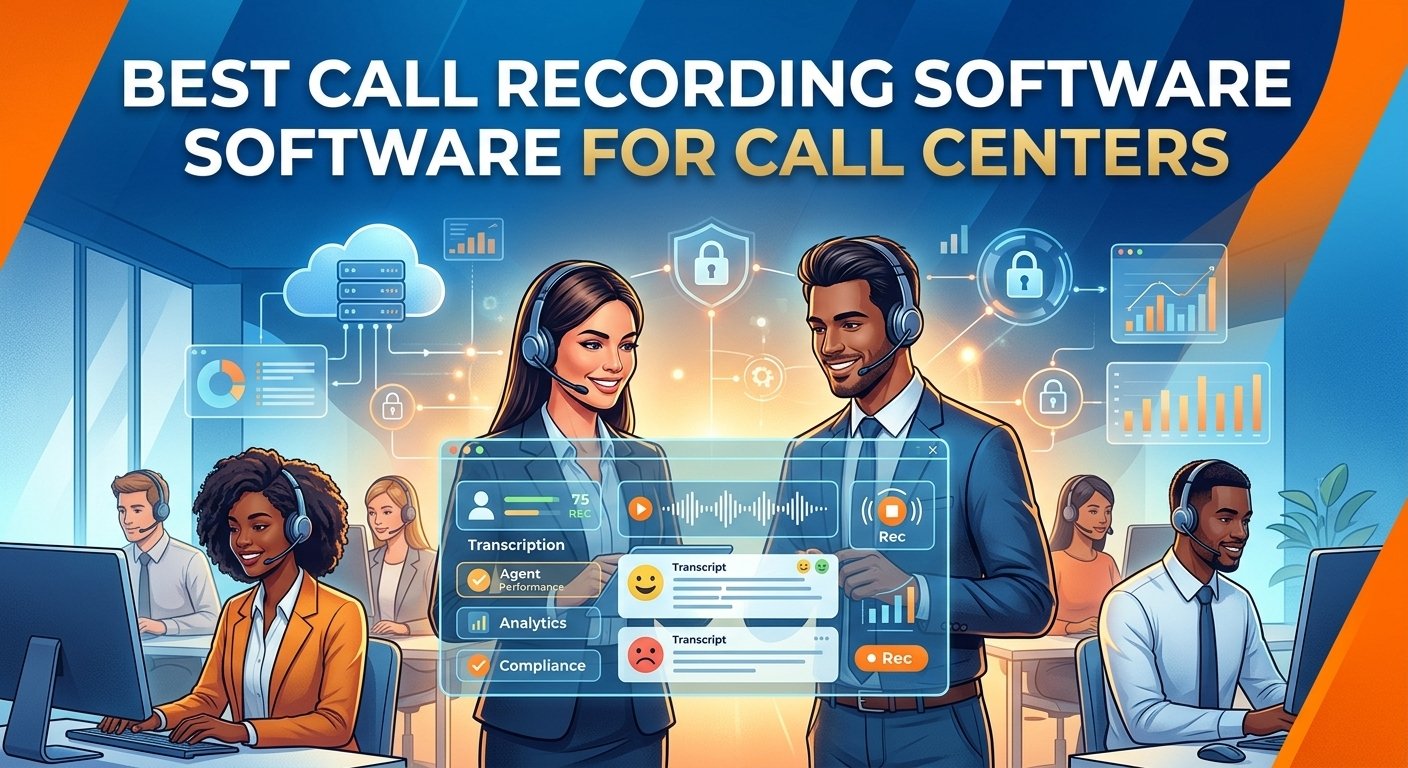
The right call recording software for call center operations can revolutionize customer interactions, compliance, and agent performance. This vital tool records audio and screen data, enabling managers to analyze conversations, pinpoint training needs, and settle disputes quickly. The best platforms will have powerful AI transcription, easy integration with systems, and secure cloud storage. Advanced call recording solutions help businesses meet industry standards and enhance the quality of their services. For small support teams or large enterprise networks, choosing the right system is essential for maintaining competitive edge and providing outstanding customer support.
What Is Call Center Recording Software?
Call center recording software is a specialized digital tool that is used to record, store, and analyze customer interactions across different communication channels. These powerful platforms capture audio conversations and screen activity in a secure manner, creating an indelible record of each client interaction. The modern voice recording system for call center is based on cutting-edge artificial intelligence technology, which can transcribe voice data, analyze emotional sentiment, and automatically identify conversations that need to be reviewed by management.
These dynamic call recording platforms are essential for organizations to keep a detailed record of all their daily communications for future strategic analysis. Assessing the most suitable call recording software for call center use guarantees that teams can easily access past recordings to handle intricate conflicts. Furthermore, these insights enable administrators to pinpoint common operational challenges, enhance standard operating procedures, and continually improve the consumer experience.
Benefits of Using Call Center Recording Software
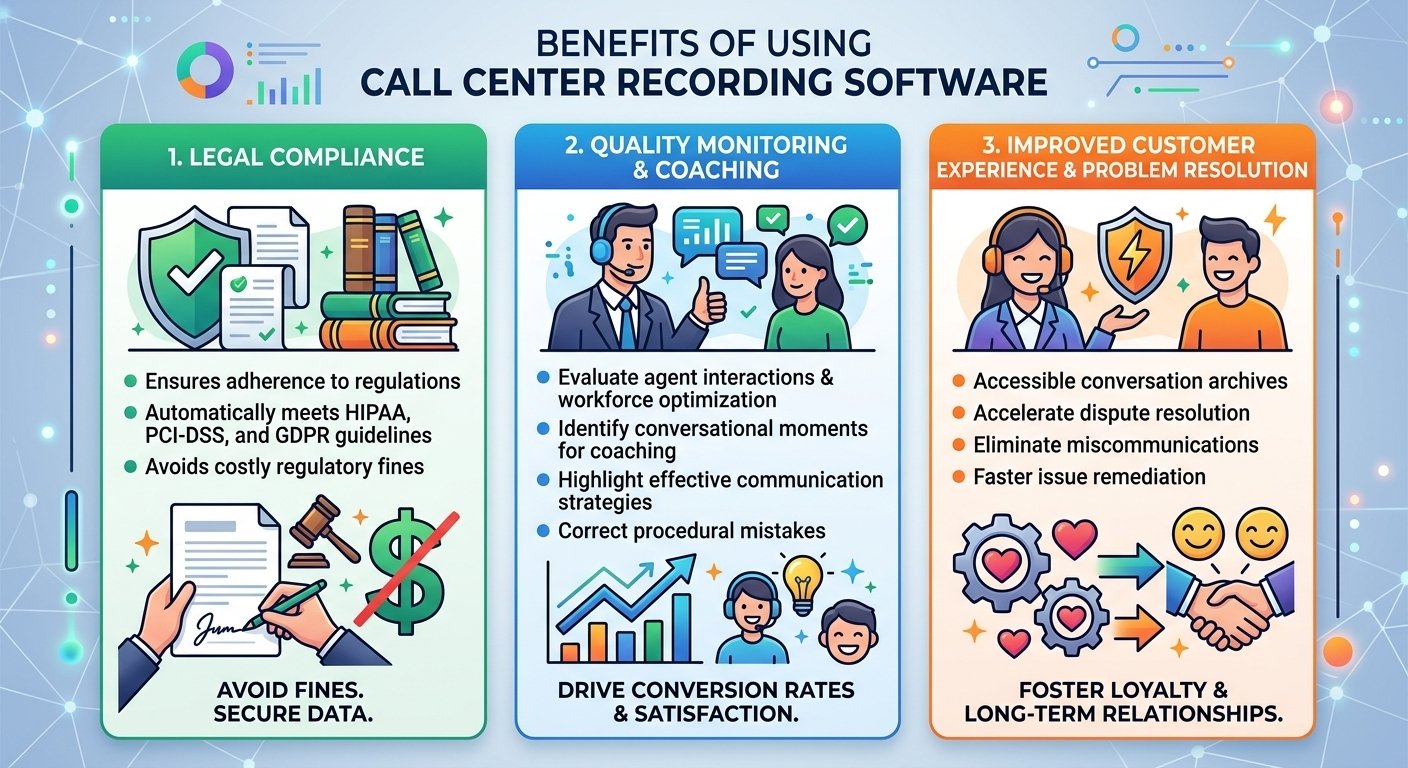
1. Legal compliance
In highly regulated areas, it is essential to have a strong financial voice call logging solution that can safeguard sensitive consumer data. A detailed 2025 compliance study by Forbes found that companies without adequate audio documentation can expect to be fined an average of $4 million per year for compliance violations. By using the best call recording software for call center compliance, businesses can ensure that they automatically comply with strict regulations such as HIPAA, PCI-DSS, and GDPR.
2. Quality monitoring and coaching
Assessing agent interactions is still an important part of effective workforce optimization and ongoing professional development. With optimize call recording techniques, managers can pinpoint key moments in the conversation to show good communication practices or identify areas for improvement. This focused strategy translates performance ideas into real-world learning experiences, leading to improved conversion rates and better client satisfaction scores.
3. Improved customer experience and problem resolution
Having easy access to conversation archives significantly speeds up dispute resolution and removes the need for tedious misunderstandings. In the event of a conflict, the ability to retrieve the precise business phone recording systems data gives clear and indisputable evidence, helping supervisors to defuse escalating conflicts in a timely manner. This means that clients can benefit from quicker remediation of issues, leading to stronger brand loyalty and positive long-term commercial relationships.
What Features to Look for in Call Center Recording Tools
-
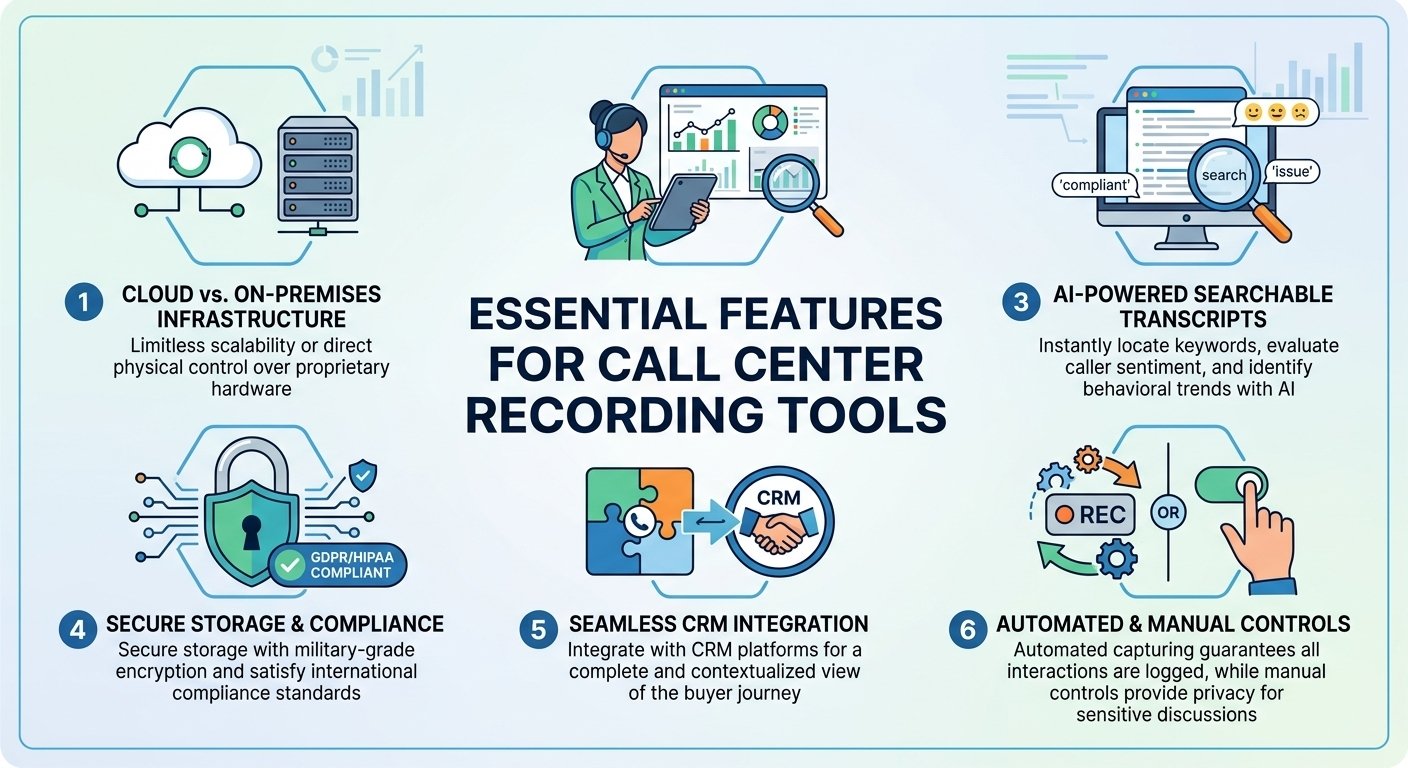
Cloud or on-premises infrastructure means the difference between limitless scalability and direct physical control of your proprietary hardware.
-
Real-time and post-call analytics enable supervisors to step in during live escalations, and also provide actionable insights for long-term strategic planning.
-
AI-driven searchable transcripts enable administrators to quickly find key words, analyze caller sentiment and gain insights into overall behavioral trends.
-
Highly sensitive consumer data is protected by secure storage with military-grade encryption and meets strict international compliance standards, while also being protected against malicious cyber threats.
-
Seamless integration with customer relationship management (CRM) platforms allows agents to have a complete and highly contextualized view of the entire buyer journey.
-
Automated capturing mechanisms ensure that no interaction is missed, while manual controls offer the privacy required for certain sensitive conversations.
10 Best Call Center Recording Software Platforms
| Tool | Best for | Key features | Starting price for call recording | Call recording type |
| Nextiva | All-in-one business communication | VoIP, CRM, analytics, call recording | $25/user/month | Automatic/on-demand |
| NiCE CXone | Enterprise contact centers | Workforce optimization, analytics, automation | $94/month | Automatic (full-time, percentage-based, event-driven) |
| Five9 | Cloud contact centers | Omnichannel support, predictive dialer, AI | $119/month | Automatic/on-demand |
| Aircall | Sales and support teams | Power dialer, CRM integration, call coaching | $30/user/month (3-user minimum) | Automatic |
| Talkdesk | Customer-centric companies | AI-powered features, customer journey mapping | $105/user/month | Automatic/on-demand |
| Rev.ai | Developers and enterprises | Speech-to-text APIs, real-time transcription | Pay-as-you-go | Automatic |
| Vonage | Businesses of all sizes | Unified communications, APIs, contact center | $27.99/line/month | On-demand call recording (15 hours per month) |
| JustCall | Remote teams | SMS automation, appointment scheduler, call tracking | $89/user/month (2-user minimum) | AI-powered and automatic |
| RingCentral | Small- to medium-sized businesses | Team messaging, video conferencing, phone system | $25/user/month | Automatic/on-demand |
| Zoom Contact Center | Businesses using Zoom | Video-first omnichannel, AI companion | $69/user/month | Ad-hoc and automatic recording |
1) Nextiva
Key recording features
-
During each client interaction, both voice and screen capturing are enabled, capturing agent audio and desktop activity at the same time.
-
AI transcription services produce full text transcriptions with distinct emojis that visually represent the sentiment of the speaker for each line in the transcription.
-
Administrators can use configurable automation rules to ensure that all logging is enabled or to let individual agents turn logging on or off as necessary.
Recording strengths
-
Searchable transcripts, with high accuracy, enable management to quickly find key phrases and gain a broader understanding of the emotional tone of the entire organization.
-
Flexible retention policies allow organizations to easily customize long-term storage parameters to ensure they are in strict compliance with complex industry retention policies.
-
Granular role-based access protocols give system administrators absolute control over who can view, download or permanently delete archives.
Pros
-
An integrated communications platform eliminates much of the internal tech stack and saves on administration.
-
The system is incredibly reliable, with industry-leading uptime metrics that ensure no critical data is lost during busy times.
-
Advanced AI features such as sophisticated tone analysis are built in, not as an expensive third-party application add-on.
Cons
-
This complete package can sometimes be more expensive than simple, one-use tracking solutions.
-
The large administrative dashboard is initially confusing to newer managers who are not used to advanced enterprise telecommunications configurations.
-
Some of the more advanced analytical reporting options are only available with the highest-priced enterprise subscription level.
Pricing
| Plan | Starting price | Key recording features included |
| Core | $15/user/month | On-demand voice and video recording (Add-on) |
| Engage | $25/user/month | Automatic voice and video recording |
| Power Suite CX | $75/user/month | Advanced recording, AI transcription & tone analysis |
2) NiCE CXone
Key recording features
-
NiCE Combined multimedia capturing captures clear voice audio and screen activity on the desktop in a single interaction file that can be easily reviewed.
-
The proprietary Enlighten artificial intelligence suite automatically analyzes conversations recorded to ensure adherence to corporate performance and procedural standards.
-
Proactive compliance flagging automatically detects and flags potential regulatory violations, enabling supervisors to take immediate action on key vulnerabilities.
Recording strengths
-
Unparalleled accuracy of deeply searchable transcriptions allows enterprise-scale contact center call recording software analytics and robust quality management.
-
The enterprise-class retention architectures enable unlimited secure long-term archiving that is demanded by heavily regulated financial institutions around the world.
-
Automated redaction tools permanently redact personally identifiable information, guaranteeing that stored files are completely compliant with data privacy laws.
Pros
-
The platform offers extraordinarily deep analytical insights that can turn raw conversational data into actionable strategic corporate initiatives.
-
Designed for large enterprises that demand the highest level of compliance features and have extensive workforce optimization needs.
-
Seamless integration with the broader gartner magic quadrant call recording ecosystem ensures unmatched operational scalability and technological longevity.
Cons
-
The cost of such an advanced infrastructure is much greater than the cost of the mid-market alternatives.
-
The administrative interface is complex, and it takes a significant amount of dedicated training time for frontline representatives and supervisory staff to master it.
-
The highly complex artificial intelligence scoring parameters require specialized technical skills to customize and ensure accurate performance evaluations.
Pricing
| Plan | Starting price | Key recording features included |
| CXone Mpower Voice Agent | $94/month | Voice recording and storage |
| CXone Mpower Omnichannel Agent | $110/month | Voice and digital capture, storage, search, and playback |
| CXone Mpower Essential Suite | $135/month | Screen recording for the agent desktop |
| CXone Mpower Core Suite | $169/month | Advanced AI QM capabilities |
| CXone Mpower Complete Suite | $209/month | AI-driven omnichannel analytics and Voice of the Customer capture |
| CXone Mpower Ultimate Suite | $249/month | Full orchestration of human and AI agents |
3) Five9
Key recording features
-
Long captured conversations are automatically summarized by generative artificial intelligence engines into easily digestible summaries, removing the need for tedious manual documentation.
-
Live assistance protocols are based on real-time analysis of the dialogue that is taking place, and provide on-screen coaching prompts in real-time to the representative’s dashboard.
-
Advanced topic analysis precisely identifies evolving consumer attitudes and recurring topics throughout the entire communication database in history.
Recording strengths
-
The extensive transcription library allows for very specific keyword queries, phrase matching and advanced emotional sentiment score filtering.
-
Administrators can customize retention frameworks to program exact deletion timelines, which are in sync with strict legal compliance obligations.
-
Hierarchical access permissions allow for fine-grained control over user access to playback, export, and secure editing of sensitive audio files.
Pros
-
This system brings in extremely powerful automation capabilities that significantly cut down on repetitive post-call administrative tasks.
-
The platform has very strong outbound campaign management features, which are perfect for more aggressive sales environments.
-
Supervisors have access to extremely powerful visual dashboards that constantly monitor changing performance trends based on historical data logged.
Cons
-
Some users find the old admin interface is not as intuitive as newer, very streamlined competitor interfaces.
-
For smaller organizations with very limited budgets, these advanced operational capabilities can be cost prohibitive.
-
To fully utilise the real-time assistance tools, the initial configuration and system recalibration must be carried out with great care.
Pricing
| Plan | Starting price | Key recording features included |
| Core | $159/seat/month | Standard call and screen recording for all interactions. |
| Plus | Contact sales | All core recording features, plus AI transcription and summarization. |
| Pro | Contact sales | All core recording features, plus workforce management tools. |
| Enterprise | Contact sales | All previous features + advanced analytics and real-time dashboards that use recording data + interaction Analytics for deep recording analysis, automated quality management, and sentiment analysis. |
4) Aircall
Key recording features
-
Frictionless single-click logging mechanisms automatically append captured audio links directly to corresponding customer profiles within your centralized database.
-
Live listening functionalities grant supervisors the ability to silently monitor active conversations and privately whisper constructive advice to representatives.
-
Collaborative communication inboxes allow entire departments to easily access, review, and sequentially comment on shared training materials simultaneously.
Recording strengths
-
Premium subscription tiers unlock sophisticated transcription services and intelligent keyword spotting for vastly accelerated post-call analytical reviews.
-
Default storage parameters retain critical files indefinitely, while granting administrators complete authority to permanently purge outdated records manually.
-
Simplified user hierarchy configurations make assigning viewing permissions and system management responsibilities incredibly straightforward for technical novices.
Pros
-
The system executes exceptionally deep, flawless integrations with premier customer relationship management platforms like Salesforce and HubSpot.
-
Frontline personnel consistently praise the highly intuitive user interface, which dramatically accelerates initial onboarding and daily operational adoption.
-
The architecture heavily emphasizes collaborative coaching methodologies, transforming individual interactions into valuable departmental learning resources.
Cons
-
Entry-level subscription packages completely lack vital modern functionalities such as automated text transcription and advanced emotional analysis.
-
Calculating expenses based on individual user licenses rapidly escalates overarching operational costs as departmental headcounts continuously expand.
-
Procuring this specific service necessitates a mandatory three-user minimum commitment, potentially alienating solitary independent contractors.
Pricing
| Plan | Starting price | Key recording features included |
| Essentials | $30/user/month | Inbound/outbound call recording available up to 1 year (by request, 6 months available in Dashboard) |
| Professional | $50/user/month | Unlimited inbound/outbound call recording (by request, 6 months available in Dashboard) |
| Custom | Contact sales | Unlimited inbound/outbound call recording (by request, 6 months available in Dashboard) |
5) Talkdesk
Key recording features
-
Continuous machine learning integration feeds generated transcripts directly into proprietary algorithms, vastly improving automated virtual assistant accuracy over time.
-
Automated quality management protocols autonomously evaluate randomized conversation samples against highly specific, pre-configured corporate performance scorecards.
-
Instantaneous transcription services project a live, scrolling textual record of the ongoing dialogue directly onto the representative’s active screen.
Recording strengths
-
Both live and historical transcriptions undergo rigorous algorithmic analysis, providing supervisors with incredibly deep, actionable behavioral insights continuously.
-
Highly flexible storage policies incorporate military-grade encryption protocols, protecting sensitive information both at rest and during active transmission.
-
Intelligent redaction mechanisms proactively identify and permanently obscure personally identifiable information housed within stored text and audio files.
Pros
-
Deploying this software introduces phenomenally powerful automated assistance tools that simultaneously empower human agents and facilitate consumer self-service.
-
The navigational layout features a remarkably modern, aesthetically pleasing design that substantially minimizes daily operational friction and fatigue.
-
Automated evaluative mechanisms salvage countless supervisory hours previously squandered on tedious, manual performance review methodologies.
Cons
-
Securing access to this premium infrastructure requires one of the most substantial financial investments currently present within the marketplace.
-
Numerous highly desirable advanced functionalities remain exclusively locked behind the most expensive top-tier enterprise subscription packages.
-
Transitioning historical data from legacy platforms into this modern ecosystem occasionally demands extensive technical support and extended timelines.
Pricing
| Plan | Starting price | Key recording features included |
| CX Cloud Voice Essentials | $105/user/month | Unlimited voice engagement, call recording, and quality management |
| CX Cloud Elite | $165/user/month | Screen recording, proactive notifications, and live custom reporting |
| CX Cloud Experience Clouds | $225/user/month | Advanced AI, industry-specific, and compliant recordings |
6) Rev.ai
Key recording features
-
The asynchronous processing interface allows developers to programmatically upload and accurately transcribe massive volumes of previously archived cloud-based audio.
-
Real-time streaming integration facilitates near-instantaneous speech-to-text conversion with remarkably low latency for demanding live application environments.
-
Advanced language identification algorithms autonomously detect dominant spoken dialects, dynamically adjusting analytical parameters to ensure optimal output accuracy.
Recording strengths
-
Delivering consistently industry-leading transcription accuracy rates remains the foundational operational pillar of this highly specialized analytical engine.
-
Dedicated privacy endpoints automatically isolate and permanently eradicate sensitive personal details from all generated textual documents seamlessly.
-
The entirely developer-centric architecture provides robust programmatic interfaces rather than relying on restrictive, pre-configured graphical user environments.
Pros
-
Organizations benefit from unprecedented textual accuracy, minimizing the necessity for frustrating manual corrections and post-processing editing.
-
The flexible pay-as-you-go financial model ensures companies exclusively purchase exact computing resources consumed, eliminating wasteful subscription overhead.
-
This specific solution perfectly accommodates massive enterprises needing to rapidly process immense backlogs of historical communication archives efficiently.
Cons
-
Implementing this sophisticated infrastructure absolutely requires dedicated software engineers and substantial internal technical developmental expertise.
-
Operating strictly as an analytical component, it fundamentally lacks the comprehensive managerial interfaces expected from standalone recording solutions.
-
Processing costs occasionally become highly unpredictable when unexpectedly massive conversational volumes surge during unforeseen seasonal operational peaks.
Pricing
| Service | Price per minute | Description |
| Asynchronous speech-to-text | $0.02 | Transcribe pre-recorded audio files |
| Summarization | $0.002/minute | Transcribe live audio streams |
| Language identification | $0.003/minute | Identify the dominant language in an audio file |
7) Vonage
Key recording features
-
Manual pause functionalities allow representatives to temporarily suspend capturing mechanisms, definitively preventing the storage of sensitive payment details.
-
Write-Once-Read-Many cryptographic storage guarantees every archived conversation remains fundamentally immutable and entirely tamper-proof against malicious alterations.
-
Enterprise-grade infrastructure ensures unparalleled system availability, guaranteeing organizations never forfeit critical compliance data due to unforeseen network outages.
Recording strengths
-
Highly customizable retention frameworks combined with immutable storage protocols ensure organizations easily satisfy the strictest international evidentiary standards.
-
Granular hierarchical permissions empower compliance officers to meticulously govern exact personnel capable of accessing highly confidential client communications.
-
Accessible manual toggles provide frontline staff immediate control over data privacy, ensuring instantaneous compliance during sensitive financial transactions.
Pros
-
The overarching network architecture consistently delivers phenomenal reliability, boasting industry-leading uptime metrics that outpace numerous contemporary competitors.
-
Maintaining a relentless focus on verified security certifications establishes unparalleled trust for organizations operating within heavily regulated sectors.
-
The highly adaptable programmatic interface enables engineering teams to construct deeply customized integrations tailored for incredibly specific corporate workflows.
Cons
-
Numerous contemporary administrators consider the visual aesthetic of the primary management console distinctly antiquated compared to newer alternatives.
-
The platform places noticeably less developmental emphasis on integrating cutting-edge generative artificial intelligence features than rival market leaders.
-
Base-level subscription packages enforce restrictive limitations on overall storage capacity, necessitating rapid upgrades for high-volume communication centers.
Pricing
| Plan | Starting price | Key recording features included |
| Mobile | $13.99/line/month | NA |
| Premium | $20.99/line/month | NA |
| Advanced | $27.99/line/month | On-demand call recording (15 hours per month) |
8) JustCall
Key recording features
-
Live monitoring tools permit managers to silently audit ongoing client interactions and actively participate in conversations to de-escalate conflicts.
-
Optional algorithmic add-ons introduce automated speech-to-text conversion and emotional sentiment evaluation for substantially deeper post-interaction analytical reviews.
-
Publicly shareable cryptographic links allow representatives to securely distribute specific audio files to external stakeholders without granting system access.
Recording strengths
-
Procuring the supplemental intelligence package unlocks highly accurate, deeply searchable transcripts that radically accelerate routine quality assurance methodologies.
-
Tier-based storage configurations ensure archived communications remain immediately accessible for predetermined durations directly corresponding to your subscription level.
-
Standardized administrative permissions simplify overarching system governance, allowing novice managers to effortlessly control fundamental operational security protocols.
Pros
-
Highly affordable entry-level pricing structures make this software exceptionally accessible for blossoming startups operating under restrictive financial constraints.
-
Core subscription packages surprisingly include robust SMS automation capabilities, providing multifaceted omnichannel communication tools without additional substantial investments.
-
The remarkably straightforward setup process empowers smaller remote teams to implement comprehensive tracking mechanisms without requiring dedicated technical assistance.
Cons
-
Accessing critical modern analytical functionalities, including automated transcription, necessitates purchasing entirely separate, supplementary intelligence application packages.
-
Various independent reviews indicate occasional inconsistencies regarding the promptness and overarching efficacy of direct technical customer support interactions.
-
Unlocking essential supervisory tools within higher-tier subscriptions enforces a mandatory two-user minimum, marginally inflating initial deployment expenditures.
Pricing
| Plan | Starting price | Key recording features included |
| Essentials | $29/user/month | Call Recording, Voicemail Drop |
| Team | $39/user/month | Call Monitoring, Whisper, Barge |
| Pro | $69/user/month | Bulk SMS Campaigns, Basic Call Analytics |
| Business | Contact Sales | JustCall iQ (AI features), Full Analytics |
9) RingCentral
Key recording features
-
Universal automated parameters empower administrators to definitively mandate the continuous capturing of every single inbound and outbound organizational transmission.
-
Comprehensive programmatic interfaces permit developmental teams to meticulously manage, extract, and manipulate archived files within deeply customized corporate applications.
-
Centralized media libraries aggregate all logged communications into one highly organized, easily navigable database accessible to authorized supervisory personnel.
Recording strengths
-
Supplemental intelligence packages introduce the capacity to generate highly accurate, searchable transcripts essential for conducting thorough behavioral analysis.
-
Automated deletion protocols allow administrators to program exact chronological parameters for the permanent destruction of outdated conversational archives.
-
Strict role-based governance frameworks ensure executives maintain absolute authority over which specific employees can download or disseminate sensitive materials.
Pros
-
Consolidating all communication archives into a singular, unified digital repository substantially streamlines daily administrative oversight and compliance auditing.
-
The architecture facilitates exceptionally smooth integrations with premier business applications, effortlessly syncing data across diverse operational technology stacks.
-
Robust developer tools provide unparalleled flexibility, enabling enterprises to engineer highly unique, automated workflows surrounding their captured communication data.
Cons
-
Acquiring comprehensive contact center functionalities mandates purchasing entirely distinct software products, increasing overarching technological complexity and procurement costs.
-
Navigating the incredibly extensive configuration menus occasionally overwhelms novice administrators, necessitating additional dedicated training and onboarding periods.
-
General technical support responsiveness fluctuates significantly depending upon your specific subscription tier, chosen communication channel, and reported issue severity.
Pricing
| Plan | Starting price | Key recording features included |
| Core | $20/user/month | On-demand call recording |
| Advanced | $25/user/month | Automatic call recording |
| Ultra | $35/user/month | Advanced reporting and device analytics |
10) Zoom Contact Center
Key recording features
-
Native multimedia capturing infrastructure flawlessly logs traditional telephonic communications alongside high-definition video interactions within one unified digital ecosystem.
-
The integrated algorithmic companion autonomously observes live discussions, subsequently generating highly accurate executive summaries and distinct actionable next steps.
-
Incredibly granular privacy controls allow administrators to precisely dictate notification parameters, participant consent requirements, and definitive geographic storage locations.
Recording strengths
-
Automated speech-to-text algorithms instantaneously generate deeply searchable text files for both standard telephonic engagements and highly visual video conferences.
-
Flexible cloud policies grant system administrators the absolute authority to establish precise retention parameters governing all unified multimedia archives.
-
Seamless synchronization with preexisting user management hierarchies dramatically simplifies the assignment of viewing permissions for newly logged conversational materials.
Pros
-
Organizations already utilizing this prominent video ecosystem experience an incredibly frictionless transition, maximizing existing internal technological familiarity immediately.
-
Incorporating visual elements provides supervisors with substantially richer contextual data, significantly enhancing the efficacy of subsequent behavioral coaching sessions.
-
The highly sophisticated automated summarization companion comes completely integrated into the foundational package without requiring predatory additional financial investments.
Cons
-
Deploying this specific solution fundamentally requires maintaining an active prerequisite foundational subscription, tangibly inflating total overarching operational expenditures.
-
Despite aggressive developmental cycles, this platform remains relatively nascent compared to deeply entrenched, historically proven contact center industry leaders.
-
Organizations relying strictly on traditional telephonic communications may find the heavy emphasis on visual multimedia integration somewhat fundamentally unnecessary.
Pricing
| Plan | Starting price | Key recording features included |
| Essentials | $69/user/month* | Omnichannel voice/video recording, AI Companion |
| Elite | $149/user/month* | AI-powered advanced quality management |
How to Choose Recording Software for Your Call Center
Choosing the right call recording software for call centers requires a thoughtful assessment of your team’s size, communication preferences, and overall budget considerations. A detailed report from Gartner indicates that integrating automated conversation analysis reduces quality assurance administrative time by nearly 40 percent. For those whose main goal is to meet strict legal requirements, look for systems with powerful encryption and automatic redaction features.
On the other hand, departments that prioritize ongoing agent development will greatly appreciate solutions that prioritize real-time monitoring of agents, full screen tracking, and smart sentiment analysis. Organizations need to carefully consider the total cost of ownership, which includes hidden costs for implementation and high storage costs. In the end, the best call recording solution will be one that is provided by a trusted vendor with a strong uptime service level agreement and excellent technical support.
Read More: What Does DND Mean? A 2026 Guide
Final Thoughts
The use of the best call recording software for call center operations is still a must-have for any modern organization that wants to provide unparalleled customer satisfaction. These dynamic platforms seamlessly connect regulatory requirements with practical workforce optimization solutions, empowering teams to work at their best. A comprehensive comparison of call recording platforms can help business leaders make informed decisions and ensure that they have a robust infrastructure that meets their specific needs and goals.
Call Center Recording FAQs
-
What is the best call recording software for call centers?
The best call recording software for call center operations heavily depends on your specific organizational size and unique regulatory compliance requirements. Platforms like Nextiva offer exceptional all-in-one capabilities for small businesses, whereas NiCE CXone provides the extensive analytical depth required by massive global enterprises.
-
What is the best software to record phone calls?
Leading platforms currently include Five9, Talkdesk, and Aircall due to their robust automated logging mechanisms and intelligent transcription integrations. These specialized applications ensure high-fidelity audio capturing while simultaneously organizing archived files for effortless retrieval during subsequent managerial reviews.
-
What is the best software for call centers?
Top-tier solutions seamlessly blend omnichannel communication routing with sophisticated quality assurance monitoring and comprehensive customer relationship management synchronizations. Modern organizations predominantly favor cloud-based architectures because they offer unparalleled scalability, exceptional reliability, and immediate access to cutting-edge algorithmic advancements.
-
Which software is best for voice recording?
Systems prioritizing flawless audio clarity, secure cryptographic storage, and instantaneous programmatic retrieval generally dominate the contemporary commercial marketplace. Tools like Vonage and RingCentral consistently deliver phenomenal reliability, making them highly trusted options for organizations handling incredibly sensitive consumer financial data.
-
Are call recording solutions legally compliant?
Reputable commercial platforms are specifically engineered to strictly adhere to complex international privacy frameworks like GDPR and HIPAA protocols. They utilize automated redaction, mandatory consent notifications, and encrypted databases to ensure organizations avoid devastating financial penalties while logging daily communications.
-
Can these platforms analyze customer sentiment?
Modern algorithmic engines integrated within top platforms actively scan spoken conversations to accurately detect distinct emotional fluctuations and behavioral trends. Supervisors utilize this invaluable contextual data to immediately identify frustrated clients, evaluate agent empathy, and continuously refine overarching service methodologies.
-
Do recording tools integrate with CRM systems?
Leading commercial applications effortlessly synchronize with prominent databases like Salesforce and HubSpot to streamline daily organizational workflows seamlessly. This crucial integration automatically appends captured audio files directly to corresponding client profiles, providing representatives with immediate historical context before answering inquiries.
-
Is cloud storage better than on-premise archiving?
Cloud infrastructure provides businesses with virtually limitless scalability, automated security updates, and significantly reduced upfront hardware implementation expenditures. While on-premise configurations grant absolute physical control over data servers, cloud environments remain vastly superior for supporting dynamic, rapidly expanding remote workforces.