You can get a free UK number for WhatsApp by using virtual number providers like CallHippo, TextNow, or any other VoIP apps. These apps offer UK based numbers that are capable of receiving SMS or call verification. Once you register and select a UK area code, you can use that number to verify and run WhatsApp, giving you a local UK presence without needing a physical SIM card.
A free UK number for WhatsApp allows users to create a secondary account without a physical SIM card. To get one, you typically use a virtual phone number UK service that provides SMS-capable lines. Once you acquire a virtual number United Kingdom, enter it into WhatsApp using the +44 country code. After receiving the verification code via the provider’s dashboard, enter it into the app to activate your account. This method is ideal for privacy, business use, or international users needing a British WhatsApp presence without the high costs of a traditional mobile contract or roaming.
Most virtual UK numbers work over the internet, so you can receive WhatsApp verification codes from almost anywhere. Some providers offer free temporary numbers, while others let you keep the same number with a paid plan. This is useful if you plan to use the account for business or long-term communication.
Get a UK Number for WhatsApp Without a Second SIM
More people are using virtual UK numbers for WhatsApp to protect their privacy or keep business and personal conversations separate. A virtual UK number lets you create a second WhatsApp account without buying another SIM card, making it useful for freelancers, businesses, and international users.
For example; If you run a business from USA but want UK customers to see a British number, a virtual UK number can help. Your customers see a local +44 number, while you continue using WhatsApp from your existing phone.
1. Choose a Virtual Number Provider
- CallHippo – Offers UK virtual numbers; free trial available.
- TextNow / TextFree – Provides free VoIP numbers (including UK options).
- MoreMins – Another app offering international numbers for WhatsApp.
2. Register and Select UK Area Code
- Download the app or sign up online.
- Choose a UK area code (e.g., +44 20 for London).
- The provider assigns you a UK number instantly.
3. Verify on WhatsApp
- Open WhatsApp → enter your new UK number.
- Select SMS or call verification.
- Retrieve the OTP code from the virtual number app and enter it in WhatsApp.
4. Start Using WhatsApp
- Once verified, you can use WhatsApp with your UK number for messaging, calls, or WhatsApp Business.
This flexibility is very important for international entrepreneurs who require a British WhatsApp number to engage with local clients while keeping their private United Kingdom mobile number secure. Ultimately, these virtual tools provide a seamless way to manage multiple communication channels, making sure that professional inquiries remain distinct from personal interactions regardless of geographic location.
Why Most Virtual Numbers Fail WhatsApp Verification
Many users find that their attempt to use a free UK number for WhatsApp fails during the initial setup phase. This frustration often comes from the type of united kingdom mobile phone number being used. WhatsApp has security systems designed to detect and block suspicious account creations. If you use a poorly sourced UK phone number virtual, the system may flag it as a “non-mobile” number. This is a common hurdle for those who try to UK number buy from low-quality providers.
The reliability of virtual phone numbers UK depends heavily on how the number is registered with international telecom databases. That’s why you should not rely on public lists. A high-quality UK number for WhatsApp must be “clean,” meaning it hasn’t been used for spam or banned by Meta previously. Using virtual mobile numbers UK that are fresh and private significantly increases your chances of a smooth verification process.
-
Know the difference between VoIP and non-VoIP
The technical distinction between different types of united kingdom virtual number options is the main reason for verification success or failure. VoIP stands for Voice over Internet Protocol, and while efficient, these lines are often categorized as landlines or “internet-only” numbers. When you try to get UK number services that are strictly VoIP, WhatsApp might reject them because they prefer numbers linked to actual mobile carriers. Research from telecommunications industry indicates that non-VoIP numbers have a 70% higher success rate for app verifications compared to standard internet-based lines. This is why seeking a get a UK number service that offers mobile-simulated lines is crucial.
If you are looking for a UK mobile number virtual, you should make sure the provider offers “long-code” mobile numbers. These resemble a standard UK virtual phone numbers format and are recognized by automated systems as legitimate mobile devices. Many users who search for a virtual mobile phone number UK fail because they unknowingly use a landline-style number. To avoid this, always check if you can buy UK number online that is specifically labeled for SMS or mobile use. Taking the time to get a UK number that works like a normal mobile number will save you hours of troubleshooting later on.
-
Avoid the traps that shared numbers create
Publicly available lists of virtual numbers UK often seem like a great way to get a free UK number for WhatsApp, but they come with few risks. These numbers are shared by thousands of users simultaneously, meaning the get UK phone number you chose might already be tied to another account. When multiple people try to register the same UK mobile number virtual, the platform’s security triggers a ban.
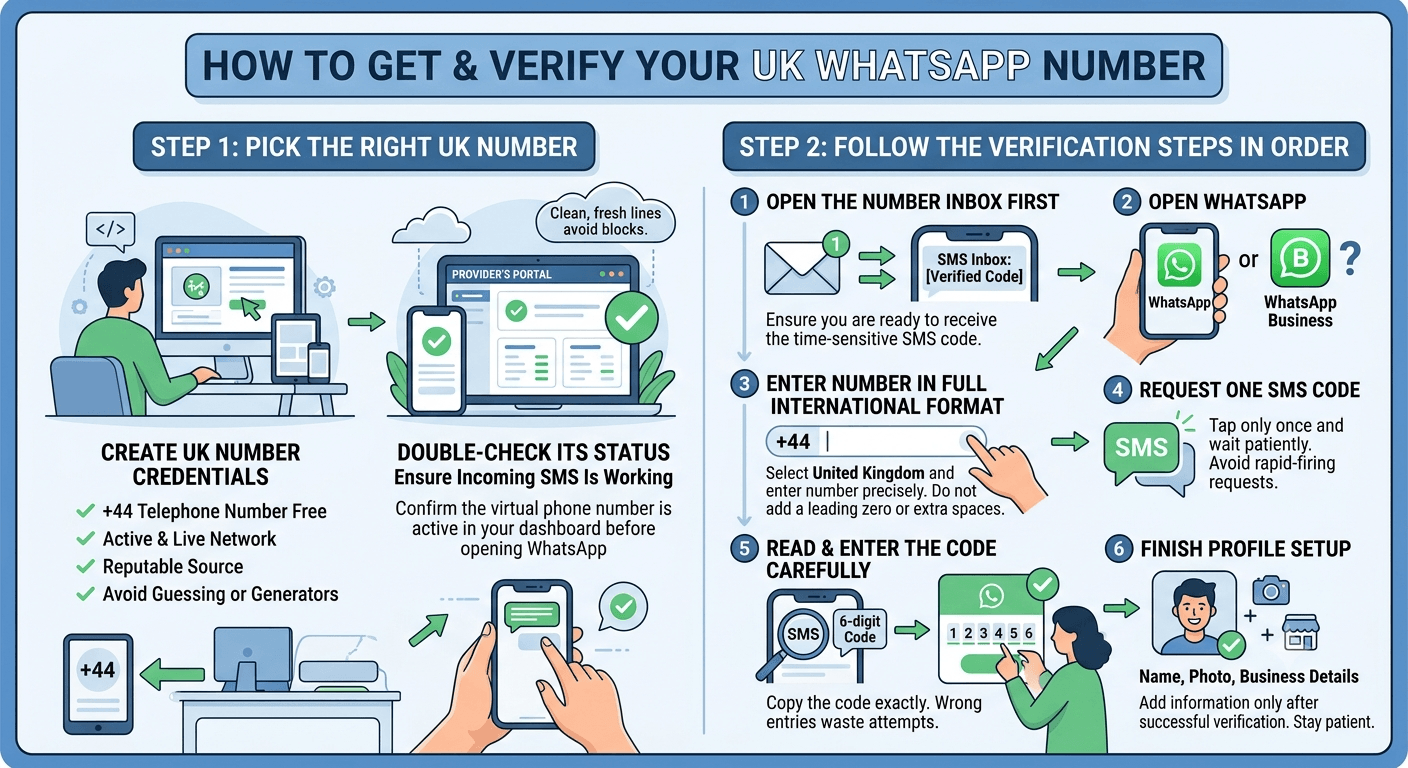
How to Get and Verify Your UK WhatsApp Number
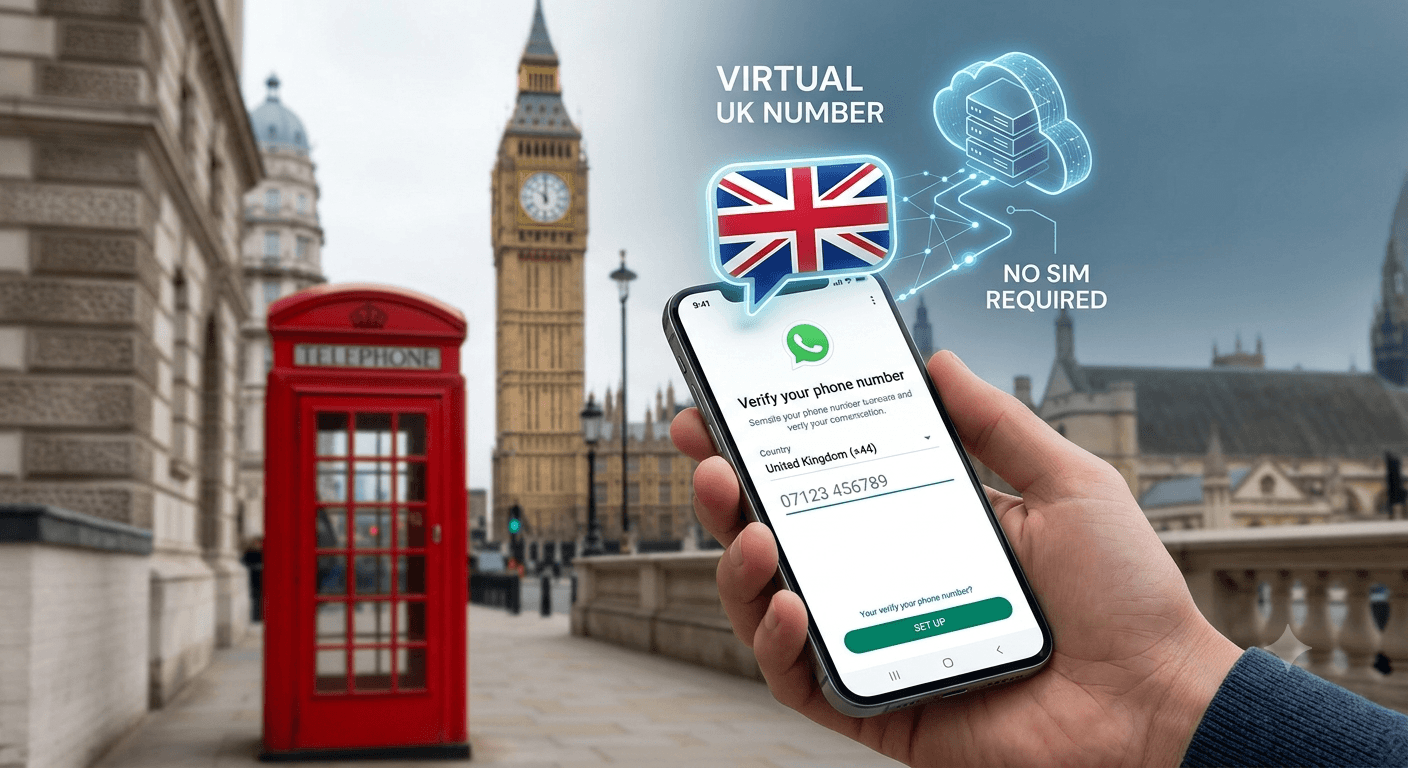
You can get and verify a UK WhatsApp number by using a virtual number provider that offers UK (+44) numbers. First, sign up with a service like TextNow, CallHippo, or MoreMins and select a UK area code (e.g., London +44 20). Once you receive your UK number, open WhatsApp, enter the number, and choose SMS or call verification.
For those who need a free virtual number UK, it is important to remember that the verification code is time-sensitive. If you are looking to buy UK mobile number access, make sure the service has a high “uptime” rating. Many businesses choose to buy UK mobile number packages to provide their staff with virtual landline UK options that also support messaging. Whether you are using a phone number in UK free of charge or a paid version, the steps for activation remain almost the same. By following a proven method, you can have your united kingdom phone number generator results working in minutes.
-
Pick the right UK number first
Before opening WhatsApp, you should create a UK number credentials through a trusted provider. Select a free UK number from a reputable source to ensure the line is active. Avoid random number generators; they cannot receive SMS because the number must be registered on a live network. Use a service that builds UK number profiles backed by real infrastructure, capable of handling international traffic.
Once you have your virtual UK number, confirm its status in the provider’s portal. A free UK number is only useful if it can display the incoming six‑digit code. Some services offer trial numbers, perfect for testing. Choose a fresh line that hasn’t been heavily used on other platforms. This reduces the risk of security blocks or “try again later” errors.
-
Follow the verification steps in order
The sequence of events is vital when you get a free UK number for WhatsApp. To ensure success, follow these steps:
-
-
-
Open the number inbox first: Confirm the UK line is active and ready to receive SMS. Do not start inside WhatsApp and then scramble to find a working number.
-
Open WhatsApp or WhatsApp Business: Use WhatsApp Business for customer support, sales, or brand messaging. Use the standard app for a second personal account on a separate device.
-
Enter the number in full international format: Select the United Kingdom, then enter the number with +44 exactly as provided. Do not add a leading zero after the country code. Do not change spacing or punctuation on your own.
-
Request one SMS code: Send the first request and wait. Repeated taps on resend often create the problem users are trying to solve.
-
Read and enter the code carefully: Copy the code exactly as it appears in the inbox. Wrong entries waste attempts fast and can trigger a temporary lock.
-
Finish the profile setup: Add the name, photo, and business details only after the number is verified. Keeping the registration flow simple reduces the chance of a restart.
-
-
Following these steps reduces the risk of app flagging your account as a bot. When using a free UK number for WhatsApp, the platform is looking for normal activity. Rapid-firing requests or entering the wrong code multiple times are red flags. By staying patient and following the order, you prove to the system that the virtual number is being used by a legitimate person.
Troubleshooting Common Verification Errors
Even with a high-quality free UK number for WhatsApp, you might encounter technical glitches. These errors are often related to network latency or app-specific limitations rather than the number itself. If you receive a message saying “this number is not a valid mobile number for the country: United Kingdom,” it usually means the formatting is incorrect or the number is recognized as a landline. In such cases, you may need to try a different virtual number United Kingdom that is specifically designated for mobile use. Most problems can be fixed by checking the setup carefully.
Another common issue when using a free UK number for WhatsApp is the dreaded “we couldn’t send an SMS to your number” error. This can happen if the number’s carrier has a temporary filter on short-code messages. To resolve this, you can try the “Call Me” option, though not all virtual providers support voice calls. If you are using a UK virtual phone number, make sure that your internet connection is stable, as any drop in signal can prevent the verification dashboard from updating. Most problems are temporary and can be fixed by waiting an hour before attempting a new request.
1. Fix code delivery problems first
If the code doesn’t arrive for your free UK number for WhatsApp, the first step is to check the prefix. You must confirm that you haven’t included the “0” that usually starts UK numbers when dialed locally. For instance, if the number is 07123 456789, you should enter it as +44 7123 456789. Small errors in formatting are the leading cause of SMS delivery failures. Additionally, check if your virtual phone number UK provider has any known outages. Sometimes, a quick refresh of the browser or app can reveal the code that was already delivered.
In some instances, you might need to change your connection type. If you are on a VPN, the app might block the request for a free UK number for WhatsApp to prevent automated sign-ups. Try switching to a local Wi-Fi or mobile data connection to see if that triggers the SMS. It is also helpful to check the official WhatsApp Help Center for any global outages that might be affecting delivery to the United Kingdom. If all else fails, waiting 24 hours is the best way to reset the app’s internal security timers.
2. Replace bad numbers quickly when needed
Not every free UK number for WhatsApp will work on the first try. If you have followed the steps and still face a “this number is banned” message, do not take it personally. This simply means a previous user violated terms of service using that specific UK virtual number. Reputable providers will allow you to cycle through numbers until you find one that is clean. The key is to request another number rather than trying to appeal a ban on a number you don’t actually own yet.
When you decide to buy UK number online, look for a “satisfaction guarantee” or the ability to test the number before committing. A high turnover of British WhatsApp numbers is a sign that the provider is active and managing their pool of lines effectively. If a free UK number for WhatsApp fails, try a different region or a slightly different number range. Often, moving from a “7xxx” mobile range to another can bypass regional filters. Speed is essential in these cases so that you can complete your setup and begin using your new digital identity without further delay.
Read More: What are 900 numbers and How To get it?
Final Thought
Securing a free UK number for WhatsApp is a practical solution for anyone looking to protect their privacy or create a UK presence. By understanding the difference between VoIP and mobile lines, and following a strict verification process, you can bypass the need for a physical SIM card entirely. Whether you are a business owner in the US or a privacy-conscious user in London, virtual numbers provide the flexibility needed in today’s connected world. Choosing a reliable provider is often more important than choosing a free one. A clean, unused number gives you a much better chance of completing WhatsApp verification successfully.
Frequently Asked Questions
-
How can I get a free UK number for WhatsApp?
You can obtain a free UK number for WhatsApp by using virtual number apps or web-based SMS receive platforms. These services provide you with a temporary or permanent United Kingdom mobile number that can receive the 6-digit verification code. Simply select a number from the list, enter it into the app with the +44 code, and check the provider’s inbox for your message.
-
Can a UK number be used for WhatsApp Business?
Yes, you can absolutely use a virtual UK number for a WhatsApp Business account. Many companies choose this route to keep their customer support lines separate from personal phones. As long as the virtual number can receive SMS and isn’t currently banned by the platform, it functions exactly like a standard mobile number for business profiles, labels, and automated replies.
-
Is it legal to use a virtual UK number for WhatsApp?
Using a virtual number is legal as long as it is used for legitimate communication and complies with the service provider’s terms. Virtual numbers are a standard telecommunications product used by businesses and individuals worldwide for privacy and convenience. However, using them to send spam, conduct fraud, or violate Meta’s terms of service can lead to account suspension or legal repercussions.
-
Can one person have two WhatsApp accounts?
Yes, a single user can maintain two accounts by using a second phone number. This is often done by installing both the standard version and the WhatsApp Business version on the same smartphone. Each app will be tied to a different number, such as your primary SIM and a secondary free UK number for WhatsApp, allowing you to switch between profiles easily.
-
What if the account will later use automation or AI support?
Virtual numbers are perfectly compatible with AI and automation tools. Once you have verified your free UK number for whatsapp, you can connect it to various CRM systems or AI chatbots through official APIs. This is a common practice for modern help desks that use virtual lines to manage high volumes of customer interactions without human intervention.
-
Do free UK numbers expire?
Many free virtual numbers are temporary and may expire after a period of inactivity. If you use a public “receive SMS” site, the number might be rotated out within days. For a long-term account, it is often better to use a private service where you can maintain ownership of the line to make sure you don’t lose access to your chats if you need to re-verify later.
-
Why is my UK virtual number not receiving the code?
Code delivery failure is usually caused by the number being classified as a landline or a blocked VoIP range. Additionally, if the provider’s server is under heavy load, the SMS may be delayed. Make sure that using a mobile-formatted number (+44 7…) and that you haven’t exceeded the number of allowed verification attempts for that specific day.
-
Can I use a UK virtual number for FaceTime?
Yes, virtual numbers can often be used for FaceTime and iMessage activation. If the number is recognized as a valid mobile line by Apple’s servers, you can link it to your Apple ID. This allows you to receive calls and messages on your UK virtual line across all your Apple devices, just like a standard cellular number.
-
What is the international format for a UK number?
The international format for any UK number starts with the country code +44. When entering this into an app, you must remove the leading zero of the local mobile number. For example, the local number 07911 123456 becomes +44 7911 123456. Correct formatting is the most important step in ensuring your verification code is sent to the right destination.