Dropped calls usually happen when your phone cannot maintain a strong, stable connection during a conversation. The most common reasons include weak signal strength, network congestion, software glitches, outdated carrier settings, or moving between towers while traveling. Thick walls, basements, elevators, and remote areas can also block coverage and cause calls to disconnect suddenly. To fix the issue, try moving to an open area, restarting your phone, updating the device software, or enabling Wi-Fi calling if available. You can also reset network settings or replace an old SIM card. If dropped calls continue often, contact your mobile carrier for support or better coverage options.
Few things are as frustrating as being in the middle of an important conversation only to hear “call ended” or have your phone cut off without warning. If you’ve ever found yourself asking, “why do my calls keep dropping?”, you’re not alone. This pervasive issue can disrupt work, personal connections, and even emergencies.
In today’s hyper-connected world, reliable communication isn’t just a convenience; it’s a necessity. A “call drop” can signify anything from a minor annoyance to a major problem for businesses and individuals alike. This comprehensive guide will delve into the common culprits behind “dropped calls” and, more importantly, equip you with actionable strategies on “how to fix dropped calls” and ensure your conversations stay connected.
The Annoyance of “Calls Keep Dropping”: A Universal Problem
The phenomenon of dropped calls has been a consistent source of irritation since the advent of mobile phones. Whether it’s your cell phone keeps dropping calls in a specific location or your phone keeps dropping calls randomly throughout the day, the experience is universally frustrating. It interrupts the flow of conversation, requires redialing, and can lead to missed information or opportunities.
Imagine discussing critical project details with a client, only for your phone to drop calls mid-sentence. Or trying to coordinate a family emergency, and your call keeps ending repeatedly. These scenarios highlight why understanding what causes dropped calls is crucial. It’s not just about technical glitches; it’s about the impact on our daily lives.
What Causes Dropped Calls? Unpacking the Core Issues
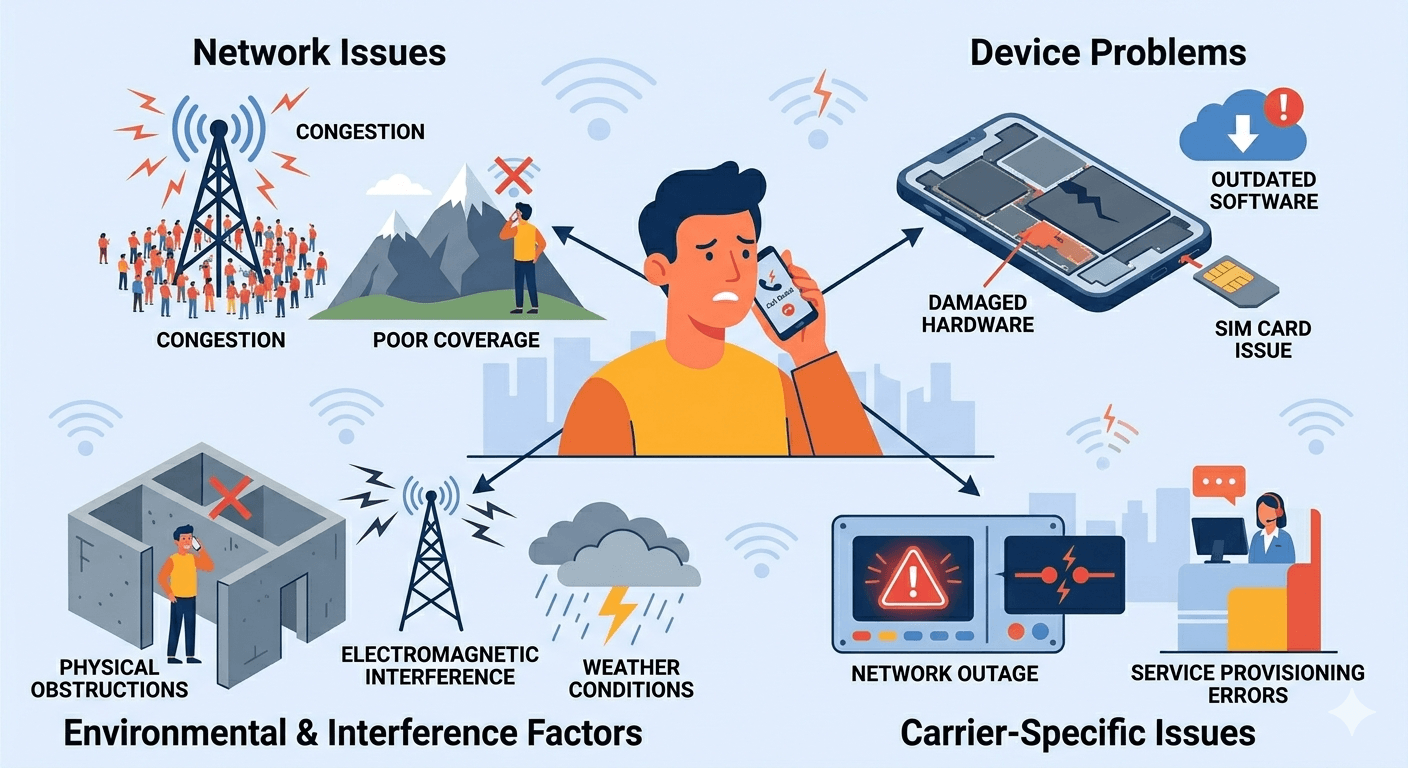
When you constantly wonder, “why does my phone keep dropping calls?”, it’s important to understand that there isn’t a single answer. Dropped calls can stem from a variety of sources, ranging from network issues to device problems and even environmental factors. Let’s explore the most common reasons why your “phone drops calls” or why your “calls keep dropping.”
1. Weak or Congested Network Signals
One of the primary reasons for “phone dropping calls” is a poor or overloaded network signal. Your phone needs a strong connection to a cell tower to maintain a call.
- Poor Coverage Areas: If you’re in a rural area, basement, or a building with thick walls, the signal strength can be significantly reduced. This makes your “phone call keep dropping” or even leads to “call drops immediately” upon connection. Areas with physical obstructions like mountains or dense buildings can also create dead zones where “my phone keeps dropping calls.”
- Network Congestion: During peak hours or in crowded places like stadiums or concert venues, too many users trying to access the same cell tower can lead to “network is congested phone call” issues. The tower gets overloaded, and it struggles to handle all the active connections, resulting in “calls dropping” for many users. This is a common reason “why are my calls dropping” in urban environments.
- Handover Issues: As you move, your phone “hands over” your call from one cell tower to another. If this handover isn’t smooth, perhaps due to a gap in coverage between towers, your “call dropped meaning” becomes clear – the connection was lost during the transition.
2. Device-Related Problems: Is Your Phone the Culprit?
Sometimes, the issue isn’t with the network but with your device itself. Your “cell phone dropping calls” might be due to internal problems.
- Outdated Software: Phone manufacturers regularly release software updates that include bug fixes and performance improvements. If you’re running an old operating system, it could be the reason “why does my phone keep ending calls.” Updates often address connectivity issues that contribute to “my phone is dropping calls.”
- Damaged Hardware: A damaged antenna, battery issues, or other internal hardware problems can severely impact your phone’s ability to maintain a stable connection. If your phone has recently been dropped or exposed to water, it might be the cause “why my phone calls keep dropping.”
- SIM Card Issues: A faulty or improperly seated SIM card can lead to intermittent network connection problems, causing your “phone keeps ending calls.” Sometimes, simply reinserting the SIM card can resolve these “calls dropping” issues.
- App Conflicts: Believe it or not, some third-party applications can interfere with your phone’s cellular functions, leading to “phone keeps dropping calls.” This is particularly true for apps that manage calls or network settings.
3. Environmental and Interference Factors
Beyond networks and devices, external factors can also play a significant role in “why do my calls keep dropping.”
- Physical Obstructions: As mentioned, thick concrete walls, basements, or even certain types of building materials can block cellular signals. If you consistently find “my phone calls keep dropping” in specific indoor locations, this might be the reason.
- Electromagnetic Interference: Other electronic devices, especially those operating on similar frequencies, can sometimes interfere with your phone’s signal, causing “calls dropping.” While less common for modern smartphones, it’s a possibility.
- Weather Conditions: Extreme weather can sometimes affect cellular network performance, particularly for older infrastructure. Heavy rain or storms can occasionally contribute to “why are my calls dropping.”
4. Carrier-Specific Issues
While less frequent, sometimes the problem lies directly with your mobile carrier.
- Network Outages: Occasionally, carriers experience localized or widespread network outages due to maintenance, equipment failure, or unexpected events. During an outage, you might find “why can’t I call out on my phone” or experience “phone call drops immediately.”
- Service Provisioning Errors: In rare cases, there might be an error in how your service is provisioned, leading to “my phone keeps disconnecting calls.” This usually requires contacting your carrier’s customer support.
Voiced Over IP (VoIP) Calls: A Different Set of Challenges
Many individuals and businesses now rely on Voice over IP (VoIP) for their calls. While offering numerous advantages, VoIP calls can also be prone to “call drop” issues, though the causes are often different from traditional cellular calls.
Advantages of VoIP
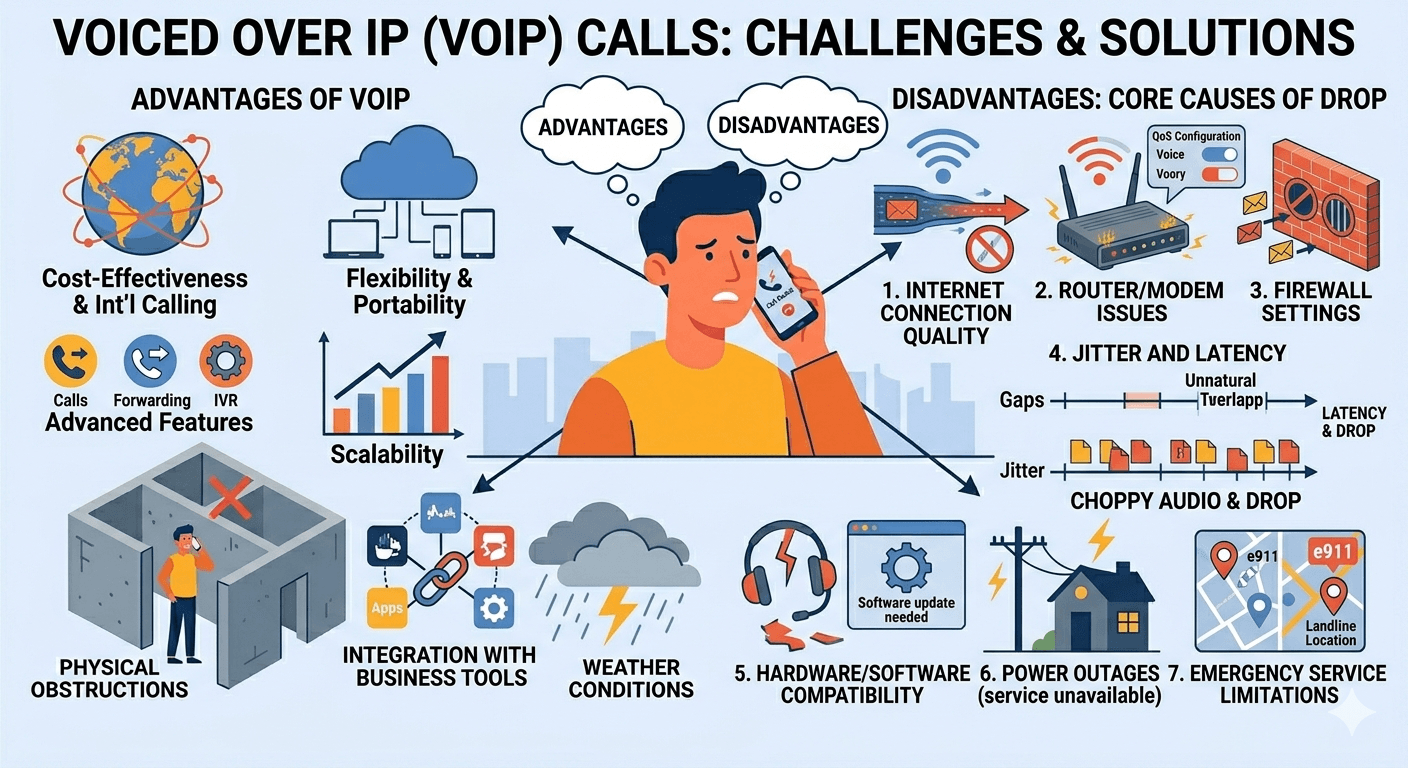
- Cost-Effectiveness: VoIP significantly reduces calling costs, especially for long-distance and international calls.
- Flexibility and Portability: You can make and receive calls from anywhere with an internet connection.
- Advanced Features: VoIP systems often come with features like call forwarding, voicemail to email, conference calling, and IVR (Interactive Voice Response) systems that traditional phones lack.
- Scalability: It’s easy to add or remove lines and features as your business grows.
- Integration with Business Tools: VoIP can integrate with CRM software, email, and other business applications for streamlined workflows.
Disadvantages
Despite its benefits, VoIP is not without its drawbacks, particularly when it comes to call stability. If you’re using VoIP and asking, “why does my phone keep dropping calls?”, here are some common reasons:
- Internet Connection Quality: This is the most critical factor. VoIP relies entirely on your internet connection. A slow, unstable, or congested internet connection will inevitably lead to “calls dropping,” poor call quality, or “call drops immediately.” If your bandwidth is insufficient, especially when multiple devices are using the internet simultaneously, your “VoIP calls keep dropping.”
- Router/Modem Issues: An old, faulty, or improperly configured router or modem can cause network instability, leading to “VoIP calls keep dropping.” Quality of Service (QoS) settings on your router, if not properly configured, can also prioritize other internet traffic over voice data, causing disruptions.
- Firewall Settings: Overly strict firewall settings can block the ports necessary for VoIP communication, resulting in “why are my calls failing” or “calls dropping.”
- Jitter and Latency: These are specific internet performance metrics that heavily impact VoIP.
- Latency (Delay): High latency means there’s a significant delay in transmitting voice data, leading to people talking over each other or unnatural pauses. While not a direct “call drop” cause, high latency can make calls unusable.
- Jitter: Jitter refers to variations in the delay of data packets. High jitter means voice packets arrive out of order or at inconsistent intervals, causing choppy audio and potentially leading to “call drop.”
- Hardware and Software Compatibility: Issues with your headset, microphone, or the VoIP software client itself can cause problems. Outdated drivers or software can lead to “my phone keeps disconnecting calls.”
- Power Outages: Without power to your internet modem and router, your VoIP service will be completely unavailable. This is a significant disadvantage compared to traditional landlines, which often work during power cuts.
- Emergency Service Limitations: While e911 services have improved, traditional landlines often offer more reliable emergency location data.
Understanding these specific VoIP challenges is key if your “phone calls keep dropping” on an internet-based system.
How Do I Stop My Phone From Dropping Calls? Solutions and Strategies
Now that we’ve explored the various reasons behind “my phone keeps dropping calls,” let’s dive into practical steps you can take to prevent these frustrating interruptions. The goal is to address the underlying cause, whether it’s “why does my phone drop calls all the time” or an occasional “call ended” nuisance.
1. Optimize Your Location and Signal Strength
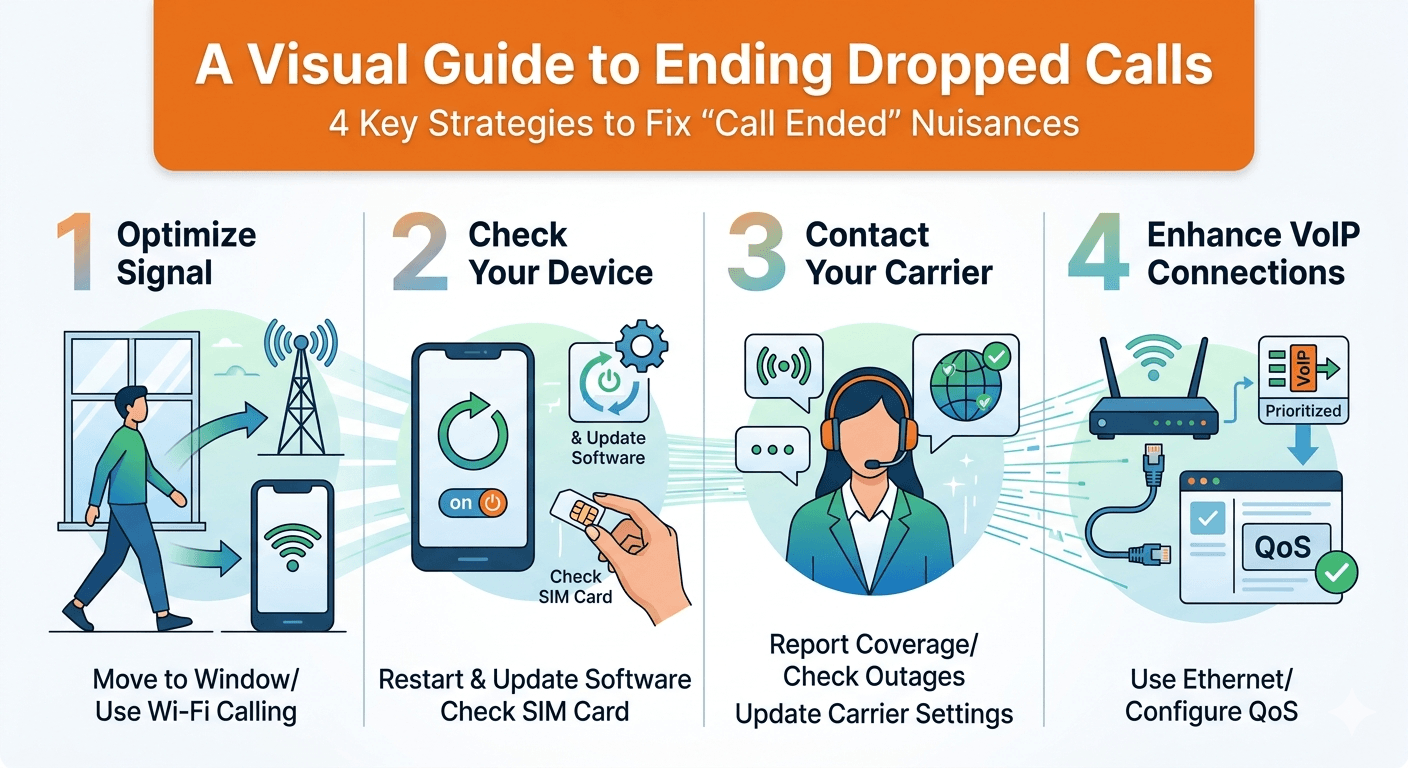
- Move to an Open Area: If you’re experiencing “phone dropping calls” indoors, try moving closer to a window or going outside to get a clearer line of sight to a cell tower.
- Avoid Known Dead Zones: If you consistently find “my phone is dropping calls” in a specific part of your home or office, try to avoid making important calls from that spot.
- Use Wi-Fi Calling: Most modern smartphones support Wi-Fi calling. This allows your “phone calls keep dropping” over your Wi-Fi network instead of the cellular network. It’s an excellent solution if you have strong Wi-Fi but poor cellular coverage indoors. Activate it in your phone’s settings.
2. Check and Update Your Device
- Restart Your Phone: The classic tech support advice for a reason! A simple restart can often clear temporary glitches that might be causing “my phone keeps dropping calls.”
- Update Software: Always keep your phone’s operating system and apps updated. These updates often include critical bug fixes and improvements to cellular connectivity, addressing “why does my phone keep ending calls.”
- Check Your SIM Card: Power off your phone, remove your SIM card, inspect it for any damage, gently clean the contacts, and reinsert it securely. This can resolve “my phone calls keep dropping” due to a loose connection.
- Disable or Remove Problematic Apps: If you recently installed an app and started experiencing “phone dropping calls,” try uninstalling it to see if the issue resolves.
- Reset Network Settings: This will reset all cellular, Wi-Fi, and Bluetooth settings to their defaults. It won’t delete your data but will require you to re-enter Wi-Fi passwords. This can fix underlying network configuration issues.
3. Contact Your Carrier
- Report Coverage Issues: If you consistently experience “phone dropping calls” in a specific area, especially one where you previously had good service, report it to your mobile carrier. They might be unaware of a new “dead zone” or a problem with a local cell tower.
- Check for Outages: Before assuming your phone is broken, check your carrier’s website or social media for any reported network outages in your area if you’re experiencing “why can’t I call out on my phone.”
- Update Carrier Settings: Sometimes, carriers release updates for network settings that are separate from OS updates. Your phone usually prompts you to install these, but you can check manually in your phone’s settings.
- Consider a Signal Booster: For persistent “cell phone keeps dropping calls” in your home or office due to weak signal, a cellular signal booster (repeater) can amplify the existing signal.
4. Optimize Your VoIP Connection
If your “VoIP calls keep dropping,” focus on your internet connection:
- Upgrade Your Internet Plan: If you frequently experience call drops with VoIP, you might need more bandwidth, especially if multiple users or devices share the connection.
- Improve Wi-Fi Signal: If using Wi-Fi, ensure your router is in a central location, free from obstructions. Consider a mesh Wi-Fi system for larger homes or offices.
- Use an Ethernet Connection: Whenever possible, connect your VoIP phone or computer directly to your router via an Ethernet cable. This provides a more stable and faster connection than Wi-Fi, reducing call drop incidents.
- Configure QoS (Quality of Service): Access your router’s settings and enable QoS. Prioritize VoIP traffic over other data streams (like streaming or gaming) to ensure your phone calls keep dropping less frequently.
- Check Firewall Settings: Ensure your firewall isn’t blocking necessary VoIP ports. Consult your VoIP provider’s documentation or support for the specific ports required.
- Reboot Router/Modem: Periodically restarting your internet equipment can clear cached data and resolve temporary connectivity issues that cause calls dropping.
- Minimize Internet Congestion: Avoid heavy internet usage (large downloads, streaming 4K video) during important VoIP calls to prevent “network is congested phone call” situations.
- Use a Reliable VoIP Provider: Not all VoIP providers are created equal. Choose a reputable provider with good customer support and a track record of reliable service if you’re frequently asking, “why does my phone drop calls?”
“Call Dropped Meaning”: Understanding the Impact
When a call drops, it essentially means the established connection between two or more parties has been unexpectedly severed. The “call dropped meaning” can range from a brief interruption requiring a quick redial to a significant breakdown in communication. For businesses, “what is a dropped call” can mean lost sales, damaged customer relationships, and decreased productivity. For individuals, it can be a source of personal frustration and missed opportunities.
Understanding “what causes dropped calls” is the first step, but recognizing the full impact of “dropped calls meaning” reinforces the importance of finding a reliable solution. No one wants to be left with the “call ended” screen, wondering “why does my call keep ending” when there’s an urgent message to convey.
Read More: VoIP PBX Phone Systems: Difference Between PBX vs VoIP
Final Thought: Stay Connected, Stay Productive
“Why do my calls keep dropping?” is a question that plagues countless individuals and businesses. From “phone cut off” due to weak signals to “call drops immediately” because of internet issues, the causes are diverse. However, by systematically troubleshooting the potential problems – whether it’s optimizing your physical location, updating your device, fine-tuning your VoIP settings, or engaging with your carrier – you can significantly reduce the incidence of phone dropping calls.
Reliable communication is the backbone of personal connection and professional success. By taking proactive steps to understand and address “why does my phone keep dropping calls,” you can ensure clearer conversations, fewer interruptions, and a more connected experience in our increasingly digital world. Don’t let the frustration of “calls keep dropping” dictate your day; empower yourself with these solutions and enjoy seamless communication.
FAQs: How Do I Stop My Phone From Dropping Calls?
How do I stop my phone from dropping calls?
To stop your phone from dropping calls, start by moving to an area with better signal (e.g., outdoors or near a window). Ensure your phone’s software is updated, restart your device, and check your SIM card. For persistent issues, try using Wi-Fi calling, resetting network settings, or contacting your mobile carrier to report coverage problems.
What is the reason for dropped calls?
Dropped calls can occur due to various reasons, including weak or congested cellular network signals, outdated phone software, damaged phone hardware (like an antenna), a faulty SIM card, or interference from physical obstructions. For VoIP calls, common reasons include poor internet connection quality, insufficient bandwidth, router issues, or firewall settings.
Why have so many dropped calls lately?
An increase in dropped calls lately could be due to several factors. There might be new network congestion in your area, recent damage to your phone, an outdated software version, or even a temporary outage with your mobile carrier. If you’re using VoIP, a recent change in your internet service, increased internet usage, or router problems could be the cause.
Why do my calls cut out so much?
Calls cutting out frequently is often a symptom of an unstable or weak connection. This could mean you’re in a poor cellular coverage area, your phone is struggling to “hand over” calls between cell towers, or your internet connection (for VoIP) is experiencing high latency or jitter. Device issues like an old battery or a damaged antenna can also contribute to calls cutting out.
What does it mean when a call drops?
When a call drops, it means the established connection between you and the other party has been unexpectedly terminated before the conversation was intentionally ended. This results in the “call ended” message appearing on your screen, requiring you to redial to resume the conversation.