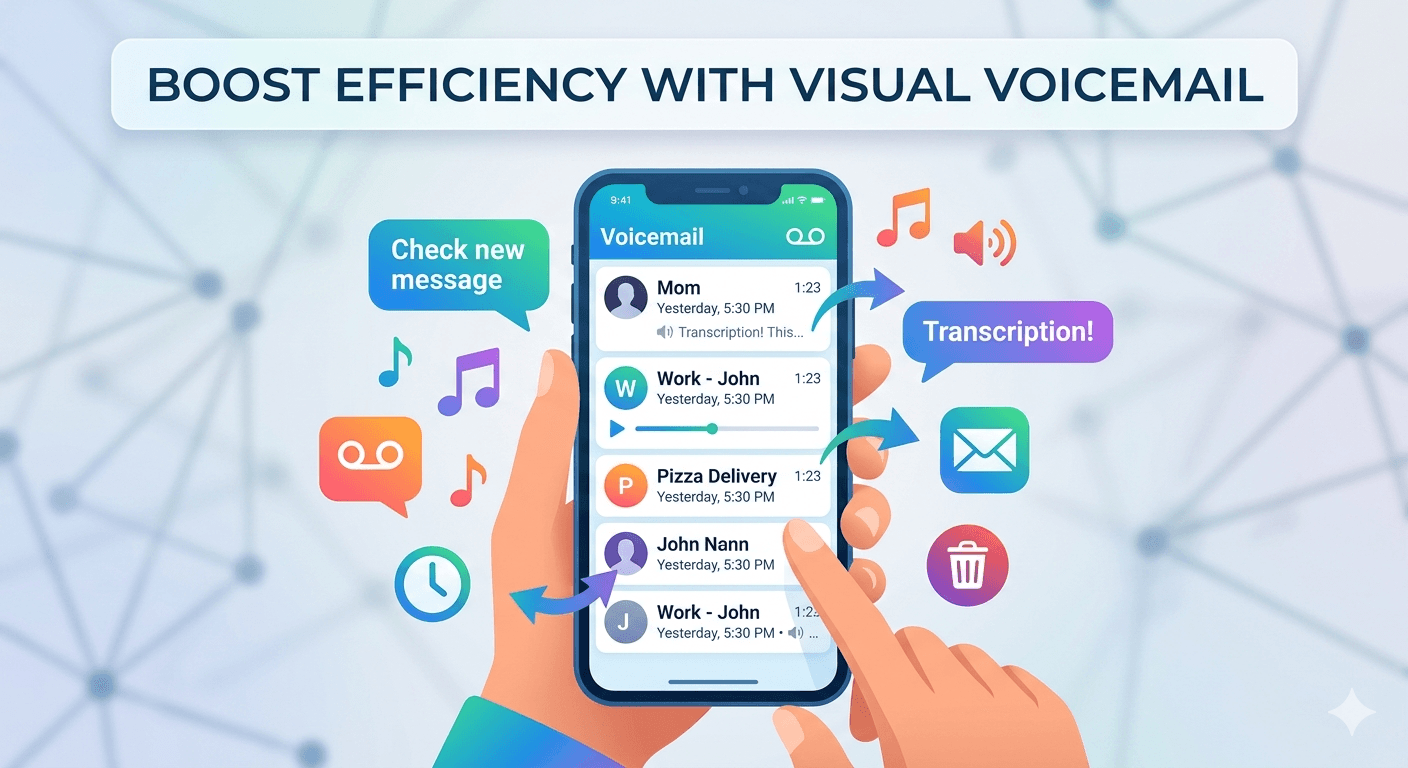
Visual voicemail is a technology that allows smartphone users to view a list of their messages and listen to them in any order they choose, without having to call a traditional voicemail system. This interface presents voice messages much like an email inbox, displaying the callers name, the date and time of the call, and the duration of the message. Instead of listening to a series of voice prompts to save or delete messages, users can simply tap on the screen to play, pause, or remove a specific recording. This modern approach to message management has largely replaced the older method of dialing a number and navigating through a menu with a keypad.
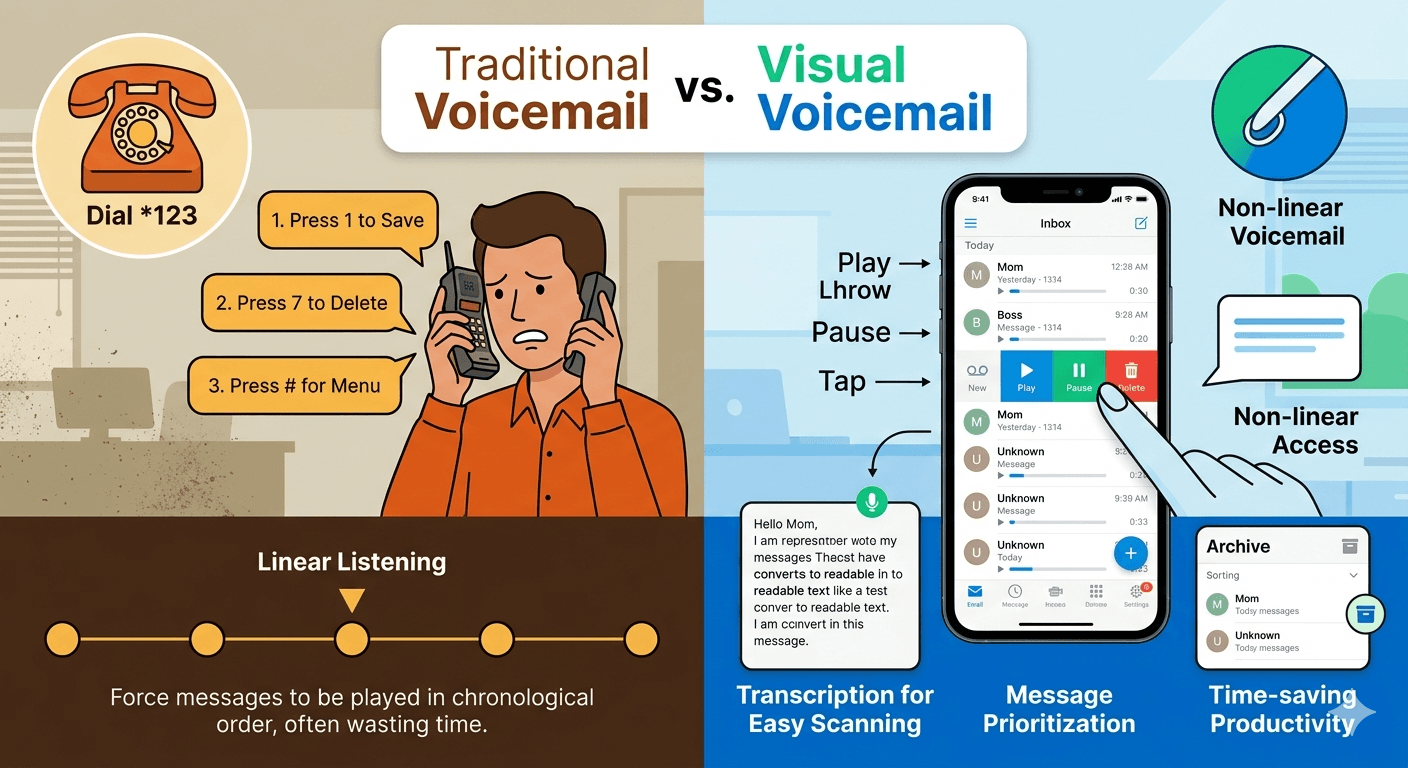
The primary convenience of this system is its non-linear nature. In traditional systems, you are forced to listen to messages in the order they were received, which can be incredibly time-consuming if you are searching for a specific piece of information. With this visual interface, you can prioritize urgent messages from important contacts while ignoring or deleting spam calls instantly. Many users find that this method significantly improves their daily productivity, as it eliminates the need to sit through long automated instructions just to hear a simple ten-second message from a colleague or friend.
For mobile users, understanding what is visual voicemail android is essential because the experience can vary depending on the manufacturer and the service provider. On most modern devices, the feature is integrated directly into the native dialer app, providing a seamless experience. When you receive a new message, a notification appears on the screen, and you can access the recording immediately by tapping the notification. This integration ensures that you do not have to download third-party software to manage your audio communication, though some carriers still offer their own branded applications for more advanced features.
Traditional Voicemail vs. Visual Voicemail: Key Differences
The evolution from traditional systems to visual interfaces represents a major shift in how we handle missed calls. Traditional voicemail requires the user to dial a specific access number, enter a password, and then follow audio prompts like press one to listen or press seven to delete. This linear process is slow and often frustrating, especially when you need to re-listen to a specific detail like a phone number. In contrast, the visual version allows you to scrub through the audio file using a playback bar, making it easy to find and repeat specific sections of the recording without starting over.
Another major difference is the presence of transcription services. Modern systems often include a feature where the audio is automatically converted into text, allowing you to read your messages instead of listening to them. This is particularly useful in loud environments or during meetings where playing audio would be inappropriate. Traditional systems offer no such text-based overview, meaning you have no way of knowing the content of a message until you have the time and privacy to listen to the entire recording. This transcription feature is a hallmark of what does visual voicemail mean in the context of modern professional communication.
Storage management is also handled quite differently between the two systems. Traditional setups often have a strict limit on the number of messages you can store, and older messages are automatically deleted after a certain period. With the visual interface, messages are often stored locally on the device or in the cloud, allowing for much larger storage capacities. You can easily archive important messages for years or export them as audio files to other devices. This level of control is simply not possible with the older, server-side systems that were the standard for decades.
What is a Visual Voicemail and How Does it Function?
To understand what is a visual voicemail, one must look at the underlying technology that bridges the gap between cellular networks and smartphone operating systems. When someone leaves a message, the audio is recorded on the carrier server. Instead of just notifying you that a message exists, the system pushes the audio data to your phone using a protocol called IMAP or specialized carrier-side signaling. This allows your device to download the file in the background, making it available for immediate playback within your visual inbox without requiring an active call to the voicemail server.
The functionality relies heavily on a data connection, either through cellular data or Wi-Fi. Because the phone is downloading an actual audio file, the system needs an active internet connection to update the list of messages. This is why you might notice that your messages do not appear immediately if you are in an area with poor reception. Once the message is on your phone, you have full control over the audio file, including the ability to share it via email, messaging apps, or save it to your local storage for future reference.
In terms of the user interface, the visual layout is designed to be intuitive. It usually consists of a list of contacts with timestamps next to them. Tapping on a contact expands the message, revealing a play button, a delete icon, and a call-back option. Some advanced versions also include a feature known as video voicemail, which allows users to leave short video clips instead of just audio. This highlights how far the technology has come from the simple tape-based answering machines of the past, turning missed calls into a rich, multimedia experience.
What is Visual Voicemail Android and How to Enable It
On the Google-developed operating system, what is visual voicemail android typically refers to the implementation found within the Google Phone app or the custom dialers used by manufacturers like Samsung and OnePlus. For many users, the feature is active by default as part of their cellular service plan. However, to ensure it is working, you usually need to open the phone application and look for a tape-recorder icon or a tab labeled as voicemail. If the tab is visible, the system is ready to display your messages visually rather than requiring a dial-in.
If the feature is not active, you may need to go into the settings menu of the phone app. Under the voicemail section, there is usually a toggle for visual message management. Enabling this may require a brief synchronization with your service provider. It is important to note that some older Android devices or budget models might not support this feature natively, in which case you might need to use a dedicated visual voicemail app provided by your carrier. These apps serve the same purpose but exist as separate icons on your home screen rather than being integrated into the main dialer.
Research suggests that users who utilize visual interfaces on their mobile devices respond to missed calls approximately thirty percent faster than those using traditional systems. This efficiency is a direct result of being able to see who called and reading a brief summary of the message through transcription. For Android users, the ability to integrate these messages with other Google services, such as Google Assistant, adds another layer of utility, allowing for voice-controlled message management and automated spam filtering that identifies and silences unwanted callers before they even leave a message.
How to Check Voicemail on Android Using the Visual Interface
Learning how to check voicemail on android via the visual interface is a straightforward process that begins with the phone application. Once you open the app, look at the bottom navigation bar where you will typically see options for favorites, recents, contacts, and a final icon for your messages. Tapping this icon will open a list of all your current recordings. The most recent messages appear at the top, and any unread or unlistened messages will usually be highlighted or marked with a blue dot to indicate their status.
To listen to a message, simply tap on the entry in the list. This will expand a small control panel with a play button and a progress bar. You can slide your finger along the progress bar to skip forward or backward, which is extremely helpful if you missed a specific detail like a time or location mentioned by the caller. Beneath the playback controls, you will often see buttons to call the person back, send them a text message, or delete the recording entirely. Some devices also allow you to share the audio file directly to other apps like WhatsApp or Slack.
In cases where transcription is enabled, the text version of the message will appear directly under the playback controls. You can scan the text to see if the call requires immediate attention or if it can wait until later. If you find that the visual list is not updating, you can often trigger a refresh by swiping down on the screen. This ensures that the phone checks the carrier server for any new messages that might have arrived while you were offline or in a low-signal area.
6 Benefits of Using Visual Voicemail
One of the primary benefits of this technology is the ability to screen calls and prioritize your responses. Instead of spending several minutes listening to every message in the order they were received, you can see exactly who called and decide which ones are worth your time. This is particularly useful for professionals who receive a high volume of calls and need to distinguish between urgent client requests and non-essential internal communication.
-
The visual interface allows for rapid message scanning which saves significant time throughout the day compared to audio menus.
-
Transcription features convert audio into text so you can read your messages in environments where listening is not an option.
-
The ability to skip to specific parts of a message makes it easy to retrieve important information like phone numbers or addresses.
-
Messages can be archived indefinitely on your device or in the cloud rather than being deleted by the carrier after a few days.
-
Users can easily share voice messages as audio files with colleagues or family members through standard sharing menus.
-
Advanced spam filtering is often integrated into visual systems allowing you to block and delete junk messages with a single tap.
Another significant advantage is the organized nature of the message list. You can see the caller name from your contacts, the exact duration of the message, and the time it was left. This level of detail helps you manage your follow-ups more effectively. Furthermore, for users with hearing impairments, the text transcription feature provides a level of accessibility that traditional audio systems cannot offer. This ensures that everyone can stay informed and connected regardless of their physical abilities or the environment they are in.
Top Features of Visual Voicemail Systems
Beyond simple playback, modern visual systems offer a suite of features designed to enhance communication. Voicemail transcription is perhaps the most popular, using artificial intelligence to provide a text-based version of the audio. While not always perfect, these transcriptions are usually accurate enough to convey the main point of the message. This feature is a core component of what’s visual voicemail in the modern era, as it bridges the gap between voice and text-based communication.
According to research on mobile communication trends, the implementation of visual interfaces for voice messaging can reduce the time spent on message management by up to 50% compared to traditional audio-only systems.
Another key feature is the integration with cloud storage. Many systems allow you to automatically back up your recordings to services like Google Drive or iCloud. This means that even if you lose your phone or switch to a new device, your important messages remain accessible. Additionally, some business-grade systems offer a feature called voicemail to email, where the recording and its transcript are sent directly to your email inbox as an attachment. This allows you to manage all your communications from a single interface, whether it started as a phone call or an email.
Personalized greetings are also much easier to manage through a visual interface. Instead of recording a greeting over the phone and hoping it sounds right, you can often record multiple versions on your device, listen to them, and select the one you want to use. Some systems even allow you to set different greetings for different callers or specific times of the day. For example, you could have a professional greeting for business hours and a more casual one for evenings and weekends, all managed through the visual voicemail app.
What is Visual Voicemail on Android and How it Differs by Carrier
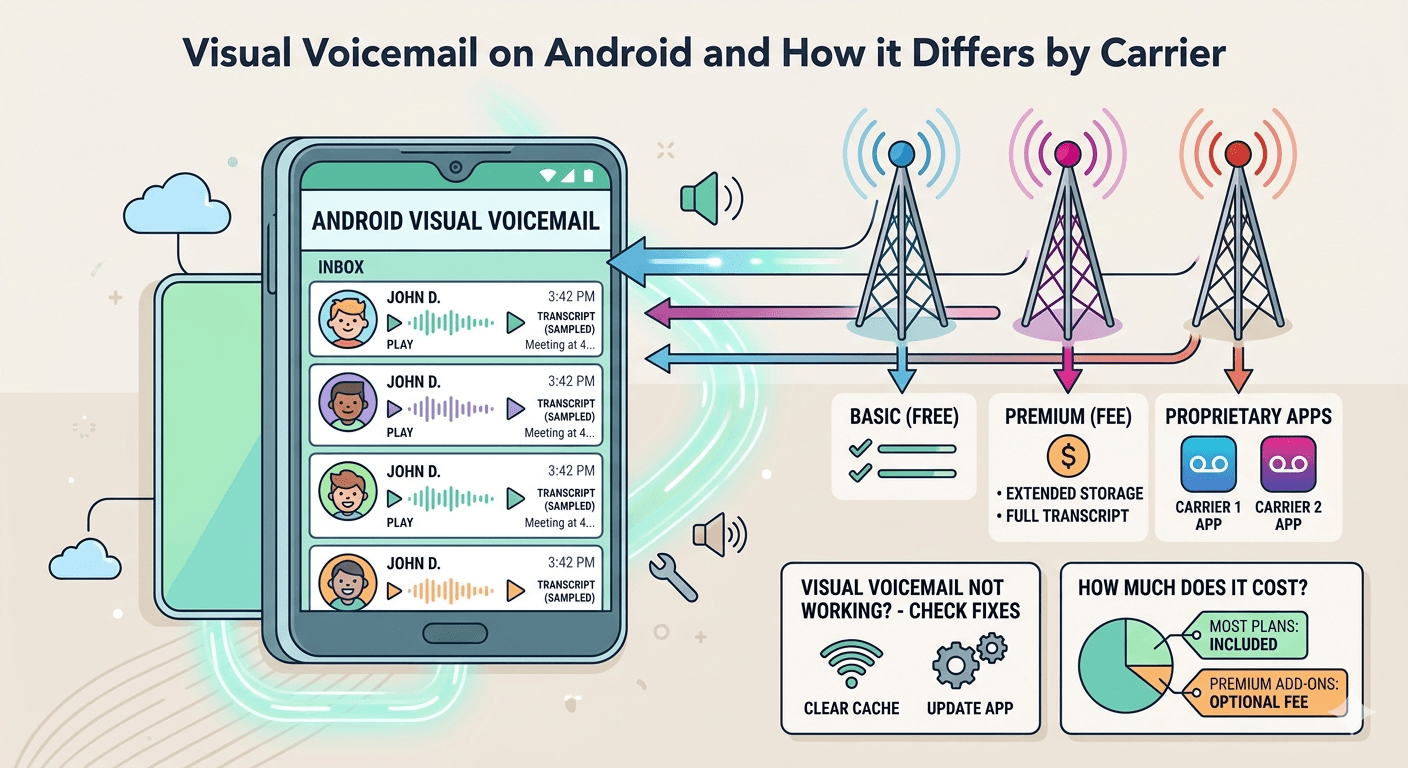
When asking what is visual voicemail on android, it is important to realize that carriers like Verizon, T-Mobile, and AT&T often implement the feature differently. While Google provides a standard framework, carriers often layer their own services on top. Some carriers include basic visual message management for free with every plan, while others might charge a monthly fee for premium features like extended storage or high-accuracy transcription. It is always a good idea to check your specific plan details to see what is included.
Certain carriers require the use of their own proprietary applications rather than the standard Android phone app. For instance, if you are a customer of a smaller prepaid carrier, you might find that the visual tab in your phone app is empty. In this case, you would need to visit the Google Play Store and download the official app provided by your network. These branded apps often include extra tools, such as the ability to block specific numbers from leaving messages or setting up a virtual voicemail that works across multiple devices.
The underlying technology remains consistent, but the user experience can vary. Some carrier apps offer a simplified view, while others provide a more complex dashboard with integrated call logs and data usage statistics. Regardless of the specific app, the goal is always the same: to give the user a visual representation of their audio messages. If you find that the feature is not working as expected, the issue often lies with the carrier settings on your account rather than the hardware of the phone itself.
Visual Voicemail Not Working: Common Fixes and Troubleshooting
If you find your visual voicemail not working, the first thing to check is your data connection. Because these systems rely on downloading audio files, they will not update over a standard voice signal alone. Ensure that your mobile data is turned on or that you are connected to a stable Wi-Fi network. Sometimes, simply toggling Airplane Mode on and off can reset your connection and trigger the phone to download any pending messages that have been stuck on the carrier server.
Another common issue involves outdated software. Ensure that your phone app and your operating system are updated to the latest versions. Manufacturers frequently release patches that fix bugs related to message synchronization. If your software is up to date and the system still fails, you might need to clear the cache of your phone app. Go to your device settings, find the apps section, select the phone app, and choose the option to clear cache and data. This often resolves glitches where the app interface becomes desynchronized from the actual messages.
In some cases, the problem is on the carrier side. If you recently switched plans or moved your SIM card to a new phone, the visual service might not have been provisioned correctly. Contacting your service provider and asking them to reset your voicemail settings can often fix this. They can send a specialized signal to your device that re-authenticates the visual interface. This is a common step for users who find that they can still dial in to hear messages but cannot see them in the visual list on their Android device.
How Much Does Visual Voicemail Cost?
One of the most frequent questions users have is whether this service comes with an additional cost. For the vast majority of modern smartphone plans, basic visual message management is included for free. Carriers recognize that this is now a standard feature that users expect from their devices. However, there are still instances where premium versions of the service carry a monthly fee. These premium tiers usually offer features like unlimited message storage, voice-to-text transcription for very long messages, and the ability to forward messages to multiple email addresses.
The cost can vary significantly between carriers. Some might charge a few dollars a month for a premium visual voicemail app that includes enhanced security or transcription features. Others might include these as part of their top-tier data plans. It is important to read the fine print of your service agreement to ensure you are not being charged for a service you do not need. For most people, the basic version included with their phone is more than enough to handle their daily communication needs without any extra expenditure.
In the business world, virtual voicemail systems are often part of a larger communication package. These professional systems might have a per-user cost but offer much more robust features than a standard consumer plan. This includes integration with customer relationship management software and the ability to share a single message inbox across an entire team. While there is a cost associated with these professional tools, the increase in efficiency and better customer service usually provides a high return on investment for the company.
How Does Visual Voicemail Work for Business Scaling?
For growing businesses, the transition to visual systems is a key step in professionalizing their communication. As a company scales, the volume of missed calls can become overwhelming for a single individual to manage. Visual systems allow for a more collaborative approach. For example, a shared visual inbox allows multiple team members to see and respond to messages, ensuring that no client request goes unanswered. This is a far more effective strategy than having messages trapped in a single person’s traditional audio inbox.
The transcription feature is also a massive asset for businesses. It allows managers to quickly scan the content of messages left for their team without having to listen to every recording. This can help in identifying trends, such as common customer complaints or frequently asked questions, which can then be addressed through better training or updated website content. Furthermore, the ability to integrate these messages into a CRM means that every voice interaction is logged alongside emails and texts, providing a complete history of the customer relationship.
Another way visual systems help businesses scale is through the use of automated routing. Some advanced systems can analyze the content of a transcribed message and automatically route it to the correct department. If a caller mentions technical support, the message and its transcript can be sent directly to the support queue. This level of automation reduces the manual work required to sort through messages and ensures that customers are connected with the right person as quickly as possible, improving overall satisfaction and retention.
Set Yourself Up To Scale With Visual Voicemail
If you are looking to future-proof your communication, moving toward a visual-centric system is a must. Start by ensuring that everyone in your organization is using a compatible device and has the feature activated. Training your team on how to check voicemail on android and use the transcription features can lead to immediate improvements in response times. It is also worth investigating third-party applications that offer more advanced features than the standard carrier-provided options, especially if you need to integrate your messages with other business tools.
A study on professional efficiency found that 85% of office workers prefer reading voicemail transcriptions over listening to audio recordings when in a meeting or a shared workspace environment.
Scaling with these tools also means thinking about how you handle data. Because visual systems make it so easy to save and share recordings, you need to have a policy in place for how long messages are kept and who has access to them. This is particularly important for businesses in regulated industries like healthcare or finance, where the privacy of communication is a legal requirement. By setting up these protocols early, you can enjoy the benefits of modern message management while ensuring that your business remains compliant with data protection laws.
Ultimately, the goal is to create a communication system that is as flexible as your business. Whether you are a solo entrepreneur or managing a large team, the ability to see and manage your messages visually gives you a level of control that was once only available to large corporations with expensive PBX systems. Today, anyone with a smartphone can leverage these tools to appear more professional, respond more quickly, and stay better organized in an increasingly fast-paced world.
How Safe Is Visual Voicemail?
Security is a paramount concern when it comes to any digital communication, and visual message management is no exception. Because your messages are stored as digital files, they are technically susceptible to unauthorized access if your device or your carrier account is compromised. However, most modern systems use strong encryption both while the message is being transmitted to your phone and while it is stored on the device. This makes it very difficult for anyone to intercept your messages without your passcode or biometric data.
To enhance the safety of your messages, it is highly recommended to use a strong, unique password for your voicemail account. Many people make the mistake of using a simple code like 1234, which can be easily guessed. Additionally, if your phone supports it, you should enable two-factor authentication for your carrier account. This adds an extra layer of protection, requiring a secondary code sent to your phone or email before any changes can be made to your communication settings.
Another safety feature to consider is the ability to remotely wipe your messages if your phone is lost or stolen. Most Android and iOS devices have built-in features that allow you to erase all data on the phone from a remote computer. This includes your visual message inbox, ensuring that your private recordings do not fall into the wrong hands. By following these basic security practices, you can enjoy the convenience of visual message management with peace of mind, knowing that your personal and professional communications are well-protected.
What Is a Good Voicemail Greeting for Business?
A professional greeting is the first impression a caller has of your business when you are unavailable. It should be concise, clear, and informative. A good greeting usually starts with a polite opening, followed by your name and the name of your company. You should then briefly explain why you are unable to take the call and provide an estimate of when the caller can expect a response. For example, a simple yet effective greeting would be: Hello, you have reached the office of Jane Doe at Acme Consulting. I am currently away from my desk or on another call, but your call is important to me. Please leave your name, number, and a brief message, and I will get back to you within two business hours.
Using a visual interface makes it much easier to manage these greetings. You can record several different versions for various situations, such as a standard greeting, one for when you are on vacation, and another for busy periods. Being able to listen to the recording before you set it live ensures that your tone is appropriate and that there is no distracting background noise. This level of quality control is essential for maintaining a professional image and ensuring that your callers feel valued even when they cannot reach you directly.
According to industry data, businesses that use professional, well-structured greetings see a twenty percent increase in the number of callers who actually leave a message rather than just hanging up. This highlights the importance of making a good first impression. With a visual system, you can also easily change your greeting as often as needed, allowing you to include timely information such as holiday hours or a secondary contact number for urgent matters, keeping your callers informed and engaged.
Why is My Visual Voicemail Not Working on a New Phone?
When you upgrade to a new device, it is common to experience a period where your visual messages do not appear correctly. This is often because the new hardware needs to be synchronized with the carrier’s network settings. While your phone might be able to make calls and send texts immediately, the specialized data protocol for visual message management can sometimes take a few hours or even a day to fully activate. If you find the feature is still missing after twenty-four hours, you may need to manually trigger the setup process.
On Android, this often involves opening the phone app and navigating to the voicemail tab. The app may prompt you to set up your inbox, which involves choosing a PIN and recording a greeting. Even if you already had these set up on your old phone, the new device might require you to go through the steps again to establish a secure connection with the server. Once this setup is complete, your old messages should begin to download and populate the list on your new screen.
If the issue persists, check to see if your new phone requires a specific carrier-branded app. While many newer phones have this feature built into the main dialer, some specific models—especially those purchased directly from a carrier—might expect you to use their dedicated software. Downloading the carrier app from the Play Store and signing in can often resolve the issue, as the app will automatically configure the necessary network settings that the generic phone app might be missing.
Read More: Why Hosted PBX Phone System is the New Standard for Businesses?
Final Thought
Visual voicemail has fundamentally changed the landscape of telecommunications by providing a fast, efficient, and highly organized way to manage missed calls. It moves us away from the frustrations of linear audio menus and into a world where we can read, scan, and prioritize our messages with the same ease as we do our emails. Whether you are using it for personal convenience or as a tool to scale your business, the advantages of having a visual interface are undeniable. By understanding how the technology works and how to troubleshoot common issues, you can ensure that you stay connected and responsive in a world that never stops moving.
Frequently Asked Questions
-
Is visual voicemail free to use?
For most mobile users, basic visual voicemail is included as a free feature in their standard monthly service plan. However, some carriers may offer a premium version for a small monthly fee that includes extra features such as high-accuracy transcription, longer storage times, and the ability to forward messages to email. It is always best to check your specific plan details with your service provider to see what is included.
-
Do I need a data connection for visual voicemail?
Yes, a data connection is required for your phone to download the audio files and transcriptions from the carrier’s server. While you can listen to messages that have already been downloaded without a connection, you will not receive new messages or updates to your inbox until your phone is connected to cellular data or Wi-Fi. This is why you might not see new messages in areas with very poor signal.
-
How accurate is the voicemail transcription feature?
Voicemail transcription is generally very accurate when the caller speaks clearly and there is minimal background noise. However, accuracy can drop significantly if the caller has a strong accent, uses technical jargon, or is calling from a noisy environment. While it is a great tool for getting the gist of a message, it is always a good idea to listen to the audio for critical information like phone numbers or dates to ensure you have the correct details.
-
Can visual voicemail work on any smartphone?
Most modern smartphones running Android or iOS support visual voicemail natively. However, compatibility can sometimes depend on your specific carrier and the plan you are on. If you have an older device or a budget model, you might need to download a separate app from your carrier to access the feature. If you do not see a voicemail tab in your phone app, contact your carrier to see if your device is supported.
-
What is the difference between visual voicemail and voicemail-to-email?
Visual voicemail is an interface on your phone where you can see and play your messages directly. Voicemail-to-email is a service that takes your voice messages and sends them to your email inbox as an audio attachment and sometimes a text transcript. Many business phone systems use both, allowing you to manage your messages on your mobile device while also having a backup copy in your email for easy archiving and sharing.