The number you have dialed has calling restrictions meaning is a specific notification indicating that the service provider has prevented the call from connecting due to predefined settings or account limitations. This message often triggers when a caller attempts to reach a number that has restricted incoming calls from certain locations, specific time frames, or due to a lack of necessary service features like long-distance calling. Understanding the number you have dialed has calling restrictions meaning is vital for troubleshooting whether the issue lies with the carrier network, the recipient’s personal settings, or even a simple administrative error on a prepaid mobile account.
The Number You Have Dialed Has Calling Restrictions
This specific announcement is a standard carrier response. It is frequently associated with “Announcement 803” or “Announcement 19,” which are internal codes used by engineers to categorize why a call failed. When the system triggers this message, it has already checked the database for the recipient’s number and found a flag that prevents the completion of your call. This could be something as simple as a regional block or as complex as a legal restriction on a specific phone line.
The number you have dialed has calling restrictions meaning is also closely tied to how cellular towers communicate with each other. If you are calling from an international location and the recipient does not have an international plan enabled, the network will bounce your call back with this restriction message. It acts as a gatekeeper, ensuring that neither party incurs unexpected charges for services they have not authorized on their monthly billing statements.
According to a study by the Federal Communications Commission (FCC), call blocking and restriction tools have seen a 30% increase in adoption over the last few years as a defense against automated robocalls. This research highlights that many “restrictions” are actually automated filters that sometimes catch legitimate callers in their net, leading to the confusing announcement you hear when trying to reach a friend or business.
Reasons the Number Has Calling Restrictions
There are several common scenarios that trigger this notification. Understanding these can help you decide if you should try calling back later or if you need to contact the person through a different medium like email or social media.
-
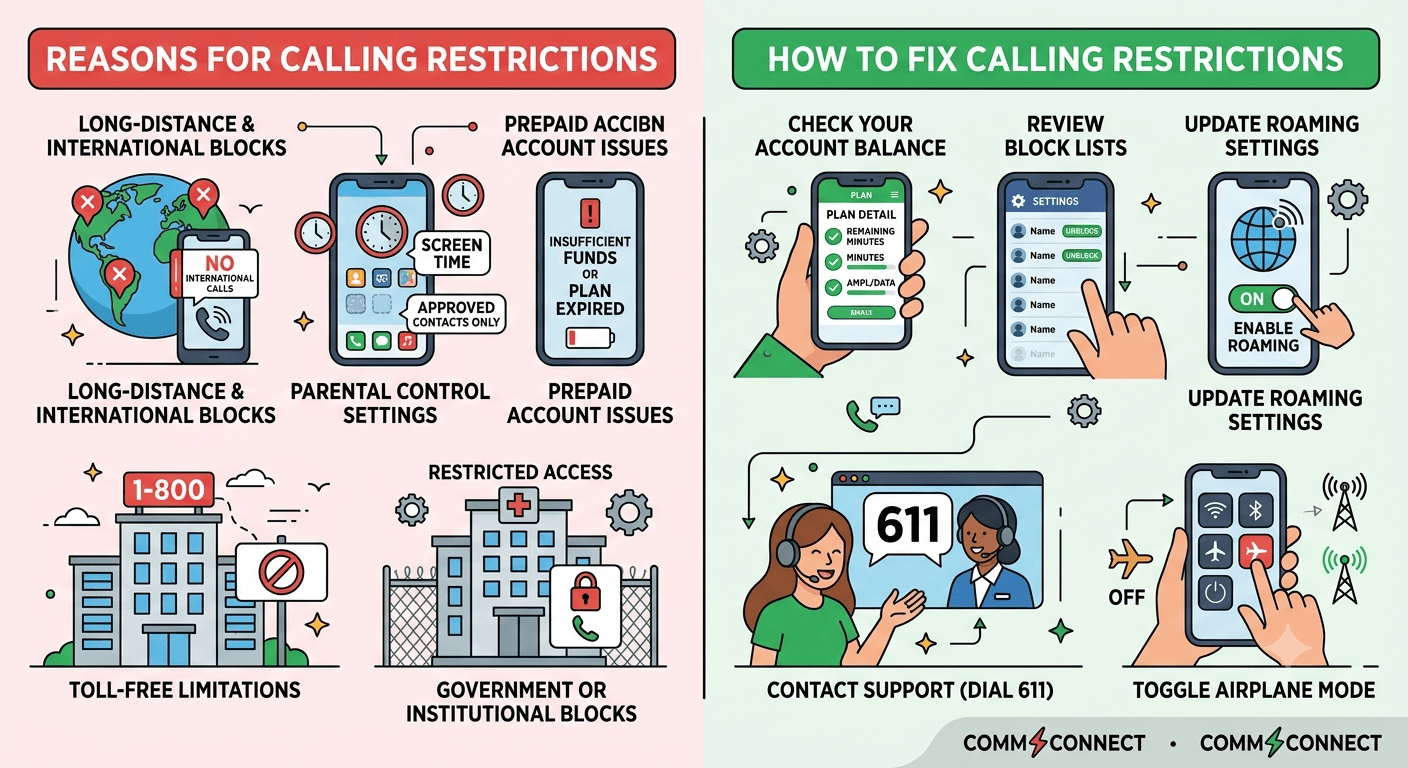
Long-Distance or International Blocks: Many prepaid accounts restrict calls that originate from outside a specific region to prevent high roaming fees.
-
Parental Control Settings: Features like Apple’s Screen Time or carrier-side parental controls can limit calls during certain hours or to only “approved” contacts.
-
Prepaid Account Issues: If the recipient is using a service like Straight Talk and has run out of minutes or their plan has expired, the network may apply a calling restriction.
-
Toll-Free Limitations: Some businesses restrict calls to their 1-800 numbers if the caller is dialing from a location where the company does not operate.
-
Government or Institutional Blocks: Phones in hospitals, prisons, or high-security government offices often have strictly enforced calling restrictions.
How to Fix Calling Restrictions?
Fixing this issue depends on whether you are the caller or the recipient. If you are the one receiving the message, your options are limited because the “restriction” is usually on the other end. However, if people are telling you that your number has calling restrictions, you can take active steps to clear the line.
-
Check Your Account Balance: Ensure your plan is active and that you have not exceeded your monthly minute or data allotment.
-
Review Block Lists: Go into your phone settings and ensure you haven’t accidentally blocked the caller or restricted calls from unknown numbers.
-
Update Roaming Settings: Ensure your phone is allowed to receive calls while outside your home network area.
-
Contact Support: Dial 611 from your mobile device to speak with your carrier. Ask them if there are any “Announcement 803” flags on your account.
-
Toggle Airplane Mode: Sometimes a simple network refresh can clear a “stuck” restriction by forcing the phone to re-register with the nearest cell tower.
What “Your Call Has Been Forwarded” Actually Means
While the primary issue is the number you have dialed has calling restrictions meaning, you might also encounter a secondary message stating that your call is being forwarded. This is a related phenomenon. Forwarding happens when the network realizes the primary device is unavailable and tries to send the call to a secondary destination, such as a voicemail box or another phone number. This often happens just before or just after a restriction message is played.
1. A Simple Explanation
Think of call forwarding as a digital detour. When the direct path to the recipient’s phone is blocked—perhaps because they are in a meeting or in a basement with poor reception—the network looks for an alternative path. If that alternative path is also restricted, you might hear the dreaded calling restrictions announcement. It is the system’s way of failing gracefully after trying all available options to connect your call.
2. A Look Behind the Scenes
Behind every call is a process called “Signaling.” This is a rapid-fire exchange of data between your phone, your carrier’s switch, and the recipient’s carrier. If the recipient’s switch sends back a “403 Forbidden” or “603 Decline” code, your carrier translates this into a voice message. The number you have dialed has calling restrictions meaning is the human-friendly translation of these technical codes. It informs you that the “handshake” between the two networks was unsuccessful due to a rule set by the receiving end.
3. “Forwarded to Voicemail” vs. “Forwarded to an Automatic Voice System”
There is a distinct difference between these two. If a call is forwarded to voicemail, the recipient is simply busy. However, if it is forwarded to an “automatic voice system” that mentions restrictions, it usually implies a more permanent barrier. This could mean the phone line has been suspended or the user has specifically configured their device to reject all calls that do not meet certain criteria, such as “Do Not Disturb” being active for everyone not in their favorites list.
5 Common Reasons Your Call Was Rerouted
When you realize the number you have dialed has calling restrictions meaning, it often follows a brief attempt by the network to reroute your call. These reroutes are common in modern telecommunications and serve various functional purposes.
Reason 1: The Person is on Another Call
If a user does not have call waiting enabled, their line might be marked as “restricted” while they are currently engaged in another conversation. Instead of a busy tone, some modern digital networks prefer to play a message stating that the number you have dialed has calling restrictions to prevent further attempts until the line is clear.
Reason 2: Their Phone is Turned Off or in Airplane Mode
When a phone is off, it is disconnected from the network. If the carrier doesn’t have a clear instruction on what to do with “offline” calls, it might default to a restriction announcement. This is particularly common with MVNOs (Mobile Virtual Network Operators) that lease lines from major carriers but have less sophisticated voicemail routing.
Reason 3: They Are in an Area with No Service
Similar to being turned off, a lack of signal prevents the “handshake” we discussed earlier. If the network can’t find the device within a specific timeframe, it may conclude that the connection is restricted. This is often a temporary state that resolves as soon as the recipient moves back into a high-coverage area.
Reason 4: They Manually Rejected Your Call
On many smartphones, hitting the “decline” button sends the caller straight to a specific announcement. While most go to voicemail, some privacy settings allow users to send rejected calls to a “restricted” message. This is a strong hint that the person is either busy or does not wish to speak at that moment.
Reason 5: “Do Not Disturb” or “Focus Mode” is Enabled
With the rise of iOS Focus modes and Android Digital Wellbeing, many people now have their phones set to automatically restrict incoming calls during work hours or sleep. If you are not on their “allow” list, the network will treat your call as restricted. This is one of the most common modern reasons for the number you have dialed has calling restrictions meaning appearing in your daily life.
Am I Blocked, or Is the Call Just Forwarded?
This is the question that haunts most callers. Distinguishing between a technical restriction and a personal block is difficult because carriers purposefully make the messages vague to protect the recipient’s privacy. However, there are subtle clues you can look for to determine if the number you have dialed has calling restrictions meaning applies to everyone or just you.
-
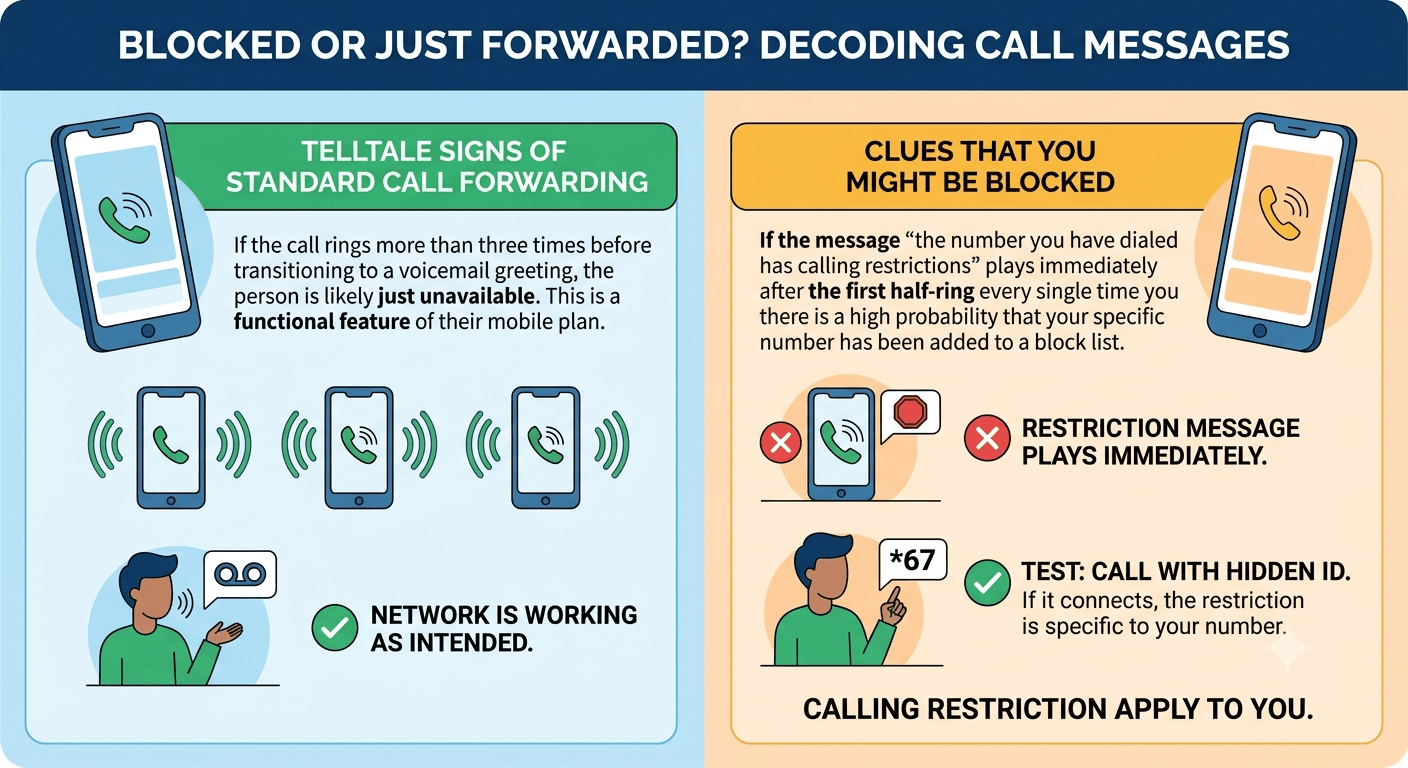
Telltale Signs of Standard Call Forwarding
Standard forwarding usually involves a few rings followed by a transition to a voicemail greeting. If the call rings more than three times before the message, it is likely that the person is just unavailable, and the network is working as intended. This is not a calling restriction in the negative sense, but rather a functional feature of their mobile plan.
-
Clues That You Might Be Blocked
If the message “the number you have dialed has calling restrictions” plays immediately after the first half-ring every single time you call, there is a high probability that your specific number has been added to a block list. To verify this, you can try calling from a different number or hiding your caller ID by dialing *67 before the number. If the call goes through when your ID is hidden, then the “restriction” is specific to your phone number.
-
Understanding the Types of Call Forwarding
To fully grasp why a call might feel restricted, you must understand the two primary types of forwarding that carriers use. These settings are often the hidden culprits behind the number you have dialed has calling restrictions meaning.
-
Unconditional Call Forwarding (UCF)
This setting sends every single incoming call to another number without the phone ever ringing. If the secondary number is out of service or also has limits, the caller will hear the restriction message. Users often turn this on accidentally in their settings and then wonder why they aren’t receiving any calls.
-
Conditional Call Forwarding (CCF)
This is a smarter version of forwarding. It only triggers if the line is busy, the call is unanswered, or the phone is unreachable. Most voicemail systems actually operate through CCF. If there is a glitch in the CCF logic between your carrier and theirs, the network might return the calling restrictions announcement instead of the voicemail box.
How to Activate Call Forwarding on Your Smartphone
If you want to manage how people reach you—perhaps to avoid them hearing that the number you have dialed has calling restrictions meaning—you should know how to set up your own forwarding. This puts the control back in your hands.
1. Setting Up Call Forwarding on an iPhone
On an iPhone, the process is integrated into the iOS settings menu. It is user-friendly and allows for quick toggling.
-
Open the “Settings” app.
-
Scroll down and tap on “Phone.”
-
Tap on “Call Forwarding” and toggle the switch to “On.”
-
Enter the number where you want calls to be sent.
2. Setting Up Call Forwarding on an Android Device
Android steps can vary slightly by manufacturer (Samsung, Pixel, etc.), but the general path remains the same across the operating system.
-
Open the “Phone” app.
-
Tap the three dots (Menu) in the top right corner.
-
Select “Settings” and then “Supplementary Services” or “Calling Accounts.”
-
Tap “Call Forwarding” and choose between “Always Forward,” “Forward when Busy,” or “Forward when Unreachable.”
-
Input your desired destination number and save.
3. Using Carrier Codes (Star Codes)
For those who prefer a more direct method, or for users with older “dumb” phones, star codes are a universal way to communicate with the carrier’s switch. These codes can often bypass software glitches that might be causing the number you have dialed has calling restrictions meaning for your callers.
-
Activate Forwarding: Dial *72 followed by the 10-digit phone number.
-
Deactivate Forwarding: Dial *73 and wait for the confirmation tone.
-
Check Status: Some carriers allow you to dial *#21# to see if any restrictions or forwarding rules are currently active on your line.
Troubleshooting Common Call Forwarding Issues
Sometimes, the system doesn’t work as intended. If you are experiencing issues where callers are constantly hit with the number you have dialed has calling restrictions meaning, you need to dive deeper into troubleshooting.
-
Issue: Calls Go Straight to Voicemail Unexpectedly
This is often caused by a conflict between your phone’s software and the carrier’s network settings. If you have “Silence Unknown Callers” turned on in your iPhone settings, anyone not in your contacts will be restricted. To fix this, go to Settings > Phone > Silence Unknown Callers and turn it off. This is a very common reason for the number you have dialed has calling restrictions meaning to be triggered for legitimate callers.
-
Issue: Call Forwarding Is Not Working at All
If you try to set up forwarding and receive an “Unexpected Response from Network” error, your account might have a “Call Barring” feature active. Call barring is a high-level restriction that prevents any changes to call routing. You will need to call your service provider’s technical support team to have this feature disabled before you can manage your own forwarding rules.
How to Deactivate Call Forwarding
To ensure no one hears the calling restrictions message by mistake, it is good practice to periodically clear all forwarding rules. On most networks, dialing ##002# and pressing the call button will reset all conditional and unconditional forwarding back to the default state (usually your carrier’s voicemail). This is a “master reset” for call routing and can solve many phantom restriction issues.
When to Contact Your Service Provider
If you have cleared your settings, checked your balance, and people still hear the number you have dialed has calling restrictions meaning, the problem is likely at the carrier’s switchboard. Telecommunications infrastructure is vast, and occasionally a routing table becomes corrupted. When you call support, specifically mention that callers are receiving “Announcement 803.” This gives the technician a specific error code to look for in their diagnostic logs.
Read More: How to Prevent VoIP Hacking? Types and Strategies
Conclusion
Navigating the world of mobile network errors can feel like decoding a secret language. The number you have dialed has calling restrictions meaning is not an end-point, but a starting point for troubleshooting. Whether it is a result of a prepaid plan expiring, a protective “Do Not Disturb” setting, or a technical glitch in the carrier’s routing system, there is almost always a logical explanation and a viable solution. By understanding how call forwarding and restrictions work in tandem, you can manage your digital presence more effectively and ensure that your lines of communication remain open when it matters most. Final thought: in an era of automated filters, sometimes the best way to bypass a restriction is to simply send a quick text message to verify the recipient’s status.
FAQs
-
What does it mean when you call a number and it says it has calling restrictions?
The number you have dialed has calling restrictions meaning is that the recipient’s service provider has blocked the call due to account settings, parental controls, or network limitations. This message indicates the call cannot be completed as dialed because of a rule set on the receiving end.
-
How do I fix calling restrictions on my phone?
To fix calling restrictions, check your account balance, disable “Do Not Disturb” mode, and ensure your call forwarding settings are correct. If the problem persists, dial ##002# to reset all call routing or contact your carrier’s support team for help with “Announcement 803.”
-
Why when I call someone it says call is restricted?
This happens when the recipient has blocked your number, has an inactive prepaid plan, or is in a location where their carrier does not allow incoming calls. It can also occur if they have enabled “Silence Unknown Callers” or other privacy filters on their smartphone.
-
What’s the difference between a restricted call and a blocked call?
A restricted call usually refers to a network-side limitation or account issue, while a blocked call is typically a personal choice made by the recipient using their phone’s settings. Restrictions are often technical or administrative, whereas blocks are interpersonal.
-
Can I bypass a calling restriction?
The only reliable way to bypass a calling restriction is to have the recipient change their settings or to try calling from a different, non-restricted number. If the restriction is due to an expired plan, the recipient must add funds to their account before the line becomes active again.
-
Does “calling restrictions” mean I’m blocked on iPhone?
Not necessarily, though it is a possibility; it could also mean the person has a “Focus” mode active or their service has lapsed. If you hear the message immediately every time, you might be blocked, but if it happens intermittently, it is likely a service or setting issue.
-
What is Announcement 803?
Announcement 803 is a carrier-specific voice message that tells the caller the number has calling restrictions. It is used by network operators to indicate that the call was intercepted by a pre-configured rule in the routing database.
-
Why does Straight Talk say “the number you have dialed has calling restrictions”?
For Straight Talk users, this usually means the prepaid service plan has expired or the user has reached their limit for the month. It is a very common message on prepaid networks when the account requires a refill to maintain active service.