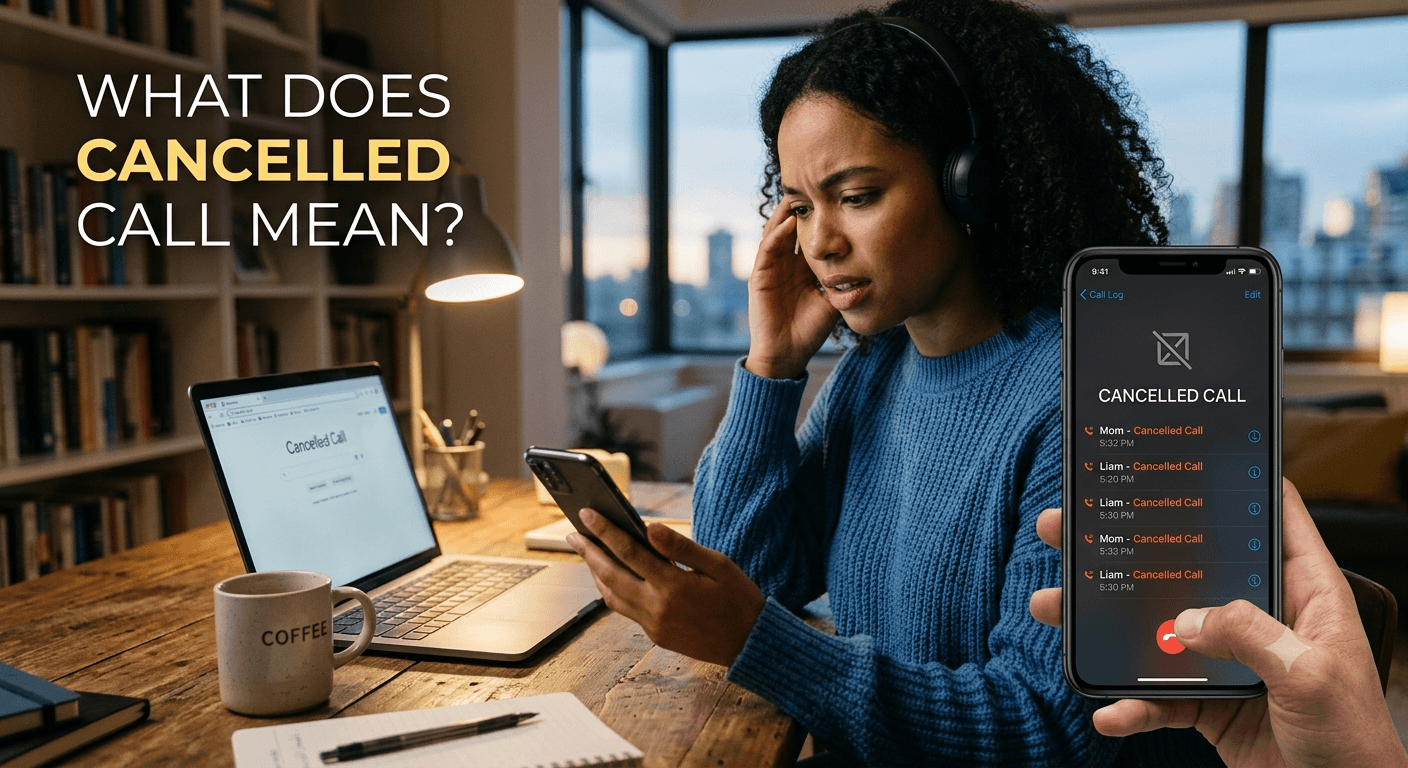
A cancelled call means a phone call was ended before it was successfully connected or answered. On iPhone and Android, a cancelled call usually appears when the caller hangs up before the other person answers, cancels an outgoing call while it is ringing, or the connection fails before the call is established. It does not necessarily mean the recipient rejected the call.
What does cancelled call mean? At its core, a cancelled call refers to an outgoing communication attempt that the caller terminates before the recipient picks up or before the system connects the call. When you see this label in your call history, it signifies that you manually pressed the end button or the call was cut off by the system before a formal connection was established. This status is common when users realize they dialed the wrong number or accidentally initiated a pocket dial. Understanding what does cancelled call mean ensures you can distinguish between your own actions and potential technical network failures or recipient rejections.
Understanding Cancelled Call
A cancelled call is a specific status in mobile communication that indicates an intentional or accidental termination of a call by the person who initiated it. This differs significantly from other call statuses because it points directly to the caller’s action rather than a problem with the service provider or the recipient’s availability. When you look at your call history, seeing this label typically means the call process was stopped during the dialing or ringing phase.
In many instances, people wonder what does cancelled call mean when they see it repeatedly in their logs after a brief network fluctuation. It serves as a digital receipt of an attempt that never reached completion. From a functional perspective, the signal to establish the call was sent to the network, but a follow-up signal to terminate the request was sent almost immediately afterward.
This status is also a protective measure for your privacy. If you accidentally tap a contact’s name and quickly end the call, the log helps you track that the attempt was made. Understanding the cancelled call meaning helps in managing professional and personal relationships, as it clarifies why a call didn’t go through without needing to guess if the other person was busy or if your phone was malfunctioning.
Cancelled Call vs. Failed Call vs. Declined Call: What’s the Difference?
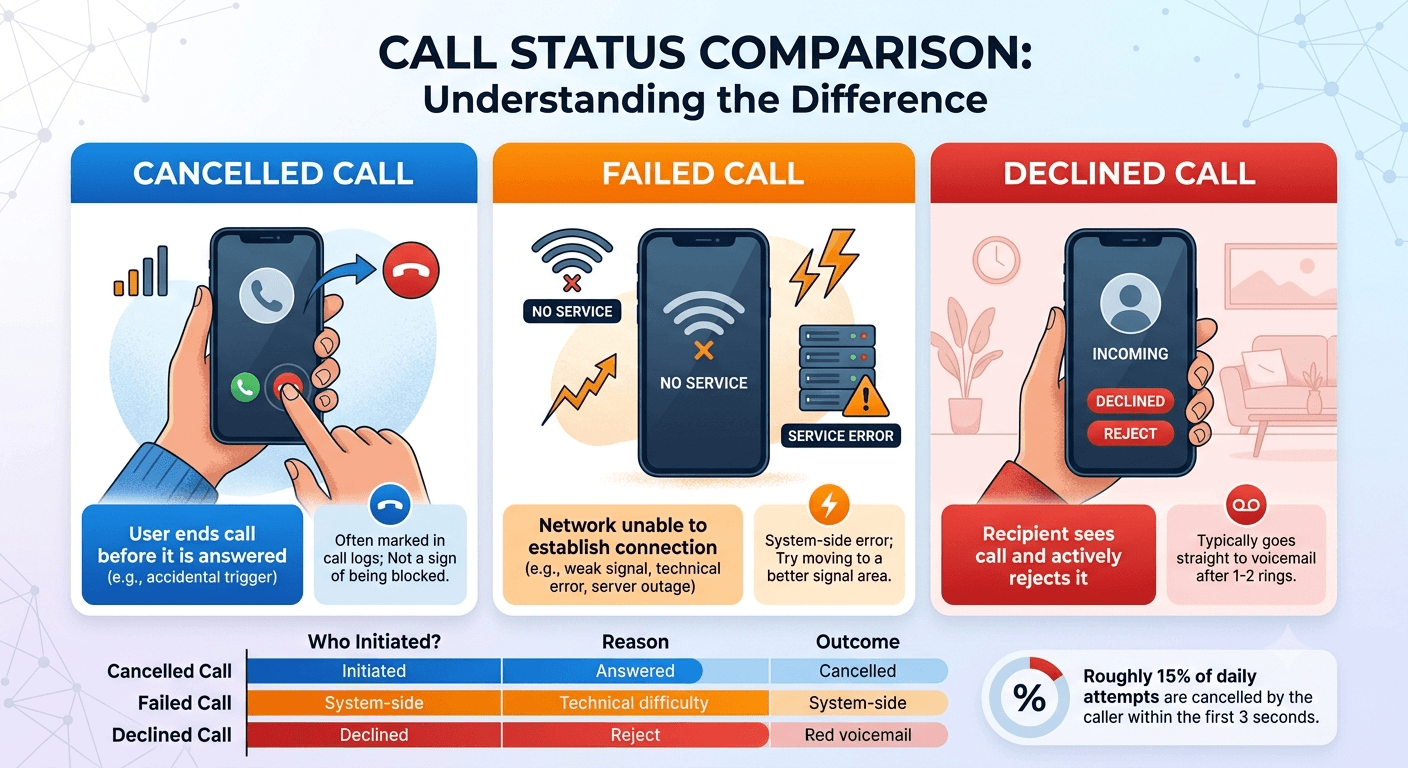
Differentiating between these three statuses is vital for troubleshooting connectivity. A cancelled call happens when the caller stops the call before it is answered. In contrast, a failed call occurs when the network cannot establish a connection at all, often due to poor signal, technical errors, or server outages. While a cancelled call is a user-initiated action, a failed call is a system-side error that prevents the communication from reaching the destination.
A declined call is another category entirely. This happens when the recipient sees the incoming call and actively chooses to press the reject button. From the caller’s perspective, a declined call often goes straight to voicemail after one or two rings. However, if you are the one who stops the call before it rings or while it is ringing, your phone will log it as cancelled. This distinction is crucial because people often worry: does cancelled call mean blocked? Generally, it does not; it simply reflects your decision to end the attempt.
A study by telecommunications researchers indicates that roughly 15% of all daily mobile call attempts are terminated by the caller within the first three seconds, often categorized as “accidental triggers.” This highlight why the cancelled status is so prevalent in modern smartphone logs. Knowing the cancelled call meaning compared to failure helps you decide whether you need to move to a better signal area or just wait to call back later.
Cancelled Call on iPhone: What Does It Mean?
Apple’s iOS uses a very specific interface to display your call history. If you see a name or number in red within the Recents tab, it could be a missed call or a cancelled call. When you tap the “i” icon next to the entry, the details will specify what is a cancelled call on iphone. Usually, this means you tapped the red end button while the screen still said calling or ringing.
For iPhone users, the cancelled call iphone notification is helpful for identifying pocket dials. If your phone is in your pocket and it inadvertently dials a contact, you might pull it out and quickly hit end. iOS records this as cancelled. This is different from a call that goes to the carrier but gets dropped; those might show up as call failed.
Users often ask what does cancelled call mean on iphone during FaceTime attempts. If you start a FaceTime call and hang up before the other person joins, the app will label this as a cancelled call. It is a very literal description of the action taken. The iPhone is designed to be highly transparent about call durations and terminations, making it easy for users to track their outgoing communication patterns.
Cancelled Call on Android: What Does It Mean?
On Android devices, the terminology remains largely the same, though the visual presentation depends on the manufacturer’s skin, such as Samsung’s One UI or Google’s Pixel UI. A canceled call meaning on Android is consistent: the caller ended the session before a bridge was formed between the two devices. In the Android phone app, you might see a small icon with a diagonal line or a specific “Canceled” text label next to the timestamp.
Android systems are often more granular with their logging. Some versions might show you exactly how many seconds the call lasted before it was cancelled. If you are wondering what does canceled call mean when your phone is in your pocket, it likely signifies a proximity sensor issue where the phone didn’t lock, leading to an accidental dial and a quick manual or system-based termination.
Regardless of the operating system, the logic remains identical across the board. Android users may experience these logs more frequently if they use third-party dialers or VOIP applications that have different protocols for ending calls. However, the core canceled call meaning stays focused on the caller’s intervention in the dialing process.
The Real-Life Explanation: What You See on the Screen
When you interact with your phone, the visual cues for a cancelled call are meant to be intuitive. During the call process, if you see the “End Call” button and press it, you have effectively cancelled the attempt. The screen will immediately return to your contact list or home screen, and the entry will be saved in your history for future reference. This visual feedback confirms that you have stopped the outbound signal.
1. What “Cancelled Call” Looks Like in Your Call Log?
In your call log, a cancelled call typically appears at the very top of the list if it was your most recent action. On most devices, it is color-coded. For example, missed calls are often red, but cancelled calls might be grey or black with a specific subtext. The entry will show the time of the attempt and the contact’s name, but the duration will be zero seconds. This absence of duration is the primary indicator that the call never truly started.
2. User Experience on Different Devices
The experience varies slightly if you are using a smartwatch or a Bluetooth headset. If you trigger a call from your Apple Watch and immediately cancel it using the watch face, the connected iPhone will still log it as a cancelled call. This multi-device synchronization ensures that your history is accurate regardless of which piece of hardware you used to initiate the communication.
3. How Quickly do You Need to Cancel for It to Register?
The timing of a cancellation is a major factor in what the recipient experiences. If you cancel within one second of pressing dial, the network might not even have time to send the signal to the other person’s phone. However, after about two or three seconds, the signal usually reaches the recipient’s carrier. In this case, even if you cancel, the other person might see a brief flash of an incoming call or a missed call notification.
4. What the Recipient Sees (or Doesn’t See)
The recipient’s view depends entirely on the speed of your network and how fast you hit the end button. If you are fast enough, they see nothing. If there is a slight delay, their phone might vibrate once and then display a missed call from you. They will not see the word cancelled; that label is exclusive to the caller’s phone. From their perspective, it looks exactly like a call that they simply didn’t reach in time.
5. Myths vs. Facts: Cancelled Calls
There are many misconceptions about what happens when a call is stopped prematurely. Many people believe that certain tricks can hide the fact that they tried to call someone.
-
Myth #1: “Turning on airplane mode after cancelling erases the call attempt.”
This is a common myth that is technically incorrect. Once you have pressed the dial button, the request is sent to your carrier. Turning on airplane mode after the fact might stop your phone from receiving a confirmation, but it does not pull back the signal that has already traveled through the cell tower to the recipient’s network.
-
Myth #2: “The other person gets a notification telling them I cancelled the call.”
Recipients never receive a specific notification stating the caller cancelled. Their phone simply treats it as a call that stopped ringing. The only way they know you cancelled is by seeing a missed call notification and realizing their phone didn’t ring long enough for them to answer it.
Does the Other Person Know I Cancelled the Call?
This is perhaps the most common question regarding this topic. The short answer is: they know you called, but they don’t know why it stopped. If the call lasted long enough to trigger their device, they will see a missed call. If you are asking if you cancel a call does it go through, the answer is usually yes, the notification “goes through” even if the audio connection does not.
1. Before Ringing vs. During Ringing
If you terminate the call during the “Calling…” phase, there is a high probability the recipient will never know. During this phase, your phone is communicating with your provider, but the provider hasn’t yet linked with the recipient’s phone. However, once your phone says “Ringing,” the recipient’s device is already being alerted. Cancelling at this stage will almost certainly leave a missed call alert on their screen.
2. What Appears on the Recipient’s Phone?
On the recipient’s phone, it will appear as a standard missed call. If they were looking at their screen at that exact moment, they might see your name pop up for a split second before it disappears. This can sometimes lead to confusion, as they might think it was a “dropped call” or a “prank call” if it happens repeatedly.
The Technical Explanation: What Happens Behind the Scenes
The technical journey of a call is complex, involving several handshakes between different servers and towers. When you press call, your phone sends a Session Initiation Protocol (SIP) invite to your carrier. Understanding what does cancelled call mean requires looking at how these signals are managed by the infrastructure.
1. Call Initiation
The moment you tap a contact, your phone encodes the request and sends it via radio waves to the nearest cell tower. This request includes your identity and the destination number. The network begins looking for the best path to reach the recipient.
2. Connection Setup
The carrier’s switching center identifies the recipient’s location. It then sends a signal to the recipient’s carrier. This process takes anywhere from milliseconds to a few seconds. If the recipient is on a different network, an interconnecting gateway is used to bridge the two providers.
3. Cancellation Signal
When you press the end button, your phone sends a “CANCEL” or “BYE” request to the network. This tells the carrier to stop looking for the recipient or to stop the ringing process immediately. If this signal arrives before the recipient’s phone is triggered, the call is successfully hidden.
4. Network Response
The network acknowledges the cancellation and releases the reserved bandwidth. It sends a confirmation back to your phone, which then updates your local database to show the call as cancelled. This is the moment the text appears in your call log.
5. Carrier Logging
Carriers keep records of these attempts for billing and troubleshooting purposes. Even if a call is cancelled, it exists in the carrier’s backend logs. However, since no connection was established, you are typically not charged for these attempts unless you are using a very specific type of international calling service.
Common Causes of Cancelled Calls
While most cancelled calls are intentional actions by the user, sometimes technical glitches can cause a call to appear as cancelled even when you didn’t mean to end it. Understanding these causes helps in diagnosing persistent phone issues.
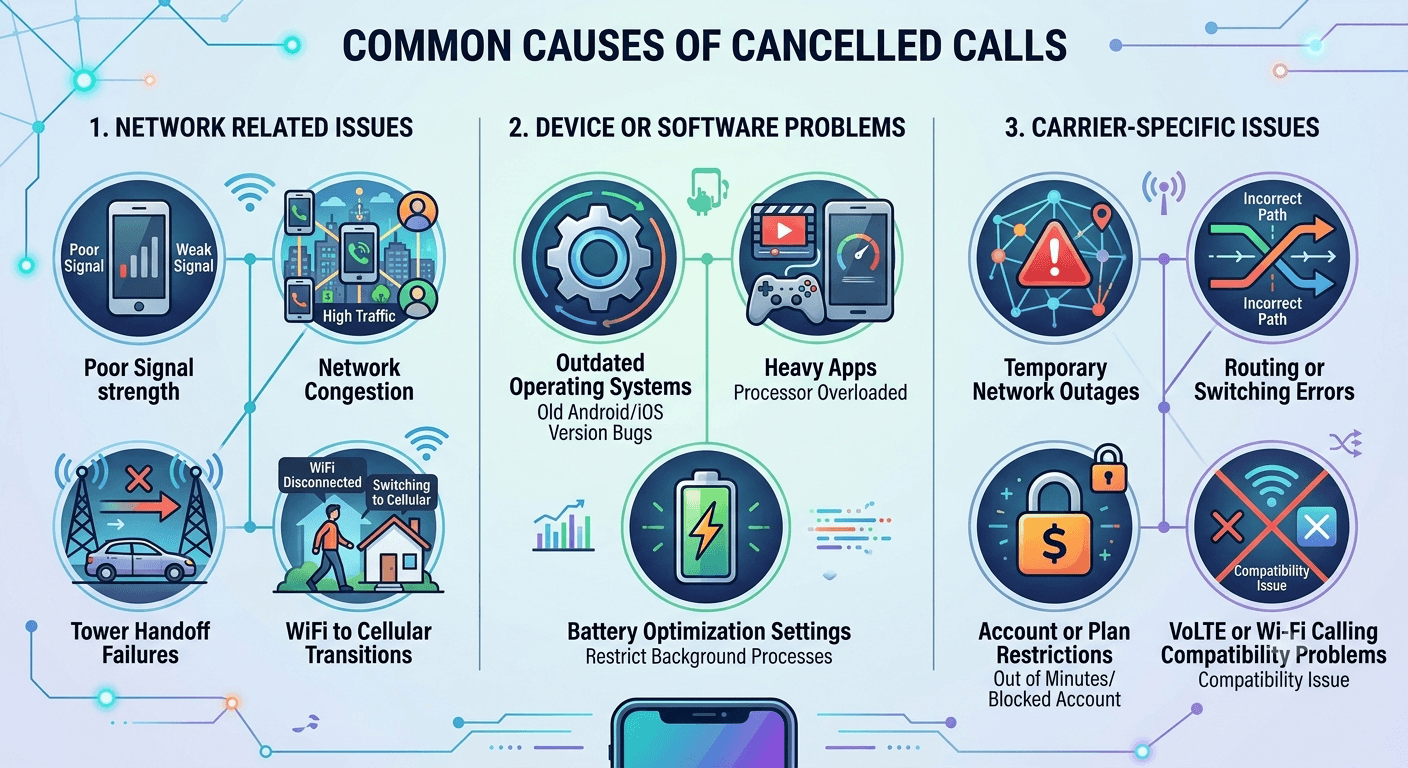
1. Network Related Issues
Network instability is a leading cause of accidental call terminations. If the signal is too weak to maintain the initial handshake, the device might automatically categorize the attempt as cancelled or failed.
-
Poor Signal strength
If you are in a basement or a remote area, your phone might struggle to send the initial call request. If the signal drops significantly right after you hit dial, the system might terminate the request, leading to a cancelled call entry in your logs.
-
Network Congestion
During major events or in highly populated areas, cell towers can become overwhelmed. When the network is congested, it may reject new call requests. Your phone might interpret this rejection as a reason to cancel the outgoing attempt.
-
Tower Handoff Failures
If you are moving in a fast vehicle, your phone must switch from one tower to another. If this handoff fails at the exact moment you start a call, the session might be cancelled by the operating system to prevent a hang-up.
-
WiFi to Cellular Transitions
Many modern phones use Wi-Fi calling. If you walk out of your house while a call is being initiated, the switch from Wi-Fi to cellular can sometimes cause the phone to drop the attempt and log it as cancelled.
2. Device or Software Problems
Sometimes the fault lies within the hardware or the software running on the device. Background processes can interfere with the dialer app’s ability to complete a call.
-
Outdated Operating Systems
Bugs in older versions of iOS or Android can cause the dialer to crash or behave unexpectedly. If the dialer crashes during the initiation phase, it may default to a cancelled status in the history.
-
Heavy Apps
If your phone’s processor is being heavily used by a high-end game or a video editing app, it might struggle to allocate resources to the phone app. This lag can lead to the call being terminated prematurely.
-
Battery Optimization Settings
Some aggressive battery-saving modes restrict background data and signal processing. If these settings are too strict, they might kill the call process before it can fully connect with the carrier.
3. Carrier-Specific Issues
Your service provider plays a massive role in how calls are handled. Sometimes, the issue is entirely on their end.
-
Temporary Network Outages
Carriers occasionally experience localized outages. During these times, any attempt to call might be immediately bounced back, showing up as a cancelled or failed call on your device.
-
Routing or Switching Errors
If the carrier’s internal routing table is incorrect, the call might be sent to a non-existent path. When the system realizes the error, it terminates the session.
-
Account or Plan Restrictions
If you have run out of minutes or if your account has been flagged for a payment issue, the carrier may block outgoing calls. On some devices, this block manifests as an immediately cancelled call.
-
VoLTE or Wi-Fi Calling Compatibility Problems
Voice over LTE (VoLTE) is the standard for high-quality calls. If there is a compatibility issue between your phone and the tower’s VoLTE settings, the call might fail to initialize and get logged as cancelled.
How to Prevent Cancelled Calls Effectively?
If you find that your calls are being cancelled without your intervention, there are several steps you can take to rectify the situation. Most of these involve refreshing your connection to the network or cleaning up your device’s software.
1. Check and Improve Network Connection
The first step is to ensure you have a solid signal. Look at the bars on the top of your screen. If they are low, try moving near a window or going outside. According to data from the FCC, signal interference from building materials like concrete and metal is one of the most frequent causes of call termination.
2. Update Your Phone
Ensure that your device is running the latest software. Manufacturers frequently release patches that fix bugs in the dialer and improve network compatibility. Check your settings menu for any pending system updates or carrier settings updates.
3. Reset Network Settings
If you are experiencing a persistent cancelled call meaning you didn’t intend, resetting your network settings can help. This will wipe your Wi-Fi passwords and Bluetooth pairings but will also refresh your cellular connection parameters, which often fixes routing bugs.
4. Verify Your Account Status
Check your carrier’s app or website to ensure your account is in good standing. Make sure you haven’t exceeded any limits and that your SIM card is active. Sometimes, simply toggling Airplane Mode on and off can re-authenticate your account with the tower.
5. Contact Your Carrier for Support
If the problem persists across different locations, your SIM card might be damaged, or there could be a specific issue with your line. Contacting support can provide clarity on whether the cancelled calls are due to an infrastructure problem in your area.
Real-Life Examples of Cancelled Call
To better understand what does cancelled call mean in practical terms, let’s look at some common scenarios that people face daily.
Example 1: Professional Avoids Embarrassing Pocket Dial with Quick Cancel
A marketing manager is in a high-stakes meeting and feels his phone vibrate in his pocket. He realizes he accidentally hit the “call” button for his CEO while shifting in his chair. He quickly pulls the phone out and taps the end button within two seconds. In his log, it shows as a cancelled call. Because he was fast, the CEO’s phone never rang, saving him from an awkward explanation.
Example 2: Remote Worker Fixes Software-Related Call Problems
A remote consultant notices that every time she tries to dial a client using her laptop’s integrated phone app, the call status immediately changes to cancelled. After researching the cancelled call meaning, she realizes her VPN is blocking the VOIP ports. Once she adjusts her VPN settings, the calls connect perfectly, and the cancelled entries stop appearing in her history.
Example 3: Business Owner Prevents Customer Service Call Failures
A small boutique owner uses a digital phone system to manage customer inquiries. She notices several cancelled calls in her dashboard. Upon further investigation, she finds that her Wi-Fi router was resetting every hour, causing the calls to drop during the initiation phase. By upgrading her router, she ensures her customers can reach her without the system automatically cancelling the attempts.
Example 4: Entrepreneur Discovers CRM Integration Conflicts
An entrepreneur integrates his iPhone with a CRM system to track sales calls. He notices that when he dials through the CRM, the phone logs show a cancelled call followed by a connected call. He learns that the CRM “pre-dials” to check the line before bridging the call to his phone. This technical quirk explains the cancelled call iphone entries and allows him to maintain accurate records.
Example 5: Call Center Agent Adjusts Availability Settings for Success
A call center agent uses a power dialer that occasionally lists calls as cancelled. He realizes that if the system tries to dial a number that is no longer in service or is busy, the dialer might show it as cancelled to save time. By adjusting the “time-to-answer” settings in his software, he reduces these entries and improves his overall connection rate.
Read More: VoIP Security Best Practices : Risks and Solutions
Conclusion
Understanding what does cancelled call mean is essential for anyone who relies on mobile communication. It is a status that primarily indicates a caller’s decision to end an attempt before it matures into a full conversation. While it usually happens due to accidental dials or quick changes of mind, it can occasionally signal underlying network or device issues. By recognizing the difference between a cancelled, failed, and declined call, you can better manage your digital interactions and troubleshoot any connectivity problems that arise. Whether you are using an iPhone or an Android, the cancelled call label is a helpful tool for maintaining an accurate and transparent history of your outbound communication efforts. Keeping your software updated and your network signal strong will ensure that the only cancelled calls you see are the ones you intended to make.
FAQs
-
How do you tell if someone cancelled your call?
You generally cannot tell for certain if someone cancelled a call specifically, but you will see a missed call notification that appears briefly or doesn’t ring for long. If the call ends after only half a ring, it is a strong indicator that the caller hit the end button manually. There is no special text on the recipient’s end that says “cancelled.”
-
How do calls automatically cancel?
Calls can automatically cancel due to sudden loss of network signal, interference from other electronic devices, or software glitches within the phone’s operating system. If the phone’s proximity sensor fails during a pocket dial, the friction against the screen might also trigger the end button automatically.
-
Does an outgoing call mean you’re blocked?
An outgoing call marked as cancelled does not mean you are blocked. If you were blocked, the call would usually go straight to voicemail or play a specific carrier message every time you dial. A cancelled status is strictly about the call being ended by the caller or a technical failure before connection.
-
Does “cancelled call” on iPhone mean the same thing as on Android?
Yes, the technical definition of what does cancelled call mean is identical on both platforms. It signifies that the call session was terminated by the initiator or the device before the recipient answered. The only difference is how the status is visually labeled in the respective call history interfaces.
-
Why do automated dialing systems show cancelled calls?
Automated systems often show cancelled calls when they detect a busy signal, a disconnected line, or if the system’s “timeout” period is reached before a person answers. It is a way for the software to log that the attempt was made but was not successful due to the system stopping the dial.
-
Why does my call get cancelled immediately when using a power dialer or predictive dialer?
This often happens because the dialer detects an “answering machine” or “no-service” tone and terminates the call to move to the next lead. It can also occur if there is a conflict between your VOIP software and your local network’s firewall settings, which triggers an immediate cancellation.
-
Does cancelled call mean they declined?
No, cancelled call refers to the person making the call hanging up before it was answered. If the person receiving the call rejected it, the caller would usually see the call go to voicemail, and the log might show the call duration as a few seconds or mark it as “declined” depending on the app.
-
Does cancelled call mean they see it?
If the call was cancelled very quickly (within a second), they might not see anything at all. However, if it rang even once, they will likely see a missed call notification on their screen. They will not see the word “cancelled”; they will only see that they have a missed call from you.
-
Does canceled call mean hang up?
In simple terms, yes. A canceled call is essentially a hang-up that happens before the conversation actually starts. It means the caller decided to stop the call while the phone was still in the process of trying to reach the other person.