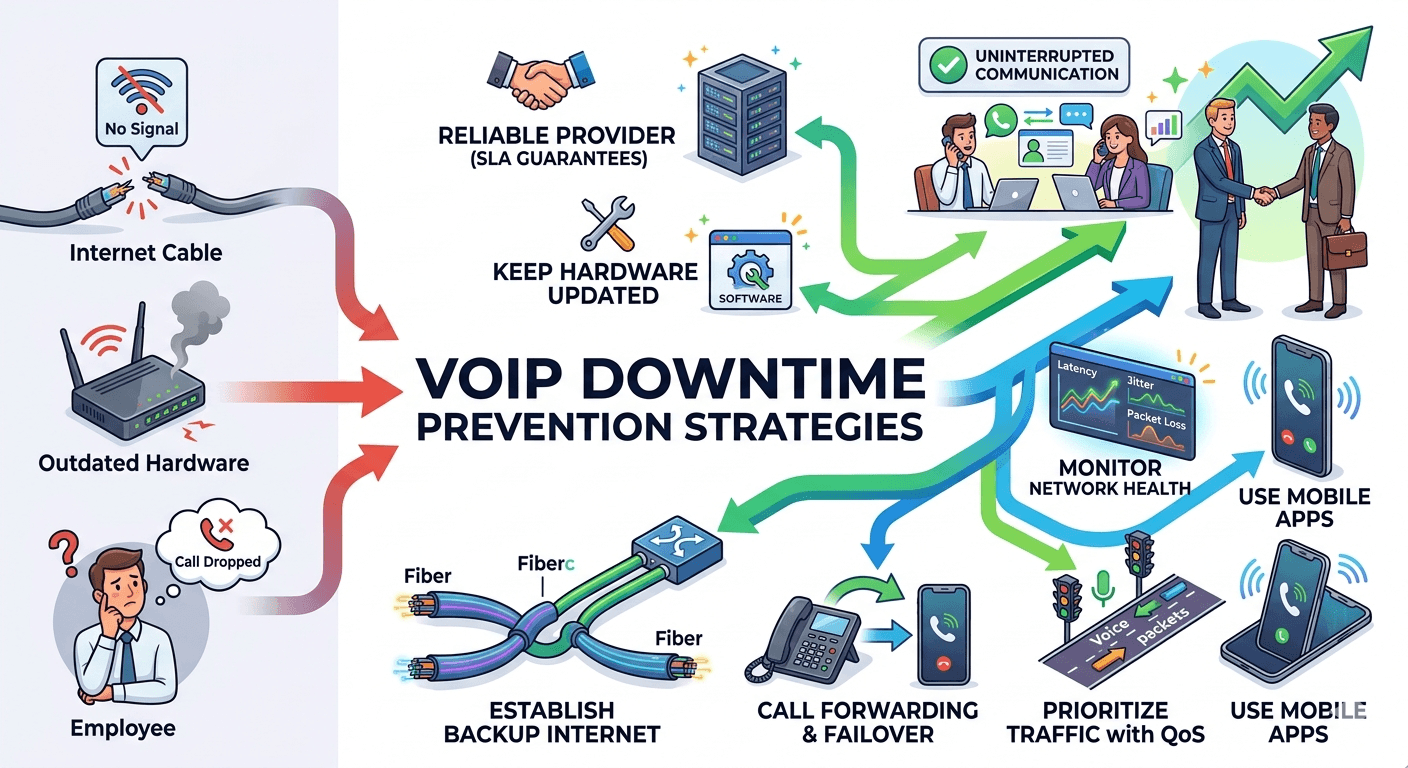
VoIP Downtime refers to the period when a voice over internet protocol system is unavailable, preventing users from making or receiving calls. To effectively reduce this disruption, businesses must implement a multi-layered strategy involving network redundancy, Quality of Service settings, and proactive hardware maintenance. Ensuring high availability requires a robust internet connection with failover capabilities and a partnership with a reliable service provider that offers a high uptime guarantee. By addressing common causes like insufficient bandwidth and hardware failures, organizations can maintain seamless communication and avoid the significant financial and reputational costs associated with unexpected outages.
Why VoIP Downtime Matters
In the modern business landscape, communication is the lifeblood of operations. When a company experiences problems like how to reduce VoIP Downtime, the consequences extend far beyond a few missed calls. For businesses that rely on their voice over internet protocol system for sales, customer support, and internal collaboration, even a few minutes of disconnection can lead to lost revenue and frustrated clients. In an era where customers expect immediate responses, a “dead line” can drive them straight into the arms of a competitor.
The financial impact of voice over ip service interruptions is substantial.
According to a research report by Gartner, the average cost of network downtime is estimated at $5,600 per minute, though this can vary significantly depending on the size and nature of the business.
VoIP downtime affects employee morale and operational efficiency. When the telephony voip system goes down, staff members are often left unable to complete their tasks, leading to a backlog of work and increased stress. This is particularly critical for businesses using voip in computer networks to manage complex workflows or remote teams. Maintaining a reliable voice ip service is not just a technical requirement; it is a fundamental component of business continuity and long-term growth.
7 Step To Reduce VoIP Downtime

For a small or mid-sized enterprise, an hour of VoIP Downtime could result in thousands of dollars in lost productivity and missed opportunities. Beyond the immediate financial loss, frequent outages damage a company’s reputation, making them appear unprofessional or unreliable to their target audience. Here are the seven steps to reduce VoIP downtime.
Step 1: Choose a Reliable VoIP Service Provider
The most critical factor in preventing VoIP Downtime is the partner you choose for your telecommunication voip needs. Not all providers are equal, and the infrastructure they use can vary significantly in terms of reliability. When evaluating a provider, look for those that offer an interconnected voip network with multiple data centers across different geographic regions. This redundancy ensures that if one data center fails due to a local issue, your traffic can be automatically rerouted to another, keeping your service active.
A reputable provider should offer a Service Level Agreement (SLA) that guarantees at least 99.99% uptime. This “four nines” standard means the system should experience no more than 52 minutes of downtime per year. When researching what is a voip provider’s track record, look for transparency regarding their past performance and their protocols for handling system-wide issues. A provider that invests in high-end voip technology and maintains a proactive approach to server maintenance is much more likely to provide a stable experience.
Additionally, consider the provider’s customer support. In the event of a voice over internet failure, you need a team that is available 24/7 to help you troubleshoot. A provider that offers real-time monitoring tools allows you to see the health of your system and provides alerts before a minor issue turns into significant VoIP Downtime. Choosing a provider that understands the nuances of voip stands for voice over internet protocol and its technical requirements will save you countless hours of frustration.
Step 2: Keep Hardware and Software Updated
Many instances of VoIP Downtime are caused by outdated hardware or software bugs that could have been easily fixed. Your IP phones, routers, and switches are the physical foundation of your communication system. Over time, firmware becomes obsolete, and hardware can develop faults that lead to dropped calls or total system failures. Regularly checking for updates ensures that your equipment is running the latest security patches and performance improvements.
Firmware Updates: Set a schedule to check for firmware updates for all IP phones and networking gear at least once a month.
Software Patches: Ensure that your VoIP application or softphone software is updated on all user devices.
Hardware Lifecycle: Replace aging routers and switches before they reach their end-of-life to prevent sudden hardware failures.
Security Audits: Regular updates help protect against cyberattacks that could lead to intentional VoIP Downtime.
By maintaining a modern infrastructure, you reduce the risk of voip call quality issues that often precede a total system crash. Older hardware may struggle to handle the voip network requirements of modern high-definition voice packets, leading to jitter and latency. Keeping your voip system requirements up to date ensures that the digital data travels smoothly across your network, providing a clear and reliable connection for every user.
Step 3: Establish a Backup Internet Connection
Since voip stands for voice over internet protocol, your phone system is only as reliable as your internet connection. If your primary Internet Service Provider (ISP) experiences an outage, your entire voice over ip service goes down with it. To prevent this, every business should establish a secondary, backup internet connection from a different provider. This creates a failover system that keeps your phones ringing even when the main line is cut.
Ideally, the backup connection should use a different technology than the primary one. For example, if your main connection is fiber-optic, consider a high-speed cable or a 5G wireless backup. This ensures that a physical issue, such as a construction crew accidentally cutting a fiber cable, doesn’t take out both connections simultaneously. This strategy is essential for meeting the strict voip network requirements of modern businesses and significantly reducing the window of potential VoIP Downtime.
Implementing an SD-WAN (Software-Defined Wide Area Network) solution can further enhance this setup. An SD-WAN can monitor the health of both connections in real-time and automatically switch voip calls to the backup line if it detects packet loss or high latency on the primary line. This seamless transition is often so fast that the users on the call don’t even notice a change, effectively eliminating downtime caused by ISP issues.
Step 4: Implement Call Forwarding and Failover
Failover is a crucial mechanism for maintaining business continuity during unexpected outages. Even with a backup internet connection, there may be times when the VoIP server itself or the local network has an issue. Implementing automatic call forwarding allows you to redirect incoming voip calls to a different location, such as a secondary office or a mobile phone, the moment the primary system becomes unreachable.
Most modern telephony voip platforms allow you to configure these settings in the admin portal. You can set up “find me/follow me” features or hunt groups that ensure a caller always reaches a live person. For example, if the office network experiences problems like how to reduce VoIP Downtime, the system can automatically route calls to an employee’s mobile app. This ensures that your customer service remains uninterrupted and that you don’t lose potential sales due to technical glitches.
Research shows that businesses with a documented and automated failover plan recover from outages 4x faster than those that rely on manual intervention.
This is because an automated system removes the “human element” and the delay of realizing there is a problem. By pre-configuring your voice over internet settings to handle failures, you create a resilient communication environment that protects your brand’s reputation and ensures that your voice ip service is always available to those who need it.
Step 5: Monitor and Test Network Health
You cannot manage what you do not measure. Proactive monitoring of your network health is one of the best ways to prevent VoIP Downtime before it starts. By using network monitoring tools, you can keep an eye on key metrics like latency, jitter, and packet loss. These factors are the leading causes of voip call quality issues and often indicate that the network is under strain. If these metrics begin to degrade, it is a sign that a larger outage may be imminent.
Latency: The delay between the sender and receiver. High latency makes conversations feel unnatural and can lead to calls being dropped.
Jitter: The variation in the time between data packets arriving. Excessive jitter causes audio to sound garbled or robotic.
Packet Loss: When data packets fail to reach their destination. Even a small amount of packet loss can significantly degrade voice over internet quality.
Bandwidth Usage: Monitor how much of your internet capacity is being used by non-essential tasks during peak calling hours.
Regular testing is equally important. Conduct periodic “fire drills” where you simulate a network failure to see if your failover and backup systems work as intended. This helps identify any gaps in your strategy and ensures that your team knows exactly what to do when real VoIP Downtime occurs. Constant vigilance and data-driven insights are the hallmarks of a well-managed telecommunication voip environment.
Step 6: Prioritize VoIP Traffic with QoS
One of the most common causes of dropped calls and poor quality is network congestion. In a typical office, the network is used for everything from large file downloads and video streaming to web browsing and voip calls. Without proper management, heavy data tasks can crowd out voice packets, leading to jitter and eventually VoIP Downtime. To solve this, you must implement Quality of Service (QoS) settings on your router.
QoS allows you to tell your network that voice traffic is the top priority. When the network becomes busy, the router will ensure that voice packets are moved to the front of the line, while less urgent data like an email sync or a software update is slowed down. This ensures that your voice over ip service remains clear and stable, even during periods of high network activity. Properly configured QoS is a fundamental part of meeting the voip system requirements for any professional business.
To implement QoS effectively, you need to know what does voip mean for your specific bandwidth needs. Generally, each high-quality voip call requires about 100 Kbps of both upload and download speed. By calculating your peak call volume and setting your QoS rules accordingly, you can create a dedicated “lane” for your voice traffic. This prevents internal network congestion from causing unnecessary downtime and significantly improves the overall reliability of your voip in computer networks.
Step 7: Use Mobile VoIP Applications
Mobility is a powerful tool in the fight against VoIP Downtime. Most modern voice over internet protocol providers offer mobile applications that turn a smartphone into a fully functional business extension. If your office building suffers a power outage or a local network failure, your employees can simply switch to their mobile data (4G/5G) and continue making calls through the company’s VoIP system.
This flexibility ensures that your team is not tethered to a single physical location. Mobile apps allow for a “distributed” communication model where the failure of one site does not bring down the entire system. This is especially useful for remote and hybrid teams who may be using different internet connections. By encouraging the use of mobile applications as a standard part of your voip technology strategy, you add a robust layer of redundancy that is easy to deploy and highly effective.
Moreover, mobile apps help maintain a professional image. Even when working from home or from a mobile device during an office outage, the caller ID will still show the company’s main business number. This consistency is vital for maintaining trust with clients. As part of your how to improve call quality initiatives, ensuring that employees have high-quality headsets for their mobile devices can further enhance the experience and make the transition between desk phones and mobile apps seamless.
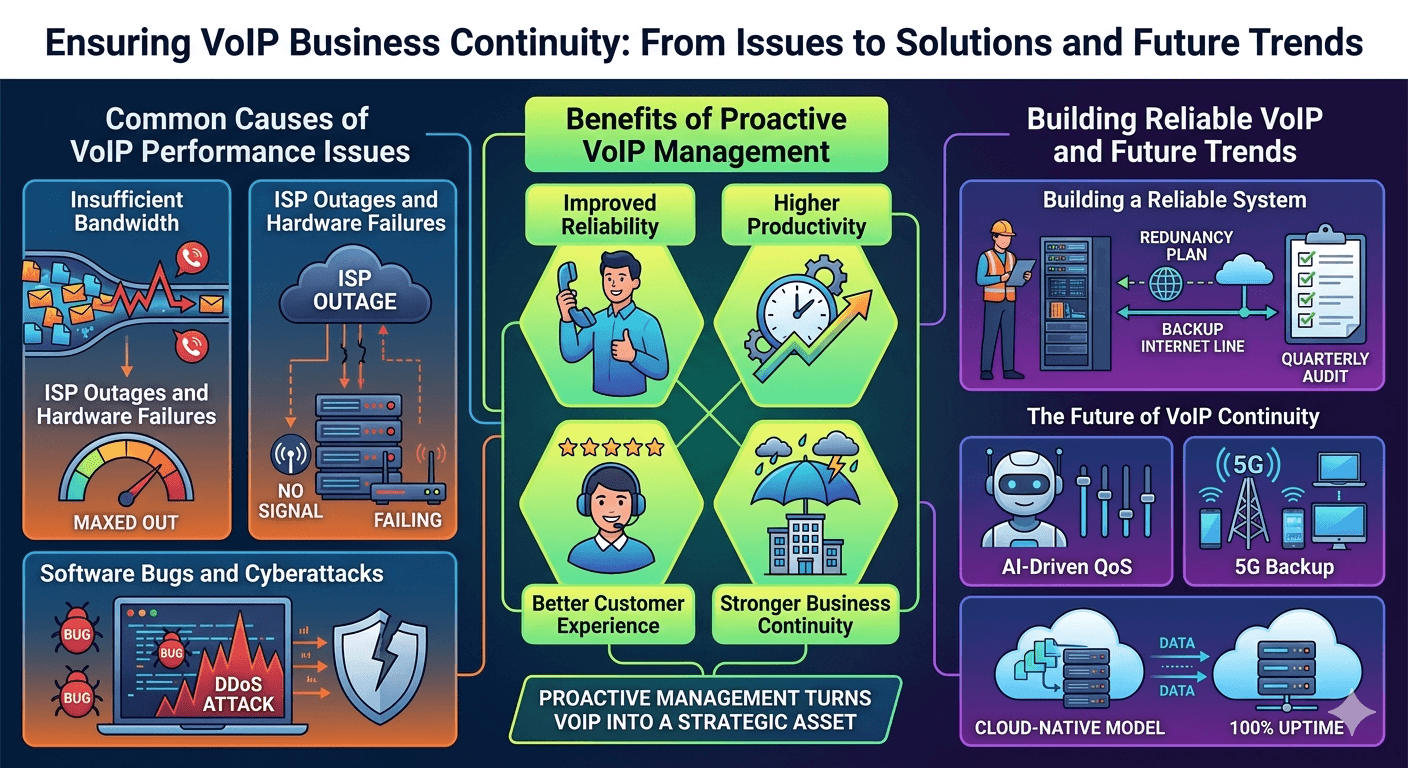
Common Causes of VoIP Performance Issues
Understanding the root causes of performance problems is the first step toward reducing VoIP Downtime. Many issues are not caused by the VoIP service itself, but by the environment in which it operates. By identifying these common culprits, you can take targeted action to harden your network and ensure a more stable voice over internet experience for everyone in your organization.
1- Insufficient Bandwidth
The most common cause of poor performance is simply not having enough internet speed to handle the volume of calls. As businesses grow and add more users, the original voip network requirements may no longer be sufficient. When the bandwidth is maxed out, voice packets are delayed or lost, leading to the garbled audio and dropped calls that characterize many voip call quality issues. Upgrading to a faster connection or implementing strict QoS is the only permanent solution to this problem.
2- ISP Outages and Hardware Failures
No ISP is perfect, and backbone failures or local line damage can happen at any time. Similarly, a single failing router or an overheated switch can bring down the entire telephony voip system. Hardware failures are often unpredictable, which is why having a redundancy plan is so important. Regular physical inspections of your server room and ensuring proper ventilation for your networking gear can help prevent heat-related hardware crashes that lead to unexpected VoIP Downtime.
3- Software Bugs and Cyberattacks
Like any software-based technology, VoIP systems can suffer from bugs or vulnerabilities. A poorly timed software update or a conflict between different network protocols can cause the system to hang or crash. Furthermore, VoIP systems are frequent targets for cyberattacks like DDoS (Distributed Denial of Service), which aim to flood the system with traffic until it becomes unreachable. Protecting your system with a strong firewall and keeping all software patched is essential for preventing these types of intentional service disruptions.
Benefits of Proactive VoIP Management
Taking a proactive approach to managing your voice over ip service offers numerous benefits that go beyond just avoiding outages. When you invest time and resources into reducing VoIP Downtime, you are essentially investing in the overall health and efficiency of your business. A well-maintained system provides a foundation for better communication, stronger relationships, and a more resilient organization.
Improved Reliability: Users can trust that the phone will work every time they pick it up, leading to a more professional atmosphere.
Higher Productivity: Staff members spend less time troubleshooting and more time focusing on their core responsibilities.
Better Customer Experience: Customers are never met with a busy signal or a dead line, ensuring they feel valued and supported.
Stronger Business Continuity: The business is better prepared to handle disasters, from power outages to local internet failures.
Reduced Long-Term Costs: Preventing a major outage is significantly cheaper than dealing with the aftermath of lost sales and emergency repairs.
By focusing on how to improve call quality and stability, you create a competitive advantage. In an industry where many companies struggle with unreliable digital tools, having a rock-solid communication system makes your business stand out as a leader. Proactive management turns your telecommunication voip setup from a potential liability into a strategic asset.
Building Reliable VoIP for Business
Creating a reliable VoIP environment is a journey, not a destination. It requires a commitment to ongoing maintenance and a willingness to adapt to new technologies. As your business grows, your voip system requirements will change, and your network must evolve to keep up. Building a truly resilient system involves a combination of the right technology, the right partners, and a culture of technical excellence within your IT team.
Start by conducting a thorough audit of your current setup. Identify any single points of failure, such as having only one ISP or a single aging router. From there, you can begin to implement the redundancy and failover strategies discussed in this guide. Remember that the goal of reducing VoIP Downtime is to create a system that is “invisible”—one that works so well that employees and customers never have to think about it.
It is also beneficial to engage with your service provider regularly. Ask them about new features or updates that could improve your voice over ip service. Many providers are constantly innovating, offering new ways to monitor traffic or more advanced mobile features. By staying informed and being proactive, you can ensure that your business stays at the forefront of voip technology and enjoys the highest levels of uptime possible.
The Future of VoIP Business Continuity
The future of voice over internet protocol looks promising, with new advancements making it easier than ever to eliminate VoIP Downtime. Artificial Intelligence (AI) is beginning to play a major role in network management. AI-driven tools can predict network congestion before it happens and automatically adjust QoS settings in real-time. This “self-healing” network technology will significantly reduce the need for manual intervention and make systems more resilient than ever before.
The global rollout of 5G is another game-changer. With its incredibly high speeds and low latency, 5G provides a perfect backup for fixed-line internet. In the future, we may see “hybrid” VoIP systems that naturally load-balance between fiber and 5G connections to provide 100% uptime. As voip in computer networks becomes more integrated with other cloud services, the infrastructure supporting it will become more robust and decentralized, further minimizing the risk of a single point of failure.
Finally, as more businesses move to a full “cloud-native” model, the physical hardware on-site will become less of a factor. When your PBX (Private Branch Exchange) lives in the cloud, you are no longer at the mercy of local power outages or hardware failures in your office. This shift toward the cloud is the ultimate solution for many organizations looking to permanently solve the problem of VoIP Downtime and provide a truly global, always-on communication platform.
Keeping Your Business Connected
Ultimately, the key to keeping your business connected is a focus on quality and preparation. By understanding what does voip mean for your specific operational needs and addressing the common voip vulnerabilities, you can build a system that stands the test of time. Don’t wait for a major outage to realize the importance of redundancy and proactive monitoring. Start implementing these changes today to protect your revenue and your reputation.
A reliable voice ip service is more than just a tool; it is a promise to your customers that you are always available to help them. By following the steps outlined in this guide—from choosing the right provider to implementing QoS and mobile failover—you can significantly reduce the risk of VoIP Downtime and ensure that your business remains a leader in a digital-first world. Stay updated, stay prepared, and keep the lines of communication open.
Read More: Best VoIP Hardware for Businesses to Boost Productivity in 2026
Final Thought
Reducing VoIP Downtime is an essential task for any modern business that values reliability and customer satisfaction. While the technical aspects of voice over internet protocol can be complex, the strategy for maintaining uptime is straightforward: invest in quality hardware, choose a reputable provider, and build redundancy at every level of your network. By taking these proactive steps, you not only eliminate the stress of unexpected outages but also provide a superior calling experience that fosters trust and growth. In the end, the most successful businesses are those that are always reachable, no matter the circumstances.
FAQs
Why does VoIP keep dropping out?
VoIP calls typically drop out due to network issues such as high latency, excessive jitter, or insufficient bandwidth. When the data packets carrying the voice signal are delayed or lost, the connection becomes unstable and eventually disconnects. This can be caused by a congested local network, a poor internet connection from your ISP, or outdated hardware that cannot handle the voip network requirements of modern voice over internet protocol.
What is the acceptable delay for VoIP?
For a high-quality conversation, the one-way latency (delay) should be kept under 150 milliseconds. If the delay exceeds this threshold, the conversation will start to feel unnatural, as speakers will inadvertently talk over each other. Once latency reaches 300 milliseconds or more, the call quality becomes unacceptable for professional use. Monitoring your network for latency is a key part of how to improve call quality.
What is the main disadvantage of VoIP?
The main disadvantage of VoIP is its total dependence on an internet connection and a power source. Unlike traditional analog landlines, which can sometimes work during a power outage, a voice over ip service will fail if the internet goes down or if the office loses electricity. This vulnerability is why businesses must invest in backup internet connections and uninterruptible power supplies (UPS) to prevent VoIP Downtime.
What happens to VoIP when the internet is down?
When the internet is down, the connection between your VoIP devices and the service provider’s server is severed, making it impossible to make or receive calls through your desk phones. However, if you have a failover plan in place, calls can be automatically forwarded to mobile phones using cellular data. Without a backup or failover strategy, an internet outage results in complete system downtime.
What do you need to ensure you have stable VoIP service?
To ensure a stable service, you need a high-speed internet connection with low latency, a router that supports Quality of Service (QoS), and high-quality networking hardware. Additionally, you need a reliable interconnected voip provider that offers a high uptime guarantee. Following voip security best practices and keeping all your software and firmware updated is also essential for maintaining a stable and secure communication environment.
How do you troubleshoot a VoIP system?
Troubleshooting starts with identifying the scope of the problem. If all users are affected, the issue is likely with the internet connection or the VoIP provider. If only one person has issues, check their specific hardware and network cable. Use speed tests to check for bandwidth issues and look at your router’s logs for signs of packet loss. Regularly monitoring your voip system requirements helps you find and fix these issues quickly.
Can a firewall cause VoIP issues?
Yes, a firewall can cause issues if it is not correctly configured to allow VoIP traffic. Firewalls sometimes mistakenly block the data packets needed for signaling or audio, leading to “one-way audio” where one person can’t hear the other, or calls that fail to connect at all. Ensuring that the correct ports are open and that the firewall is “VoIP-aware” is a critical part of building a secure and reliable voice over internet protocol network.
How can I improve call quality on a slow connection?
If you have a slow connection, you can improve call quality by implementing QoS to prioritize voice traffic over other data. You can also use “low-bandwidth” codecs like G.729, which compress the voice data more than standard high-definition codecs, allowing calls to work better on limited connections. However, the best long-term solution for voip call quality issues is always to upgrade to a faster and more stable internet connection.