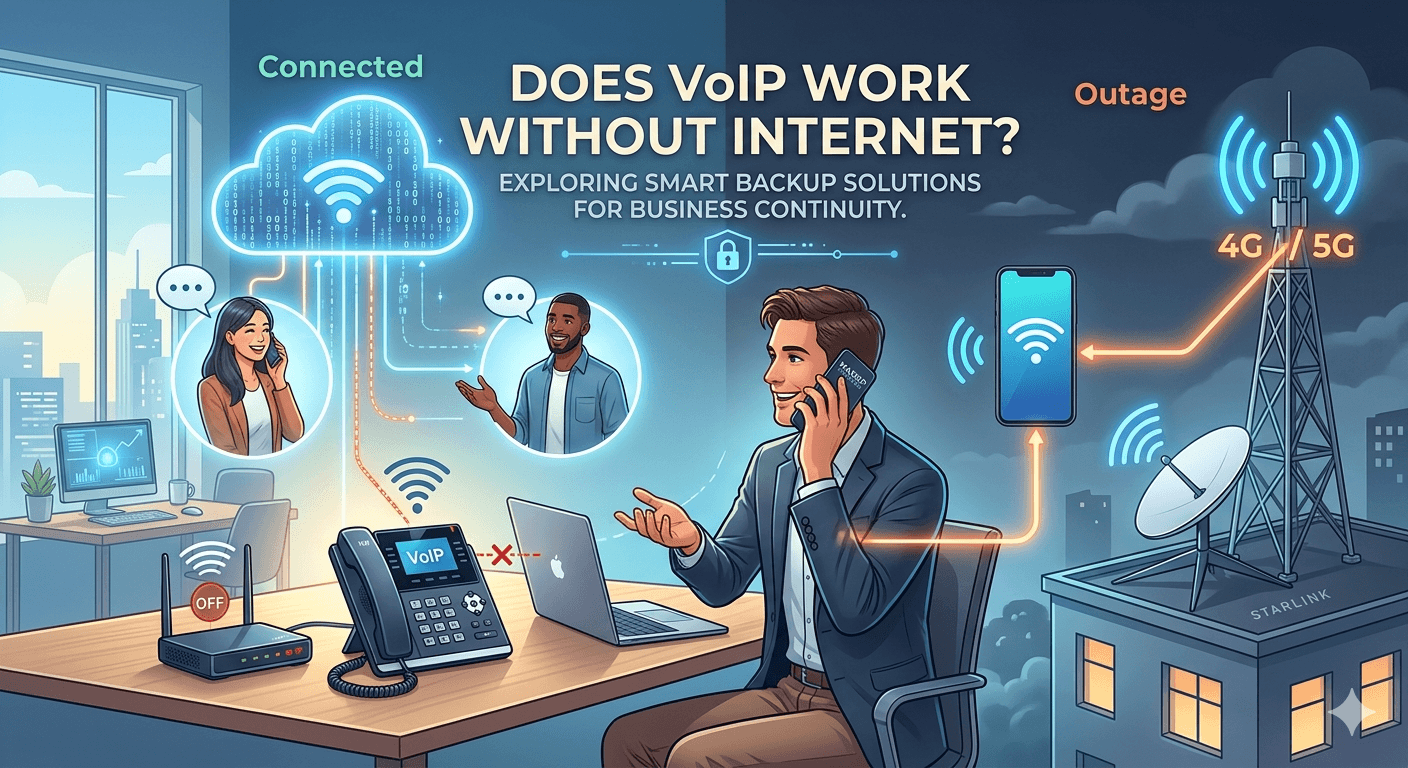
The primary question many businesses and homeowners ask is does voip work without internet. Voice over Internet Protocol (VoIP) is a digital technology that converts your voice into data packets to be transmitted over a network. Fundamentally, VoIP relies on an active internet connection to send these packets to the intended recipient. If your internet service is completely disconnected, standard VoIP hardware and software cannot establish a call because the transport medium is missing. However, modern systems offer advanced failover solutions, such as mobile data tethering, automatic call forwarding to cellular numbers, or utilizing 4G/5G backup routers, which allow communication to continue even during a primary ISP outage.
What Does VoIP Mean?
Voice over Internet Protocol, commonly known as VoIP, is a technology that allows you to make voice calls using a broadband internet connection instead of a traditional analog phone line. In the traditional telecommunications world, voices were carried over copper wires through a system known as the Public Switched Telephone Network (PSTN). VoIP changes this dynamic entirely by using the same protocols that power the web and email. When you speak into a device, your voice is captured and broken down into small digital “packets.” These packets travel across the internet and are reassembled into sound at the other end.
This digital transformation allows for much greater flexibility than old-fashioned telephony. Because the data is digital, it can be managed by software, stored in the cloud, and integrated with other business applications like CRM systems or email clients. Many people utilize this technology daily without realizing it through apps like Skype, WhatsApp, or specialized business hardware. The technology has matured significantly over the last decade, moving from a niche hobbyist tool to the global standard for enterprise communications.
For those wondering does voip work without internet, it is important to understand that the “IP” in VoIP stands for Internet Protocol. Without the protocol’s medium—the internet—the bridge between your voice and the listener cannot be built. However, the rise of voip in cloud services has made it so that the physical location of the user matters less than their access to some form of data connectivity, whether that be fiber, cable, or even satellite internet.
How VoIP Differs from Traditional Phones
The most striking difference between VoIP and traditional landlines is the infrastructure used to transmit data. Traditional phones use circuit switching, a method where a dedicated line is opened between two callers for the duration of the conversation. This is why a landline often works during power outages, as the copper wires carry their own low-voltage power from the central office. In contrast, VoIP uses packet switching. This method is far more efficient because it only uses the network when data is actually being sent, allowing multiple “conversations” to share the same digital path simultaneously.
Another key difference lies in the cost and scalability of the services. Traditional phone systems require expensive hardware installations, such as Private Branch Exchange (PBX) boxes located on-site. VoIP systems are often hosted in the cloud, meaning the business does not need to maintain physical servers. This leads to the famous voip pros and cons, where the pros include significantly lower costs and the ability to add new lines instantly, while the cons often center on the total dependence on a high-quality internet connection to maintain call clarity.
Research from Global Market Insights indicates that the VoIP market size exceeded USD 40 billion in 2022 and is slated to grow at a CAGR of over 10% from 2023 to 2032. This rapid adoption is largely due to the limitations of traditional systems. While traditional phones are geographically tied to a physical jack in the wall, a VoIP number is virtual. This means you can take your business phone number anywhere in the world, as long as you have a way to connect to the web, which brings us back to the vital role of connectivity.
Can You Use VoIP Without Internet?
When addressing the core query, does voip work without internet, the technical answer is no. VoIP requires a digital network to function. If you unplug your router and have no other data source, your VoIP phone will be unable to register with its server. Unlike a traditional landline that uses a dedicated physical wire to the phone company, a VoIP phone is essentially a computer designed to make calls. If that computer cannot “see” the outside world through an internet gateway, it cannot send your voice data anywhere.
However, the definition of “internet” has expanded. Many people confuse a specific Wi-Fi connection with the internet as a whole. You can use VoIP over cellular data (4G or 5G), satellite links, or even private wide area networks (WAN). If your office fiber goes down, but your desk phone can connect to a mobile hotspot, the VoIP service will continue to work. Therefore, while the service requires an internet protocol connection, it does not necessarily require your primary home or office internet to be active, provided you have a secondary data path available.
It is also worth noting that many modern providers, including those offering maxsip phones, build redundancy into their software. While the physical device on your desk might go silent without a connection, the “phone system” itself exists in the cloud. This means that incoming calls aren’t lost; they are simply held in the cloud until they can be rerouted. This is a significant safety net that traditional landlines cannot offer, as a cut wire in a legacy system usually results in a busy signal or a dead line for the caller.
How Does VoIP Work if the Internet Is Down?
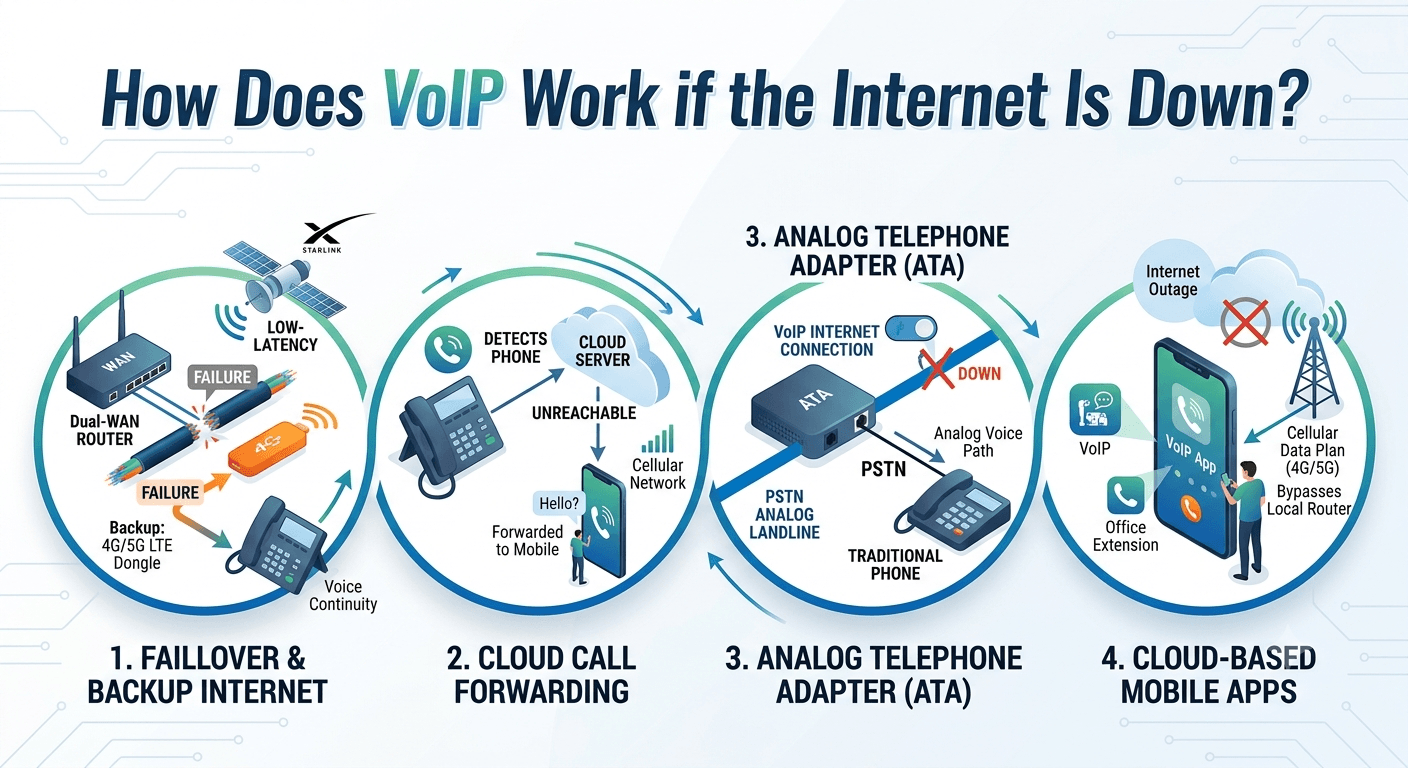
If you find yourself in a situation where your primary ISP fails, there are several strategies to ensure your communication remains uninterrupted. Understanding how voip works during an outage is essential for any business that relies on constant availability. The internet is the lifeblood of the system, but the system is smart enough to find other ways to reach you if the main path is blocked. These workarounds effectively answer the concern of does voip work without internet by providing alternative digital routes.
Most enterprise-grade VoIP services are designed with “failover” in mind. Failover is the process of automatically switching to a secondary system when the primary one fails. This ensures that even if a construction crew accidentally cuts your fiber optic cable, your customers can still reach you. By planning ahead, you can create a communication setup that feels like it works without internet, even though it is simply using a hidden backup connection.
-
Backup Internet Options
The most reliable way to keep your phones ringing is to have a secondary internet source. Many modern routers support “dual-WAN” or “cellular failover.” This involves plugging a 4G or 5G LTE dongle into your router. When the router detects that the primary cable or fiber internet has stopped responding, it automatically switches all traffic to the cellular network. In this scenario, your VoIP phones continue to function perfectly, though you might notice a slight change in call quality if the cellular signal is weak.
Another option is satellite internet, such as Starlink. While satellite connections used to have high “latency” (delay), newer low-earth orbit satellites have reduced this significantly, making them a viable backup for voice calls. Having a diverse array of connection types ensures that you are never truly without a way to transmit your digital voice packets, providing a robust solution to the limitations of a single ISP.
-
Using Call Forwarding
If your physical location loses all connectivity, one of the best advantages of voip is the ability to reroute calls instantly. Most VoIP providers allow you to set up “unreachable forwarding.” This feature monitors the connection to your desk phone; if the phone loses its connection to the cloud server, the system automatically forwards all incoming calls to a pre-defined mobile number or a different office location.
This happens at the cloud level, meaning the caller never knows there is an issue. They dial your office number, the cloud realizes your office internet is down, and it instantly pushes the call to your smartphone’s cellular line. This is a prime example of how the system provides continuity. While the VoIP phone itself isn’t working without internet, the VoIP service is still managing your calls effectively through other networks.
-
Using an Analog Backup Line
For businesses that absolutely cannot afford a second of downtime, an Analog Telephone Adapter (ATA) with a lifeline port can be used. This setup allows you to plug a traditional analog landline into your VoIP hardware. If the internet fails, the phone can switch over to the PSTN line for outgoing calls. While this is becoming less common as copper lines are phased out, it remains a “gold standard” for emergency services and high-security environments.
However, it is important to remember that a landline comes with its own costs and limitations. You won’t have access to your VoIP features like video calling or advanced analytics while using the analog backup. It serves purely as a voice-only safety net. For most, the question of does landline work without internet is a simple yes, making it the ultimate fallback for voice communication in remote or unstable areas.
-
Cloud-Based VoIP Apps
The mobility of VoIP is perhaps its greatest strength. Every major VoIP provider offers a mobile app for iOS and Android. If your office Wi-Fi goes down, you can simply open the app on your smartphone and continue making calls using your mobile data plan. This bypasses the need for a router or a local network entirely.
This flexibility is why many modern workers are moving away from physical desk phones altogether. By using a smartphone app, you are essentially carrying your office extension in your pocket. As long as you can get a 4G or 5G signal, your VoIP system is active. This effectively solves the problem of how to connect voip phone without router dependencies, as the smartphone acts as both the phone and the gateway.
What Are Some of the Features of a VoIP Phone Service?
One reason people are willing to navigate the requirement of an internet connection is the massive array of features available. Traditional phones are limited to simple voice, but VoIP is a multimedia powerhouse. These features are why the voip pros and cons list usually tilts heavily toward the pros for any growing business. When your voice is data, you can do incredible things with it that were once impossible or prohibitively expensive.
According to a report by the FCC on modernizing communications, VoIP systems provide advanced accessibility features that traditional lines cannot match, such as real-time text-to-speech and enhanced emergency location services.
These capabilities make VoIP not just a cheaper alternative, but a more powerful one. Whether you are a solo entrepreneur or a massive corporation, these tools can revolutionize how you handle every customer interaction.
1. Call Forwarding
Beyond simple emergency forwarding, VoIP offers sophisticated “Find Me/Follow Me” services. You can program your system to ring your desk phone first, then your mobile app, and then your home phone if you don’t answer. This ensures that you never miss a vital call regardless of where you are or what your local internet status is. This level of customization is a hallmark of the flexibility offered by digital voice systems.
2. Voicemail to Email
In the digital world, you don’t have to check a physical machine for messages. VoIP systems can record your voicemails, convert them into audio files (like .mp3 or .wav), and email them directly to your inbox. Some systems even offer transcription, allowing you to read your voicemails as text. This is a massive time-saver for busy professionals who need to skim messages during meetings.
3. Video Calling
Because VoIP uses a data connection, it isn’t limited to audio. Most systems allow you to switch from a voice call to a high-definition video call with the click of a button. This is essential for the modern remote work era, facilitating face-to-face collaboration without the need for travel. It integrates your phone system with your meeting platform, creating a unified communication experience.
4. Auto-Attendant
Small businesses can sound like large corporations using an auto-attendant (or virtual receptionist). This feature provides a professional greeting and a menu of options (e.g., “Press 1 for Sales, Press 2 for Support”). It directs callers to the right department automatically, reducing the need for a dedicated human receptionist and ensuring that calls are handled efficiently even during peak hours.
5. Conference Calls
VoIP makes hosting large meetings simple and inexpensive. Traditional conference bridges often charge by the minute or per user, but VoIP allows you to host dozens or even hundreds of participants on a single digital line. With built-in moderation tools, you can mute participants, share your screen, and record the session for later viewing, all through your internet-based phone system.
6. Call Recording, Analytics, IVR
For businesses focused on quality control and training, call recording is an invaluable tool. You can record every interaction and store it securely in the cloud. Furthermore, advanced analytics provide data on call volume, wait times, and peak hours. When combined with Interactive Voice Response (IVR), which uses voice recognition to help callers find information, your phone system becomes a powerful data-gathering tool that can help optimize your entire operation.
Tips to Keep Your VoIP Running Smoothly
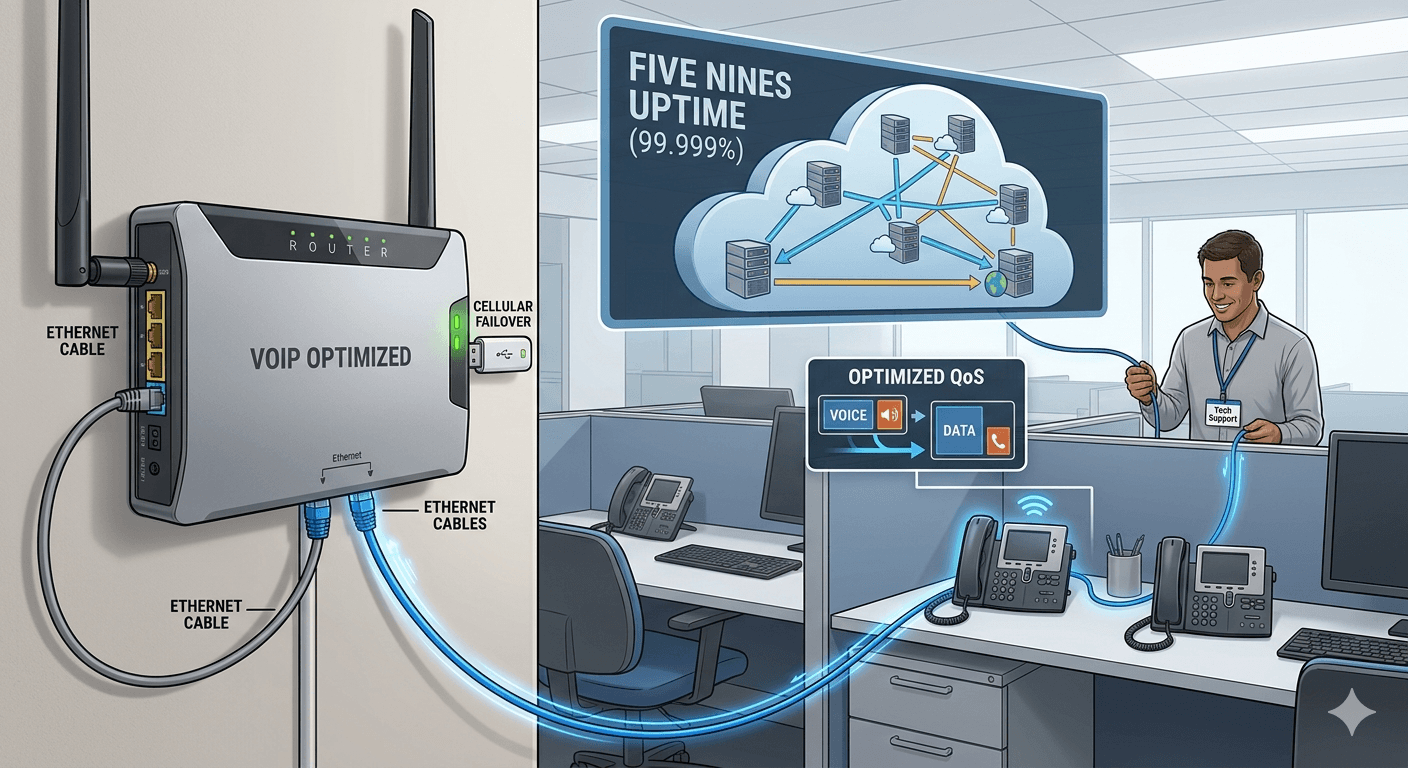
To ensure you never have to worry about the question does voip work without internet, you must build a resilient network. Quality of Service (QoS) is the most important concept in VoIP. It refers to the ability of your network to prioritize voice data over other types of traffic, like Netflix streaming or large file downloads. Without proper optimization, your calls may suffer from “jitter” or “latency,” making conversations difficult to understand.
Maintaining a smooth experience requires a combination of the right hardware and a reliable service provider. By following these professional tips, you can enjoy all the advantages of voip without the common headaches of dropped calls or poor audio quality. A well-configured system should feel as reliable as a traditional landline while offering ten times the functionality.
Tip 1: Use a Reliable Router
Not all routers are created equal when it comes to handling voice data. You should look for a router that specifically mentions “VoIP optimization” or “Quality of Service” settings. These routers are designed to recognize voice packets and move them to the front of the line, ensuring that your conversation remains clear even if someone else on the network is using a lot of bandwidth.
Additionally, consider using a wired Ethernet connection for your desk phones instead of Wi-Fi. While Wi-Fi is convenient, it is prone to interference from other devices and physical obstacles. A physical cable provides a stable, consistent path for your data, which is crucial for maintaining high-definition voice quality. This is the first step in learning how to connect voip phone without router issues becoming a recurring problem.
Tip 2: Set Up Automatic Failover Routing
As discussed earlier, failover is your best defense against internet outages. If your business depends on its phones, you should invest in a router that supports a backup cellular connection. Many enterprise-grade firewalls can hold a SIM card or connect to a USB modem. When the primary fiber line drops, the system switches over in milliseconds—often so fast that an active call won’t even drop.
This setup provides peace of mind. You won’t have to scramble to forward calls or find a hotspot if the internet goes out. The technology handles the transition for you, maintaining the illusion that your VoIP system is working without its primary internet source. It is an investment that pays for itself the first time a major ISP outage hits your area.
Tip 3: Test Your Backup Plans Regularly
A backup plan is only useful if it actually works when you need it. You should schedule a “fire drill” for your communications system at least once a quarter. This involves intentionally disconnecting your main internet source and seeing how the system reacts. Does the failover kick in? Do the calls forward correctly to your mobile devices?
Testing allows you to identify bottlenecks or configuration errors before a real emergency occurs. You might find that your cellular backup signal is too weak in the server room, requiring you to move the antenna. Or you might realize that some staff members haven’t installed the mobile app on their phones. Fixing these issues during a test is much easier than trying to solve them during a total blackout.
Tip 4: VoIP Provider
Choosing the right provider is perhaps the most important decision you will make. You want a company with a proven track record of “five nines” uptime (99.999%). This means their cloud servers are distributed across multiple geographic locations, so even if one of their data centers goes down, your service remains active.
Check reviews and ask about their security protocols. Since VoIP is internet-based, it can be vulnerable to hacking if not properly secured. A good provider will offer end-to-end encryption and robust fraud prevention tools. They should also provide excellent customer support to help you configure your network for the best possible voice quality, ensuring you get the most out of your digital communication investment.
Read More: What Is Business SMS and How Does It Work?
Conclusion
In summary, the answer to does voip work without internet is fundamentally no, as the technology relies on data packets to transmit sound. However, the modern definition of connectivity is broad and resilient. By utilizing cellular backups, cloud-based mobile applications, and automatic failover systems, businesses can ensure that their communication lines remain open even during a local internet failure. VoIP offers a level of flexibility, cost-savings, and advanced features that traditional landlines simply cannot match. While it requires an internet protocol connection to function, the ability to reroute calls through the cloud ensures that you stay connected to your customers no matter what happens to your physical office infrastructure.
FAQ’s
-
Can VoIP calls work without Wi-Fi?
Yes, VoIP calls can function perfectly without Wi-Fi. While Wi-Fi is a common way to connect to the internet, VoIP only requires a data connection of any kind. You can connect a VoIP desk phone directly to your router using an Ethernet cable, which is actually the recommended method for better stability. Additionally, you can use your smartphone’s 4G or 5G cellular data to make VoIP calls through a dedicated app. As long as you have some form of internet access—be it wired, cellular, or satellite—your VoIP system will work.
-
What happens to VoIP when power goes out?
Unlike traditional landlines that draw power from the phone company’s copper wires, VoIP equipment (like your router and desk phone) requires local electricity. If the power goes out, your internet connection will likely drop, and your VoIP devices will shut down. However, because your phone system is hosted in the cloud, you can still receive calls on your smartphone via cellular data. To keep your physical desk phones running during a blackout, many businesses use an Uninterruptible Power Supply (UPS) to keep their router and phones powered for several hours.
-
Can I use VoIP with mobile data?
Absolutely. Using VoIP with mobile data is one of the most popular ways to stay connected on the go. Most VoIP providers offer mobile apps that allow you to send and receive calls using your 4G, 5G, or LTE connection. This is a great way to maintain your business identity while working remotely, as the person you are calling will see your office number rather than your personal mobile number. Just be aware that high-quality voice calls use a small amount of data, so ensure your plan has an adequate data allowance.
-
What is the best backup plan for VoIP users?
The best backup plan for VoIP users is a combination of automated failover and mobile app readiness. First, use a router that supports a secondary LTE/5G connection to provide an “always-on” internet source. Second, configure your VoIP service to automatically forward calls to your mobile number if your primary desk phone loses its connection. Finally, ensure all employees have the company’s VoIP app installed and logged in on their smartphones. This multi-layered approach ensures that no single point of failure can take down your communication system.
-
Do I need special equipment for VoIP failover?
To achieve seamless automatic failover, you usually need a router or firewall capable of “Multi-WAN” or “LTE Failover.” This hardware can monitor two different internet connections at once and switch between them instantly. For simpler setups, you don’t necessarily need special hardware; you can simply use the manual failover features provided by your VoIP software, such as setting up a forwarding rule in your online dashboard. However, for a professional business environment, an automated failover router is a highly recommended investment.
-
Ready to upgrade your calling?
Transitioning to VoIP is easier than most people think. Most providers allow you to “port” your existing numbers so you don’t have to change your contact information. To get started, you simply need a reliable internet connection and a choice of hardware—either specialized IP phones or headsets to use with your computer. With the vast array of features and the significant cost savings, upgrading to a digital phone system is one of the smartest moves a modern business can make to improve its efficiency and professional image.
-
Will VoIP work if the internet is down?
Technically, the physical VoIP phone on your desk will not be able to make or receive calls if its only internet source is down. However, the system itself remains active in the cloud. This means you can still access your phone system via a smartphone app using cellular data, or the system can automatically redirect your calls to another location or a mobile device. So, while the “phone” might be down, the “service” is still reachable through alternative digital paths.
-
Which is better, VoIP or VoLTE?
VoIP and VoLTE (Voice over LTE) are similar in that they both turn voice into digital data, but they serve different purposes. VoIP is a general technology used for apps and office phone systems over any internet connection. VoLTE is a specific standard used by mobile carriers to send high-quality voice calls over their 4G LTE networks. For a business, VoIP is better because it offers advanced features like IVR and call recording. For a standard mobile call on your cell phone, VoLTE is excellent for providing clear audio and fast connection times.
-
What is the main disadvantage of VoIP?
The main disadvantage of VoIP is its total dependence on a stable internet connection and a reliable power source. If your internet is slow or has high latency, your call quality will suffer, leading to echoes or dropped words. Unlike traditional landlines, VoIP also requires power to run the router and the phone hardware. However, these disadvantages are easily mitigated with modern technology like backup batteries (UPS) and cellular data failover, which is why most businesses find the benefits far outweigh the risks.
-
Can I use VoIP for free?
Yes, there are many ways to use VoIP for free. Popular consumer apps like WhatsApp, Messenger, and Viber allow for free voice and video calls between users over the internet. For business use, some providers offer free “lite” tiers with limited features. However, if you want a professional setup with a dedicated business phone number, call forwarding, and 24/7 support, there is usually a monthly subscription fee. Even then, the cost of a professional VoIP service is typically 40% to 60% lower than a traditional business phone line.