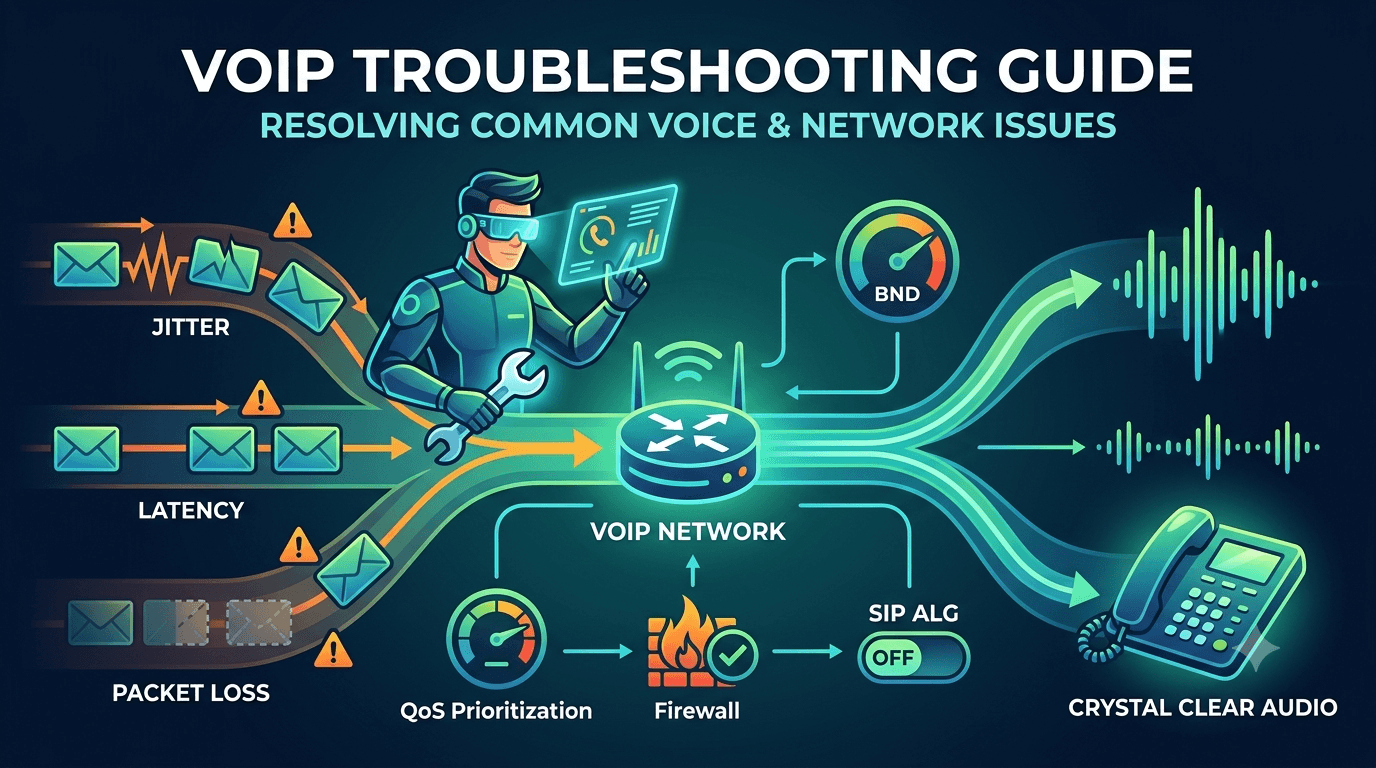
VoIP troubleshooting involves identifying and resolving connectivity and audio issues within an internet-based phone system. Common steps include testing bandwidth, checking hardware, and optimizing router settings for Voice over Internet Protocol. If your system experiences jitter, latency, or dropped calls, systematic voip troubleshooting can restore clarity. Businesses rely on these methods to ensure uninterrupted communication. By addressing network congestion, firewall restrictions, and outdated firmware, organizations maintain professional standards. Effective troubleshooting often begins with a speed test and a review of the Local Area Network configuration to support high-quality voice data packets.
Intro to Voice over Internet Protocol (VoIP)
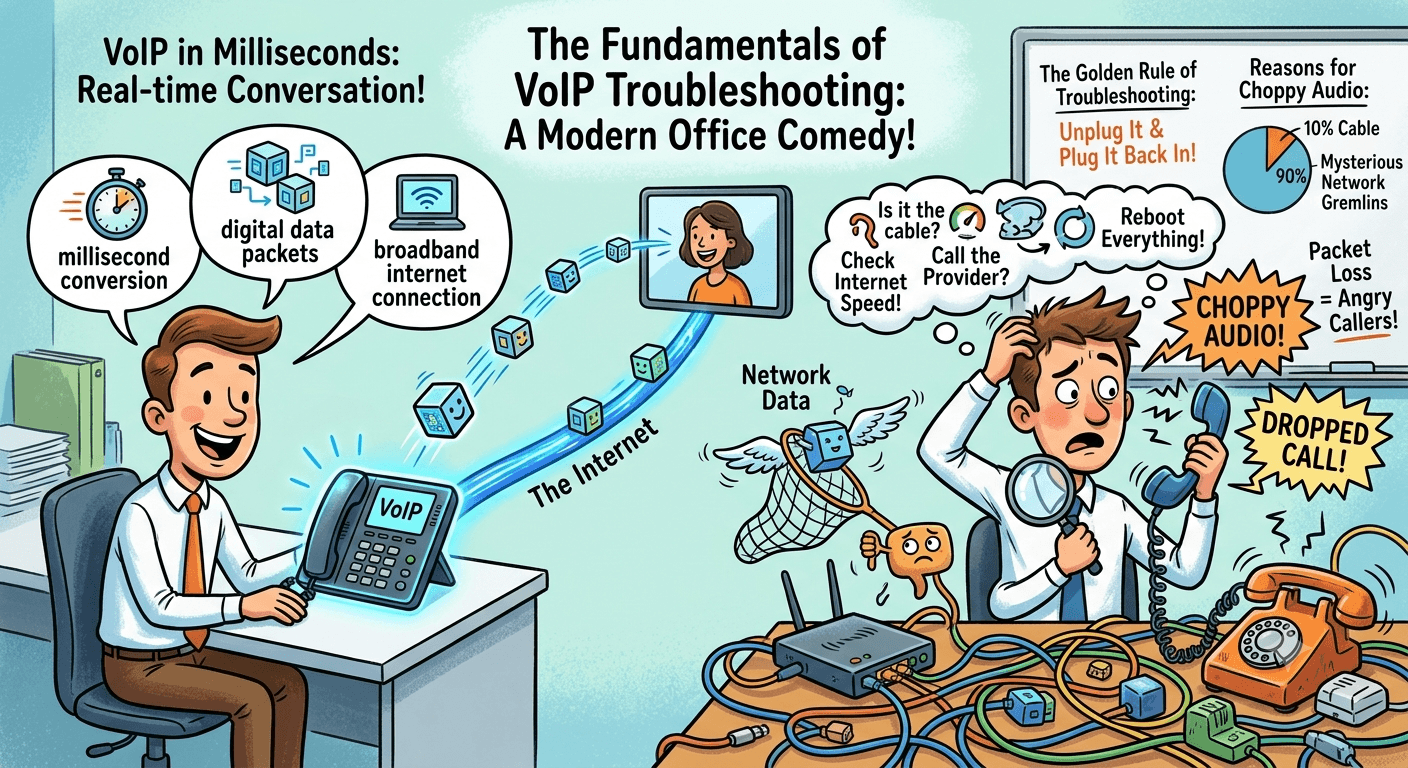
Voice over Internet Protocol is a revolutionary technology that allows users to make voice calls using a broadband internet connection instead of a traditional analog phone line. This technology works by converting voice signals into digital data packets and transmitting them over the internet. When these packets reach their destination, they are reassembled into the original audio. This process happens in milliseconds, allowing for real-time conversation. However, because this system relies entirely on internet infrastructure, it is susceptible to various network-related interruptions. This is why understanding the fundamentals of voip troubleshooting is essential for any modern office environment.
The transition from traditional landlines to internet-based systems has provided businesses with incredible flexibility and cost savings. Unlike older systems that require extensive physical wiring, internet-based telephony can be deployed quickly and scaled according to the needs of the company. However, the complexity of digital networks means that problems can arise from multiple sources, including local hardware, internet service providers, or the cloud hosting platform itself. Identifying the root cause of an issue requires a logical approach that examines each component of the communication chain, from the physical handset to the global web.
Is VoIP reliable?
When businesses ask about the reliability of internet-based calling, the answer is generally a resounding yes, provided the underlying network is robust. Modern cloud communication systems offer uptime guarantees that often exceed 99.99%. However, the reliability is directly tied to the quality of your internet connection and the configuration of your internal network. In a professional setting, having a secondary internet line for redundancy is a common strategy to ensure that voice services remain active even if the primary provider experiences an outage. Without a stable foundation, voip troubleshooting becomes a frequent necessity rather than an occasional maintenance task.
Research from the International Journal of Engineering and Technology suggests that packet loss should be kept below 1% to maintain professional voice quality. If your network exceeds this threshold, callers will experience choppy audio or dropped connections. Therefore, reliability is not just about the software being up and running; it is about the network’s ability to handle the data load consistently. When managed correctly with proper hardware and enough bandwidth, these systems are significantly more reliable and versatile than legacy analog systems, offering features like video conferencing, call recording, and integration with customer relationship management tools.
Troubleshooting Common VoIP Issues
When an issue occurs, the first step is to categorize the problem. Is the audio choppy? Are calls dropping entirely? Is the phone failing to register with the network? Categorization allows you to narrow down the potential causes. Most voip troubleshooting efforts start with the simplest variables, such as checking physical connections and power sources. If multiple users are experiencing the same issue, it is likely a network-wide problem. If only one person is affected, the issue is likely isolated to their specific device or cable.
-
Identify the symptoms: Choppy audio, echo, or one-way audio.
-
Scope the problem: Single user versus the entire office.
-
Check the hardware: Inspect cables, headsets, and power supplies.
-
Examine the network: Test internet speed and router settings.
-
Contact the provider: Check for service outages or configuration errors.
By following a structured process, you can avoid wasting time on unlikely solutions. For example, if the internet is working fine on all computers but the phones are down, the issue is likely related to the specific ports or protocols used for voice traffic. This distinction is vital for efficient troubleshooting voip call quality issues.
Problem #1: Networking and LAN Issues
The Local Area Network is where most voice problems originate. Because voice data is extremely sensitive to timing, any congestion or poor configuration on your internal network will immediately affect call quality. The LAN includes your router, switches, ethernet cables, and the devices themselves. Ensuring this environment is optimized for voice traffic is the most effective way to prevent future problems. When voip troubleshooting, you must look at how data moves within your building before blaming external factors.
1) Reset your router and all computers and check the wiring
It may sound simple, but a basic power cycle often resolves many voip phone troubleshooting issues. Routers and switches can sometimes experience memory leaks or internal errors that cause them to slow down. By turning them off for thirty seconds and then back on, you clear the cache and force the device to re-establish connections. Additionally, check every physical connection. A slightly loose ethernet cable or a damaged wire can cause intermittent packet loss, leading to static or dropped calls. Ensure that all cables are at least Category 5e or Category 6 to support the necessary data speeds.
2) Ensure you have a router configured for VoIP prioritization
Voice traffic must be treated with higher priority than standard web browsing or file downloads. This is achieved through Quality of Service (QoS) settings on your router. Without QoS, a large file download in one part of the office could “choke” the voice packets, leading to jitter. By configuring your router to prioritize voice data, you ensure that even during heavy network usage, your phone calls remain clear. This is a critical step in voip network troubleshooting for any business with more than a few employees.
3) Disable SIP ALG
SIP Application Layer Gateway (SIP ALG) is a feature found in many commercial routers that is intended to help voice packets pass through firewalls. However, in many cases, SIP ALG actually corrupts the data packets, leading to issues like one-way audio or calls that fail to connect. One of the first things experts do when voip not working is to disable this feature in the router’s security settings. Disabling SIP ALG allows the voice provider’s software to handle the packet translation more effectively, leading to a much more stable connection.
4) Upgrade your router
If you are using a consumer-grade router for a business environment, you will likely encounter voip phone issues frequently. Consumer routers are not designed to handle the high number of simultaneous connections required for business telephony. Upgrading to a professional-grade router with a faster processor and better memory management can instantly resolve chronic problems. Professional routers also offer better security features and more granular control over how your network handles different types of traffic, making them an essential investment for long-term reliability.
5) Adjust the placement of your wireless router
If your desk phones or softphones are connected via Wi-Fi, the physical location of the router is paramount. Physical obstructions like concrete walls, metal cabinets, and even large mirrors can degrade the signal. Furthermore, interference from other electronic devices like microwaves or cordless phones can disrupt the 2.4GHz frequency. For the best results during voip troubleshooting, move the router to a central, elevated location. Ideally, business phones should be connected via a hardwired ethernet cable to avoid the inherent instability of wireless signals.
6) Check for VoIP phone system registration issues
A registration issue occurs when the phone is powered on but cannot communicate with the service provider’s server. This often manifests as a “No Service” or “Network Error” message on the phone screen. This can be caused by incorrect login credentials, a firewall blocking the necessary ports, or an outdated firmware version. Ensure that your firewall is configured to allow traffic on ports like 5060 and 5061, which are standard for SIP communication. Keeping your phone’s firmware updated is also vital, as manufacturers frequently release patches to fix known connectivity bugs.
Problem #2: Phone and Voice Quality
Voice quality issues are often the most frustrating because they can be intermittent. Echo, static, and choppy audio are classic symptoms of network instability. If you hear an echo, it is often caused by the volume being too high on the recipient’s end, causing the sound to leak from the earpiece back into the microphone. However, if the echo is delayed, it is likely a latency issue within the network. Troubleshooting voip call quality issues requires listening carefully to the type of sound distortion to determine if the cause is hardware-based or network-based.
In some cases, the problem is simply a low-quality headset. Inexpensive or damaged headsets can introduce static and background noise that sounds like a network problem but is actually a physical fault. During voip troubleshooting, try switching the headset or using the phone’s speakerphone to see if the quality improves. If the audio remains poor across different devices, the focus must shift back to the network bandwidth and the internet service provider. Consistent voice quality is the result of a clean signal path from the microphone all the way to the final destination.
Problem #3: WAN and Internet Connectivity
The Wide Area Network, or your internet connection, is the bridge between your office and the rest of the world. Even if your internal LAN is perfect, a poor connection from your ISP will result in voip problems. Issues in the WAN are often out of your direct control, but identifying them allows you to hold your provider accountable. When voip not working, checking the health of your internet connection is a top priority. Most businesses require a fiber or high-speed cable connection to support multiple simultaneous calls without degradation.
1) Run a bandwidth-speed test
A speed test provides a snapshot of your network’s current performance. However, for voice services, upload speed is just as important as download speed. If your upload speed is too low, the person on the other end will hear choppy audio because your voice data isn’t leaving the building fast enough. During voip troubleshooting, run several speed tests throughout the day to see if performance dips during peak hours. If your speeds are consistently lower than what you are paying for, it is time to contact your ISP to investigate potential line issues.
2) Test for packet loss
Packet loss occurs when data units fail to reach their destination. In web browsing, this might cause a page to load slowly, but in a voice call, it results in missing words or robotic-sounding voices. You can test for packet loss using a ping command or a specialized network diagnostic tool.
According to research by Cisco, a packet loss rate of even 1% can significantly degrade the user experience. If you find consistent packet loss, it usually indicates a faulty cable, a congested network, or an issue with the ISP’s routing.
3) Examine causes for jitter and packet loss
Jitter and latency are the two primary enemies of clear digital communication. Understanding these concepts is essential for anyone performing voip troubleshooting. While they are related, they represent different types of network instability and require different solutions. Addressing them often involves a combination of hardware upgrades and network configuration changes to ensure a steady stream of data.
Jitter
Jitter refers to the variation in the delay of received packets. In a perfect network, packets arrive at steady intervals. However, if the network is congested, some packets might take longer to arrive than others. This variation causes the audio to sound “scrambled” or out of order. To combat this, many systems use a “jitter buffer” which collects packets and reorders them before playing the audio. If the jitter is too high, the buffer cannot keep up, and audio quality drops. High jitter is often a sign of network congestion or a failing router.
Latency
Latency is the total time it takes for a data packet to travel from the sender to the receiver. High latency results in a noticeable delay between when you speak and when the other person hears you, often leading to people talking over each other. This is frequently referred to as “lag.” For a high-quality call, latency should ideally be under 150 milliseconds. If latency exceeds 250-300 milliseconds, the conversation becomes difficult to maintain. Common causes of latency include geographic distance from the server, slow satellite connections, or an overloaded local router.
Problem #4: Security
Security is an often-overlooked aspect of voip troubleshooting. Because these systems run on the internet, they are susceptible to various cyber threats, including toll fraud and eavesdropping. If you notice strange activity, such as calls being made to international numbers that your staff didn’t dial, your system may have been compromised. Voip-associated vulnerabilities can lead to significant financial loss if not addressed quickly. Security should be integrated into your initial setup and checked regularly as part of your maintenance routine.
1) Reset your passwords
Weak passwords are the most common entry point for hackers. This includes the passwords for your online management portal and the SIP credentials for the individual phones. As part of your voip phone troubleshooting, ensure that every device and user account has a unique, complex password. Avoid using default passwords that come with the hardware. Regularly updating these passwords and using multi-factor authentication where available provides a strong layer of defense against unauthorized access and potential service disruptions.
2) Set security layers and firewalls
Your firewall is your first line of defense against external attacks. However, it must be configured correctly to allow voice traffic while blocking malicious actors. Implementing a Session Border Controller (SBC) is a professional way to manage this. An SBC acts as a specialized firewall for voice traffic, protecting the network from Distributed Denial of Service (DDoS) attacks and ensuring that only authorized traffic can enter the system. By creating multiple layers of security, you protect both your company’s data and its communication budget from exploitation.
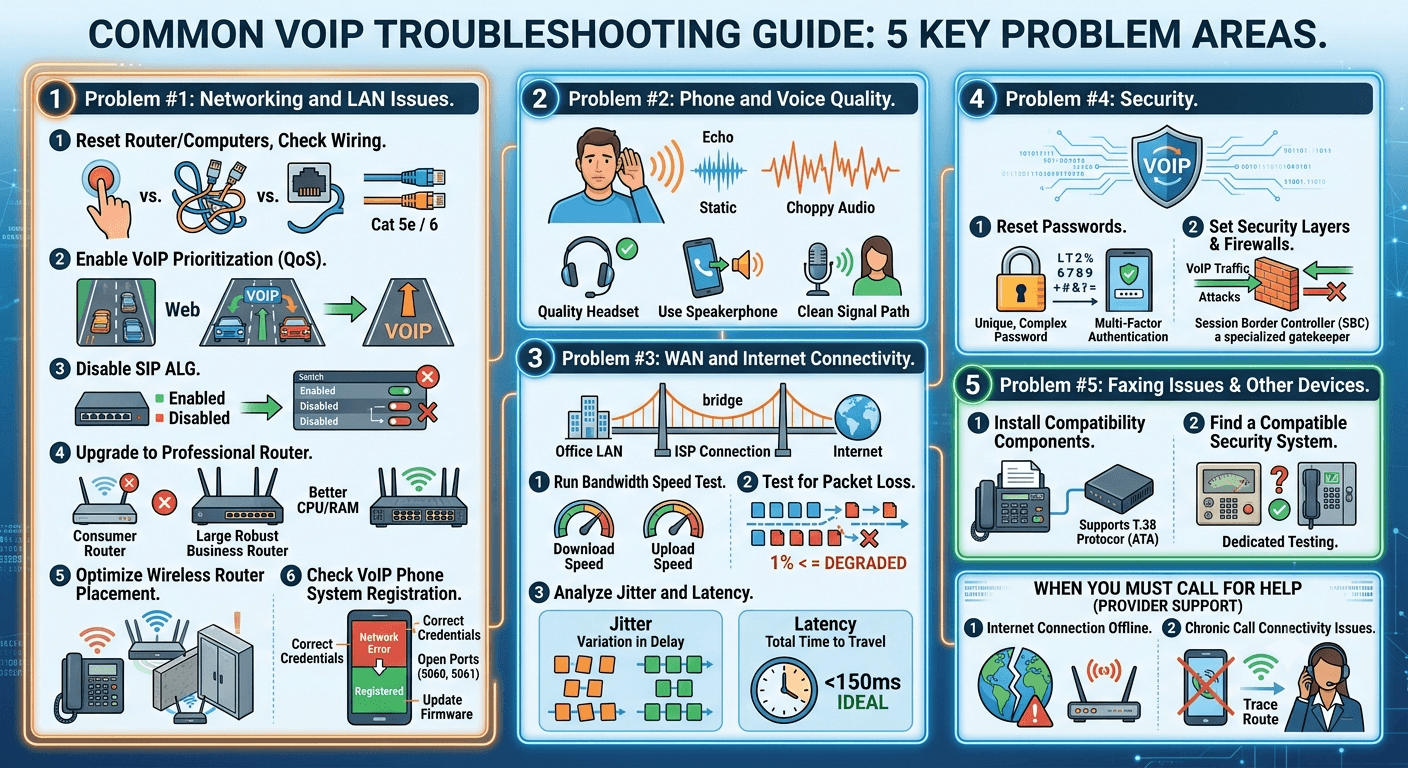
Problem #5: Faxing Issues & Other Devices
Despite the rise of digital signatures and email, many businesses still rely on fax machines for legal and medical documentation. Faxing over an internet connection is notoriously difficult because fax machines were designed for the steady, uninterrupted signals of analog lines. The slight timing variations in internet-based systems can cause a fax transmission to fail. If you are experiencing voip problems related to faxing, you may need to look at specialized hardware or protocols designed specifically for this purpose.
1) Install compatibility components
To make an analog fax machine work with a digital system, you usually need an Analog Telephone Adapter (ATA). This device converts the analog signal from the fax machine into digital data. However, not all ATAs are created equal. For the best results, use an adapter that supports the T.38 protocol. T.38 is a standard designed specifically for sending faxes over IP networks by adding redundancy to the data stream. This ensures that even if some packets are lost, the fax can still be completed successfully. This is a common solution in voip residential reviews where users still want to use old hardware.
2) Find a compatible security system
Many older building security systems and elevator phones rely on analog connections to dial out in an emergency. These systems often struggle with the compression used in internet-based calling. When switching to a modern system, it is vital to test these emergency lines. In many cases, it is safer and more reliable to keep a single traditional analog line for the security system or to upgrade to a cellular-based backup. During voip troubleshooting, never assume that emergency devices will work without dedicated testing and configuration.
When You Must Call for Help
While many issues can be resolved with local voip troubleshooting, there are times when the problem is beyond your control. Knowing when to stop tinkering and start calling your service provider can save you hours of frustration. If you have exhausted all local checks and the problem persists, the issue likely resides in the provider’s infrastructure or the internet backbone. A professional provider will have diagnostic tools that can see exactly where a packet is being dropped or delayed outside of your office walls.
1- When your internet connection goes offline
If your internet connection is down, your phones will be down as well. This is an ISP issue rather than a phone system issue. If your computers cannot reach the web, your voip troubleshooting should focus on the modem and the service provider. Check the provider’s status page for known outages in your area. If the internet is up but the phones are down, check the service status of your specific voice provider. Large-scale outages are rare but do happen, and usually, the provider’s support team is already working on a fix by the time you notice.
2- You have chronic call connectivity issues
If you have optimized your network, upgraded your hardware, and configured your firewall, but you still have voip phone issues, it is time for professional intervention. Chronic issues may indicate a deeper problem with how your ISP routes traffic to your voice provider. This is known as a routing peering issue. By contacting your provider’s support team, you can provide them with call logs and timestamps. They can then perform a “trace route” to identify exactly which server along the path is causing the delay or packet loss, allowing them to work with other carriers to resolve the issue.
Read More: Best Free Messaging Apps Without Phone Number for Ultimate Privacy
Final Thought
Effective voip troubleshooting is a combination of having the right tools, following a logical process, and maintaining a high-quality network environment. By understanding how voice data travels across the internet, you can quickly identify whether a problem is caused by a loose cable, a congested router, or an external provider issue. Prioritizing voice traffic through QoS, disabling interfering features like SIP ALG, and keeping hardware updated are the foundations of a reliable system. While internet-based calling offers immense advantages in flexibility and cost, its success depends on the diligence of the team managing the network. With a proactive approach to maintenance and a structured guide to resolving common problems, your business can enjoy the crystal-clear communication that modern technology promises.
FAQs
-
What causes echoing in VoIP calls?
Echoing is typically caused by acoustic feedback or network latency. Acoustic echo happens when sound from the speaker leaks into the microphone on the other end. Network echo occurs when there is a significant delay in the transmission of data packets, causing the speaker to hear their own voice reflected back after a brief interval. Lowering the volume or using a high-quality headset can often resolve acoustic echo.
-
What are the common VoIP problems that businesses face?
Businesses frequently encounter issues such as choppy audio, dropped calls, and one-way audio. These are often rooted in network congestion, insufficient bandwidth, or improper router configurations. Other common problems include “ghost calls” caused by security vulnerabilities and difficulties integrating older hardware like fax machines and security alarms with the digital system.
-
How can I troubleshoot dropped calls in VoIP?
To troubleshoot dropped calls, start by checking your internet stability and looking for packet loss. Ensure that your firewall is not prematurely closing inactive sessions and that SIP ALG is disabled on your router. Additionally, check for firmware updates on your phones and ensure that your router’s Quality of Service settings are correctly prioritizing voice traffic over other data.
-
How to troubleshoot a VoIP system?
Troubleshooting a system involves a step-by-step check of the hardware, local network, and internet connection. Begin with a power cycle of all devices, then perform a speed and packet loss test. Verify that your router is optimized for voice and that all cables are in good condition. If the issue is widespread, contact your service provider to check for external outages.
-
What is a common issue with VoIP?
The most common issue is poor audio quality, which manifests as jitter, latency, or static. This is usually caused by the internet connection being unable to handle the voice data packets consistently. Because voice is real-time, any minor fluctuation in the network speed or stability immediately affects how the participants hear each other during a conversation.
-
What are the technical faults of VoIP?
Technical faults include packet loss, which leads to missing audio, and jitter, which causes audio to sound garbled. Other faults include registration failures, where the phone cannot connect to the server, and security flaws that can lead to toll fraud. These faults are inherent to the way data is transmitted over the public internet and require specific network configurations to mitigate.
-
How to fix VoIP not working?
If your system is not working, first confirm that your internet connection is active. Next, restart your router and your phone handsets. Check for any loose cables and ensure that your account with the service provider is active and in good standing. If these steps do not work, review your firewall settings to ensure that the necessary ports for voice traffic are open.
-
What is the most important factor in VoIP quality?
The most important factor is a stable and sufficient upload speed. While many people focus on download speed, voice calls require a consistent stream of data leaving your building. Without enough upload bandwidth, the person you are calling will experience significant audio distortion, regardless of how fast your download speeds are.