
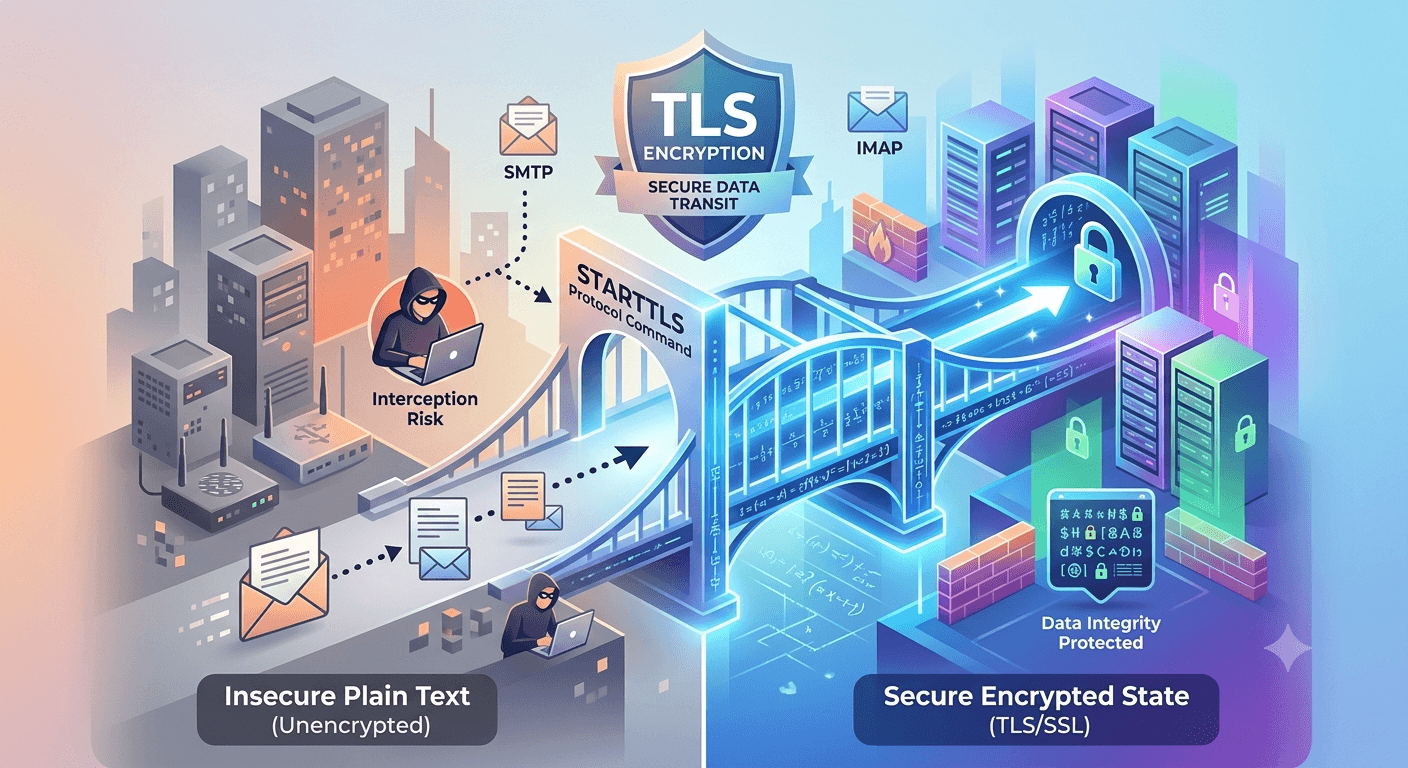
What is StartTLS? It is a protocol command that informs an email server that an email client wants to upgrade an existing insecure connection to a secure one using Transport Layer Security or Secure Sockets Layer encryption. Essentially, it serves as a bridge that allows communication to begin in plain text and then transition into an encrypted state. This process is widely used in Simple Mail Transfer Protocol and Internet Message Access Protocol to ensure that sensitive data like login credentials and message content remain protected from unauthorized interception during transit across the internet.
Understanding the Fundamentals of Email Encryption
Email security relies on protocols that prevent third parties from reading your messages. When you send an email, it travels across various servers before reaching its destination. Without encryption, this data is sent as plain text, making it vulnerable to hackers who might intercept the traffic. StartTLS was developed to solve this problem by allowing a single port to handle both secure and insecure traffic, making it a versatile tool for modern mail servers.
The evolution of email security has seen a transition from older methods to more robust frameworks. Initially, encryption was handled by creating entirely separate connections for secure traffic, which often led to port exhaustion and configuration complexities. What is StartTLS provides is a way to negotiate security on the fly, allowing for a more flexible approach to managing server resources while maintaining high standards for data integrity.
-
StartTLS vs TLS: What is the Difference?
It is common for people to use these terms interchangeably, but they represent different components of the security stack. TLS is the actual encryption protocol that secures the data, while StartTLS is the specific command used to initiate that encryption over an existing connection. You can think of TLS as the lock on a door and the other as the act of asking the server to lock that door after you have already walked into the room.
The relationship between them is collaborative rather than competitive. StartTLS tells the server that the client is ready to use TLS to scramble the data. Once both parties agree, they perform a handshake to establish the encryption keys. This distinction is important because it highlights that the command itself does not provide security; it merely acts as the trigger for the TLS protocol to begin its protective work.
-
StartTLS vs SSL: Understanding the Evolution
Before TLS became the industry standard, Secure Sockets Layer was the primary method for encrypting web and email traffic. SSL is now considered deprecated due to numerous security vulnerabilities found in its older versions. Modern systems almost exclusively use TLS versions 1.2 or 1.3 to ensure the highest level of protection. The command we are discussing can work with both, but in contemporary settings, it is almost always triggering a TLS connection.
The primary difference in how they are implemented often comes down to implicit versus explicit security. SSL typically requires an implicit connection where the encryption is established before any data is exchanged. In contrast, the explicit nature of StartTLS allows the connection to start in the clear before upgrading. This historical transition has shaped how we view port assignments and server configurations in the current digital landscape.
How Does StartTLS Work?
The operation of this protocol is a multi-step negotiation that occurs within seconds. It begins when an email client connects to a mail server and initiates a conversation. Because the connection starts as unencrypted, it is compatible with older systems that might not support modern security standards. This backwards compatibility is one of the reasons why the protocol remains so popular among service providers today.
Once the initial connection is established, the client and server exchange information about their capabilities. This exchange is critical because it prevents the connection from failing if one side is more advanced than the other. If both sides support encryption, the command is issued, and the session is upgraded. This seamless transition ensures that users do not have to manually configure complex settings for every single email they send or receive.
The StartTLS Process Step-by-Step
The technical communication between a client and a server follows a very specific sequence to ensure a successful upgrade. This process involves several commands that must be executed in order to avoid errors or connection drops.
-
TCP Handshake: The client and server identify each other and establish a basic network connection.
-
Server Greeting: The server sends a 220 code, indicating it is ready to receive instructions.
-
EHLO Command: The client sends an Extended Hello to see which features the server supports.
-
Capability List: The server responds with a list of features, including the 250-STARTTLS string.
-
Initiation: The client sends the specific command to request an encrypted session.
-
Go Ahead: The server responds with a 220 Ready to start TLS message.
-
TLS Handshake: Both parties negotiate the version of TLS and the encryption keys to be used.
-
Encrypted Communication: The actual email data is sent through the newly secured tunnel.
A Detailed Look at the Visual Representation of the Process
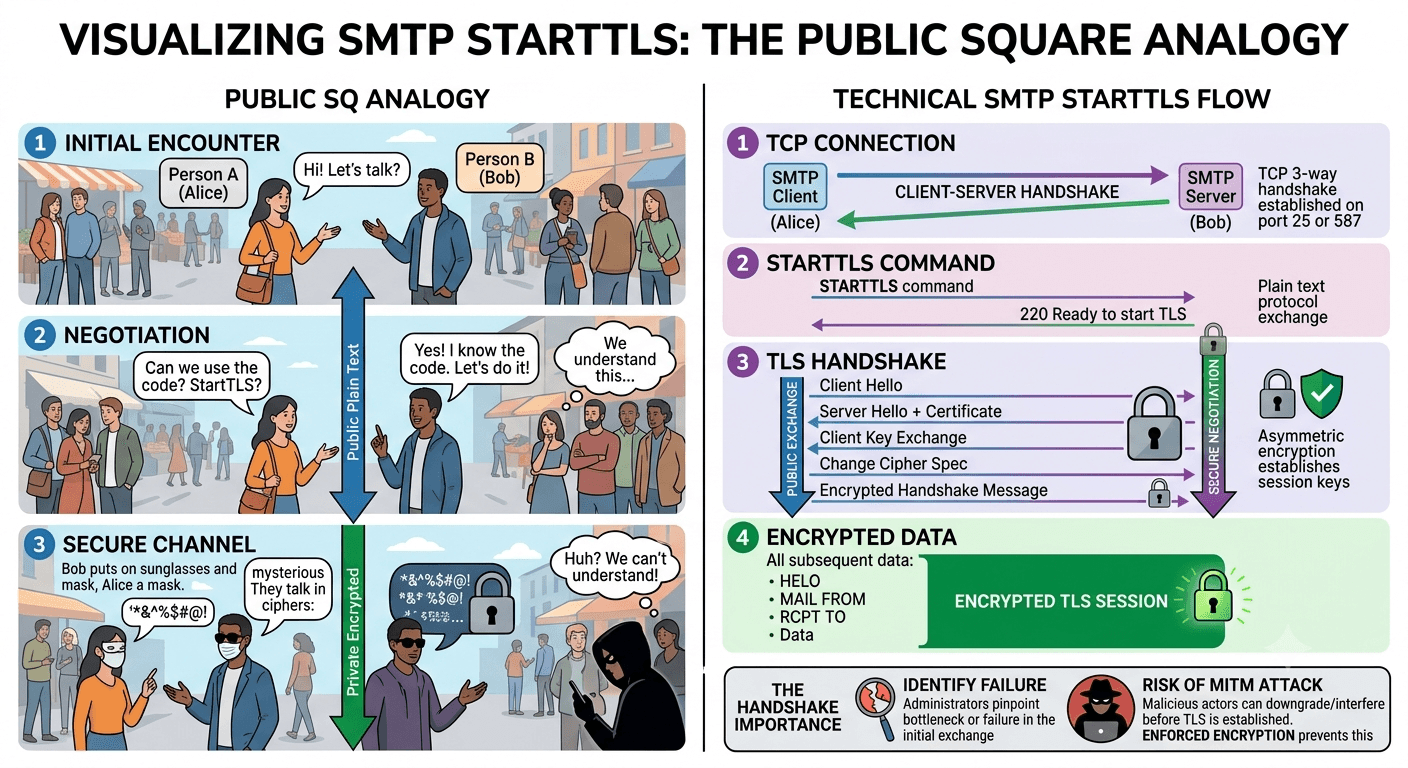
Imagine a conversation where two people meet in a public square. They start talking in a language everyone understands to confirm they both know a secret code. Once they agree to use the code, they switch to a private language that no one else around them can decipher. This is exactly what happens during the SMTP StartTLS negotiation. The public conversation is the initial plain text exchange, and the private language is the TLS-encrypted session.
This visual flow highlights the importance of the initial handshake. If a malicious actor interferes with the first few steps, they might be able to trick the client into staying in the plain text mode. This is why many security experts recommend moving toward enforced encryption where possible. By understanding this flow, administrators can better identify where a connection might be failing and which part of the handshake is causing a bottleneck.
Which Port Should You Use?
Choosing the right port is essential for ensuring that your emails are delivered securely and efficiently. Different ports are designed for different stages of the email delivery process, such as submission or relaying. Using the wrong port can lead to your messages being blocked by Internet Service Providers or being flagged as spam by receiving servers.
Historically, port 25 was the standard for all email traffic. However, because it was frequently abused by spammers, many ISPs now block it for client-side email submission. This has led to the adoption of alternative ports that are specifically optimized for secure communication. Understanding the nuances of these ports helps in configuring email clients and servers for maximum reliability.
Exploring TLS Port Numbers and Their Functions
Each port has a specific role in the email ecosystem, and knowing when to use them is key to a functional setup. The port number for TLS often depends on whether you are using implicit or explicit encryption.
-
Port 587: This is the recommended port for email submission. It almost always uses the explicit command to upgrade the connection to TLS.
-
Port 465: Originally intended for SMTPS, this port uses implicit TLS. The connection is encrypted from the very first byte.
-
Port 25: This is primarily used for server-to-server relaying. While it supports encryption, it is often unencrypted by default.
-
Port 2525: An unofficial alternative to port 587, often used when an ISP blocks standard ports. It also supports the explicit upgrade command.
For most modern applications, port 587 is the industry standard because it follows the modern guidelines for mail submission. It provides a clear separation between the act of a user sending an email and a server moving that email across the web. This distinction allows for better monitoring and security enforcement across different network layers.
Opportunistic vs Enforced TLS
There are two main philosophies when it comes to implementing email security: opportunistic and enforced. Opportunistic TLS, also known as explicit security, is designed for maximum deliverability. It attempts to encrypt the connection if the receiving server supports it but will fall back to plain text if encryption is unavailable. This ensures the message gets through, even if the security is not perfect.
Enforced TLS, or implicit security, takes a stricter approach. It requires the connection to be encrypted before any data is sent. If the receiving server does not support the required security levels, the connection is terminated, and the email is not sent. This is often used in industries with high security requirements, such as finance or healthcare, where sending an unencrypted message is considered a major compliance violation.
According to the Google Transparency Report, approximately 90% of emails received by Gmail are now encrypted in transit.
This statistic shows a massive shift toward encryption, making opportunistic methods more effective than they were a decade ago. As more servers adopt these standards, the gap between deliverability and security continues to shrink, allowing for safer global communication.
Why is StartTLS Important for Modern Communication?
The primary reason this protocol is so important is that SMTP was not built with security in mind. When the original protocols for email were designed in the early 1980s, the internet was a small, trusted community of researchers. There was no need for encryption because no one was worried about malicious actors. Today, the internet is a hostile environment, and unencrypted emails are a significant liability.
Without the protection offered by StartTLS, your personal information is at constant risk. This includes not just the content of your messages, but also the metadata and authentication credentials used to access your mail server. By scrambling this information, the protocol ensures that even if a hacker manages to tap into the network line, they will only see a meaningless jumble of characters instead of your private data.
Areas of Application for StartTLS
While email is the most common use case, this protocol extension is actually used across a variety of different services. Any protocol that started as a plain text system but needed to add security later can benefit from this explicit upgrade method. This flexibility has allowed many legacy systems to remain relevant in an era where encryption is mandatory.
In the world of directory services, LDAP uses this method to secure queries between clients and servers. Similarly, the File Transfer Protocol often uses a version of this command to protect login credentials during file movements. Even some instant messaging protocols, like XMPP, rely on this mechanism to ensure that chats are kept private between the participants. This wide range of applications demonstrates how the concept of “upgrading” a connection has become a cornerstone of internet security architecture.
Advantages and Disadvantages of StartTLS
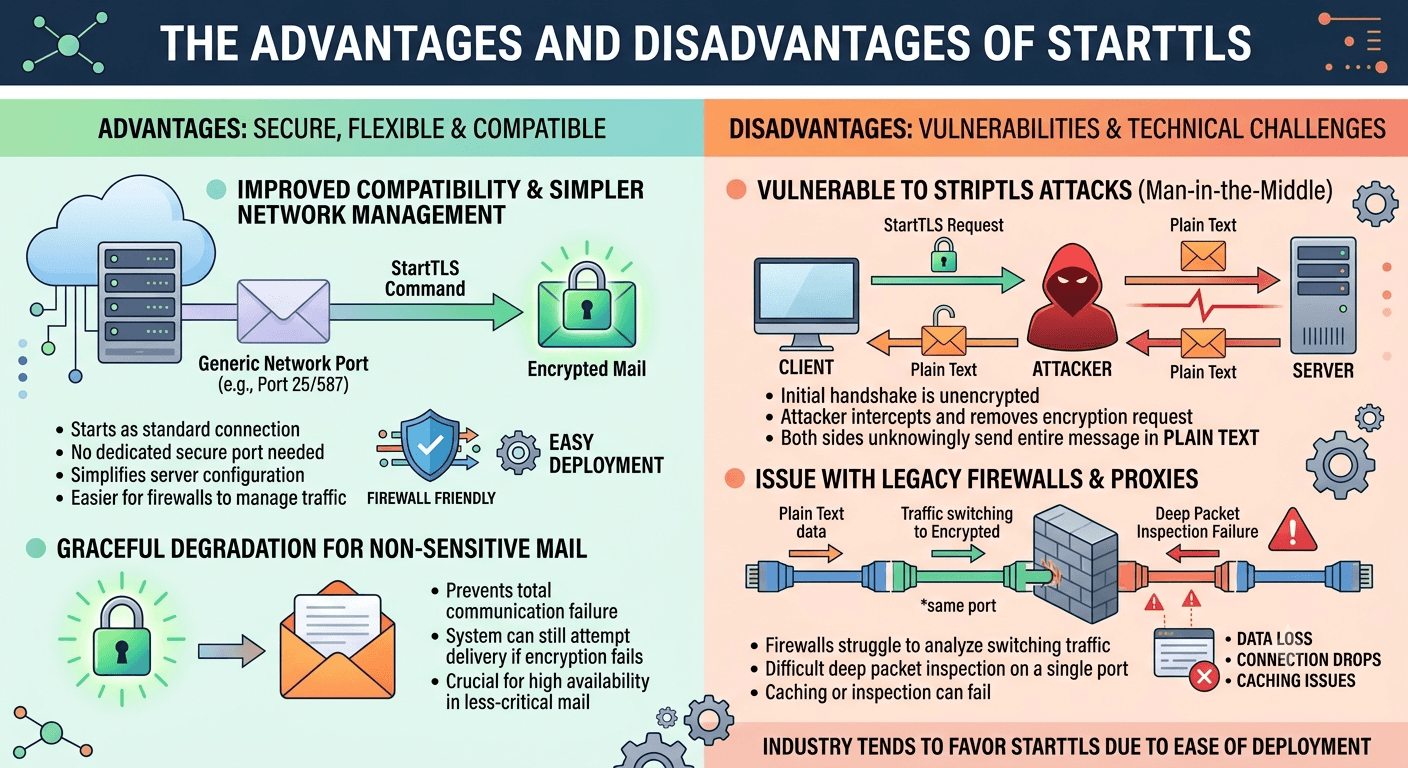
One of the biggest advantages of this method is its incredible compatibility. Because it starts as a standard connection, it doesn’t require a dedicated port for security. This simplifies server management and makes it easier for firewalls to handle traffic. It also allows for a graceful degradation; if encryption fails for a technical reason, the system can still attempt to deliver the mail, which is vital for non-sensitive communication.
However, there are notable disadvantages, particularly regarding a specific type of cyberattack. Because the initial handshake is unencrypted, a “man-in-the-middle” can intercept the communication and strip away the encryption request. This is known as a STRIPTLS attack. If this happens, the client and server may believe that the other side doesn’t support security, causing them to send the entire message in plain text without the user ever knowing they are at risk.
Another challenge involves security software and proxies. Some older firewalls struggle to analyze traffic that switches from plain text to encrypted on the same port. This can lead to issues with caching or deep packet inspection, potentially causing delays or connection drops. Despite these hurdles, the industry continues to favor this method because of the ease of deployment compared to older, more rigid encryption frameworks.
How Can I Test StartTLS?
Testing is a critical step for any administrator setting up a new mail server or troubleshooting an existing one. You need to verify that the server is correctly advertising the capability and that the handshake is completing successfully. If the server says it supports the command but fails during the encryption phase, emails might be sent unencrypted or not sent at all.
You can use command-line tools to manually walk through the process and see exactly where a failure might be occurring. This manual verification provides insights that a standard email client might hide behind a generic error message. It allows you to see the raw response codes from the server, which is invaluable for identifying configuration blunders or certificate issues.
-
Manual Testing with Telnet and OpenSSL
Using a tool like telnet allows you to connect to the server on port 587 and type the commands yourself. You would first type EHLO to see the list of features. If you see STARTTLS in the list, the server is configured to offer the upgrade. You can then type the actual command and wait for the 220 OK response. This confirms that the server is at least acknowledging the request for security.
For a more comprehensive test, OpenSSL is the preferred tool. It can actually perform the TLS handshake and show you the details of the encryption certificate. A successful test with OpenSSL will display the certificate chain, the cipher suite being used, and the version of TLS. If the verification returns a “code 0 (ok)”, you can be confident that your server is properly secured and ready to handle encrypted traffic from modern clients.
Troubleshooting Common StartTLS Errors
Errors related to this protocol are often frustrating because they can prevent you from sending any mail at all. Most of these issues stem from a mismatch between what the client expects and what the server is providing. For example, if your client is set to require encryption but the server doesn’t offer it, you will see a “StartTLS is required to send mail” error.
-
Must issue a STARTTLS command first: This usually means your email client is trying to send a password before it has secured the connection. The fix is to ensure the security setting in your mail app is set to StartTLS or TLS/SSL.
-
Connection timeout: This often happens if an ISP is blocking port 587. Switching to port 2525 can often resolve this issue.
-
Certificate verification failed: This happens if the server’s security certificate is expired or doesn’t match the domain name. Double-check that your SMTP server address matches the one on the certificate.
-
Negotiation failed: This indicates that the client and server cannot agree on a TLS version. Upgrading your email client software is usually the best fix for this, as older versions may only support insecure, outdated protocols.
Read More: Rotary Phone: A Complete Guide
Final Thought
Ensuring that your email communication is secure is no longer an optional task; it is a fundamental necessity in the modern digital age. StartTLS provides the perfect balance between backwards compatibility and modern security, allowing servers to talk to each other while protecting user data. By understanding how this protocol works, which ports to use, and how to troubleshoot common issues, you can ensure that your messages stay private and arrive safely at their destination.
Frequently Asked Questions
-
What is STARTTLS in email?
STARTTLS is a protocol command used to upgrade an insecure email connection to a secure one using TLS or SSL encryption. It allows a mail client and server to negotiate security over an existing plain text connection rather than requiring a dedicated secure port.
-
Which is better, SSL TLS or STARTTLS?
TLS is the modern and secure version of SSL, which is now considered obsolete. StartTLS is a method of implementing TLS that is more flexible than implicit SSL/TLS because it allows the same port to handle both encrypted and unencrypted traffic, though implicit TLS on port 465 is often considered slightly more secure against certain types of attacks.
-
Is port 587 STARTTLS or TLS?
Port 587 is the standard port for email submission and typically uses StartTLS, which is an explicit encryption method. This means the connection starts as plain text and is then upgraded to an encrypted TLS session.
-
How do I enable STARTTLS in SMTP?
To enable this in your email client, go to the SMTP or Outgoing Mail Server settings and look for the security or encryption dropdown menu. Select the option labeled StartTLS or TLS and ensure the port is set to 587.
-
What port does StartTLS use?
It typically uses port 587, which is the standard for email submission with encryption. Ports 25 and 2525 also support the protocol, but port 587 is the most recommended for modern client applications to ensure compatibility and security.
-
Is StartTLS secure?
It provides strong security when properly configured, but it can be vulnerable to man-in-the-middle attacks during the initial unencrypted handshake if the connection is not enforced. For maximum security, you should ensure that certificate verification is always enabled in your settings.
-
How do I enable StartTLS?
Enable this feature in your email client’s SMTP settings by selecting options like “Use STARTTLS,” “Explicit TLS,” or “TLS/StartTLS.” You should avoid selecting “SSL” or “Implicit TLS” if you are using port 587, as those require a different connection method.
-
What is the difference between StartTLS and SSL?
StartTLS upgrades an existing connection to an encrypted one, while SSL (now replaced by TLS) usually creates an encrypted connection from the very start. The primary advantage of the upgrade command is its ability to support both secure and insecure connections on a single port.
-
Why am I getting StartTLS is required errors?
This error occurs when the mail server requires an encrypted connection, but your email client is trying to send data in plain text. To fix this, check your SMTP configuration to ensure that encryption is turned on and that you are using the correct port number.
-
Can I use StartTLS with any email provider?
Most modern email providers support this protocol, but some older or specialized providers might still rely on legacy methods. You should check your provider’s documentation or test the connection using a tool like telnet to confirm support.


