
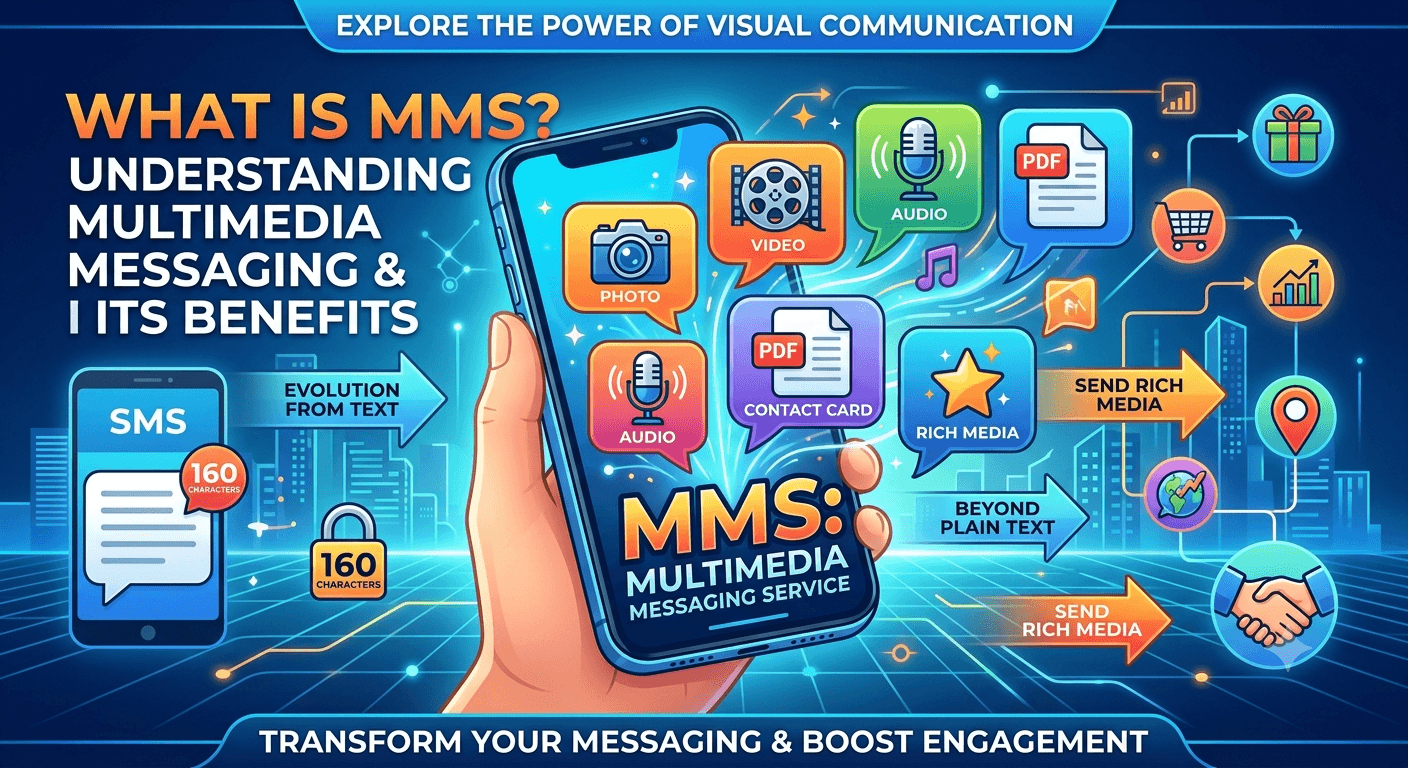
Multimedia Messaging Service, commonly referred to as MMS, is a standard telecommunications technology that allows mobile phone users to send and receive messages containing rich media content rather than just plain text. When exploring the mms meaning (what is mms messaging), it is important to realize that this service extends the core capabilities of SMS by enabling the transmission of images, videos, audio files, and contact cards. Unlike traditional texting, which is limited to 160 characters, MMS provides a dynamic platform for more expressive and detailed communication across various cellular networks and devices worldwide.
What Is MMS Messaging?
The mms full form stands for multimedia messaging service, a technology designed to allow mobile users to share various forms of media through their standard texting applications. While standard SMS is limited to alphanumeric characters, understanding what is mms requires looking at how it integrates different file formats into a single message. This service was developed as an evolution of Short Message Service to meet the growing demand for visual communication as mobile device technology advanced in the early 2000s. It operates by utilizing a combination of cellular data and messaging protocols to ensure that high-quality content reaches the recipient regardless of their device type or service provider.
Defining what does mms mean also involves understanding its technical limitations and requirements compared to standard text. When you send an mms, the file is usually sent via a data connection rather than the traditional signaling path used for basic text. This is why many people ask do mms messages use data, and the answer is generally yes, as the multimedia files require more bandwidth than simple text strings. Whether you are using an iPhone or an Android device, the system automatically detects when you have added an image or exceeded the character limit, converting the message into an mms format to ensure successful delivery of the rich content.
How Is an MMS Message Delivered?
The process of delivering a multimedia message involves a more complex infrastructure than a standard text message. When you initiate a message, your mobile device sends the data to the Multimedia Messaging Service Center, which acts as a central hub for managing the transmission. This center is responsible for analyzing the message content and determining the best way to route it to the recipient based on their network capabilities and device compatibility. During this phase, the system might perform transcoding, which is the process of resizing or reformatting an image or video so that it fits the technical specifications of the receiving handset.
Once the content is processed, the system sends a notification to the recipient device indicating that a multimedia message is available. The receiving phone then uses its data connection to download the content from the server, making it appear in the user messaging thread. This architecture is what allows for the seamless exchange of media between different carriers and geographical locations. According to technical documentation from the GSMA, the interoperability of these systems is crucial for maintaining global communication standards, ensuring that a user in one country can send a photo to a user in another without compatibility hurdles.
MMS Messaging Examples for Businesses
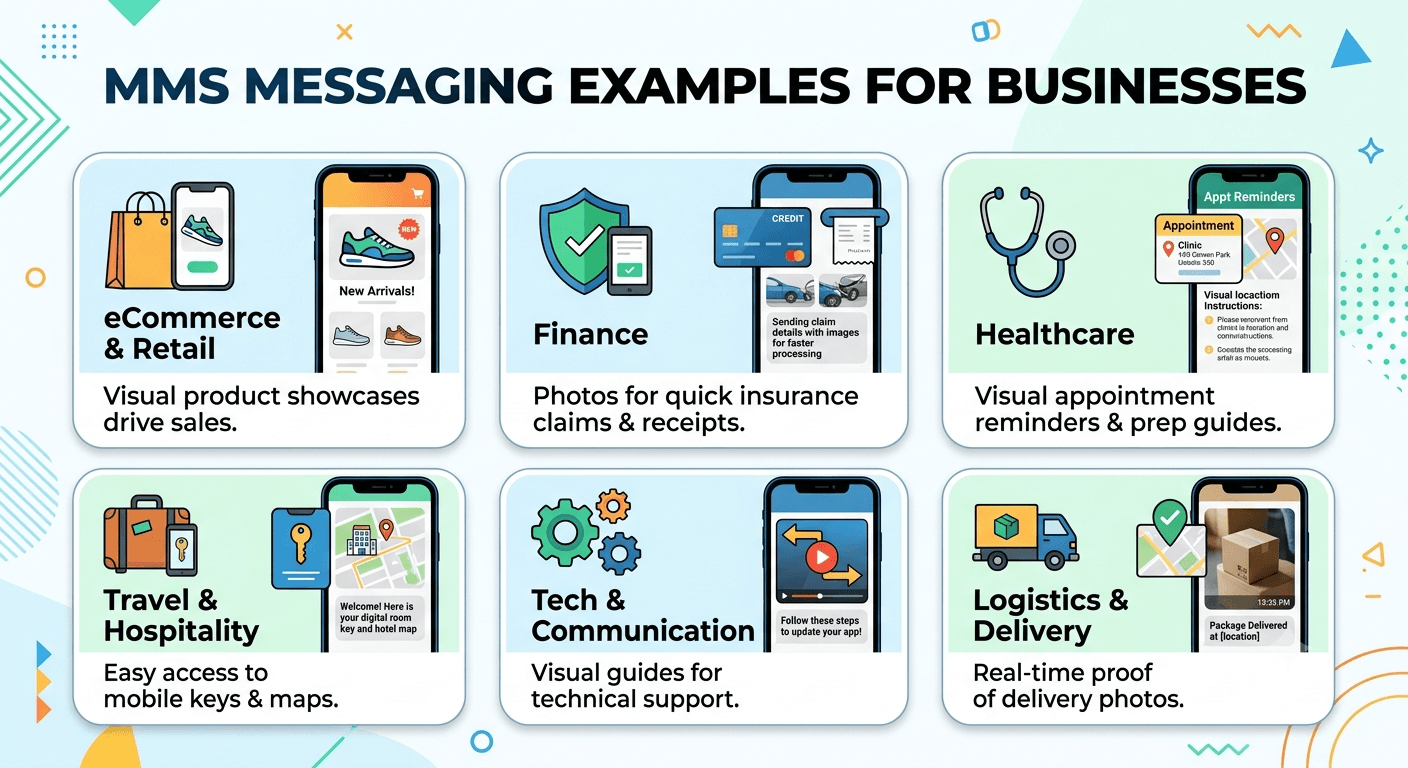
Businesses across various sectors utilize multimedia messaging to create more impactful interactions with their customers. By moving beyond plain text, companies can provide visual evidence, instructional videos, or branded graphics that enhance the professional nature of their communication. This approach not only improves clarity but also significantly boosts the likelihood of a customer taking a specific action or remembering the information provided.
Sending high-quality images of new products to interested buyers.
Distributing digital coupons with barcodes or QR codes for easy scanning at checkout.
Providing video tutorials for complex product setups or troubleshooting steps.
Sharing personalized greeting cards or event invitations that reflect the brand identity.
Sending maps or location pins to help customers find physical store locations easily.
eCommerce and Retail
In the retail sector, visual storytelling is a primary driver of sales, making multimedia communication an invaluable tool for driving conversions. Retailers often send promotional messages that include images of trending items or upcoming seasonal collections to capture immediate interest. By seeing the actual product in a high-resolution photo, customers are more likely to click through to the website compared to reading a text-only description. This visual stimulation serves as a powerful psychological trigger that enhances the shopping experience and fosters brand loyalty through consistent visual engagement.
Finance
Financial institutions use multimedia messaging to improve security and provide more detailed account information to their clients. Banks may send mms messages that include detailed charts of spending habits or visual receipts for high-value transactions to ensure transparency. Additionally, insurance companies utilize this technology to allow customers to send photos of vehicle damage or property issues directly through text for faster claims processing. This streamlines the documentation phase and reduces the time spent on phone calls or lengthy email chains, providing a modern solution for busy consumers.
Healthcare
The healthcare industry has adopted multimedia messaging to facilitate better patient outcomes and more efficient administrative workflows. Doctors and clinics often send visual appointment reminders that include maps of the facility or instructional graphics for pre-surgery preparations. Patients can also benefit by receiving digital prescriptions or laboratory results in a format that is easy to read and store on their mobile devices. This immediate access to visual information helps in reducing patient anxiety and ensures that critical health instructions are followed accurately.
Travel and Hospitality
Travel agencies and hotels leverage rich media to enhance the traveler journey from booking to arrival. Hotels often send mms messages containing digital room keys, property maps, or photos of the breakfast menu to welcome guests before they even step through the door. Airlines use this method to distribute mobile boarding passes that include scannable barcodes, making the check-in process much smoother for the passenger. By providing these resources directly in the text thread, travel brands eliminate the need for guests to search through their emails for essential travel documents.
Technology and Communication
Tech companies use multimedia messages to provide instant support and software updates to their user base. When a user encounters a technical issue, support teams can send screenshots or short screen-recording clips that guide the user through a specific fix. This visual aid is often much more effective than a long list of written instructions, which can be difficult to follow on a small screen. Furthermore, developers use these messages to announce new feature launches with engaging graphics that highlight the user interface improvements, driving higher adoption rates for new software versions.
Transportation and Logistics
For the logistics sector, providing real-time visual updates is essential for maintaining trust and efficiency in the delivery chain. Delivery drivers can send photos of where a package was left to provide proof of delivery and peace of mind for the recipient. Likewise, logistics managers use multimedia messaging to send route updates or digital manifests to their fleet, ensuring everyone has access to the most current visual information. This reduces the number of lost packages and improves the overall customer satisfaction scores for shipping companies.
What Is the Difference Between SMS and MMS Messaging?
The primary distinction between SMS and MMS lies in the type of content and the technical capacity of the message. SMS stands for Short Message Service and is strictly limited to 160 characters of text without any formatting or media attachments. In contrast, MMS is designed for rich media, allowing for much larger data sizes and the inclusion of various file types like GIFs, audio, and video. While SMS uses the cellular voice signaling channel, MMS relies on a data connection, meaning it requires either a mobile data plan or a Wi-Fi connection to be sent and received effectively.
Another significant difference is how these messages are billed and tracked by mobile service providers. Most modern phone plans include unlimited SMS, but MMS might be subject to different data usage policies or individual message costs depending on the carrier. Additionally, SMS is a universal standard that works on virtually every mobile phone in existence, while MMS requires a device capable of displaying media and a network configured for multimedia delivery. This makes SMS more reliable for critical, text-only alerts, while MMS is the preferred choice for creative and engaging communication strategies.
What Are the Pros and Cons Between SMS vs MMS?
When choosing between these two messaging standards, it is important to weigh the advantages of visual engagement against the simplicity and reliability of text. MMS offers the ability to stand out in a crowded inbox and provides a more modern feel to communications. However, this comes at the cost of higher data consumption and potential compatibility issues with older devices. SMS is incredibly fast and has near-perfect deliverability, but it lacks the visual appeal and character space needed for complex marketing or detailed information sharing.
Pros of MMS: Higher engagement rates, ability to send visual content, and no 160-character limit.
Cons of MMS: Higher cost per message, requires a data connection, and can be slower to send.
Pros of SMS: Low cost, works on every mobile phone, and high deliverability.
Cons of SMS: Limited to 160 characters, no visual elements, and can feel impersonal.
When Should You Use SMS vs. MMS in Your General Customer Communications?
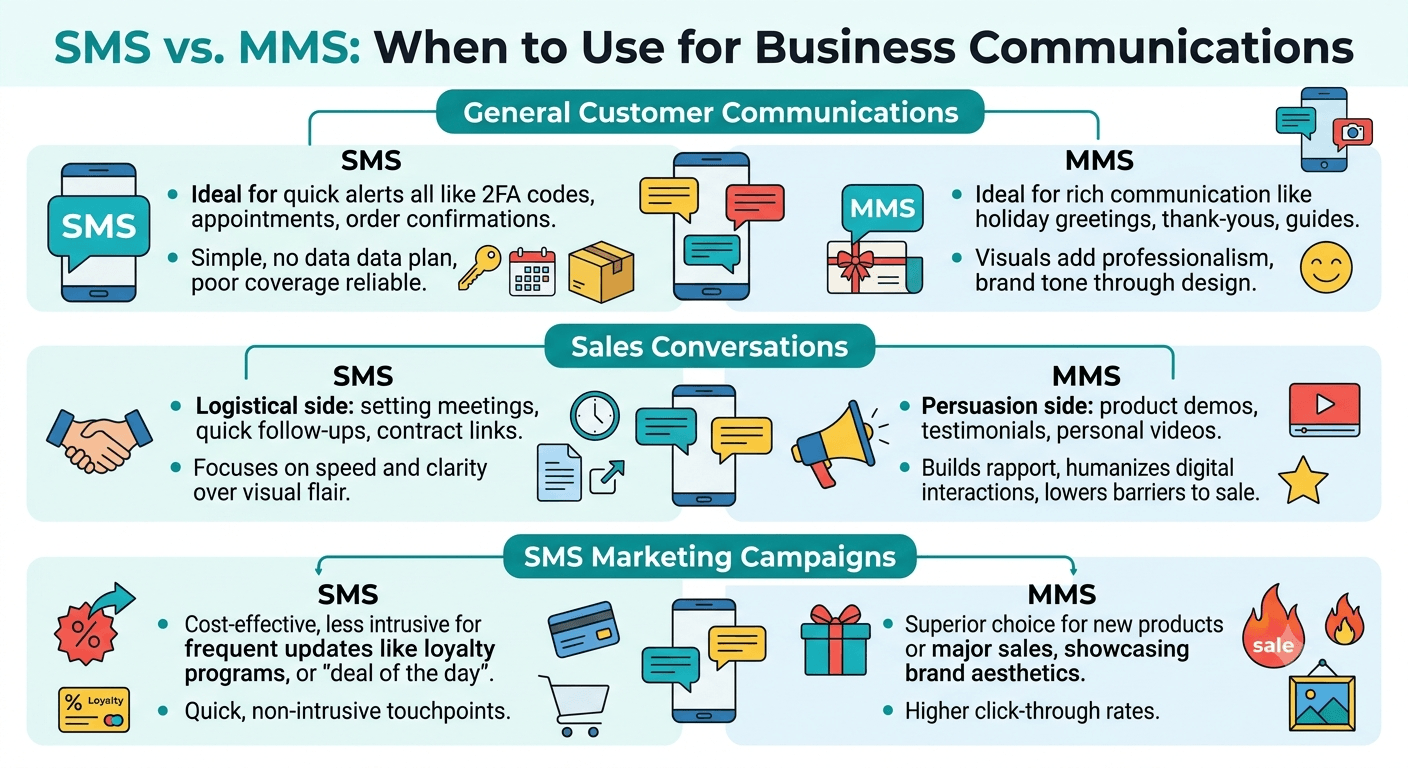
For general customer communications, the choice depends on the urgency and the nature of the information being shared. SMS is ideal for quick alerts, such as two-factor authentication codes, appointment reminders, or order confirmation numbers, where the goal is to provide a brief piece of information as quickly as possible. These messages are easy for customers to digest at a glance and do not require them to use their data plan to view the content. The simplicity of SMS ensures that the message is received even in areas with poor data coverage.
On the other hand, MMS should be used when the communication benefits from a visual element or a more detailed explanation. If you are sending a holiday greeting, a thank-you note, or a detailed instruction manual, the multimedia format adds a layer of professionalism and care that text cannot achieve. It allows the brand to project a specific image and tone through colors and design. Using MMS for general communication is most effective when the relationship with the customer is established and you want to provide a premium experience that goes beyond basic transactional updates.
When Should You Use SMS vs. MMS in Your Sales Conversations?
In a sales environment, the goal is often to build rapport and demonstrate the value of a product or service. MMS is a powerful tool here because it allows sales representatives to send product demonstrations, testimonials, or personalized video messages to prospects. Seeing a product in action or hearing a friendly voice can significantly lower the barriers to a sale. It helps in humanizing the digital interaction and makes the prospect feel more valued than a generic text message would.
Conversely, SMS is better suited for the logistical aspects of the sales process. This includes setting up meeting times, sending quick follow-ups after a call, or providing a link to a contract. These actions require speed and clarity rather than visual flair. By using SMS for the “business” side of sales and MMS for the “persuasion” side, sales teams can create a balanced communication strategy that is both efficient and highly effective at converting leads into loyal customers.
When Should You Use SMS vs. MMS in Your SMS Marketing Campaigns?
Marketing campaigns thrive on engagement, and data shows that messages with visuals often perform better in terms of click-through rates. When launching a new product or a major seasonal sale, MMS is the superior choice because it allows you to showcase the aesthetics of your brand. A well-designed graphic can convey the excitement of a sale much faster than a text-based announcement. This visual impact is crucial in a world where consumers are constantly bombarded with digital notifications and have limited attention spans.
However, for ongoing loyalty programs or quick “deal of the day” updates, SMS might be more cost-effective and less intrusive. If your audience receives messages from you frequently, they may prefer the brevity of a text over a media-heavy message that uses their data. It is important to segment your audience and test which format yields the best results for different types of offers. Many successful marketers use a mix of both, reserving MMS for high-impact announcements and using SMS for consistent, low-friction touchpoints throughout the customer lifecycle.
What Is MMS Group Messaging?
MMS group messaging is a feature that allows multiple people to participate in a single conversation thread where everyone can see everyone else responses. Unlike a mass BCC-style text where replies only go to the sender, a group mms creates a collaborative environment. This is the technology that powers group chats on both Android and iPhone devices when using standard messaging apps. It is particularly useful for families, small teams, or social groups who need to share photos and updates with everyone simultaneously without sending individual messages.
From a business perspective, group messaging can be used for small-scale project coordination or for keeping a specific group of stakeholders informed. However, it is important to note that group mms has limits on the number of participants, typically ranging from 10 to 30 depending on the carrier and device. For larger groups, professional messaging platforms or apps like WhatsApp are often preferred. Understanding the mms meaning in a group context helps users manage their notifications and understand how their replies will be distributed among the other members of the thread.
How Can You Enable MMS Messaging on Your Business Phone Number?
Enabling multimedia capabilities for a business number usually involves working with a dedicated business messaging provider. Most standard landlines or VOIP numbers are not automatically equipped to handle multimedia content, so you must ensure your service provider supports the protocol. The first step is to verify that your service plan includes mms and that your software interface is capable of uploading and sending media files. Many businesses use an API or a web-based platform to manage these messages, allowing them to send high volumes of media efficiently from a computer rather than a handheld device.
Once the technical side is set up, it is crucial to configure your settings to handle incoming multimedia messages as well. This ensures that when customers send you photos of their issues or documents, your team can view them directly in your customer relationship management system. You should also establish guidelines for file sizes and formats to ensure maximum compatibility with your customers’ devices. By integrating this service into your existing communication infrastructure, you provide a more versatile and modern touchpoint for your clients, enhancing the overall professional image of your organization.
Read More: Loa Meaning in Business: Crucial Insights for Successful Management
Final Thought
Understanding the mms meaning (what is mms messaging) is the first step toward transforming your personal or professional communication. By embracing the power of visual media, you can transcend the limitations of plain text and create deeper, more meaningful connections with your audience. Whether you are a business owner looking to boost sales or an individual wanting to share memories with friends, multimedia messaging offers a versatile and ubiquitous platform that remains a cornerstone of the mobile experience. As technology continues to evolve, the ability to communicate with clarity and creativity through MMS will remain an essential skill in our increasingly digital world.
FAQs
What does MMS mean for an adult?
In the context of adult communication, MMS simply refers to the same Multimedia Messaging Service used for any other type of media exchange. It denotes the transmission of images, videos, or voice notes between consenting adults. While the term is sometimes associated with private or sensitive content in casual slang, its technical definition remains the standard method for sending any visual file through a cellular messaging application.
Which is better, MMS or SMS?
Neither is inherently better, as they serve different purposes based on the user’s needs. SMS is superior for quick, reliable, and low-cost text alerts that work on every phone. MMS is the better choice for engagement, marketing, and sharing detailed visual information. The best approach is to use SMS for brief updates and MMS when the message requires a visual element to be fully understood or appreciated.
Is WhatsApp MMS?
WhatsApp is not considered MMS; it is an Over-the-Top (OTT) messaging application that uses the internet rather than the cellular messaging protocols. While WhatsApp allows you to send multimedia, it does so through its own proprietary system and data servers. MMS specifically refers to the service provided by cellular carriers that works through the native messaging app on your phone without requiring a third-party account.
What does MMS messaging do?
MMS messaging enables the transfer of rich media files between mobile devices over a cellular network. It allows users to embed photos, videos, GIFs, and audio clips into their text conversations, breaking the 160-character limit of traditional SMS. This service bridges the gap between simple text and modern social media sharing, providing a built-in way for all mobile users to communicate visually.
What is mms full form in mobile?
The full form of MMS in mobile technology is Multimedia Messaging Service. It was developed to allow users to send more than just text, expanding the original SMS framework to include various digital media formats. This technology is a standard feature on almost all modern smartphones and is supported by nearly every major cellular network provider globally.
Why would a text be sent as an MMS?
A text message is converted to an MMS if it contains an image, video, or audio file, or if the text exceeds the character limit of a standard SMS. Additionally, messages sent to multiple recipients in a group chat are often processed as MMS to allow for collaborative threading. Most modern smartphones automatically handle this conversion to ensure the message is delivered in the most appropriate format for the content included.
Do MMS messages cost more than SMS?
In many cases, yes, MMS messages can cost more depending on your mobile service provider’s pricing structure. Some plans offer unlimited SMS but charge a small fee for each MMS sent, or they may count the data used for the MMS against your monthly data allowance. However, many modern “unlimited” plans now include both SMS and MMS as part of the standard package, though it is always wise to check with your carrier.
When was MMS first introduced to the public?
MMS was first introduced commercially around 2002, following the massive success of SMS in the late 1990s. It was designed to coincide with the rollout of 2G and 3G networks, which provided the data speeds necessary to transmit larger media files. Since its introduction, it has become a global standard, evolving to support higher resolution images and longer video clips as mobile hardware has improved.
Can I send an MMS without a data plan?
Generally, you cannot send or receive an MMS without some form of data connection, whether it is mobile data or, in some cases, Wi-Fi calling features supported by your carrier. Because MMS involves transferring files that are much larger than simple text, the system requires a data pipe to move that information. If your mobile data is turned off and you are not on a supported Wi-Fi network, the MMS will usually fail to send or download.


