
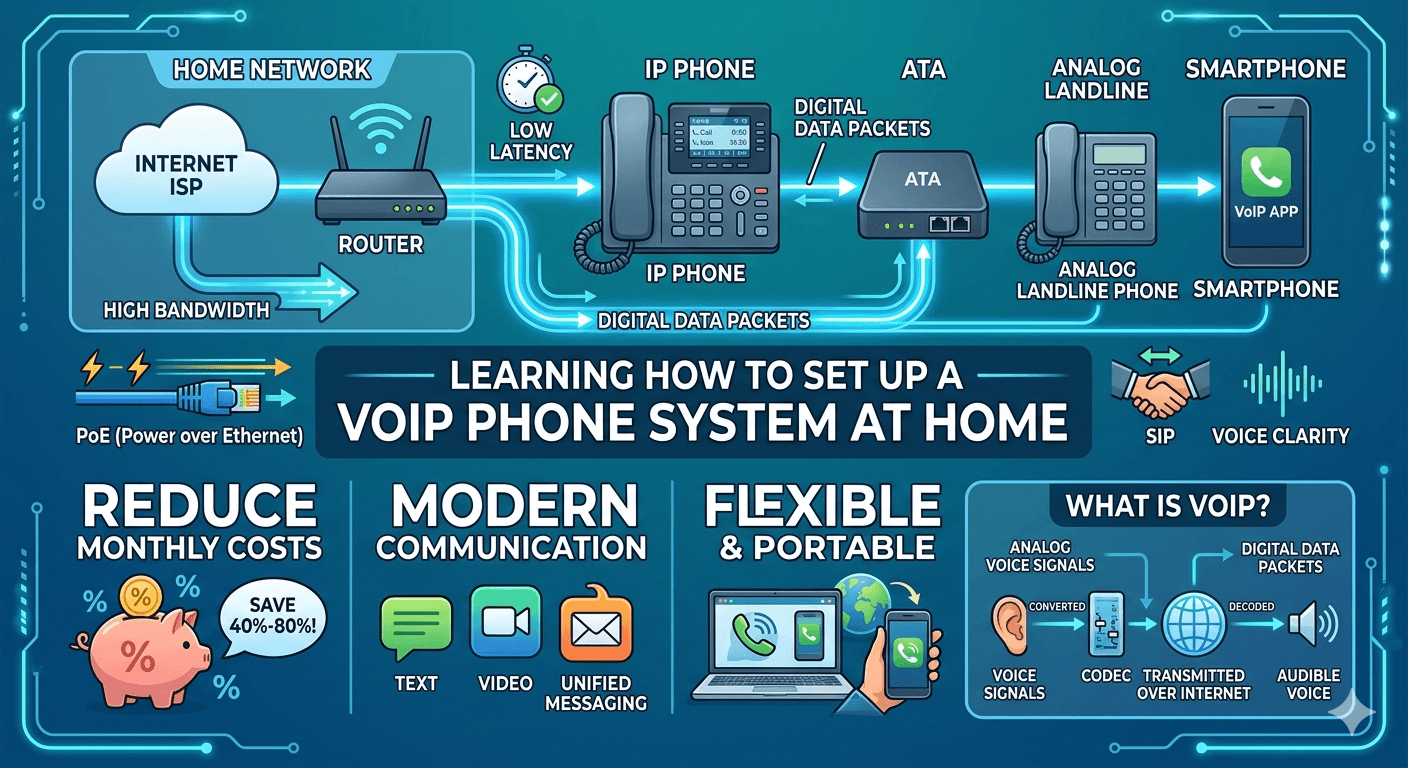
Learning how to set up a VoIP phone system at home is a transformative step for anyone looking to modernize their communication while reducing monthly costs. VoIP, or Voice over Internet Protocol, allows you to make phone calls using your high-speed internet connection rather than a traditional copper-wire landline. To get started, you will need a reliable internet service provider, a VoIP service subscription, and compatible hardware like an IP phone or an analog telephone adapter. The process involves connecting your device to your router, configuring the software settings provided by your carrier, and performing a quick test call to ensure voice clarity.
Understanding VoIP: A Glossary of Key Terms
To master the phone system setup, it is helpful to understand the language used by technicians and service providers. Navigating the world of internet-based calling can be confusing without a basic grasp of the terminology.
Voice over IP (VoIP): This is the core technology that allows for voice communication and multimedia sessions over Internet Protocol networks.
IP Phone: A specialized device that looks like a traditional desk phone but connects directly to your router via Ethernet or Wi-Fi to facilitate voip phone installation.
Analog Telephone Adapter (ATA): A small hardware device that allows you to connect a standard landline phone to your internet network.
Bandwidth: The amount of data that can be transmitted over your internet connection in a fixed amount of time, which is crucial for voip setup.
Latency: The delay between when a voice signal is sent and when it is received; low latency is essential for clear conversations.
Jitter: The variation in the time between data packets arriving; high jitter can cause broken or distorted audio during a voip phone connection.
PoE (Power over Ethernet): A technology that allows Ethernet cables to carry both data and electrical power, simplifying the ip phone setup by reducing cord clutter.
SIP (Session Initiation Protocol): A signaling protocol used for initiating, maintaining, and terminating real-time sessions that include voice, video, and messaging applications.
What is VoIP?
VoIP stands for Voice over Internet Protocol. It is a technology that takes your analog voice signals and converts them into digital data packets. These packets are then transmitted over the internet, just like an email or a web page. When they reach the recipient, the packets are converted back into sound. When you learn how to set up voip, you are essentially bypassing the traditional public switched telephone network (PSTN) in favor of the more efficient and versatile internet.
This technology has evolved significantly since its inception. Today, voip phone system installation is the standard for modern businesses and is increasingly popular for residential use. Unlike traditional landlines, which are tied to a physical location, VoIP is portable. You can use your VoIP account on a desk phone, a laptop, or a smartphone app, making it highly flexible for the modern remote work environment.
How VoIP Technology Works for Your Home
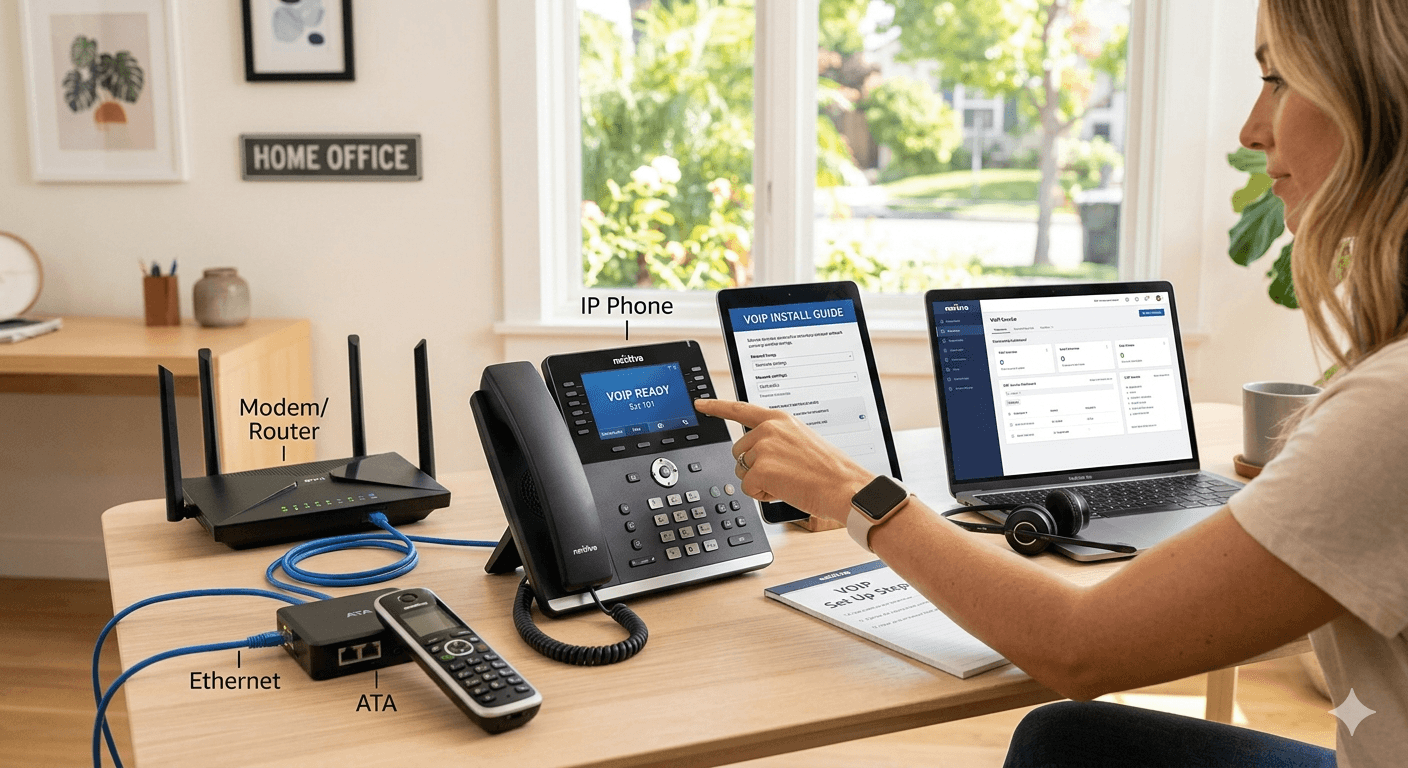
The mechanics of how to make voip calls are fascinatingly efficient. When you speak into a handset or a headset, your voice is an analog wave. The VoIP software or hardware uses a “codec” to compress this analog signal into a digital format. These digital packets are routed through the internet via the most efficient path available. Once they arrive at the destination IP address, they are reassembled in the correct order and decoded back into an audible voice.
A key advantage of this system is that it utilizes your existing internet infrastructure. Research indicates that households switching from traditional landlines to internet-based systems can save an average of 40% to 80% on their monthly bills. This is because internet data is handled much more cheaply by providers than dedicated physical circuits. Furthermore, because it is digital, it can easily be integrated with other services like email, instant messaging, and video conferencing, providing a unified communication experience.
Essential Requirements: What You Need to Set Up VoIP
Before diving into the voip configuration, you must ensure you have the necessary components. Having these items ready will make the how to setup voip phone process much smoother.
A High-Speed Internet Connection: VoIP relies entirely on your internet. You need a stable connection with sufficient upload and download speeds. Most experts recommend at least 100 Kbps of bandwidth per concurrent call.
A VoIP Service Provider: You cannot simply plug a phone into the internet and start calling. You need a provider like Nextiva or similar services to route your calls and provide you with a phone number.
Hardware Devices: You have three main choices here. You can use an IP phone, a computer with a headset, or your existing analog phone paired with an adapter.
Ethernet Cables: Even if your devices support Wi-Fi, a wired connection is always preferred for voip phone setup to ensure the most stable audio quality.
A Router and Modem: Your home network needs a router capable of prioritizing voice traffic through a setting called Quality of Service (QoS).
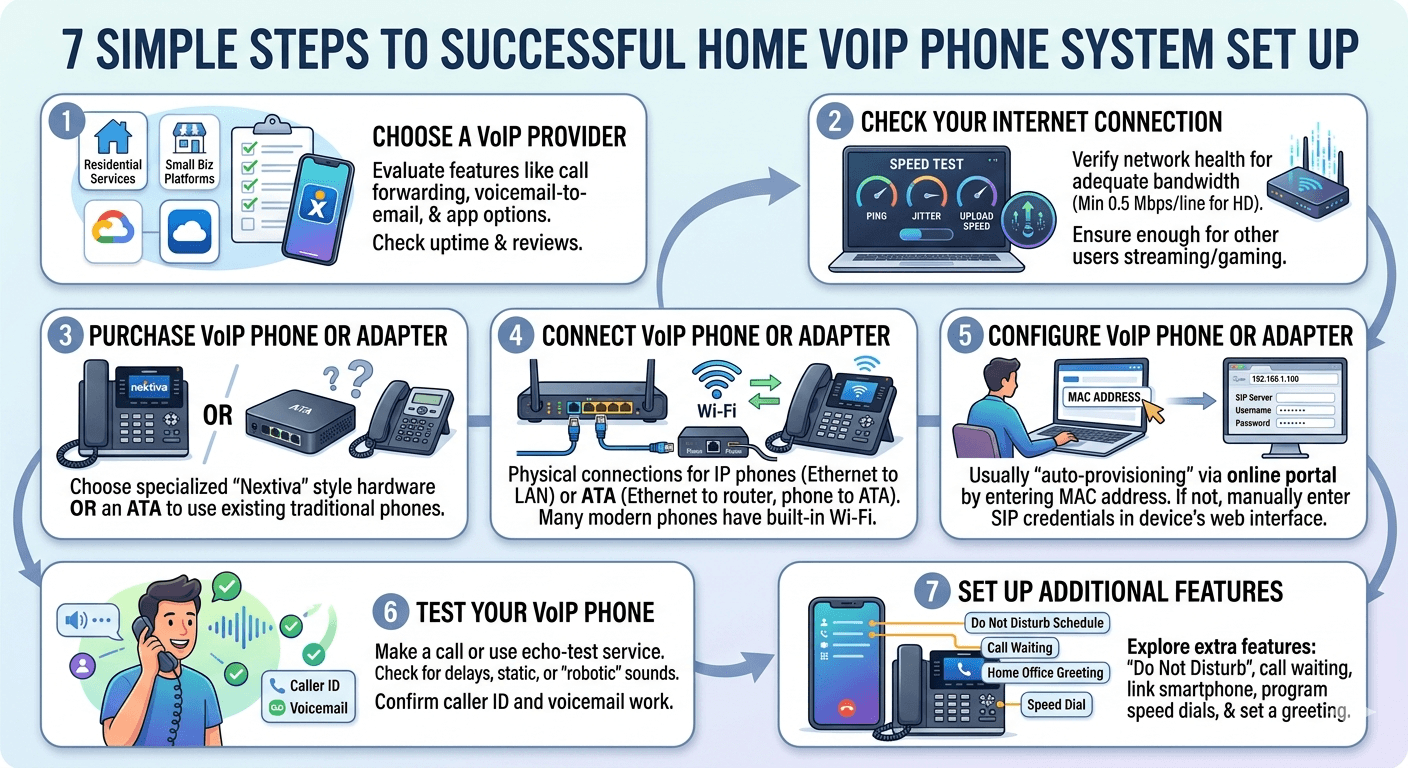
7 Simple Steps to Successfully Set Up a VoIP Phone System at Home
Step 1: Choose a VoIP Provider
The first step in voip installation is selecting the right company to handle your calls. There are many options ranging from residential-focused services to robust platforms designed for setting up voip for small business. When choosing, consider features such as call forwarding, voicemail-to-email, and whether they offer a mobile app. Check their service level agreements and customer reviews to ensure they have a high uptime percentage.
Step 2: Check Your Internet Connection
Before you proceed with how to setup voip phone at home, you must verify your network’s health. Use an online speed test to check your ping, jitter, and bandwidth.
According to the Federal Communications Commission (FCC), a standard VoIP call requires about 0.5 Mbps of upload speed for a single line to maintain high-definition quality.
If your household has multiple people streaming video or gaming, you will need a higher tier of internet service to prevent dropped calls.
Step 3: Purchase a VoIP Phone or Adapter
Once you have a provider, you need the physical tools to make calls. If you prefer a traditional feel, look into specialized devices like nextiva voip phones which are designed to work seamlessly with digital networks. Alternatively, if you want to save money, buy an Analog Telephone Adapter (ATA). This device acts as a bridge during the voip phone installation, allowing your old hardware to speak the language of the internet.
Step 4: Connect the VoIP Phone or Adapter
The physical voip phone connection is relatively straightforward. If you are using an IP phone, plug one end of an Ethernet cable into the phone and the other into a LAN port on your router. If you are using an ATA, connect the adapter to the router via Ethernet and then plug your traditional phone into the “Phone” port on the adapter. For those wondering how to connect voip phone to wireless network, many modern IP phones have built-in Wi-Fi menus that allow you to scan for your home network and enter your password.
Step 5: Configure the VoIP Phone or Adapter
This is where you handle the voip configuration. Most providers use a process called “auto-provisioning.” You will likely need to log into an online portal provided by your service company and enter the MAC address of your device. The device will then automatically download the necessary settings. If auto-provisioning is not available, you will have to manually enter the SIP server address, username, and password into the device’s web interface by typing its IP address into a browser.
Step 6: Test Your VoIP Phone
After the setting up voip phone process is complete, you must test the line. Make a call to a friend or use an automated echo-test service often provided by the carrier. Listen for any delays, static, or “robotic” sounding voices. This is the time to check if the caller ID is displaying correctly and if the voicemail system is active. Testing is a crucial part of how to install voip phone correctly.
Step 7: Set Up Additional Features
Now that the basic how to make a voip call functionality is working, explore the extra features. You can set up “Do Not Disturb” schedules, configure call waiting, or link your home system to your smartphone. If you are setting up a voip phone for a home office, this is when you would program your speed dial buttons and set your professional greeting.
Setting Up a Home Phone Specifically
When focusing on how to set up a voip phone at home, the priority is usually ease of use and reliability for the whole family. Many families choose to keep their existing handsets because they are already distributed throughout the house. In this case, the ATA method is the most popular. You can actually connect the ATA to your home’s existing telephone wiring (after disconnecting the landline from the outside box) to make every wall jack in your house live with VoIP service.
Another popular residential option is the use of “softphones.” A softphone is an application you install on your computer or tablet. This allows for how to use voip phone features without needing any extra hardware at all. For families who are always on the go, this ensures that the “home” phone can ring on everyone’s mobile device simultaneously, ensuring no important calls are missed.
VoIP Setup Best Practices for High Quality
To ensure your voip setup remains crystal clear, follow these industry best practices. First, always try to use a wired Ethernet connection. While Wi-Fi is convenient, it is prone to interference from microwaves and other electronic devices, which can ruin a conversation. Second, enable Quality of Service (QoS) on your router. This setting tells your router to give priority to voice data over other types of traffic, such as large file downloads or Netflix streaming.
Additionally, keep your hardware updated. Manufacturers frequently release firmware updates for IP phones and adapters to fix bugs and improve security. Regularly checking the voip settings in your provider’s dashboard can also help you stay informed about new features or security protocols. Lastly, invest in a good headset if you plan on using your computer for calls, as built-in laptop microphones often pick up too much background noise.
Troubleshooting Common VoIP Installation Issues
Even if you follow all the steps on how to setup a voip phone, you might encounter some hurdles. One common issue is “one-way audio,” where you can hear the caller, but they cannot hear you. This is usually caused by a firewall setting or a protocol called SIP ALG (Application Layer Gateway) being enabled on your router. Disabling SIP ALG in your router’s security settings often fixes this immediately.
If you experience dropped calls, it might be due to a lack of bandwidth or an aging router. Ensure that your voip setup requirements are being met by checking if other devices on the network are hogging the connection. If the phone won’t register at all, double-check your voip account credentials. A single typo in the username or password during the voip phone configuration stage will prevent the device from connecting to the server.
Choosing a Reliable VoIP Service Provider
Selecting the right partner for your phone system setup is the most important decision you will make. You should look for a provider that offers 24/7 customer support, as technical issues don’t always happen during business hours. A reliable provider should have multiple data centers located geographically apart; this ensures that if one center goes down, your calls are automatically rerouted through another, maintaining your service.
Furthermore, consider the scalability of the service. Even if you are just learning how to set up a small business voip phone system for a one-person office today, you might need to add more lines in the future. Providers like Nextiva offer tiers that grow with you. Always read the fine print regarding “unlimited” plans to ensure there are no hidden caps on minutes that could result in unexpected charges on your monthly bill.
Read More: Voip Setup Requirements: A Complete Guide
Final Thought
Transitioning to an internet-based calling system is a smart move for any modern household. By following the steps on how to set up a VoIP phone system at home, you unlock a world of high-definition audio, advanced features, and significant cost savings. Whether you choose to use an adapter for your old phones or invest in state-of-the-art IP hardware, the flexibility of VoIP ensures that your home communication stays as connected and efficient as the rest of your digital life. With a little bit of patience during the configuration phase, you will have a professional-grade system running in no time.
Frequently Asked Questions
How do I set up a VoIP phone system at home?
To set up a VoIP system at home, you first need to choose a service provider and ensure your internet speed is at least 0.5 Mbps. You then purchase an IP phone or an adapter, connect it to your router using an Ethernet cable, and follow the provider’s instructions to configure the device via an online portal or web interface. Finally, test the connection by making an outbound call to verify audio quality.
Will my VoIP phone work during a power outage?
Unlike traditional copper landlines, VoIP phones require both electricity and an active internet connection to function. If your power goes out, your router and phone will shut down. To prevent this, many users connect their modem, router, and VoIP hardware to an Uninterruptible Power Supply (UPS) battery backup, which can provide several hours of use during a blackout.
Can I keep my current home phone number?
Yes, most VoIP providers support a process called “number porting.” This allows you to transfer your existing landline or mobile number to your new VoIP service. You will need to provide your new provider with a recent bill from your old carrier and fill out a Letter of Authorization (LOA). The process typically takes between 7 to 14 business days to complete.
How do I actually activate my system?
Activation usually happens automatically once you connect your hardware and link it to your account. For most modern services, you log into your provider’s web dashboard, enter the unique MAC address found on the bottom of your phone, and the system handles the rest. Once the phone reboots and shows your extension or phone number on the screen, it is activated and ready for use.
What kind of internet speed do I need for VoIP?
For a single high-quality voice call, you need a minimum of 100 Kbps (0.1 Mbps) of dedicated upload and download bandwidth. However, to account for other household activities like streaming or browsing, a general internet plan with at least 5-10 Mbps of upload speed is recommended to ensure that your voice packets aren’t delayed by other web traffic.
Do I need a special phone to use VoIP?
Not necessarily. While you can buy dedicated IP phones that plug directly into the internet, you can also use an Analog Telephone Adapter (ATA) to connect your existing traditional house phones to the system. Additionally, many people use “softphones,” which are simply apps on their smartphones or computers, eliminating the need for a physical desk phone entirely.
What is the difference between an IP phone and a regular phone?
A regular phone uses analog technology to send signals over copper wires to a local telephone exchange. An IP phone is a digital device that looks similar but contains a mini-computer that converts your voice into data packets. IP phones connect via Ethernet cables or Wi-Fi and offer more advanced features like on-screen directories, built-in conferencing, and HD audio.
How do I connect a VoIP phone to my router?
The most reliable way is to use a standard RJ45 Ethernet cable. Plug one end into the LAN port on the back of your VoIP phone and the other end into an open LAN port on your internet router. If your phone supports Power over Ethernet (PoE) and your router does not, you may also need to plug the phone into a power outlet using an AC adapter.
Can I use my VoIP phone anywhere?
One of the best features of VoIP is portability. As long as you have a stable internet connection, you can take your IP phone or your laptop with a softphone app to any location in the world, and it will function exactly as it does at home. Your phone number remains the same, and callers will not know you are in a different location.


