
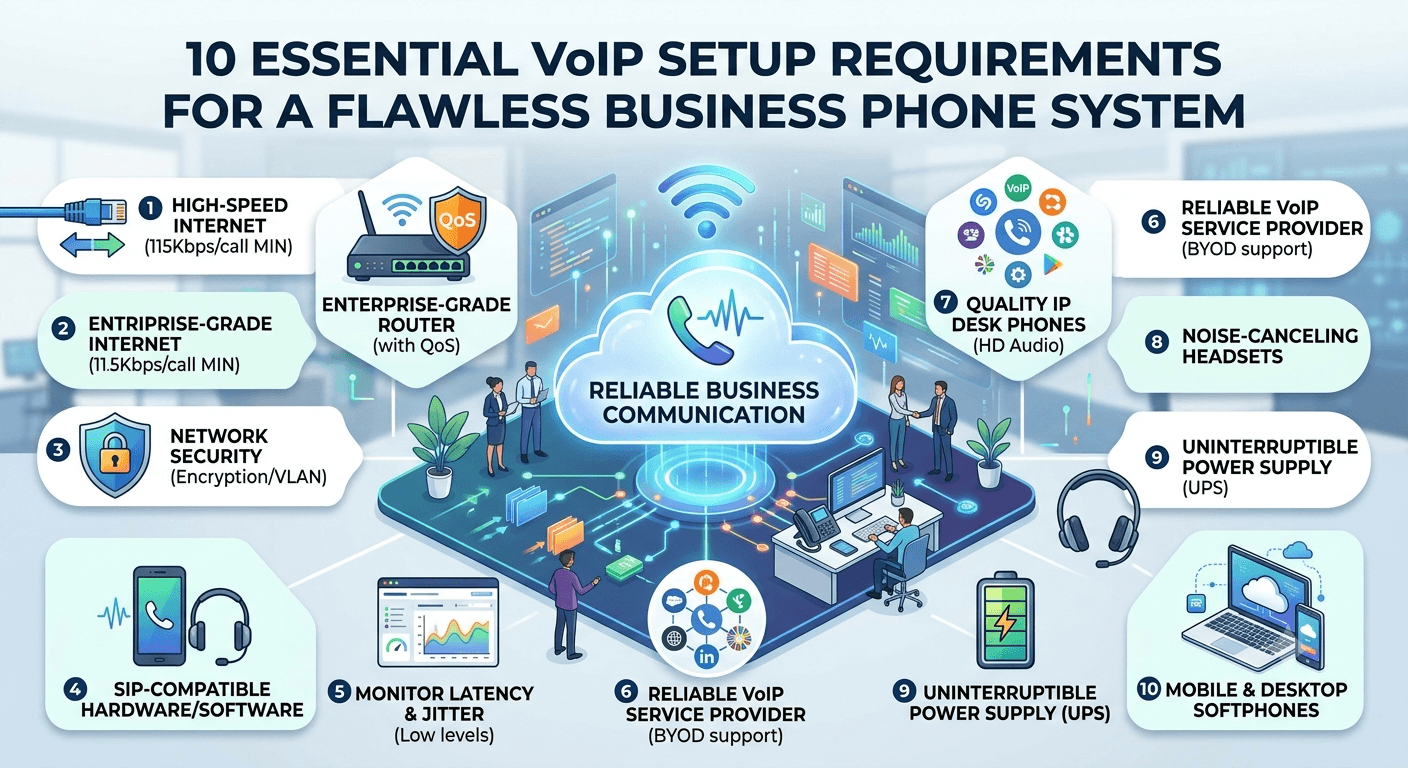
VoIP setup requires a stable high-speed internet connection, a VoIP service provider, and compatible devices like IP phones, smartphones, or computers with softphone apps. You also need a router with QoS settings to prioritize voice traffic for clear calls. Headsets or VoIP phones improve call quality and usability. Finally, proper configuration of SIP credentials and network settings is essential for smooth communication.
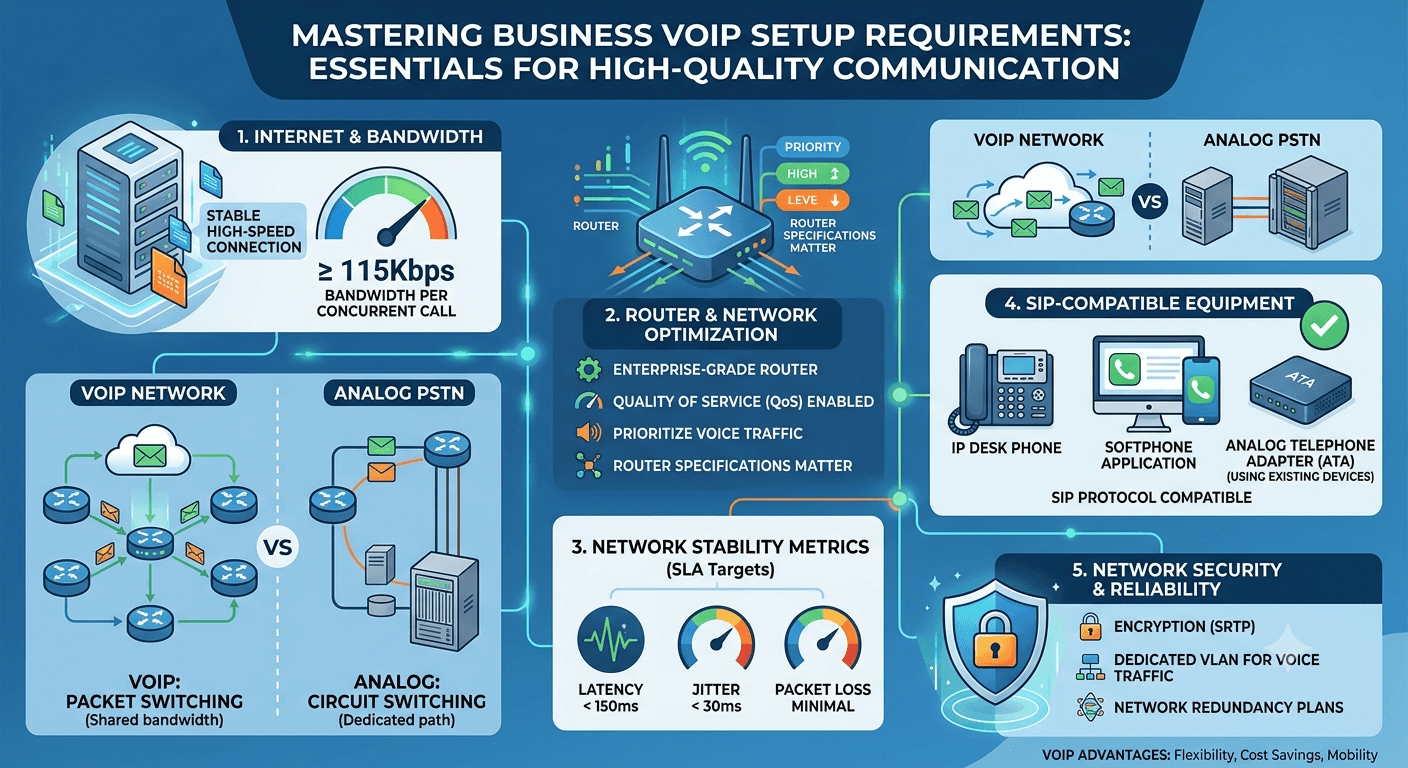
To achieve a reliable communication infrastructure, businesses must strictly adhere to specific VoIP setup requirements that ensure high-quality voice transmission. At its core, a successful deployment requires a stable high-speed internet connection with at least 115Kbps of bandwidth per concurrent call, an enterprise-grade router supporting Quality of Service (QoS), and SIP-compatible hardware or software. Additionally, the network must be optimized to maintain latency below 150ms and jitter under 30ms. By fulfilling these foundational VoIP setup requirements, organizations can eliminate common issues like packet loss and audio delays, resulting in a professional and seamless voice over internet protocol experience.
How Does VoIP Work?
Understanding the technical process behind modern communication is the first step in mastering VoIP setup requirements for your office. Unlike traditional phone lines that rely on physical copper wires and circuit switching, voip telephony converts your voice into digital data packets. These packets are transmitted over the internet using the same protocols that power web browsing and email. When these packets reach their destination, the voice system reassembles them into the original audio, allowing for real-time conversation. This technology, often referred to as what is ip voice, leverages existing data networks to provide a more flexible and cost-effective solution than legacy systems.
The efficiency of how voip works is largely dependent on the underlying voip networks that facilitate the movement of these data packets. When a call is initiated, the Session Initiation Protocol (SIP) handles the signaling, while the Real-time Transport Protocol (RTP) manages the actual delivery of the audio. Because these processes happen in milliseconds, the quality of your voip networking environment is paramount. If the network is congested or poorly configured, these packets can arrive out of order or be lost entirely, leading to broken audio. This is why understanding what is viop requires a deep dive into how data travels across local and wide area networks.
Transitioning to a voice over ip phone system allows businesses to consolidate their communication onto a single digital platform. This integration simplifies the overall voice and network services management, as voice traffic is treated as another data type. However, because voice is time-sensitive, it requires higher priority than standard web traffic.
Research by tech analysts suggests that companies adopting a cloud-based voip network can see up to a 50% reduction in communication costs while significantly increasing worker mobility.
This shift highlights why meeting the technical voip network requirements is no longer optional for growing enterprises.
VoIP phone system vs. analog phones
When evaluating what is a voip phone system against traditional analog technology, the architectural differences are striking. Analog phones connect to the Public Switched Telephone Network (PSTN), where a physical path is dedicated to a single conversation for its entire duration. This is an inefficient use of resources and makes scaling a voice system expensive, as every new line requires physical installation. In contrast, a volp phone service uses packet switching, where data finds the most efficient route through various voip networks, allowing multiple conversations to share the same physical bandwidth.
The requirements for these two systems are also vastly different. Analog systems depend on on-premises PBX hardware that is bulky and requires specialized maintenance. Modern voip system requirements are much lighter, often relying on cloud-based servers that handle call routing and features like voicemail-to-email. For those wondering do i need a special phone for voip, the answer depends on your preference; while specialized hardware exists, you can also use existing devices with the right adapters or software. This flexibility is a hallmark of voice ip service, providing businesses with a range of options that legacy analog systems simply cannot match.
VoIP Setup Requirements for Network Stability
The foundation of any digital communication platform is the network it runs on. To ensure that your calls remain clear, you must audit your current infrastructure against a strict set of voip network requirements. The most important factor is ensuring your router can handle the volume of data without introducing delays. A standard home-office router might suffice for a few users, but a professional setting requires networking gear that can manage multiple data streams simultaneously. Your voip setup requirements should always include a plan for network redundancy to prevent a single point of failure from taking down your entire phone system.
Network security is another critical aspect of voip setup requirements that cannot be ignored. Since voice traffic travels over the public internet, it is vulnerable to interception if not properly protected. Implementing encryption through Secure Real-time Transport Protocol (SRTP) ensures that your conversations remain private. Furthermore, your voip networking strategy should include a dedicated VLAN (Virtual Local Area Network) for voice traffic. This separates your phone data from your general office data, reducing the risk of interference and making it easier to apply security policies specifically to your communication channels.
High-speed internet connection
A high-speed internet connection is the primary engine behind every successful voice over ip phone system. Without sufficient bandwidth, the quality of your calls will suffer, leading to frustration for both employees and clients. When calculating your voip setup requirements, you should account for the total number of simultaneous calls your office might handle at peak times. Each high-definition voice call typically requires about 100Kbps to 115Kbps of both upload and download speed. Therefore, an office that expects to have 20 people on the phone at once would need at least 2.3Mbps of dedicated bandwidth just for voice.
Verify that your ISP provides a “Business Class” connection to ensure higher uptime and better support.
Monitor your connection for latency; anything above 150ms will cause noticeable delays in conversation.
Check for packet loss, which should stay below 1% to prevent audio clipping or robotic voices.
Ensure your internet/voice equipment is capable of handling the advertised speeds of your data plan.
Consider a secondary internet connection from a different provider to act as an automatic failover.
Bandwidth is not just about the raw speed; it is also about consistency. Fiber-optic connections are generally the gold standard for meeting voip requirements because they offer symmetrical speeds and extremely low latency. Cable and DSL can work, but they are often prone to fluctuations during high-traffic periods in your local area. For more information on optimizing your connectivity, you can visit FCC Guidelines on Broadband to understand how different speeds affect various online applications including voice and video.
A reliable VoIP service provider
Selecting a partner for your volp phone service is a decision that impacts every other part of your voip setup requirements. A quality provider does more than just route calls; they provide the software, security, and support necessary to keep your business running. When searching for a provider, look for one that has multiple data centers distributed geographically. This ensures that if one server goes down, your traffic is automatically rerouted, fulfilling the reliability portion of your voip system requirements.
The provider you choose will also dictate which voip phone requirements you need to meet. Some providers are strictly “Bring Your Own Device” (BYOD), meaning they work with any SIP-compatible hardware, while others may require you to use specific proprietary voip devices. A reliable provider should offer a robust management portal where you can easily adjust settings, add users, and monitor call quality metrics in real-time. This level of transparency is essential for maintaining the health of your voice ip service and ensuring that your investment is performing as expected.
Essential Equipment Needed for VoIP Setup Requirements
While the internet is the medium, the voip hardware you choose is the interface through which your team communicates. A complete voip hardware requirements list includes several layers of technology, starting from the point where the internet enters your building down to the individual headsets worn by your staff. Each piece of voip equipment must be chosen for its compatibility and its ability to handle real-time data processing. Using outdated or consumer-grade internet/voice equipment can lead to bottlenecks that degrade the quality of your voip telephony.
Professional voip phone equipment is designed to be “plug and play,” but it still requires a properly configured network to function at its best. Most modern voip devices support Power over Ethernet (PoE), which is a technology that allows the device to receive its electrical power and data through a single Ethernet cable. This is a critical part of modern voip setup requirements as it eliminates the need for bulky power adapters at every desk, making the office cleaner and easier to manage. By investing in the right voip phone hardware from the start, you avoid the costs of mid-project upgrades.
1- Modem and Router Configuration
The modem and router are the gatekeepers of your voip networking environment. For a successful implementation of voip setup requirements, your router must be the most robust piece of hardware in your stack. It needs to support advanced features like Quality of Service (QoS), which allows you to designate voice traffic as a high priority. This means that if someone in the office starts downloading a massive file, the router will ensure that the bandwidth for active phone calls is protected first. Without QoS, a single large download could ruin the audio quality of every call in the building.
Beyond QoS, your router should also have a powerful processor and ample RAM to handle the packet routing for a voice system. Many consumer routers struggle with the high number of small packets that voip generates, leading to “router lag” that can drop calls. When planning your voip requirements, look for routers that are specifically marketed as being VoIP-friendly or enterprise-grade. These devices often include specialized firewalls that are optimized to let voice traffic pass through without the “one-way audio” issues often caused by standard security settings.
2- VoIP Desktop Phones and Adapters
The most recognizable part of the voip hardware setup is the physical phone. A what is a volp phone dedicated to the desktop provides a professional interface with physical buttons for features like transfer, hold, and conference. These devices are technically small computers that run a specialized operating system designed for audio. When selecting voip phone hardware, ensure that the devices support the latest audio codecs, such as G.722, which provides wideband “HD” audio. This makes voices sound much more natural and reduces listener fatigue during long meetings.
Standard Desk Phones: Ideal for general office staff who need reliable, high-quality audio and a familiar interface.
Receptionist Consoles: These have larger screens and more buttons to manage multiple incoming lines and extensions.
Conference Phones: Specialized devices with 360-degree microphones designed for meeting rooms.
Analog Telephone Adapters (ATA): Used to connect old analog phones or fax machines to your new digital network.
Wireless IP Phones: These connect via Wi-Fi or DECT technology, allowing users to move around the office while staying connected.
If your budget is tight, you might ask, “can I use my old phones?” This is possible through the use of an ATA, which is a small voip device that acts as a bridge. It converts the analog signal from your old phone into digital packets that your voip network can understand. While this is a great way to save money, keep in mind that you will lose out on many of the advanced features and the superior audio quality offered by dedicated voip phone equipment.
3- High-Quality VoIP Headsets
In many modern offices, headsets for voip phones have replaced traditional handsets. Headsets offer significant ergonomic benefits and allow employees to multi-task by keeping their hands free. When considering voip phone requirements, the quality of the headset is just as important as the quality of the phone itself. A cheap headset can introduce static or fail to cancel out background noise, which can make your business sound unprofessional. Professional voip devices are often compatible with both wired and wireless headsets, giving your team the freedom to choose what works best for them.
When selecting headsets, look for features like active noise cancellation and a high-quality microphone boom. These features are essential for staff working in open-office plans or busy call centers where background chatter is constant. Some voip hardware requirements list headsets that connect via USB or Bluetooth directly to a computer, which is perfect for teams that use softphone applications rather than physical desk phones. Regardless of the connection type, ensuring your headsets are comfortable for all-day wear is a key part of maintaining employee productivity and satisfaction.
Detailed Hardware Requirements List for Professional Teams
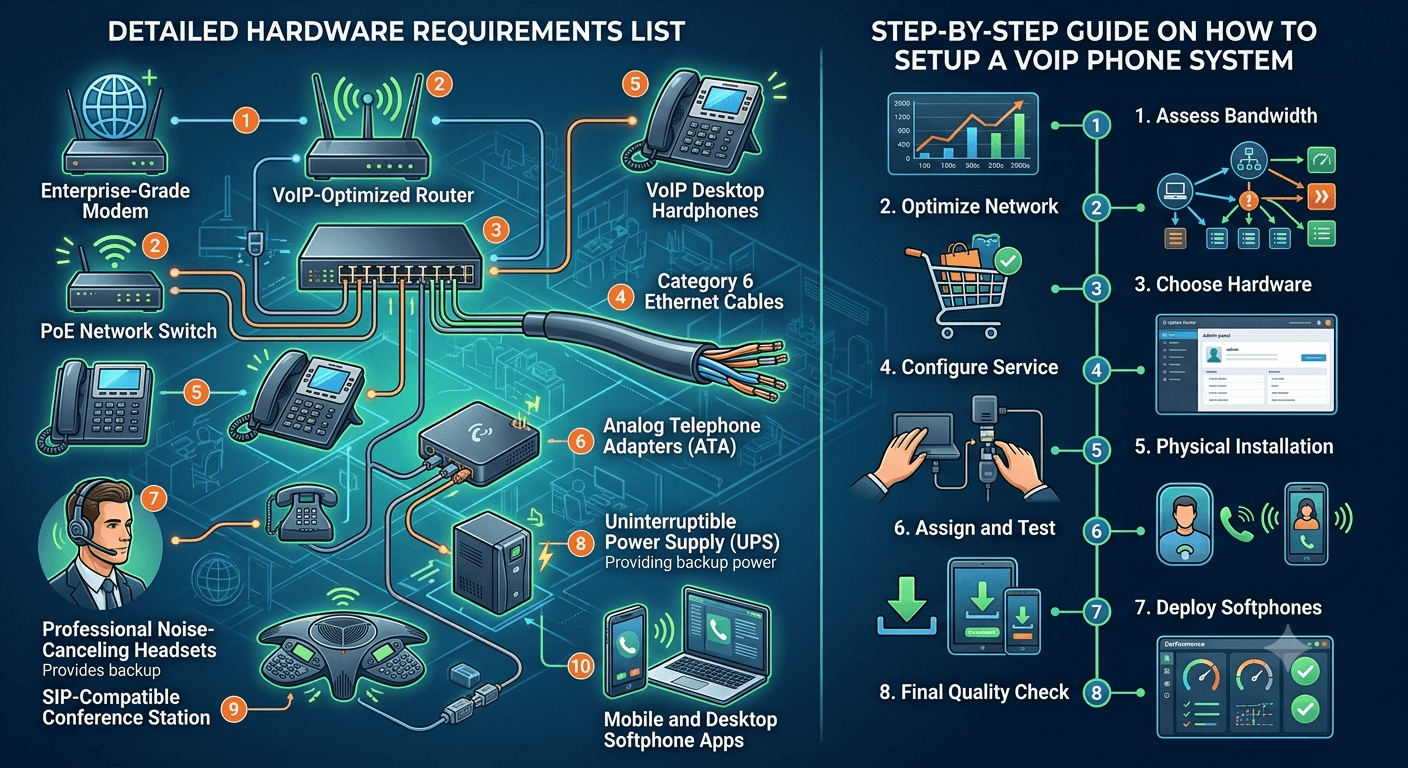
To ensure you haven’t missed anything in your planning, here is a comprehensive voip hardware requirements list. This list covers the physical components needed to build a professional-grade communication system from the ground up.
Enterprise-Grade Modem: Supports the full speed of your business internet plan.
VoIP-Optimized Router: Features QoS settings and a powerful CPU to handle voice packets.
PoE Network Switch: Provides power and data to all voip devices through a single cable.
Category 6 Ethernet Cables: Ensures the highest data transfer rates and reduces electrical interference.
VoIP Desktop Hardphones: Physical phones for every desk that requires a dedicated line.
Analog Telephone Adapters: To bridge any remaining analog hardware to the digital voice system.
Professional Noise-Canceling Headsets: Specifically designed for voip telephony use.
Uninterruptible Power Supply (UPS): Protects your network and phones during power outages.
SIP-Compatible Conference Station: For high-quality audio in shared meeting spaces.
Mobile and Desktop Softphone Apps: Software that allows users to take their extensions on the go.
Failing to meet these voip requirements can lead to a system that is unreliable and frustrating to use. For example, using old Cat5 cables instead of Cat6 can sometimes lead to data bottlenecks in a very busy office. Similarly, if you do not have a UPS, a five-second power flicker could reboot your entire network and drop every active call, taking several minutes for the system to come back online. By treating your voip setup requirements as a holistic project, you ensure that every component works in harmony to provide the best possible service.
Step-by-Step Guide on How to Setup a VoIP Phone System
Setting up a new communication platform can seem daunting, but by following a structured approach, you can ensure a smooth transition. The key to a successful implementation is preparation. Before you begin plugging in any voip equipment, you must have a clear map of your network and a deep understanding of your provider’s requirements. This proactive approach helps you avoid common pitfalls like IP address conflicts or firewall blocks that can stall your project.
Assess Your Current Bandwidth: Use an online tool to test your current upload and download speeds during peak hours.
Optimize Your Local Network: Set up a dedicated VLAN for voice and enable QoS on your router to prioritize voip network traffic.
Choose Your Hardware: Select the devices from your voip hardware requirements list that best fit your team’s workflow.
Configure the Service: Log into your voip provider’s portal to set up user accounts, extensions, and auto-attendants.
Physical Installation: Connect your PoE switch to the router and then plug in your voip desktop phones using Ethernet cables.
Assign and Test: Assign each physical device to a user in the portal and make test calls to check for audio clarity.
Deploy Softphones: Have employees install the provider’s app on their smartphones and laptops for remote access.
Final Quality Check: Conduct a “stress test” by making multiple simultaneous calls to ensure the network handles the load without jitter.
Once the system is live, it is important to provide training for your staff on how to use the new voip telefonie features. Many employees may be used to traditional systems and might not realize they can now transfer calls to their mobile phones or receive voicemails as text messages. Ongoing monitoring of your voip networking performance is also recommended. Most professional systems provide analytics that show call quality trends, allowing you to identify and fix network issues before they affect your business operations.
Read More: Your Call Has Been Forwarded to Voicemail: Meaning and Solutions
Final Thought
Successfully meeting VoIP setup requirements is about more than just buying the right phones; it is about building a network that can support the future of your business communication. By focusing on high-speed connectivity, enterprise-grade hardware, and careful network configuration, you create a voice system that is both reliable and scalable. Whether you are a small startup or a large corporation, the transition to a modern voice over ip phone system offers a competitive edge through improved audio quality and advanced digital features. Take the time to plan your voip requirements thoroughly, and you will be rewarded with a communication platform that enhances every interaction your business has with the world.
FAQs
What is required for VoIP setup?
To properly implement a VoIP setup, you need a stable high-speed internet connection with sufficient bandwidth (approx. 115Kbps per call), a VoIP-ready router that supports Quality of Service (QoS), and a subscription to a reliable service provider. Additionally, you will need end-user devices such as IP desk phones, softphone software, or analog adapters. Ensuring your network is optimized for low latency and minimal jitter is also a critical part of the setup requirements.
What equipment is required for VoIP?
The essential equipment for a VoIP system includes a broadband modem, an enterprise-grade router, and a network switch, preferably one that supports Power over Ethernet (PoE). On the user end, you need VoIP-compatible phones, headsets, or computers with softphone software installed. For businesses with legacy hardware, Analog Telephone Adapters (ATAs) or a VoIP gateway may also be necessary to connect older devices to the digital network.
Which is better, VoIP or VoLTE?
VoIP is generally superior for business and office environments because it offers a full suite of professional features like call routing, auto-attendants, and CRM integrations over any internet connection. VoLTE is a specialized form of VoIP used specifically by mobile carriers over cellular networks to improve mobile voice quality. While VoLTE is great for individual mobile calls, a dedicated VoIP system provides the infrastructure needed for a comprehensive, multi-user business communication platform.
How to setup your own VoIP?
To set up your own VoIP system, start by verifying that your internet speed can handle the call volume and configure your router to prioritize voice traffic. Sign up for a plan with a VoIP provider and use their online dashboard to create user extensions and set up call rules. Finally, connect your hardware (IP phones or headsets) to your network and install softphone apps on mobile devices. Test the system by making several internal and external calls to ensure everything is functioning correctly.
Do I need a special phone for VoIP?
You do not strictly need a special physical phone because you can use softphone applications on your computer or mobile device. However, dedicated VoIP hardware, such as an IP desk phone, offers a more reliable and feature-rich experience for daily office use. If you want to use a traditional analog phone, you can do so by connecting it to an Analog Telephone Adapter (ATA), which bridges the gap between old hardware and modern digital networks.
What are the minimum internet speeds for VoIP?
The minimum speed for a single high-quality VoIP call is approximately 100Kbps for both upload and download. However, for a professional business environment, it is recommended to have a connection that offers much higher speeds to account for other network activities like web browsing and file transfers. A general rule of thumb is to have at least 5Mbps to 10Mbps of dedicated bandwidth if you have multiple people using the phone system simultaneously.
Is a wired connection better than Wi-Fi for VoIP?
Yes, a wired Ethernet connection is significantly better than Wi-Fi for VoIP calls. Wired connections provide a stable and consistent data path, which is essential for real-time audio. Wi-Fi can be prone to interference, signal drops, and congestion, all of which lead to jitter and dropped calls. For the best audio quality and reliability, all primary desktop VoIP phones should be connected directly to your network switch using high-quality Ethernet cables.
How does a VoIP gateway work?
A VoIP gateway acts as a bridge between a traditional telephony system and an IP-based network. It converts analog voice signals into digital data packets for transmission over the internet, and vice versa. This is particularly useful for businesses that have invested in expensive legacy PBX systems but want to take advantage of the cost savings and features of a modern VoIP network without replacing all their existing hardware.
Can I keep my current phone number with VoIP?
Yes, you can keep your current phone number through a process called “number porting.” Most VoIP providers allow you to transfer your existing business numbers from your old analog or digital carrier to their service. This process typically takes a few days to a couple of weeks to complete. During the transition, your provider can often set up temporary numbers or call forwarding to ensure you don’t miss any important calls while the move is finalized.


