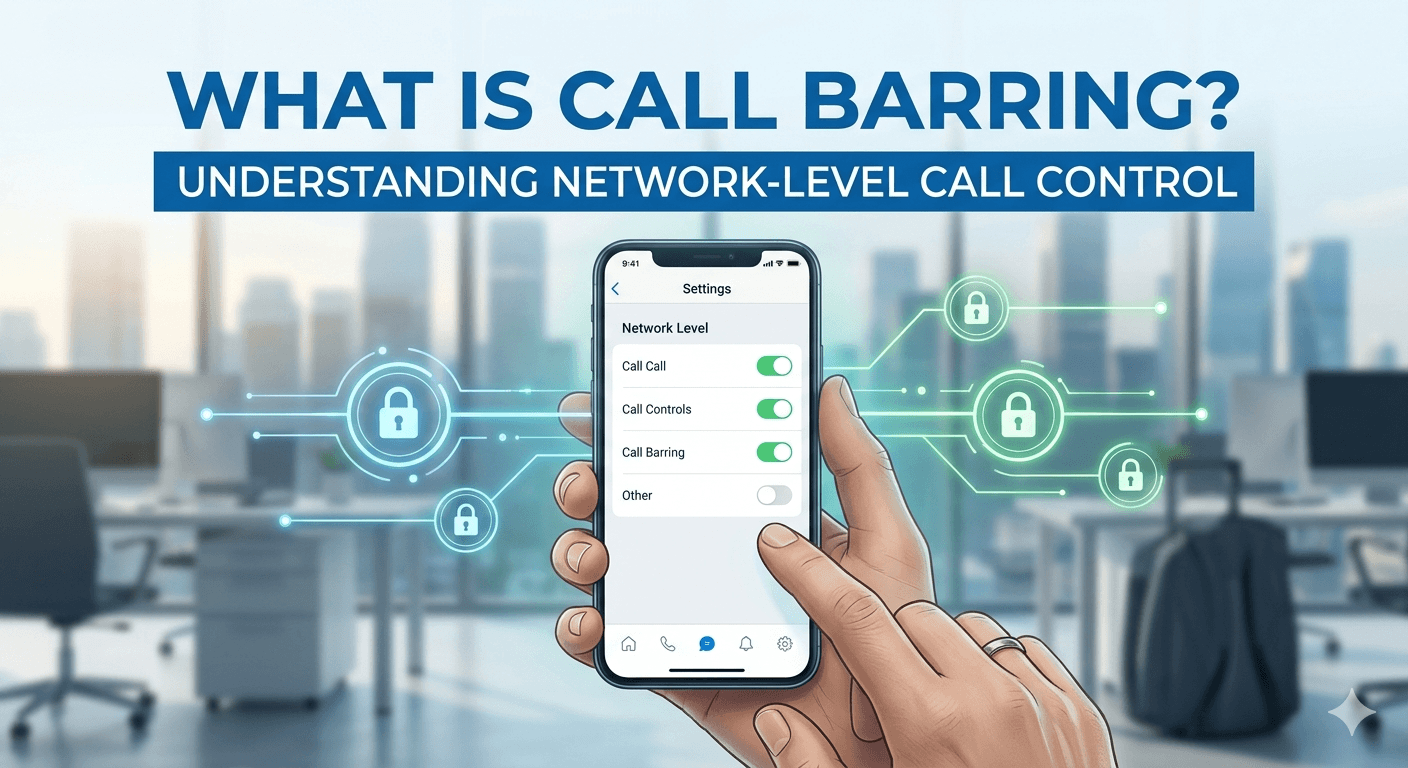
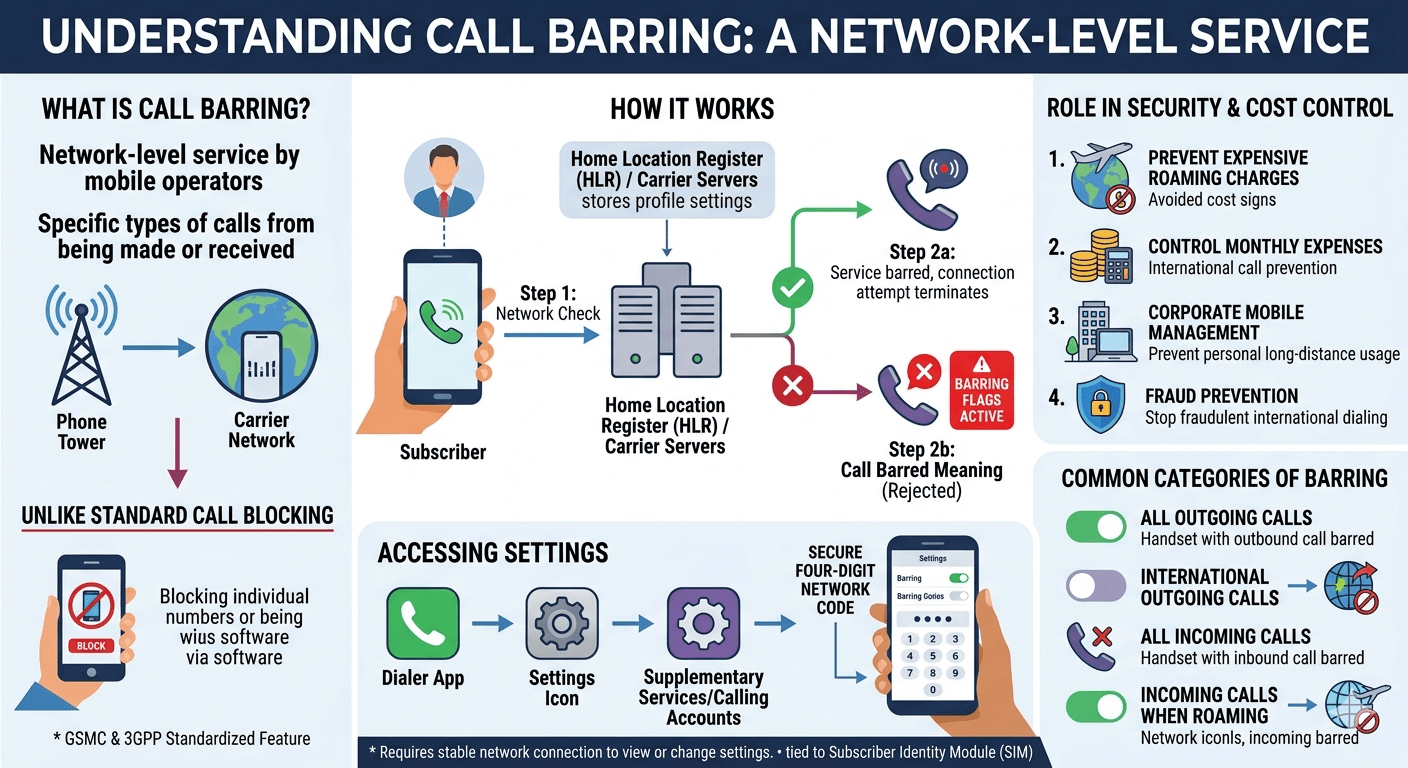
Call barring is a professional telecommunications service provided by mobile network operators that allows a subscriber to stop specific types of calls from being made or received on their device. Unlike standard call blocking which usually targets individual phone numbers through the software of the handset, call barring functions at the network level, meaning the instructions are stored with the carrier. This feature is essential for users who want to control their monthly expenses by preventing international calls or for those traveling abroad who wish to avoid expensive roaming charges by stopping incoming calls. To manage these restrictions, users must access specific menus or use network codes protected by a secure four-digit code.
What is Call Barring and its Role in Network Security
To understand the full scope of cellular management, one must first look at how network providers categorize various communication signals. Call barring meaning refers to the intentional restriction of certain classes of telephone traffic based on the direction of the call or the destination of the digits. This service is part of the Global System for Mobile Communications standard, which was designed to give users more control over their service usage without needing complex software. When a call is restricted, the network identifies the barred status of the account and terminates the connection attempt before it ever reaches the handset, often playing a recording that indicates the service barred meaning to the person trying to initiate the contact.
In many corporate environments, call barring is a standard security protocol used to prevent employees from using company-owned mobile devices for personal long-distance communication. By activating outgoing international call barring, a company can ensure that their telecommunications budget remains predictable. This level of control is also vital for parents who provide mobile phones to their children; they can bar outgoing premium rate calls to prevent accidental charges from subscription services or high-cost voting lines. Because these settings are tied to the subscriber identity module, the restrictions remain in place even if the sim card is moved to a different physical phone, providing a layer of security that software-based apps cannot match.
The technical implementation of this feature relies on communication between the mobile station and the home location register of the carrier. When a user attempts to dial a number, the network checks the user profile to see if any barring flags are active. If a barred call meaning is identified, the network sends a rejection code back to the device. Research into telecommunications standards shows that these supplementary services are regulated by the 3rd Generation Partnership Project, which ensures that call barring works consistently across different networks and international borders. This standardization is why the same feature works whether you are using a local carrier or roaming on a foreign network.
Understanding What is Call Barring Mean for Modern Mobile Users
The practical application of barring varies depending on the specific needs of the subscriber. For instance, a person who is frequently bothered by telemarketers while trying to work might choose to bar all incoming calls during specific hours, although this is usually handled by a broad network setting rather than a schedule. More commonly, the feature is used to prevent any calls from being received while roaming. This is particularly useful because many mobile plans charge the recipient for incoming calls when they are outside their home country. By understanding the call barred meaning and how to apply it, travelers can save significant amounts of money on their monthly statements.
There are several distinct categories of barring that a user can choose from depending on their current situation. These include barring all outgoing calls, which effectively turns the phone into a receive-only device, and barring all incoming calls, which does the opposite. There is also the option to bar outgoing international calls or outgoing international calls except those directed back to the home country. The latter is a favorite among frequent flyers who need to call home while abroad but want to prevent any other long-distance dialing. Each of these settings helps define the service barred meaning in a way that is tailored to the specific lifestyle and budget of the mobile user.
Beyond cost-saving measures, call barring serves as a frontline defense against certain types of mobile fraud. Some malicious actors use automated systems to trick phones into dialing high-cost international numbers. If a user has proactively enabled barring for international calls, these fraudulent attempts will fail immediately. Statistics from telecommunications oversight boards suggest that proactive network-level restrictions can reduce the incidence of unexpected bill shock by over forty percent for users who travel frequently. This highlights the importance of the feature as a tool for financial security rather than just a simple technical setting within a menu.
Exploring What is Call Barring Settings on Different Device Interfaces
Accessing the control panel for these features requires navigating into the telephony layers of your smartphone. What is call barring settings involves a path through the dialer application rather than the general system settings in many cases. On most modern devices, you can find these options by opening the phone app, tapping the three-dot menu icon, and selecting settings followed by supplementary services or calling accounts. Here, the network will take a moment to read the current status of your account from the carrier servers before displaying the toggles for various barring categories. It is important to note that you must have a stable network connection to view or change these settings as they are not stored locally on the phone.
The user interface for these settings usually presents a list of options that can be toggled on or off individually. These options typically include:
-
All Outgoing Calls: This stops every attempt to dial out from the device, which is useful if you are lending your phone to someone else briefly.
-
International Outgoing Calls: This specifically targets numbers with foreign country codes while allowing local and domestic long-distance calls to proceed as normal.
-
International Outgoing Calls when Roaming: This is a specialized setting that only activates when the phone detects it is connected to a foreign network provider.
-
All Incoming Calls: This prevents any phone calls from reaching your device, which can be useful during periods of deep focus or rest.
-
Incoming Calls when Roaming: This ensures that you are not charged for receiving calls while traveling internationally by blocking them at the network source.
When you attempt to toggle one of these switches, the device will prompt for a security code. This is where many users get confused about the difference between their lock screen pin and the network-level password. The phone will communicate with the mobile exchange to verify the credentials before the change is accepted. If the network returns a message stating call bearing or service barred, it usually means there is a conflict in the settings or the provider does not support that specific barring type on your current plan. Consulting with your service provider, such as using bt call barring resources, can clarify which specific features are available for your particular subscription level.
How to Secure Your Device and What is Call Barring Password Requirements
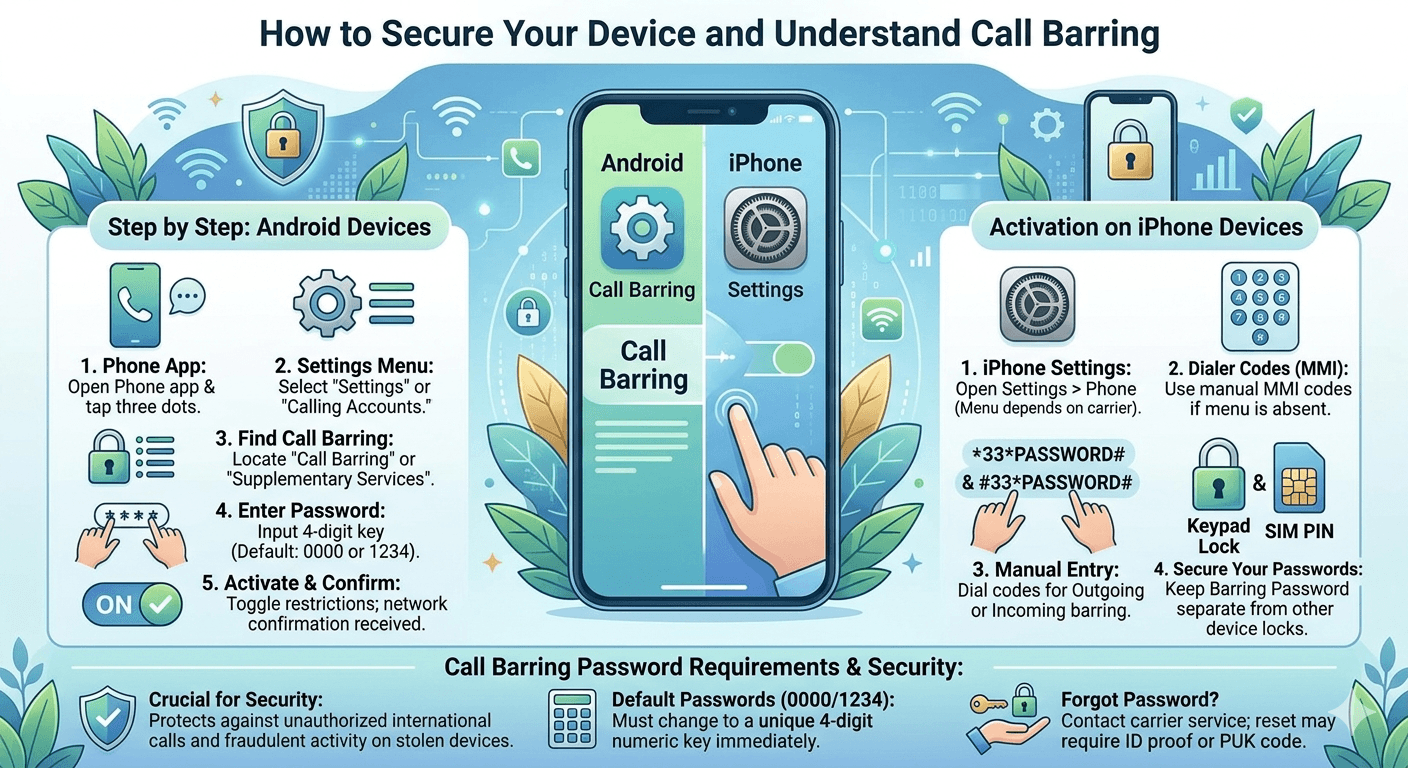
The security of these network settings is maintained through a specific four-digit numeric key. What is call barring password is a question that arises whenever a user tries to modify their restrictions for the first time. By default, most network providers set this password to a simple sequence such as 0000 or 1234. However, it is highly recommended that users change this default code to something more secure to prevent unauthorized parties from lifting the restrictions. This password is the gatekeeper that prevents a thief from taking a stolen phone and immediately making high-cost international calls that would be charged to the original owner.
Changing the password can often be done within the same supplementary services menu where the barring options are located. If the menu option is not visible, users can often use standardized MMI codes, which are sequences starting with asterisks and hashes. For example, a common code to change the barring password involves dialing a sequence like star star zero three star old password star new password star new password hash. This sends a direct command to the carrier to update the security credential. Keeping this password separate from your voicemail pin or your device unlock code adds an extra layer of protection to your overall telecommunications account.
If you happen to forget your password or enter it incorrectly too many times, the feature may become locked as a security precaution. In this scenario, you will need to contact your mobile operator’s customer service department to have the password reset. They may require you to provide proof of identity or a personal unblocking key associated with your sim card. This rigorous security approach is a primary reason why call barring is considered more robust than local call blocking. It ensures that the integrity of the calling restrictions is maintained at the infrastructure level, protecting both the user and the network provider from potential abuse or fraudulent activity.
Step by Step Instructions for What is Call Barring on Android Devices
Android smartphones offer a relatively standardized path for managing network features, though the exact naming conventions might vary slightly between manufacturers like Samsung, Google, or OnePlus. To find what is call barring on android, start by launching the primary phone application. From there, look for the settings icon which is often hidden behind a three-dot menu in the upper right corner of the screen. Within the settings menu, look for a section labeled calling accounts or supplementary services. This area contains the advanced features that interact directly with your mobile carrier’s database rather than just the local software on the device.
Once you have located the call barring section, the device will perform a brief query of the network. You will see a list of categories such as outgoing calls and incoming calls. To activate a restriction, simply tap the category you wish to change. At this point, the android system will request the call barring password. Enter your four-digit network pin and wait for the confirmation message. If successful, the toggle will move to the on position, and the network will now filter your calls according to the rules you have set. This process is identical for most android skins, making it a universal way to manage your connectivity without needing third-party applications.
If you encounter an error during this process, it could be due to several factors:
-
Incorrect Password: Entering the wrong four-digit pin more than three times can temporarily disable the ability to change settings.
-
Network Incompatibility: Some prepaid plans or virtual network operators do not support network-level call barring through the android menu.
-
Sim Card Issues: An older or damaged sim card may fail to properly communicate the MMI codes required to update barring status.
-
Active Call Forwarding: Sometimes, having call forwarding enabled can create a conflict with incoming call barring rules on certain network infrastructures.
How to Activate Call Barring on iPhone Devices
The process for Apple users is slightly different because the iOS interface tends to simplify or hide some of the more technical network settings. To manage these features on an iPhone, navigate to the main settings app and scroll down to the phone section. Here, you may see an option for call barring, but it is highly dependent on whether your carrier has enabled this menu for the iPhone. If it is not present, iPhone users typically rely on the manual entry of dialer codes to manage their barring status. This involves opening the keypad in the phone app and typing specific strings of characters to communicate with the carrier’s backend.
For example, to bar all outgoing calls on an iPhone using network codes, you would dial star thirty-three star followed by your password and the hash symbol. To deactivate this setting later, you would dial hash thirty-three star followed by the password and hash. These codes are part of the universal GSM standard and work across almost all global networks. While not as visual as a toggle switch in a menu, using these codes is a powerful way to manage your account settings directly. It is always a good idea to keep a list of these codes in a secure note on your device if you plan on changing your barring status frequently while traveling.
Another aspect of the iPhone experience involves the use of the Do Not Disturb or Focus modes. While these are not technical call barring in the network sense, they provide a similar user experience by silencing incoming calls. However, for true network-level restriction that prevents a caller from even reaching your voicemail or triggering a roaming charge, the dialer codes or the carrier’s official app remain the only effective methods. Understanding how to deactivate call barring via these codes ensures that you can quickly restore full functionality to your device when you return from an international trip or no longer need the restrictions.
The Top 5 Benefits of Using Call Barring for Personal and Professional Use
Implementing call barring provides several distinct advantages that enhance both the security and the utility of a mobile device. One of the primary benefits is effective budget management. By preventing outgoing international or premium-rate calls, users can avoid the shock of a massive monthly bill. This is especially important for households with multiple users on a single account, where the primary account holder wants to maintain strict control over the total expenditure without constantly monitoring every single call made by family members.
A second major benefit is the prevention of unwanted roaming charges. When a user is in a foreign country, even receiving a call can result in significant per-minute fees. Setting up incoming call barring while roaming ensures that the phone remains silent and the account remains free of unexpected international fees. Third, call barring acts as a robust anti-theft measure. If a phone is stolen, the barring password prevents the thief from using the device for expensive fraudulent calls, limiting the financial damage to the owner before they have a chance to report the device as stolen and have the line deactivated.
Additional benefits include:
-
Enhanced Privacy: Barring all incoming calls allows a user to use their phone for data-heavy tasks or local apps without being interrupted by ringtones or vibrations.
-
Corporate Compliance: Businesses can ensure that company-issued phones are used strictly for their intended purpose by barring non-essential call types.
-
Fraud Reduction: By disabling outgoing international calls, users protect themselves from malware that might attempt to dial high-cost numbers in the background.
-
Simplified Management: Since settings are stored at the network level, they persist regardless of what handset the user is currently using.
-
Peace of Mind: Knowing that certain types of calls are impossible to make or receive provides a level of digital serenity in an increasingly connected world.
Key Limitations to Keep in Mind When Using Network Restrictions
While call barring is a powerful tool, it is not without its limitations and potential drawbacks. One significant limitation is that it is an all-or-nothing feature for the categories it covers. For example, if you bar outgoing international calls, you cannot make an exception for a single international number without deactivating the barring entirely. This lack of granularity can be frustrating for users who need to reach one specific person abroad but want to block all other international dialing. For more specific control, software-based blocking apps are often a better supplement to network-level barring.
Another consideration is that call barring can sometimes interfere with other network services. For instance, some users find that they cannot receive emergency alerts or certain types of automated system notifications when incoming call barring is active. Furthermore, if you are using a Voice over LTE or Wi-Fi calling service, the way the network handles barring might differ slightly from traditional circuit-switched calls. It is always a good idea to test your settings after making a change to ensure that you can still reach emergency services and that your most important contacts can still find a way to communicate with you through alternative means like SMS or data-based messaging apps.
Finally, the availability of call barring is entirely at the discretion of the mobile network operator. Not all carriers support every type of barring, and some may charge a small monthly fee for the privilege of using these features. Prepaid users, in particular, often find that their options are more limited compared to post-paid contract customers. If you find that the settings on your phone are greyed out or return an error, it is likely a restriction placed by the carrier rather than a fault with the device itself. Researching your specific provider’s policy on supplementary services is the best way to understand what is possible with your current plan.
Read More: HD Voice Quality: What It Means
Final Thought
Call barring remains one of the most effective and underutilized features of modern telecommunications. By moving the control of calls from the device software to the network hardware, it provides a level of security and cost-management that is essential in a globalized world. Whether you are a parent looking to protect your child from high-cost scams, a traveler avoiding the pitfalls of roaming fees, or a professional seeking uninterrupted focus, understanding how to navigate barring settings and passwords is a valuable skill. As mobile networks continue to evolve, these core features will remain a foundational part of how we manage our digital identities and financial well-being.
FAQs about Call Barring
-
What’s the main difference between call barring and call blocking?
Call barring is a service managed by your mobile network that restricts broad categories of calls, such as all international or all incoming calls, before they even reach your device. Call blocking is typically a feature built into your phone’s software or a third-party app that allows you to stop specific, individual phone numbers from ringing your handset. While barring is better for general categories and security, blocking is the preferred method for dealing with specific nuisances like a persistent telemarketer.
-
What is the default PIN for this service?
For most mobile network providers, the default call barring password is a simple four-digit code like 0000 or 1234. However, some carriers might use a unique code or require you to set one up through their official website or customer service line before the feature can be used. It is important to check with your specific carrier, such as BT or Verizon, to confirm their default settings. Once you have access, you should change the default pin to a private number to ensure that only you can modify your call restrictions.
-
Does this service also stop text messages (SMS)?
In most standard configurations, call barring only applies to voice calls and does not affect the sending or receiving of text messages. If you bar all incoming calls, you will likely still receive SMS messages as they travel through a different signaling channel on the mobile network. However, some advanced network settings and certain carriers may offer separate barring options for SMS, but these are typically distinct from the call barring menu found in your phone’s settings.
-
Can I use this feature to block a single, specific number?
No, call barring is designed to restrict entire classes of traffic rather than individual contacts. If you need to stop a specific person or business from calling you, you should use the call blocking feature found in your phone’s contact list or recent calls menu. Call barring is a more “blunt” instrument used for high-level account management, such as stopping all outgoing international calls to prevent bill shock, rather than managing your personal social interactions.
-
How do I remove call barring?
To remove call barring, you must return to the supplementary services or calling accounts menu on your device and toggle the active restrictions to the off position. You will be prompted to enter your four-digit call barring password to authorize the change. Alternatively, you can use universal MMI codes; for example, dialing hash thirty-three followed by your password and the hash symbol will typically deactivate all outgoing call barring. If you have forgotten your password, you will need to contact your carrier’s customer support to have the settings reset.