Imagine ditching glitchy landlines for desk phones that ring crystal-clear across continents, all powered by SIP phones—the backbone of modern SIP phone systems. Whether you’re hunting what is a SIP technology, exploring SIP telephone setups, or debating SIP vs IP phone, this guide delivers. SIP devices like SIP desk phones and SIP softphones transform SIP telephony into a business superpower, slashing costs while packing SIP telephone features like HD video and AI transcription.
What Does SIP Stand For and What Is a SIP Phone?
SIP stands for Session Initiation Protocol, the open-standard signaling wizard that kickstarts, manages, and ends real-time calls, video, and chats over IP networks. A SIP IP phone, is any device—hardware or software—that speaks this protocol to enable VoIP SIP phones for internet-based communication.
What Is a SIP Phone?
A SIP phone is a device that uses the internet to make and receive phone calls. Forget clunky analog lines; what is a SIP phone technology? It’s your gateway to systems where voice morphs into packets zipping via broadband. SIP phone meaning boils down to interoperability: pair a SIP desk phone from Yealink with a VoIP calling system from any provider. What is a SIP device? Anything from SIP telephones to apps handling calls, making phones SIP-ready universally.
This tech powers SIP telephony, letting SIP devices like SIP cell phones or SIP hardware deliver phone service without proprietary lock-ins.
What Are SIP Phones Features?
SIP phones blend desk warriors and mobile ninjas, supporting voice, video, and messaging via SIP protocol. Typical features include HD wideband audio, call transfer, conferencing, voicemail, and presence indicators showing if colleagues are available.
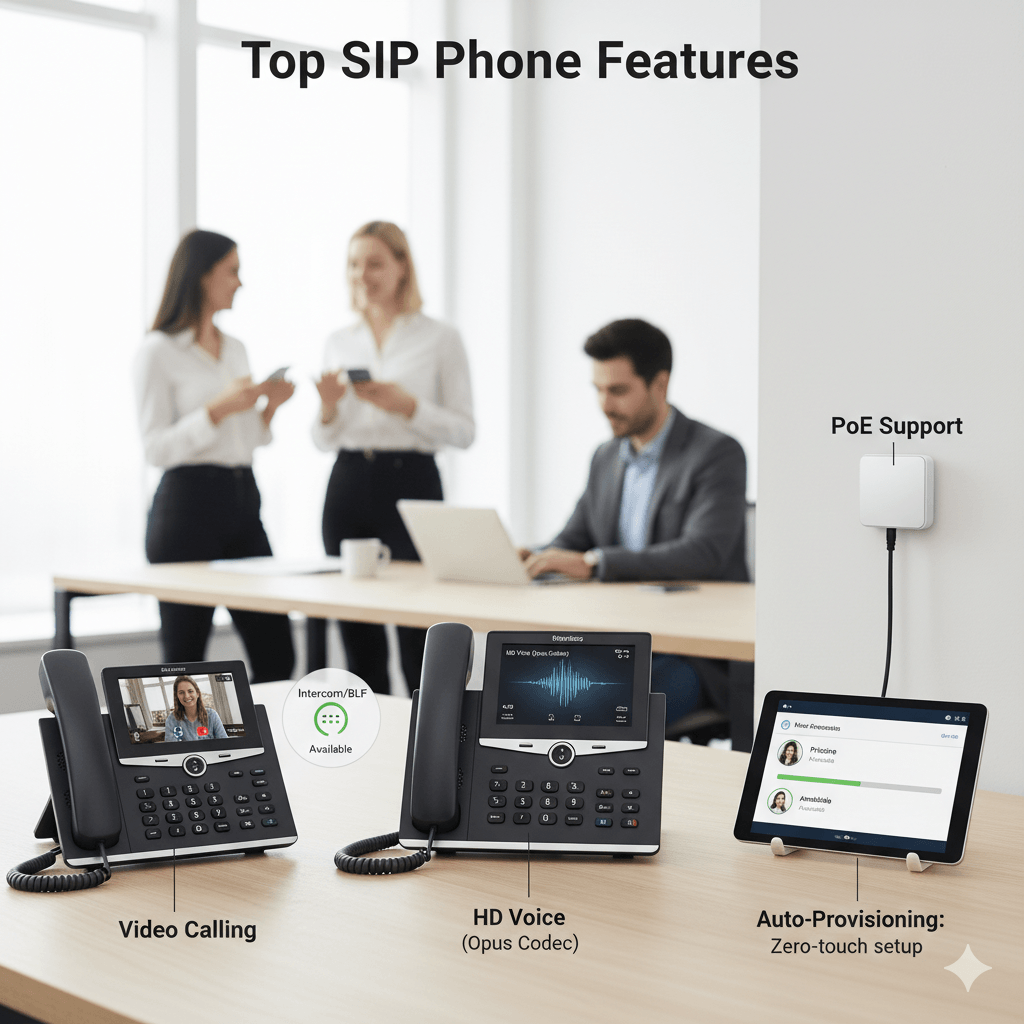
Top Features:
- HD Voice (Opus Codec): Crystal-clear audio beyond PSTN.
- Video Calling: Built-in cameras on SIP IP phones.
- Intercom/BLF: Monitor extensions in real-time.
- Auto-Provisioning: Zero-touch setup for fleets.
- PoE Support: Single-cable power/data for SIP desk phones.
These make this systems ideal for SIP telephone service, outshining basic telephone SIP setups.
How Can SIP telephone Be Classified—Hardphones vs Softphones?
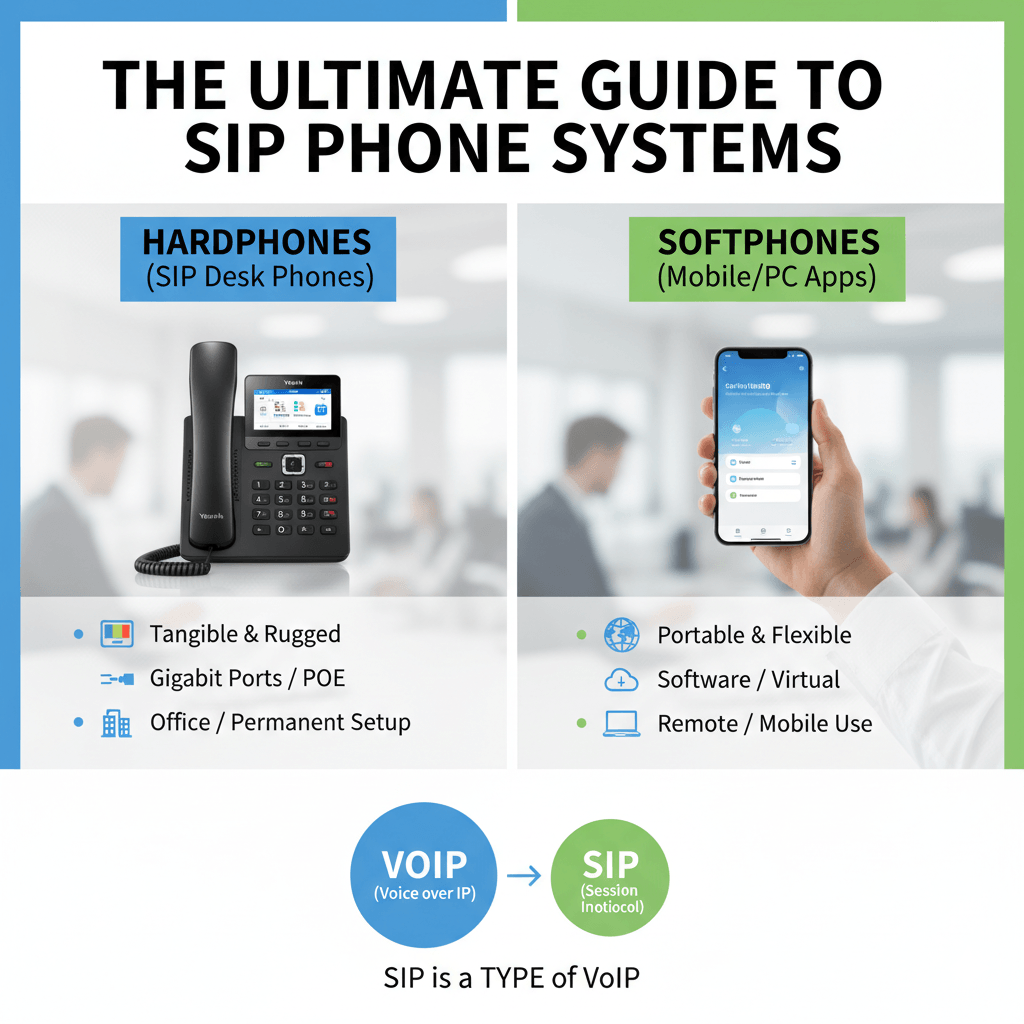
SIP telephones split into two powerhouse categories: hardphones (deskphones or hardware) and softphones (software), each excelling in SIP phone systems.
Hardphones are tangible SIP desk phones like Poly or Cisco models—rugged, with color screens, gigabit ports, and programmable keys. Perfect for offices, SIP hardware offers tactile bliss and SIP phone line reliability.
Softphones, or SIP soft phone apps (e.g., Zoiper, MicroSIP), run on PCs, laptops, or mobiles as software. Soft phone meaning? Virtual telephony via SIP VoIP phone, ideal for remote warriors needing SIP on phone flexibility without buying gear.
SIP desk phone hardphones win for permanence; SIP softphones rule mobility in SIP based phone systems.
What Are the Differences Between VoIP and SIP Phones?
VoIP (Voice over Internet Protocol) is a broad, “umbrella” term referring to any technology that transmits voice calls over the internet rather than traditional copper wires. It is the foundation that allows digital voice data to travel across IP networks. SIP (Session Initiation Protocol), on the other hand, is one specific “language” or signaling protocol used within the VoIP framework to initiate, manage, and tear down those communication sessions.
While all SIP phones are essentially VoIP phones because they send voice over the internet, not all VoIP systems use SIP; some utilize older or proprietary protocols like H.323. Furthermore, IP phones are the physical hardware designed for IP networks, but a SIP IP phone specifically uses the open-standard SIP protocol to ensure it can communicate with various providers.
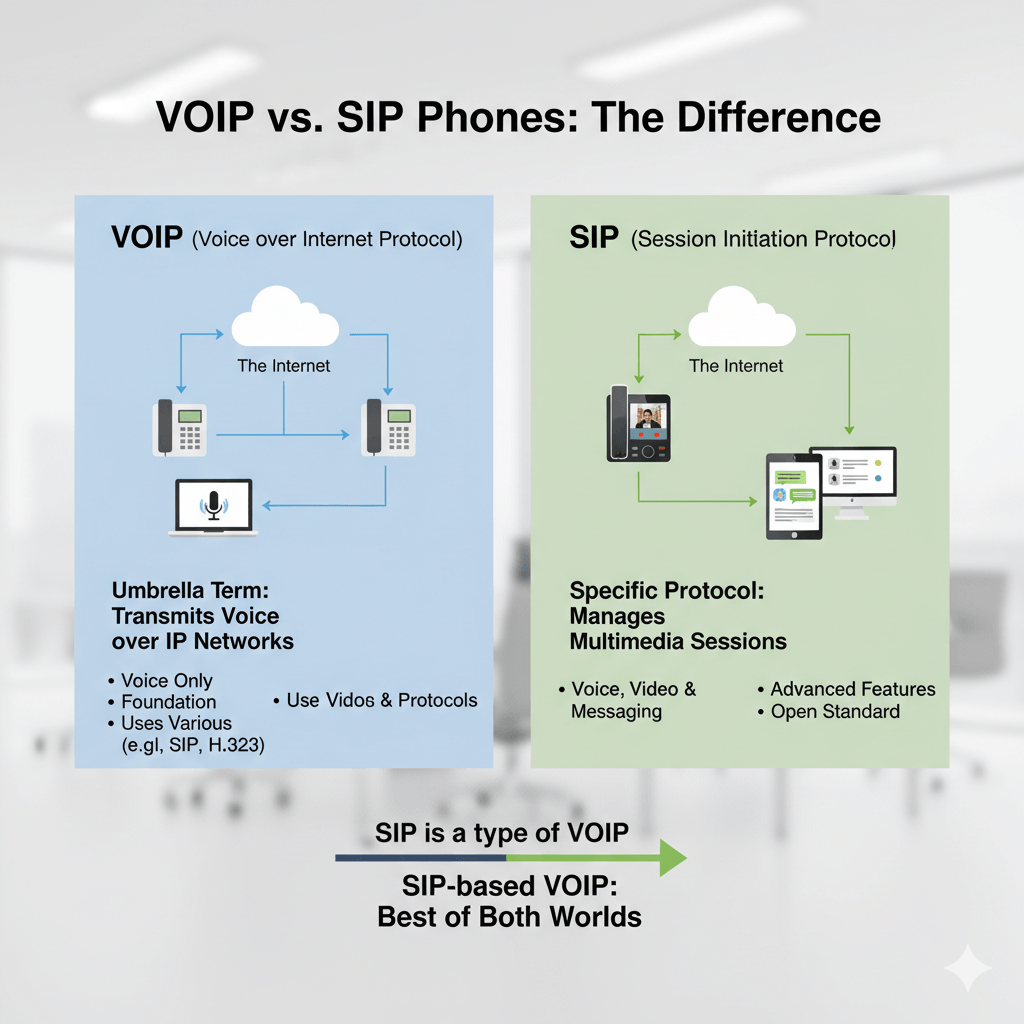
The primary difference lies in versatility: while basic VoIP focuses mainly on voice, SIP-based telephony is designed for multimedia. It can handle video conferencing, instant messaging, and “presence” indicators (showing if a user is online) all within a single session. Combining these creates a SIP-based VoIP system, which offers the best of both worlds by providing high-quality voice calls alongside advanced modern communication features.
How Does SIP-Based Telephony Work?
SIP-based telephony functions through a series of client-server “handshakes” that manage the lifecycle of a SIP call. The process begins when a SIP device (like a SIP IP phone or SIP soft phone) registers its location with a central registrar server. To initiate a call, the sip based phone system sends an “INVITE” request to negotiate technical details, such as audio codecs, before streaming the actual voice data via Real-time Transport Protocol (RTP).
A key technical hurdle in SIP telephony is NAT traversal; systems use protocols like STUN or TURN to ensure lines can communicate through firewalls. Once the SIP proxy locates the recipient’s SIP number and authenticates the user, the SIP telephone rings. For maximum efficiency, the media flows peer-to-peer between SIP devices once the connection is established, bypassing the server.
How Do SIP Calls Work Step-by-Step?
Understanding the SIP call meaning requires looking at the “digital dance” of the call flow. SIP devices can be used for calls by following these standardized steps:
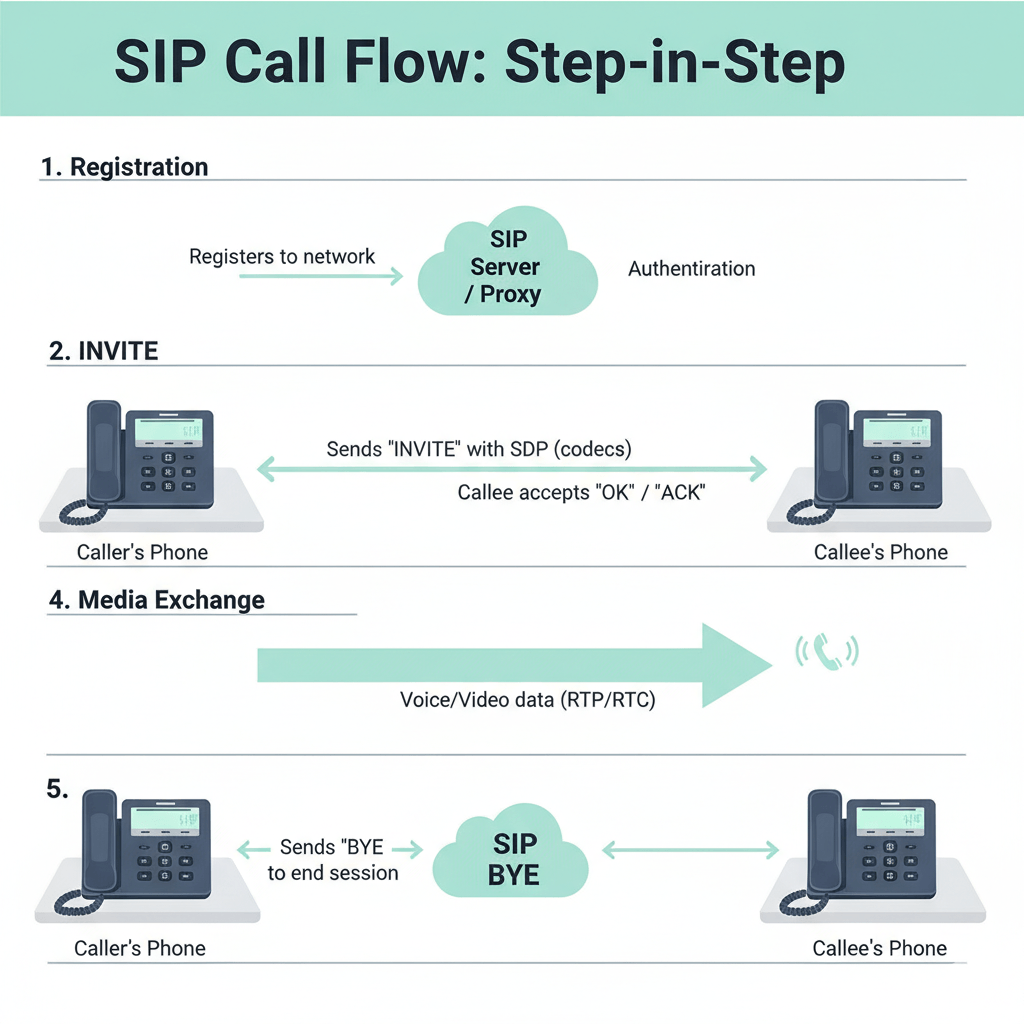
- Registration: The telephone sip or voip sip phone authenticates with a registrar to let the network know it is online.
- INVITE: The caller’s SIP device sends a session invitation containing a Session Description Protocol (SDP) to offer specific codecs.
- Ringing/OK: The callee’s SIP phone accepts the invite, and an “ACK” (acknowledgment) confirms the setup.
- Media Exchange: Voice sip data is carried by RTP/RTCP protocols.
- BYE: When a user hangs up, the SIP telephone service sends a BYE request to tear down the session.
What Are the Benefits of a Softphone?
A softphone is a software application that allows you to run a service on any computing device, such as a laptop or a sip cell phone. The soft phone meaning essentially refers to “hardware-free” communication.
- Portability: You can use a single SIP account across multiple SIP devices.
- Cost: Soft phone applications are often free or low-cost compared to purchasing physical SIP hardware.
- Features: These apps often include advanced SIP features like screen sharing and recording.
- Integration: SIP phone software often features plugins for tools like Slack or Microsoft Teams.
For mobile users, apps like Groundwire can turn a standard smartphone into a fully integrated SIP VoIP phone.
What Is a SIP telephone Line and SIP Account?
SIP telephone line is a virtual channel provided via a SIP trunk, which is significantly more scalable than traditional PRI lines. Practically, it refers to the boundless extensions possible in a SIP VoIP phone system. While the SIP phone line provides the path for the call, the SIP account provides the identity and permission for the SIP device to use that path.
What Are Top-Rated Business SIP Phones?
To help you choose the best hardware for your SIP systems, here is a detailed breakdown of the top-rated SIP devices currently dominating the business market:
Yealink T54W
The Yealink T54W is widely considered a “king” among SIP desk phones due to its versatility and user-friendly interface. It features a 4.3-inch color display and supports up to 16 SIP phone lines, making it ideal for busy professionals who handle multiple calls simultaneously. This SIP IP phone is built for the modern office, offering built-in Bluetooth and dual-band Wi-Fi to reduce cable clutter. With an estimated price of $180 and a 4.8/5 rating, it balances high-end features with affordability.
Poly VVX 450
The Poly VVX 450 is a powerhouse SIP telephone known for its exceptional “HD Voice” technology, which provides professional-grade audio clarity. This SIP device supports 12 lines and includes dual USB ports for media and storage applications, enhancing the functionality of your system. At a price point of $220 and a 4.7/5 rating, it is a reliable choice for executives who require a robust, high-performance phone sip solution.
Cisco 8841
For enterprises that prioritize security and mission-critical reliability, the Cisco 8841 is a premier SIP ip phone. It offers 10 lines and features a high-resolution widescreen VGA display with wide-band audio for superior communication quality. As a staple in large-scale SIP based phone systems, this model includes a built-in Gigabit Ethernet switch to ensure high-speed data transfer alongside voice sip traffic. It maintains a top-tier 4.9/5 rating with an estimated cost of $250.
Grandstream GXP2130
The Grandstream GXP2130 is an excellent entry-level voip phone that doesn’t compromise on modern essentials. It is often praised for its Android-based operating system, which allows for a more flexible user experience compared to traditional phones sip. This SIP telephone service hardware includes built-in Wi-Fi and even a camera for basic video needs, offering a high value-to-cost ratio at $140 with a 4.6/5 rating.
How Do You Get a Business Phone Number for SIP?
To activate a SIP telephone, you must secure a SIP phone number (also known as a SIP number) from a SIP phone service provider like Twilio or RingCentral. What is a SIP phone number? It is a virtual line tied to your SIP account rather than a physical copper wire. What is a SIP account? It consists of the credentials (username, domain, and password) that authenticate your SIP device. These SIP numbers can be local or international DIDs, and bundling them with SIP trunking allows for multi-line SIP phone service.
How To Choose a SIP Service Provider?
When selecting the ideal SIP phone service provider, it is essential to look beyond basic connectivity and focus on long-term operational stability and global reach. Below is an expanded evaluation guide for your SIP phone system:
1. Uptime and Reliability
- Prioritize 99.999% “Five Nines”: While 99.99% is standard, top-tier SIP services often strive for “five nines” (99.999%) to ensure that SIP telephony remains active even during major network maintenance.
- Geographic Redundancy: Confirm the provider utilizes multiple data centers globally so that if one server fails, your SIP phone lines automatically failover to another node without dropping calls.
2. NAT Traversal and Firewall Compatibility
- Reliable Firewall Handling: Ensure the phone system utilizes advanced protocols like STUN, TURN, or ICE to reliably navigate complex corporate firewalls.
- Deep Packet Inspection (DPI) Support: Look for providers that offer troubleshooting tools to identify if your network router is incorrectly dropping voice sip packets, which can lead to one-way audio issues.
3. 24/7 Technical Support
- Omnichannel Assistance: Beyond just phone support, your provider should offer 24/7 live chat and a comprehensive knowledge base specifically for configuring various SIP devices.
- Dedicated Account Management: For larger SIP phone systems, check if the provider assigns a technical account manager to help optimize your SIP hardware settings and network architecture.
4. Mobile Apps and Softphone Integration
- High-Quality Softphones: The provider must offer a native SIP soft phone app that maintains high-fidelity audio on both iOS and Android, ensuring your sip cell phone stays connected.
- Unified Communications (UCaaS) Features: Ensure the software integrates seamlessly with your business’s presence settings, allowing you to see if colleagues are on a SIP desk phone before transferring calls.
5. Leading Providers and Infrastructure
- Industry Leaders: Companies like Nextiva, 8×8, and Vonage are celebrated for their robust SIP telephone service and massive global infrastructure.
- Security and Compliance: These top providers also ensure that your SIP telephony meets strict regulatory standards, such as HIPAA or PCI-DSS, protecting your SIP numbers and data from unauthorized access.
Read More: Is VoIP Reliable? Pros, Cons, and What You Really Need to Know
Final Words:
The transition from traditional landlines to SIP phone systems represents a fundamental shift in how businesses communicate. By leveraging the Session Initiation Protocol, organizations can move beyond the limitations of physical hardware and geographic boundaries. Whether you choose the tactile reliability of a SIP desk phone like a Yealink or Poly, or the agile flexibility of a SIP softphone for remote work, the result is the same: a scalable, cost-effective, and feature-rich communication environment.
As SIP telephony continues to integrate with AI transcription, HD video, and unified communications, it remains the most robust choice for modern enterprises. By understanding the nuances of SIP devices, accounts, and service providers, you can build a communication backbone that not only slashes costs but also empowers your team with crystal-clear, global connectivity. Investing in a SIP-based system today ensures your business is ready for the innovations of tomorrow.
FAQs
Is a SIP Phone the Same as a VoIP Phone?
No—SIP phones use the SIP protocol within broader VoIP technology. Think of VoIP as the entire industry of “calling over the internet,” while SIP is the specific “language” used to signal and control those calls; therefore, all SIP phones are VoIP, but not all VoIP systems use SIP.
How Do You Use a SIP Phone System?
To use the system, you simply connect your SIP-ready device to the internet and register it using credentials (username and password) provided by your service provider. Once authenticated, you dial numbers just like a traditional phone, and the system handles the digital conversion to route your voice across the web.
How Does a SIP Telephone Differ from SIP Trunking?
A SIP telephone is the physical or virtual endpoint (the handset or app) that a person actually uses to talk. In contrast, SIP trunking is the digital “pipe” or virtual phone line that connects an entire office’s internal phone system to the global telephone network.
SIP Phone vs. IP Phone?
An IP phone is a broad term for any hardware that plugs into a network jack to transmit data, regardless of the software it uses. A SIP phone is a specific type of IP phone that follows the open-standard SIP protocol, ensuring it can work with almost any service provider rather than being locked to one brand.