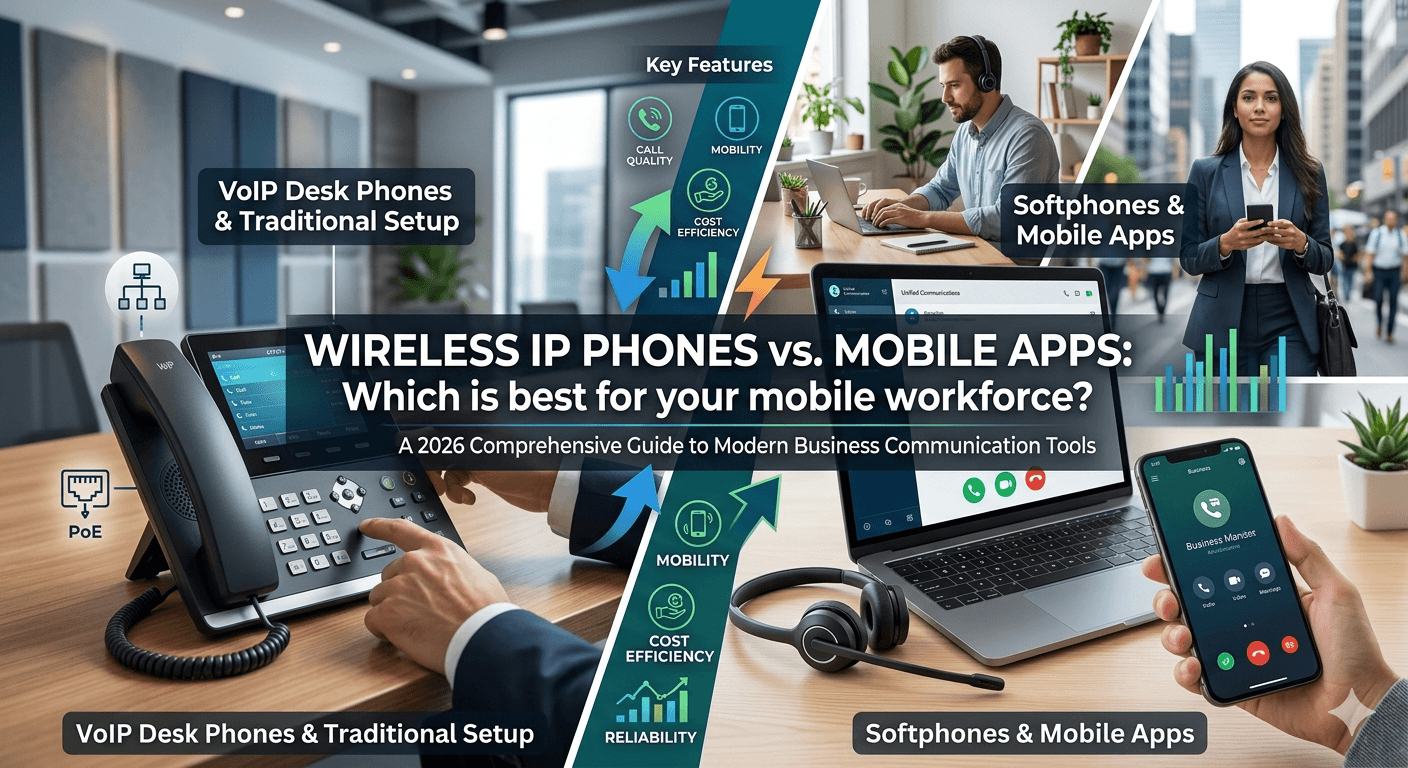
Wireless IP phones are dedicated devices that offer stable call quality, reliability, and a professional setup for remote teams. Mobile apps, on the other hand, provide flexibility, mobility, and lower costs by turning smartphones into VoIP tools. The best choice depends on your workforce needs—whether you prioritize performance and consistency or convenience and scalability.
In today’s dynamic business landscape, where remote work and mobility are no longer exceptions but norms, choosing the right communication tools is paramount. The traditional desk phone has evolved, giving way to a spectrum of options including dedicated wireless IP phones and versatile mobile apps. For businesses aiming to optimize their remote or mobile workforce’s connectivity, the question isn’t just “which is better?” but “which is best for us?”
This comprehensive guide delves into the nuances of wireless IP phones vs mobile apps, examining their individual strengths and weaknesses, cost implications, security features, and suitability for various business environments. We’ll help you navigate the complexities to make an informed decision that empowers your team, enhances productivity, and ultimately drives business success.
Understanding Your Communication Toolkit: Desk Phones, Web Phones, and Mobile Apps
Before we pit wireless IP phones against mobile apps, it’s essential to understand the broader ecosystem of modern business communication tools. These can generally be categorized into three main types, each serving distinct purposes and catering to different user needs.
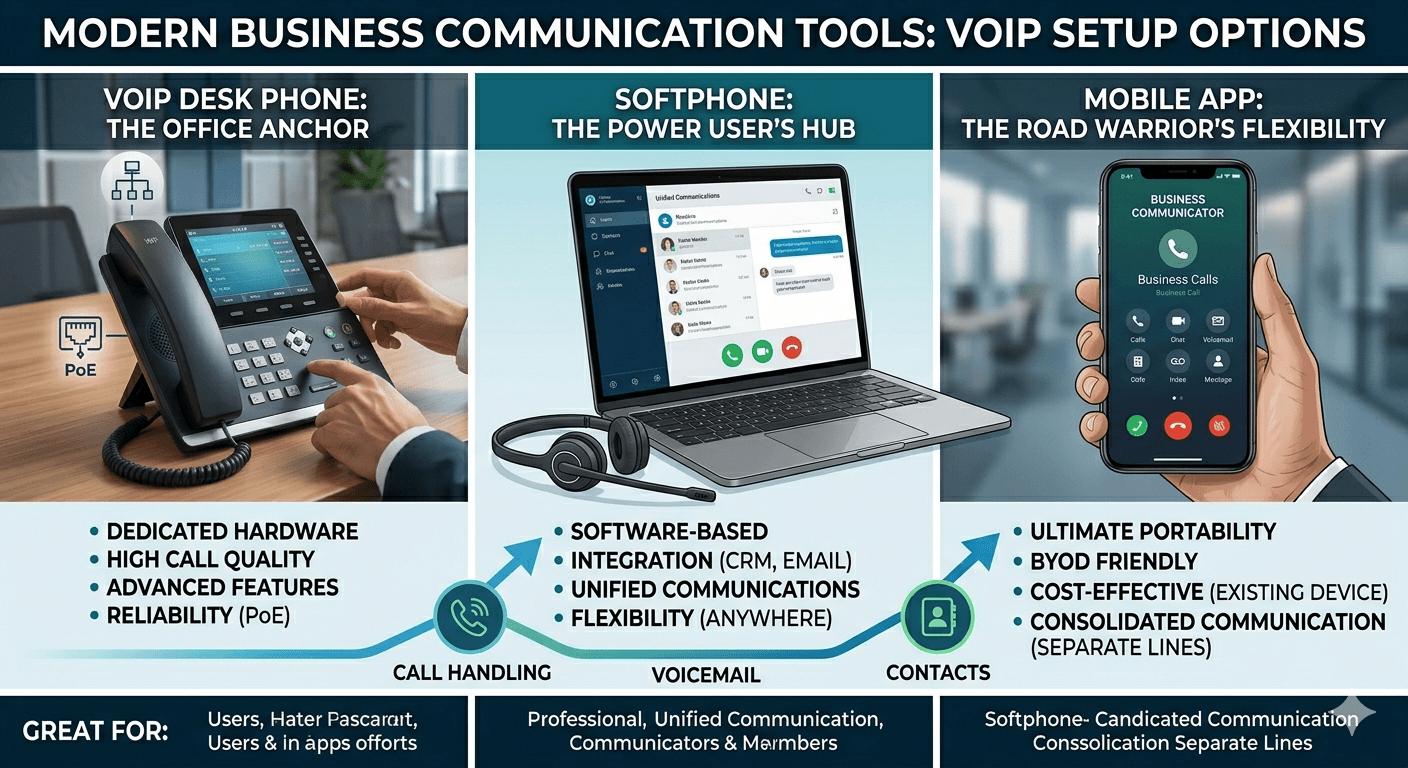
What is a VoIP Phone? – The Office Anchor
A VoIP (Voice over Internet Protocol) phone, often referred to as an IP phone or internet phone for business, is a physical device that looks and functions much like a traditional desk phone but connects to your internet network instead of a traditional phone line. These devices convert analog audio into digital packets, transmitting them over the internet.
Key Features of a VoIP Phone:
- Dedicated Hardware: A physical device designed specifically for making and receiving calls.
- High Call Quality: Often provides excellent audio quality due to dedicated hardware and network optimization.
- Advanced Features: Supports features like call forwarding, conferencing, voicemail, and directory services.
- Reliability: Can be very reliable, especially when paired with Power-over-Ethernet (PoE).
Great For:
- Employees who spend most of their day at a fixed desk.
- Roles requiring constant, high-quality voice communication.
- Environments where a physical phone presence is preferred or necessary.
- Businesses prioritizing a professional, established communication setup.
What is a Softphone? – The Power User’s Hub
A softphone is software that allows you to make and receive calls over the internet using a computer, laptop, or tablet. It essentially transforms your device into a telephone. Softphones are typically part of a larger Unified Communications (UC) platform, integrating voice, video, messaging, and presence features.
Key Features of a Softphone:
- Software-Based: Runs on a computer or laptop, utilizing existing hardware (headset, microphone).
- Integration Capabilities: Seamlessly integrates with CRM systems, email, and other business applications.
- Unified Communications: Often part of a broader UC suite, offering chat, video conferencing, and screen sharing.
- Flexibility: Allows users to work from anywhere with an internet connection, using their primary computing device.
Great For:
- Employees who heavily rely on their computer for daily tasks, such as sales or customer service representatives.
- Tech-savvy users who appreciate integrated workflows.
- Businesses looking for a comprehensive UC solution.
- Remote workers who primarily use a desktop or laptop for their work.
What is a Mobile App? – Ultimate Flexibility for the Road Warrior
A mobile app, in the context of business communication, is a VoIP application installed on a smartphone or tablet. These apps extend your business phone system to mobile devices, allowing employees to make and receive calls, access voicemails, and manage their business identity using their personal or company-issued smartphone.
Key Features of a Mobile App:
- Ultimate Portability: Allows communication from virtually any location with mobile data or Wi-Fi.
- BYOD Friendly: Can be easily deployed on employees’ personal smartphones (Bring Your Own Device).
- Cost-Effective: Leverages existing mobile devices, potentially reducing hardware costs.
- Consolidated Communication: Keeps business and personal calls separate on the same device.
Great For:
- Field sales teams, technicians, and employees who are constantly on the move.
- Businesses with a highly mobile or remote workforce.
- Organizations looking to leverage BYOD policies.
- Individuals who need to be reachable on their business line wherever they are, without carrying an extra device.
Desktop VoIP Phones vs Softphones vs Mobile Apps: A Head-to-Head Comparison for 2026
To truly understand which solution is best, let’s conduct a detailed comparison across several critical business metrics for the year 2026, considering technological advancements and evolving work patterns.
| Feature / Metric | VoIP Desk Phones | Softphones | Mobile Apps |
| Hardware | Dedicated physical device | Computer/laptop, headset, microphone | Smartphone/tablet |
| Portability | Low (fixed location) | Medium (requires laptop/internet) | High (mobile data/Wi-Fi) |
| Ease of Setup | Moderate (network configuration, physical installation) | Easy (software installation, peripheral setup) | Very Easy (app download, account login) |
| Call Quality | Excellent (dedicated hardware, QoS) | Very Good (dependent on internet, headset quality) | Good (dependent on internet, device, network congestion) |
| Reliability | High (dedicated power/Ethernet) | Medium (dependent on computer performance, internet) | Medium (dependent on mobile network, battery life) |
| Integration | Limited (some CRM, directory features) | Extensive (CRM, email, UC platforms) | Moderate (contacts, some CRM integration) |
| Security | High (dedicated, controlled environment) | High (software security, network protocols) | Moderate (device security, app permissions) |
| Cost (Per User) | Higher (hardware purchase + license) | Moderate (headset purchase + license) | Lower (license only, leverages existing device) |
| Power Dependency | Can use PoE (Power-over-Ethernet) for reliability | Dependent on laptop/computer power | Dependent on smartphone battery |
| Best Use Case | Static office workers, call centers | Desk-bound remote workers, heavy computer users | Field staff, highly mobile employees, BYOD environments |
Pros and Cons: VoIP Phones vs Softphones vs Mobile Apps
Let’s break down the advantages and disadvantages of each option to provide a clearer picture.
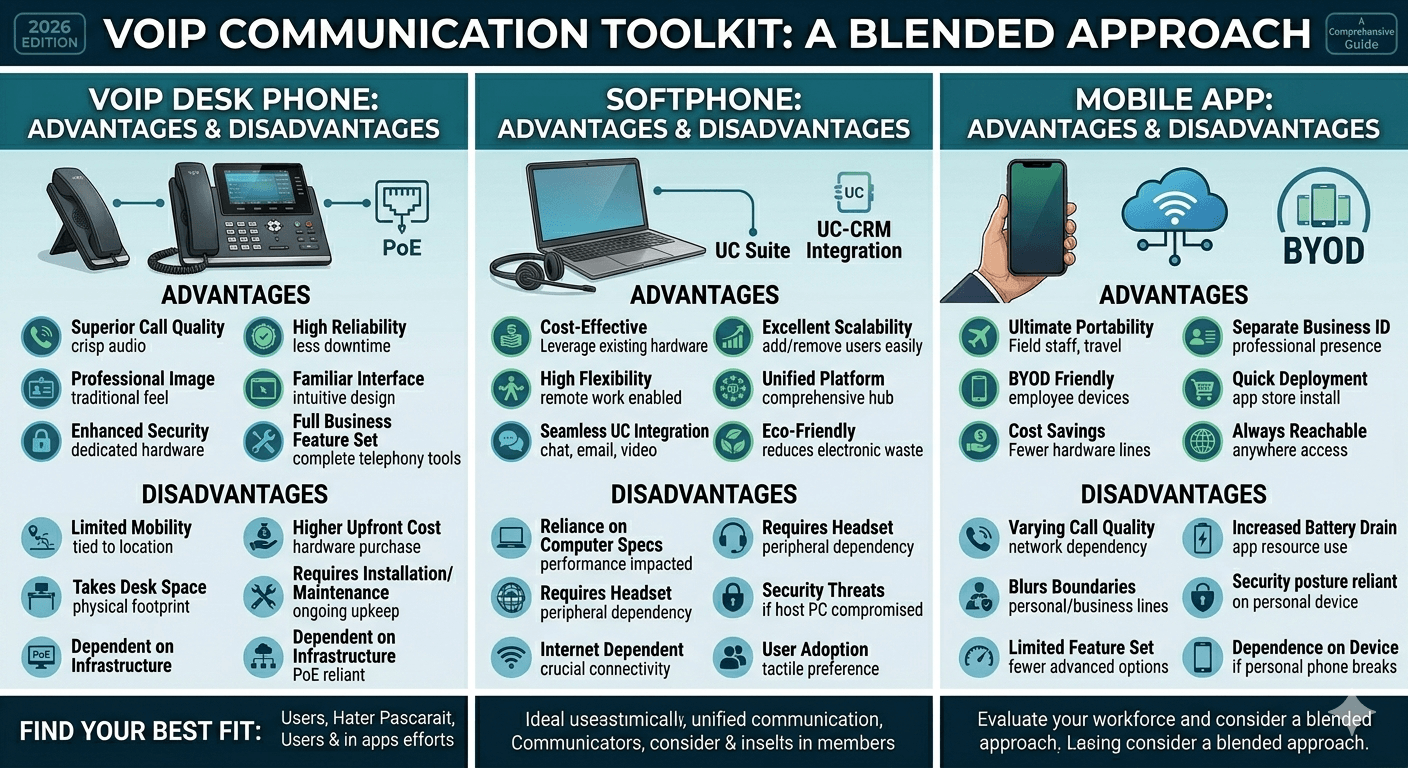
VoIP Desk Phones
Advantages of VoIP for Business (VoIP Desk Phones):
- Superior Call Quality: Dedicated hardware often leads to crystal-clear audio.
- Reliability: Less prone to software glitches or conflicts with other applications. PoE provides power redundancy during outages.
- Professional Image: A physical desk phone can project a more traditional, professional image.
- Ease of Use: Familiar interface for many users, requiring minimal training.
- Enhanced Security: Dedicated devices can be more secure as they are less susceptible to malware common on general-purpose computers.
- Advanced Features: Access to a full suite of business telephony features like hold, transfer, conference, and speed dial buttons.
Disadvantages of VoIP (VoIP Desk Phones):
- Lack of Mobility: Tied to a specific physical location. Not suitable for a mobile workforce.
- Higher Initial Cost: Requires purchasing dedicated hardware for each user.
- Physical Space Requirement: Takes up desk space.
- Installation & Maintenance: Can require more effort for initial setup and ongoing physical maintenance.
- Power Dependency: While PoE helps, they are still dependent on network infrastructure.
Softphones
Advantages of VoIP (Softphones):
- Cost-Effective: Eliminates the need for dedicated desk phone hardware, often only requiring a good headset.
- High Flexibility & Portability: Users can make and receive calls from any location with an internet-connected computer.
- Unified Communications (UC) Integration: Seamlessly integrates with other business tools like CRM, email, chat, and video conferencing, offering a comprehensive communication hub.
- Scalability: Easy to add or remove users as your business needs change.
- Advanced Features: Access to all VoIP features, often with a more intuitive software interface.
- Eco-Friendly: Reduces electronic waste compared to physical phones.
Disadvantages of VoIP (Softphones):
- Reliance on Computer Performance: Call quality and performance can be affected by the computer’s resources and other running applications.
- Peripheral Dependency: Requires a good quality headset and microphone for optimal performance.
- Internet Dependency: A stable and robust internet connection is crucial for reliable service.
- Security Concerns: Can be more vulnerable to security threats if the underlying computer system is compromised.
- User Adoption: Some users may prefer the tactile experience of a physical phone.
Mobile Apps
Advantages of VoIP (Mobile Apps):
- Ultimate Mobility: Enables employees to communicate effectively from anywhere, ideal for a highly mobile or remote workforce.
- BYOD (Bring Your Own Device) Friendly: Leverages existing employee smartphones, reducing hardware costs and allowing personal choice.
- Cost Savings: Eliminates the need for separate business phones or additional mobile plans for business calls.
- Separation of Business and Personal: Allows employees to maintain a professional business identity on their personal device.
- Quick Deployment: Easy to download and set up, enabling rapid scaling of communication capabilities.
- Accessibility: Ensures employees are always reachable on their business line.
Disadvantages of VoIP (Mobile Apps):
- Call Quality Variability: Highly dependent on the quality of the mobile network (cellular data or Wi-Fi) and device performance.
- Battery Drain: Constant use of VoIP apps can significantly drain smartphone battery life.
- Potential for Distraction: Blurring of lines between personal and business use on a single device.
- Device Security: Business communication is reliant on the security posture of the employee’s personal device.
- Feature Limitations: While robust, some advanced features or integrations might be less seamless than on a dedicated softphone or desk phone.
- Dependence on Personal Device: Issues with an employee’s personal phone can impact their ability to perform work.
How to Choose a VoIP Setup Based on Your Environment
The best phone system for your business isn’t a one-size-fits-all solution. It depends heavily on your specific operational environment, employee roles, and strategic goals.
Should You Use Just One? Mixing & Matching is an Option
Absolutely not! In fact, for many businesses, a hybrid approach offers the most significant advantages. Mixing and matching different VoIP solutions allows you to tailor communication tools to individual roles and departments, maximizing efficiency and cost-effectiveness.
For instance:
- Customer Service & Sales Teams (Desk-Bound): Primarily VoIP desk phones or softphones for consistent, high-volume communication and CRM integration.
- Field Technicians & Sales Representatives (On-the-Go): Mobile apps for ultimate flexibility and constant connectivity.
- Executives & Managers (Hybrid): A softphone on their laptop for office and home use, complemented by a mobile app for when they are traveling or away from their desk.
- Receptionists: Often benefit most from a dedicated VoIP desk phone with advanced features for call handling.
This strategy allows you to leverage the specific benefits of each option while mitigating their disadvantages.
Use Cases: VoIP Phones vs Softphones vs Mobile Apps
Let’s explore practical scenarios where each solution shines.
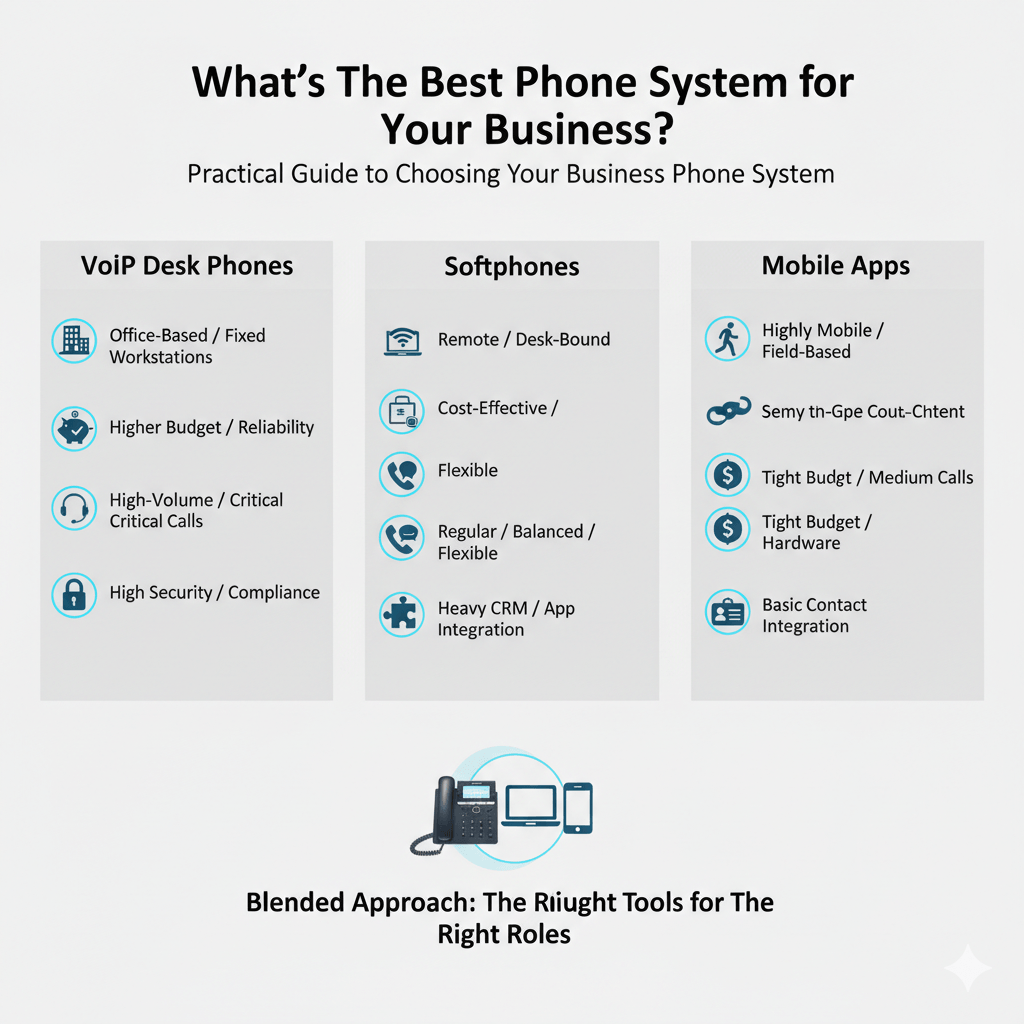
VoIP Desk Phones
- Call Centers: Agents benefit from dedicated hardware, consistent call quality, and easy access to features like call hold and transfer.
- Office Environments with Fixed Workstations: Employees who spend their entire workday at a desk can rely on the stability and clarity of a physical phone.
- Conference Rooms: Dedicated conference phones (a type of VoIP desk phone) provide superior audio for group meetings.
- Reception Desks: A physical phone with multiple lines and advanced call handling features is essential for managing incoming calls efficiently.
Softphones
- Remote Workforces (Desk-Bound): Employees working from home can use their laptops as their primary business communication hub, integrating with other applications.
- Sales and Marketing Teams: Integration with CRM systems allows for seamless call logging, click-to-dial functionality, and improved productivity.
- Customer Support Teams: Agents can handle calls, chats, and emails from a single interface, enhancing efficiency.
- Project Teams: Unified communications features (chat, video, screen sharing) within a softphone platform facilitate collaboration.
Mobile Apps
- Field Service Technicians: Can make and receive business calls while on job sites, keeping their personal number private.
- Traveling Salespeople: Stay connected with clients and the office from anywhere in the world with internet access.
- Delivery Drivers: Coordinate logistics and communicate with customers using their business line on their smartphone.
- Real Estate Agents: Manage client calls and inquiries while showing properties.
- Part-time or Flexible Employees: Easily access business communication tools without needing dedicated hardware.
Cost Considerations: What’s the Most Affordable Option?
Cost is often a significant factor in business decisions. Let’s examine the financial implications of each VoIP solution.
- VoIP Desk Phones: Generally have the highest upfront cost due to the purchase of physical hardware for each user. Prices can range from $50 to $300+ per phone, depending on features. However, they typically offer a longer lifespan and potentially lower long-term replacement costs if durable.
- Softphones: The most cost-effective hardware solution, as they leverage existing computers and typically only require a high-quality headset (ranging from $20 to $100). The primary cost is the software license, which is usually included in your VoIP service plan.
- Mobile Apps: Similar to softphones, the hardware cost is minimal to non-existent as it utilizes employees’ personal smartphones. The primary cost is the per-user license for the VoIP service that includes mobile app access. This can be very affordable, especially with BYOD policies.
Overall Affordability:
- For businesses with a high percentage of mobile workers or a strong BYOD policy, mobile apps often present the lowest overall cost due to minimal hardware investment.
- For desk-bound remote workers, softphones offer excellent value by leveraging existing computer hardware.
- VoIP desk phones represent a higher initial investment but can be justified for roles requiring dedicated, high-quality, and highly reliable physical communication.
It’s crucial to consider not just upfront costs but also ongoing subscription fees, maintenance, and potential productivity gains or losses associated with each option. Many VoIP providers offer tiered plans that include softphones and mobile apps as standard features, making the incremental cost minimal for these options.
Desk Phones vs. Web Phones vs. Mobile Apps: Call Quality & Security Considerations
Beyond cost and flexibility, call quality and security are paramount for business communication.
Call Quality
- VoIP Desk Phones: Generally offer the most consistent and highest call quality. Dedicated hardware, often with built-in Quality of Service (QoS) features on the network, prioritizes voice traffic, minimizing latency, jitter, and packet loss. This leads to clear, uninterrupted conversations.
- Softphones: Can deliver excellent call quality, especially when paired with a high-quality headset and a stable internet connection. However, performance can be impacted by other applications running on the computer, CPU usage, and network congestion if QoS isn’t fully optimized.
- Mobile Apps: Call quality is the most variable. It heavily depends on the strength and stability of the mobile data signal (4G/5G) or Wi-Fi connection. During periods of poor coverage or network congestion, call quality can degrade significantly. However, with strong connections, quality can be comparable to traditional calls.
Security
- VoIP Desk Phones: Can be very secure within a controlled network environment. Physical access can be restricted, and dedicated devices are less susceptible to general computer viruses or malware. Security relies on robust network firewalls and VPNs for remote access.
- Softphones: Security is a major consideration. Since they run on general-purpose computers, they are vulnerable to the same threats as other software (malware, phishing). Strong cybersecurity practices on the host computer (antivirus, firewalls, regular updates) are essential. VoIP providers also employ encryption (SRTP/TLS) to secure calls.
- Mobile Apps: Introduce unique security challenges due to the use of personal devices and reliance on public networks. Device security (PINs, biometrics), app permissions, and the use of secure Wi-Fi or VPNs are critical. Reputable VoIP providers ensure end-to-end encryption for mobile calls. BYOD policies require careful planning to ensure business data security.
The benefits of VoIP for security are substantial, including encrypted calls and robust network defenses, but the implementation choice (desk phone, softphone, or app) influences the specific security posture.
Load Shedding and Reliability: The Power-over-Ethernet (PoE) Advantage
For businesses operating in regions prone to power outages or simply seeking enhanced reliability, the power source of your communication devices is critical.
- VoIP Desk Phones (with PoE): This is where desk phones can truly shine. Many modern VoIP desk phones support Power-over-Ethernet (PoE), meaning they receive both power and data through a single Ethernet cable. If your network switches are connected to an Uninterruptible Power Supply (UPS) or a generator, your VoIP desk phones can continue functioning during a power outage, provided your internet connection remains active. This offers a significant reliability advantage over devices that require separate power adapters.
- Softphones & Mobile Apps: These devices are inherently dependent on their host device’s power source. Laptops and smartphones rely on internal batteries, which have limited lifespans, or external power. During extended power outages, without access to charging, these devices will eventually cease to function. While mobile data can provide internet connectivity during a Wi-Fi outage, the power supply for the phone itself remains a vulnerability.
Therefore, for mission-critical roles that must remain contactable even during power disruptions, a PoE-enabled VoIP desk phone, backed by a robust power infrastructure, offers the highest level of reliability. This is a significant advantage of VoIP, specifically for physical IP phones.
Are Desk Phones Becoming Obsolete? Not Yet.
Despite the rise of softphones and mobile apps, desk phones are far from obsolete. While their role has shifted, they continue to be indispensable in many professional environments.
Why are desk phones still relevant?
- Dedicated Functionality: A physical phone is purpose-built for calls, reducing distractions and ensuring consistent performance.
- Ergonomics: For employees who spend hours on calls, a comfortable handset or integrated headset port can be more ergonomic than holding a smartphone or relying solely on a computer headset.
- Familiarity: Many users, especially those less tech-savvy, prefer the tangible buttons and familiar layout of a traditional-looking phone.
- Reliability & Durability: They are often robust devices, designed for continuous use, and can be more reliable than a general-purpose computer or smartphone for critical calls.
- Specific Roles: Receptionists, call center agents, and executives often benefit from the advanced features and stability of a dedicated desk phone.
The idea that desk phones are obsolete is largely a misconception. Instead, they are evolving, offering advanced VoIP features and integrating into a broader, more flexible communication ecosystem.
What’s the Best Phone System for Your Business?
Choosing the best phone system for your business involves evaluating your unique needs, workforce characteristics, and strategic priorities. Consider the following:
- Workforce Mobility:
- Highly Mobile (Field sales, technicians): Prioritize mobile apps.
- Desk-Bound Remote Workers: Softphones are an excellent choice.
- Office-Based, Fixed Workstations: VoIP desk phones or softphones.
- Budget:
- Tight Budget, Minimal Hardware: Softphones and mobile apps are more cost-effective.
- Budget for Dedicated Hardware, Prioritize Reliability: VoIP desk phones.
- Call Volume & Importance:
- High-Volume, Critical Calls: VoIP desk phones for superior call quality and reliability.
- Regular Business Communication, Some Mobility: Softphones offer a good balance.
- Constant Connectivity, Low to Medium Call Volume: Mobile apps.
- Integration Needs:
- Heavy CRM/Business App Integration: Softphones excel here.
- Basic Contact Integration: Mobile apps.
- Limited Integration: VoIP desk phones.
- Security & Compliance:
- Evaluate your industry’s compliance requirements and choose a solution (and provider) that meets them. All options can be secure with proper implementation, but the specific vulnerabilities differ.
- IT Infrastructure & Support:
- Ensure your internet bandwidth can support VoIP traffic for all users.
- Consider your IT team’s capacity to manage and support various devices.
- Employee Preference & Training:
- Involve your employees in the decision-making process. Provide adequate training for whichever system you implement.
By carefully assessing these factors, you can determine whether a single solution or a blended approach (mixing desk phones, softphones, and mobile apps) will best serve your organization.
Read more: VoIP PBX Phone Systems: Difference Between PBX vs VoIP
Final Thoughts: What’s Right for You?
The journey to finding the best communication solution for your remote or mobile workforce is a strategic one. It’s not about declaring one technology superior to another but rather understanding how each option – be it the steadfast wireless IP phone, the integrated softphone, or the highly mobile app – can best serve your specific operational needs.
By considering the nuances of cost, call quality, security, reliability, and employee workflow, you can architect a communication ecosystem that is both robust and flexible. Embracing a hybrid approach, leveraging the strengths of each platform, is often the most effective path forward, ensuring your team remains connected, productive, and ready to meet the demands of tomorrow’s business landscape. The benefits of VoIP, in all its forms, offer a powerful foundation for modern business communication.
FAQs
-
Can I use my personal cell phone as a business phone?
Yes, with a VoIP mobile app, you can use your personal cell phone to make and receive business calls using your company’s phone number. This separates your personal and business calls while using a single device, leveraging the advantages of using VoIP.
-
What are the main advantages of using VoIP over a cell phone plan?
The advantages of using VoIP over a standard cell phone plan for business include significant cost savings (especially for long-distance and international calls), access to advanced business features (auto-attendant, call routing, conferencing), scalability, unified communications integration, and the ability to maintain a professional business identity across various devices. These are key benefits of VoIP for business.
-
Do I need to buy extra phones or equipment for VoIP?
Your chosen setup determines your hardware needs. For softphones or mobile apps, you typically don’t need to buy extra dedicated phones, leveraging your computer/headset or smartphone. For VoIP desk phones, you will need to purchase the physical phone hardware. However, a reliable internet connection and possibly a good quality headset are generally the only essential “extra” equipment.
-
Which phone plan is better for a startup: VoIP or a mobile plan?
For most startups, a VoIP plan is significantly better. It offers superior scalability, professional features that traditional mobile plans lack, and often much lower costs per user, especially for teams that communicate frequently internally or with clients across different locations. The flexibility of softphones and mobile apps within a VoIP system makes it ideal for evolving startup needs.
-
Can I still use VoIP if my team works remotely or employees move to new locations?
Absolutely. One of the greatest advantages of VoIP is its location independence. As long as your team members have a stable internet connection, they can use their VoIP desk phone (if connected via VPN), softphone, or mobile app from anywhere in the world, making it perfect for remote work and geographically dispersed teams.