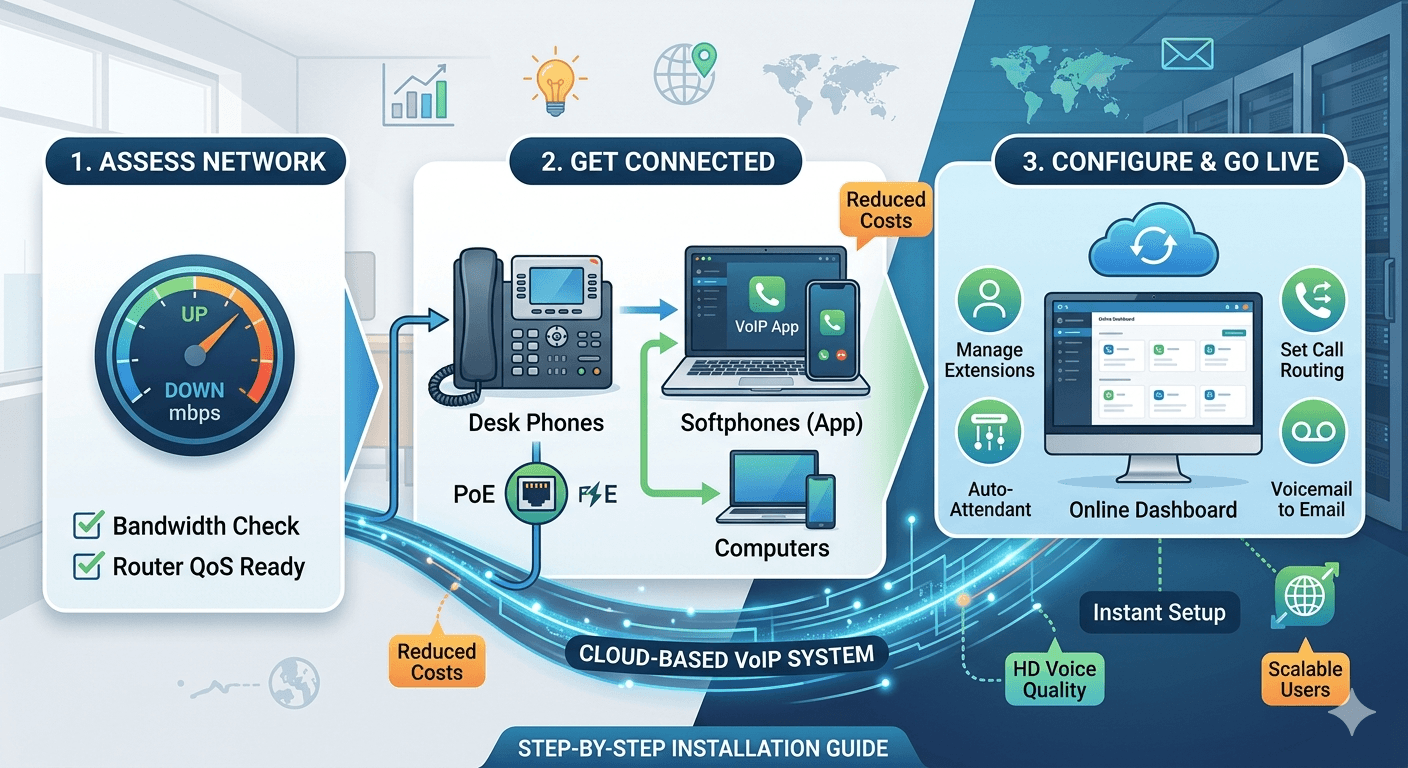
A VoIP setup guide for business in 30 minutes involves selecting a cloud-based provider, ensuring your internet bandwidth meets the necessary system requirements, and configuring your devices. First, verify your connection speed to ensure it can handle multiple high-definition calls simultaneously. Next, acquire your specific hardware or install software applications on existing computers and smartphones. Finally, log into your provider’s dashboard to assign extensions and set up call routing rules. This streamlined process eliminates the need for complex on-site wiring, allowing small businesses to establish a professional communication network quickly and cost-effectively without requiring specialized technical expertise or lengthy waiting periods for hardware delivery.
Understanding VoIP Phones for Business and How They Operate
Modern communication has shifted away from traditional copper wires toward internet-based protocols. At its core, voip business systems convert voice signals into digital data packets that travel across the internet rather than traditional telephone lines. This technology allows for much higher flexibility because the system is not tied to a physical location. When you initiate a call, the voice data is compressed and sent to a server, which then routes it to the recipient’s device. This process happens in milliseconds, ensuring that the conversation remains fluid and clear. For a small company, this means you can manage your entire communication stack through a simple web interface.
Implementing voip business phones requires a reliable internet connection as the foundation of the network. Unlike older systems that required a dedicated PBX box in a closet, today’s voip business system is often hosted in the cloud. This means the service provider manages the heavy lifting, such as servers and security updates, while the business owner simply manages the user accounts and settings. This shift has democratized high-end features that were once only available to large corporations, such as automated receptionists and detailed call analytics. By using this digital approach, companies can scale their operations up or down by adding or removing users with a few clicks in their administration portal.
Research indicates that the shift to digital telephony is not just a trend but a strategic financial move.
According to data from Blueface, small businesses switching to these digital solutions can reduce their initial capital expenditure by up to 90 percent while saving nearly 30 percent on their recurring monthly phone bills.
This is largely because the hardware requirements are lower and the competitive pricing of internet-based providers often includes unlimited calling plans that are far cheaper than traditional long-distance rates. Furthermore, a study by Frost & Sullivan highlights that high-definition voice quality is the leading feature driving business migration, as digital signals provide much clearer audio than analog lines.
Detailed Steps for Business Phone System Installation
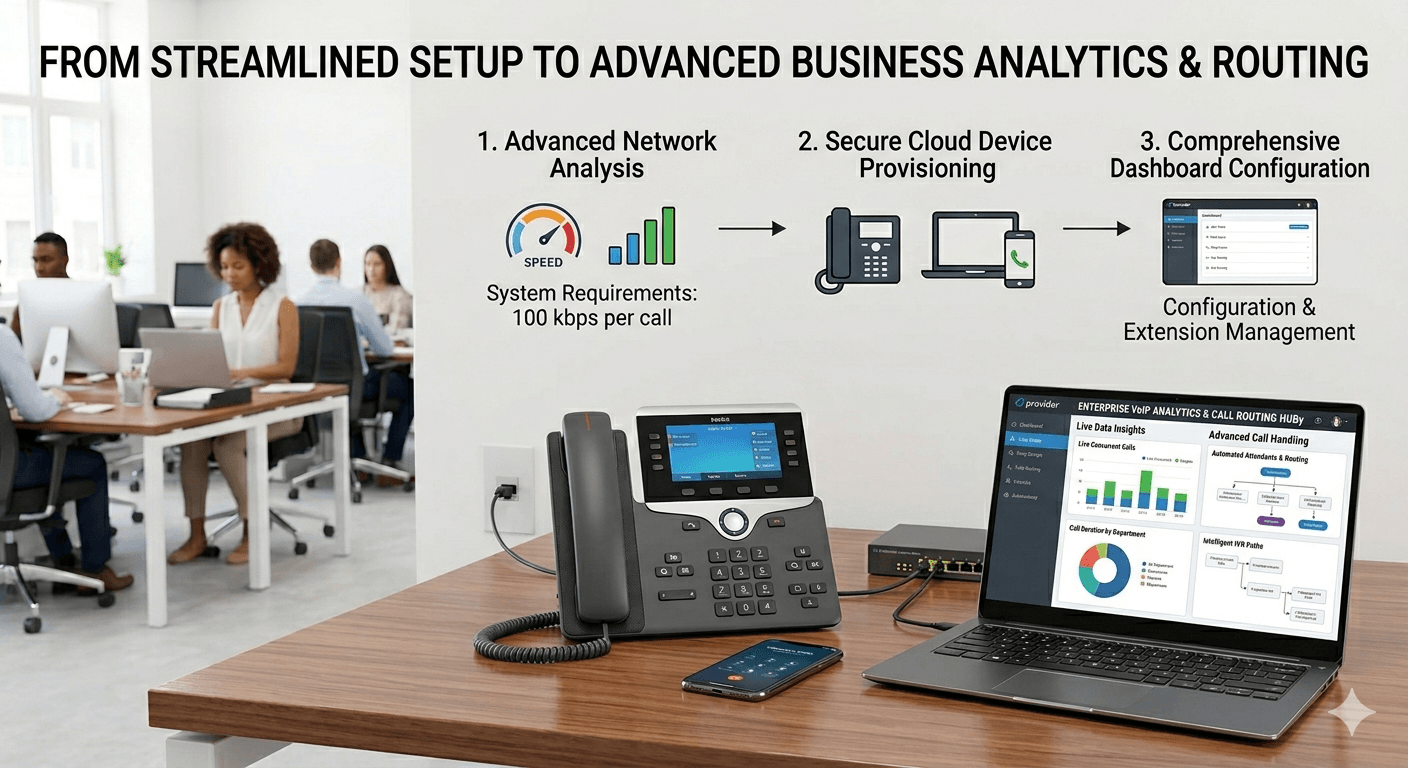
The initial phase of business phone setup begins with a comprehensive assessment of your current network environment. You must ensure that your router is capable of handling voice traffic and that your internet service provider offers enough upload and download speed to prevent latency. Generally, each active call requires about 100 kbps of bandwidth. If you expect to have ten employees on the phone at the same time, you need at least 1 Mbps of dedicated bandwidth just for voice. Checking these voip system requirements early prevents dropped calls and poor audio quality once the system goes live across the office.
Once the network is ready, the next step involves the physical voip installation of desk phones or the deployment of software-based callers. If you are using physical hardware, most devices are plug-and-play. You simply connect an ethernet cable from your router or switch into the back of the phone. Many modern business environments utilize Power over Ethernet (PoE) switches, which provide both data and power through a single cable, eliminating the need for separate power bricks for every desk. For those choosing a more mobile approach, setting up voip for small business can be as simple as downloading an application onto a laptop or smartphone and logging in with employee credentials.
After the hardware is connected, you must proceed with the voip configuration via the provider’s online dashboard. This is where you define the architecture of your communications. You will assign phone numbers to specific users, create ring groups for departments like sales or support, and record your initial greeting for the auto-attendant. This stage of the VoIP setup guide for business in 30 minutes allows you to customize how calls flow through your organization. You can set rules for after-hours calls to go straight to voicemail or be forwarded to a mobile device. This level of control ensures that no client inquiry is missed, regardless of where the staff is physically located.
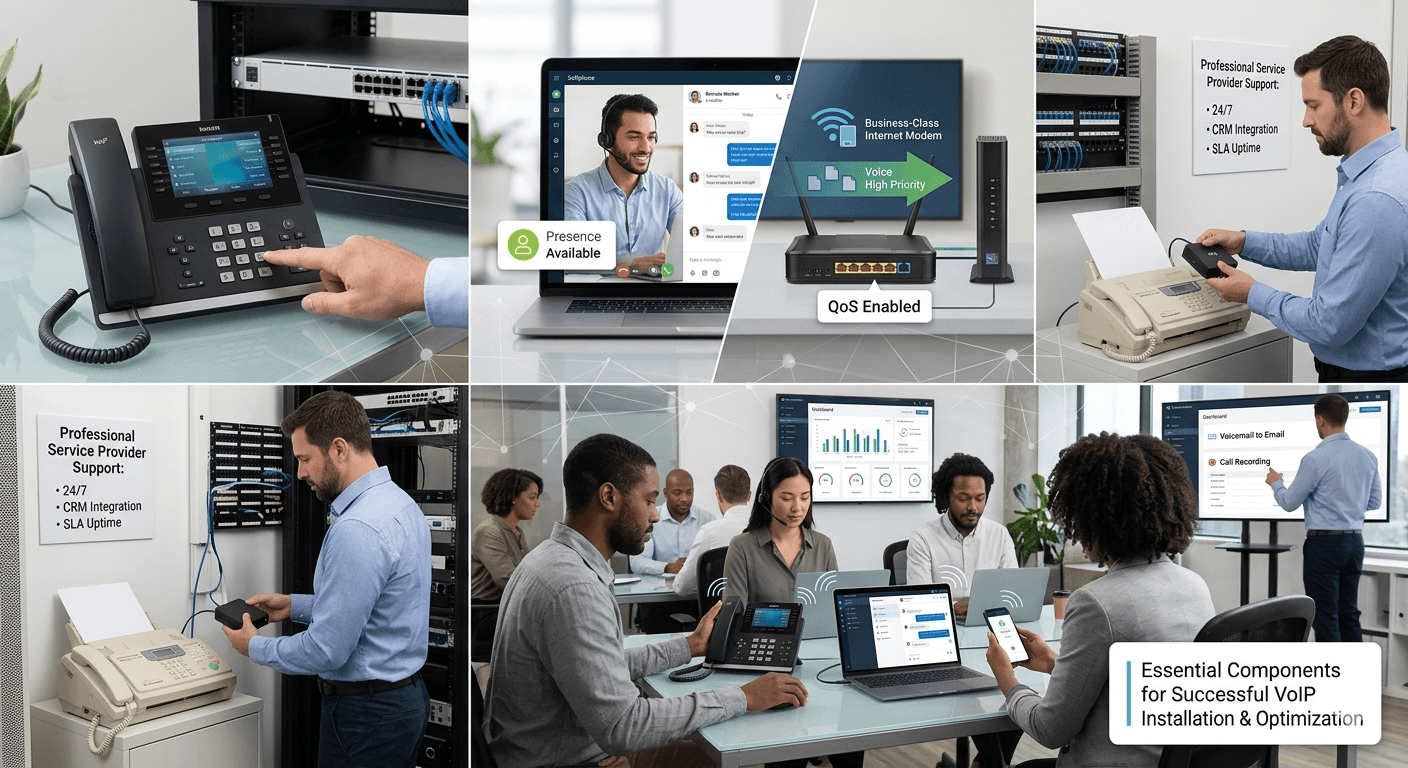
Essential Components for Successful VoIP Installation
-
High-Quality Internet Connection: A stable and fast internet connection is the most critical requirement for any voip business phone system. Without sufficient bandwidth, users will experience jitter, echoes, or disconnected calls. It is highly recommended to use a business-class internet service that offers a service level agreement (SLA) for uptime.
-
VoIP Compatible Hardware: You can choose between dedicated desk phones designed specifically for digital protocols or use existing computers. Many companies prefer voip phones for small business that include large screens for directory management and dedicated buttons for transferring calls.
-
Network Switches and Routers: A high-performance router that supports Quality of Service (QoS) is essential. This feature allows you to prioritize voice data over other types of internet traffic, such as large file downloads or video streaming, ensuring that call quality remains high even during peak usage hours.
-
Professional Service Provider: Selecting the right vendor is crucial for long-term success. Look for providers that offer 24/7 support, a high uptime guarantee, and a feature set that matches your specific business needs, such as CRM integration or SMS capabilities.
How to Configure VoIP Phone Systems for Optimal Performance
Configuring your system correctly is the difference between a frustrating experience and a seamless communication flow. When you begin the voip configuration step by step, start by setting up your user profiles. Each employee should have a unique extension and a personalized voicemail box. This organization makes it easier for internal transfers and helps in tracking call metrics. Many systems allow you to upload a CSV file to bulk-import user data, which can save a significant amount of time during the initial office phone setup.
The next part of the VoIP setup guide for business involves setting up your call routing and interactive voice response (IVR) systems. An IVR is the menu callers hear when they dial your number, such as “Press 1 for sales.” Setting this up effectively helps direct customers to the right person quickly, improving the customer experience. You should also configure your emergency calling settings (E911) during this phase. Because voip phone connection is not tied to a specific physical location, you must manually enter the address of your office so that emergency services can find you if a 911 call is placed from a desk phone.
Testing is the final and perhaps most important part of the how to install voip phone process. Before fully migrating away from your old system, place several test calls between internal extensions and to external numbers. Check for any delay in the audio and ensure that the caller ID displays the correct business information. If you encounter issues like one-way audio, where one person can hear but the other cannot, you may need to adjust your firewall settings. Modern voip settings often include STUN or TURN server options to help navigate complex firewalls and ensure a reliable connection.
Exploring VoIP Phone Features Business Owners Value
One of the primary reasons to switch to a voip business phone system is the vast array of features included at no extra cost. For instance, voicemail-to-email allows employees to read their messages as text or listen to audio files directly from their inbox. This is particularly useful for remote teams who may not always be at their desks. Additionally, call recording is a vital tool for training and quality assurance, allowing managers to review interactions and provide feedback to staff. These tools are often managed through a centralized dashboard that requires no advanced technical skills to operate.
Another significant advantage is the ability to use a single number across multiple devices. When someone dials an employee’s business number, the desk phone, laptop app, and mobile phone can all ring simultaneously. This ensure that staff members are reachable even when they are traveling or working from home. Furthermore, features like “presence” allow colleagues to see if a teammate is currently on a call, available, or away. This improves internal collaboration and prevents unnecessary interruptions during focused work periods.
The integration capabilities of voip business systems also add immense value. Most modern systems can connect directly with popular CRM software like Salesforce or HubSpot. When a customer calls, the system can automatically pull up their record on the employee’s screen, providing immediate context for the conversation. This integration streamlines workflows and ensures that every customer interaction is logged accurately without manual data entry. For a small business, these efficiencies can lead to significant improvements in productivity and customer satisfaction levels.
Managing Hardware and Software in a Business Environment
Deciding between hardware and software is a major part of the phone system setup. Hardware-based voip business phones provide a familiar experience for employees who prefer a physical handset. These devices are built for heavy daily use and offer superior audio quality through dedicated hardware processing. They are also useful in common areas like breakrooms or lobbies where a computer might not be available. However, purchasing hardware requires an upfront investment, though many providers offer leasing options to spread the cost over several months.
On the other hand, software-based solutions, often called softphones, are becoming increasingly popular due to their flexibility and low cost. When learning how to use a voip phone in software form, employees simply use their existing headsets and computers. This approach is ideal for remote work environments where providing physical phones to every home office would be logistically difficult. Softphones offer all the same features as desk phones, including conferencing, transferring, and directory access, but they live entirely within an application on the user’s screen.
For those who still rely on legacy equipment, a voip phone installation can still include older analog devices. By using an Analog Telephone Adapter (ATA), you can connect traditional fax machines or older analog phones to your digital network. This allows businesses to transition to the cloud at their own pace without discarding expensive legacy hardware immediately. This hybrid approach is common in industries that still require physical faxing or have specialized analog equipment integrated into their security systems.
Selecting the Best Phone System for a Small Business
Choosing a provider requires looking beyond just the monthly price. You must evaluate the reliability of their network and the quality of their customer support. A provider like voip phone vonage or similar industry leaders often provides extensive documentation and live support to help with the voip howto aspect of installation. It is also important to consider the scalability of the service. As your business grows, you want a system that allows you to add new lines and features without a complete overhaul of your existing infrastructure.
The best small business voip system should also offer a user-friendly interface. Business owners should be able to make changes to their call routing or add new users without needing to call an IT consultant. Look for a system that provides a mobile app for administration, allowing you to manage your office communications from anywhere. Security is another critical factor; ensure the provider uses encryption for voice data and offers multi-factor authentication for account access to protect your business from unauthorized use or eavesdropping.
-
Evaluation of Features: Ensure the provider offers the specific tools your business needs, such as video conferencing, SMS, or international calling plans.
-
Network Reliability: Look for providers with a proven track record of 99.999% uptime to ensure your business remains reachable at all times.
-
Quality of Support: Prioritize companies that offer multiple channels of support, including phone, chat, and detailed online knowledge bases.
-
Pricing Structure: Compare the total cost of ownership, including any hidden fees for activation, number porting, or international surcharges.
Common Challenges and Disadvantages of Digital Telephony
While the benefits are numerous, there are some challenges to consider when implementing voip. The most significant drawback is the total reliance on an internet connection and power. If your internet goes down or your office loses electricity, your desk phones will stop working. To mitigate this risk, many businesses use mobile apps as a backup or ensure their network hardware is connected to an Uninterruptible Power Supply (UPS). Having a secondary internet connection from a different provider can also provide the redundancy needed for mission-critical communications.
Another potential issue is emergency service limitations. Because the system is cloud-based, the location of a caller is not automatically known by emergency dispatchers in the same way it is with a traditional landline. It is the responsibility of the business owner to keep the physical address associated with each phone number updated in the system. Failure to do so can lead to delays in emergency response times. It is also important to educate employees on how to use voip in an emergency and the importance of providing their location to the dispatcher.
Lastly, call quality can sometimes be affected by network congestion. If your internal network is not optimized with QoS settings, a large file upload could cause a phone call to break up or drop. This requires a bit more technical oversight during the initial how to configure voip phone phase than a traditional system would. However, once the network is properly tuned, these issues are rare. Most modern routers and switches have built-in presets for voice traffic that make this optimization much simpler than it was in the past.
Read More: Understanding Call Parking: the Best Practices of On Call Parking
Final Thought on Business Communication Evolution
Transitioning to a digital phone system is a transformative step for any small business looking to modernize its operations and reduce costs. The ability to set up a professional, feature-rich communication network in under 30 minutes allows owners to focus on growth rather than technical infrastructure. By understanding the voip system requirements and following a structured installation process, you can ensure high-quality audio and reliable service for both your employees and your customers. As technology continues to evolve, the flexibility offered by cloud-based systems will remain a key competitive advantage for businesses of all sizes.
Frequently Asked Questions
-
Do I need to get a brand new phone number for my business?
No, you do not need a new number because most providers offer a process called porting. This allows you to transfer your existing landline or mobile business number to your new digital service provider so that your customers experience no disruption. The porting process usually takes a few days to a week to complete, during which time you can use temporary numbers provided by your new service to keep your office running.
-
Can my employees use their personal cell phones for business calls?
Yes, employees can use their personal smartphones by installing the provider’s mobile application. This app allows them to make and receive calls using the business phone number rather than their private one, maintaining a professional image. It also keeps their personal and professional lives separate, as they can set “do not disturb” hours within the app to prevent business calls from reaching them outside of working hours.
-
What is the primary difference between cloud-based and on-premise systems?
A cloud-based system is hosted by the service provider, meaning they handle all the maintenance, security, and hardware updates in their data centers. An on-premise system requires you to have a physical server located in your office, which gives you total control but requires an IT expert to manage and fix. For most small businesses, the cloud-based option is preferred due to its lower cost and lack of technical maintenance requirements.
-
How can I ensure my calls always sound clear and professional?
The best way to ensure call quality is to perform a speed test and implement Quality of Service (QoS) on your office router. QoS tells your router to give priority to voice data packets over other types of internet usage, which prevents audio issues during busy times. Additionally, using a wired ethernet connection for desk phones instead of relying on Wi-Fi will provide a more stable and interference-free experience for your staff.
-
What happens to my old fax machine if I switch to this technology?
You can continue to use your traditional fax machine by connecting it to a device known as an Analog Telephone Adapter (ATA). This adapter plugs into your internet router and provides a standard phone jack for the fax machine to use. Alternatively, many digital providers offer “e-fax” services where you can send and receive faxes directly through your email, which often eliminates the need for a physical machine and paper costs entirely.