A VoIP adapter (ATA) is a device that converts traditional analog phone (POTS) signals into digital VoIP data—and back—allowing old landline phones to work over the internet. In an era where digital transformation is no longer a luxury but a necessity, many businesses and homeowners feel pressured to abandon their reliable hardware for the latest “smart” gadgets. But what if you could keep the tactile comfort of your favorite desk phone while slashing your monthly bills?
Enter the VoIP adapter, the unsung hero of modern telecommunications. Whether you call it a voIP to analog converter or an analog telephone adapter (ATA), this small device is the key to bringing legacy hardware into the fiber-optic age.
What is a VoIP Adapter? The Digital Bridge
At its core, a VoIP adapter (Voice over Internet Protocol) is a hardware device that acts as a translator. Imagine your old analog phone speaks “Old English” while your fiber-optic internet speaks “Binary Code.” The VoIP telephone adapter acts as the interpreter. By bridging this communication gap, it allows you to retain your existing hardware while upgrading to modern, cost-effective communication standards. This eliminates the need to invest in expensive digital-only handsets or complex infrastructure.
Technically known as an analog telephone adapter (ATA), VoIP device allows you to connect a standard analog telephone to a digital internet connection.
It functions as a digital to analog phone line converter, taking the analog voice signals from your handset and converting them into digital data packets for transmission over the web. This conversion process is virtually instantaneous, ensuring that call quality remains clear and lag-free even during high-bandwidth activities. Furthermore, many of these adapters support advanced features like caller ID and call waiting that were previously limited to traditional landline services.
How a VoIP to POTS Converter Transforms Your Voice
A VoIP to POTS converter (ATA) lets you connect a traditional analog phone to a VoIP network. It converts analog voice signals into digital data for internet transmission and vice versa. This enables you to use existing landline phones with modern VoIP services without replacing hardware.
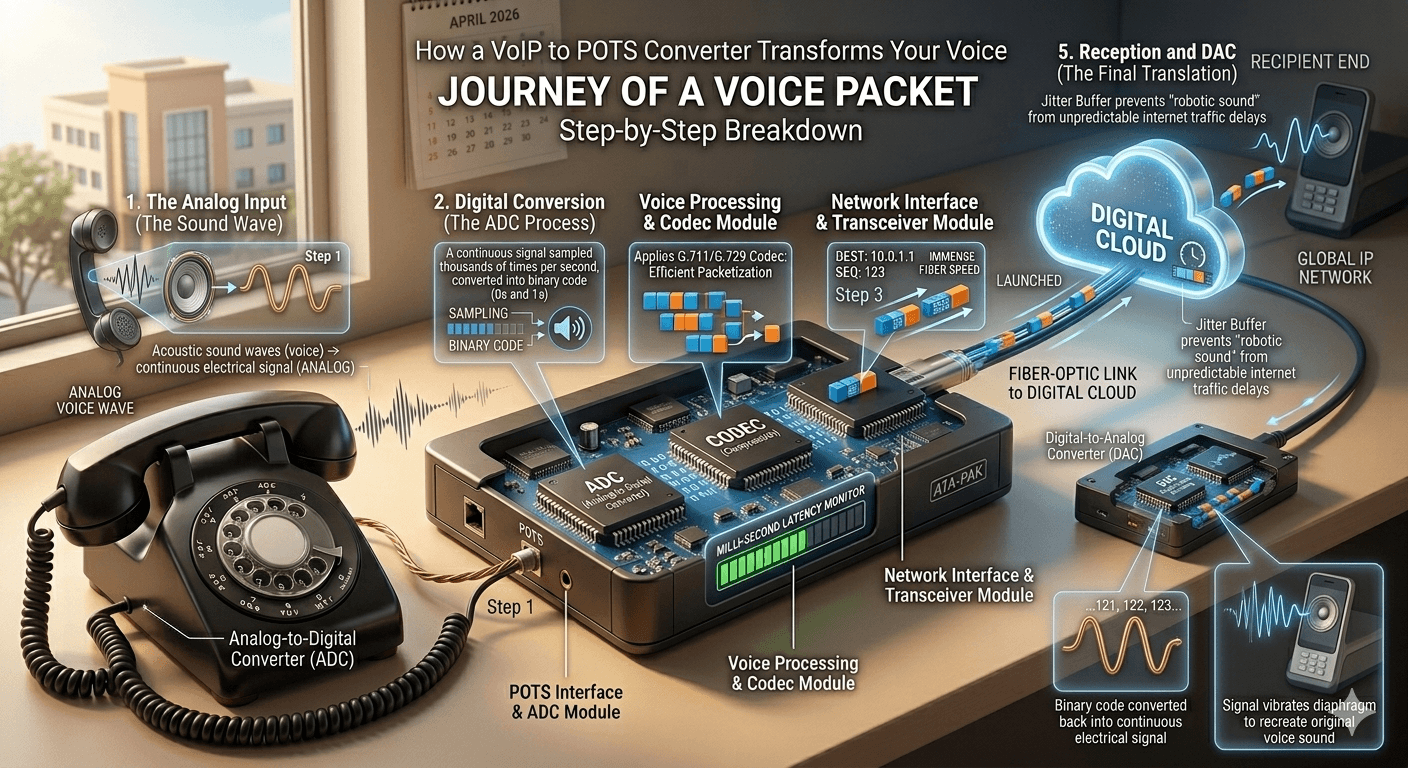
Have you ever wondered how a tiny box can take a 1990s rotary or desk phone and make it work on a 2026 fiber-optic network? The process of analog to VoIP conversion is a marvel of modern engineering. Understanding the journey of a voice packet helps you appreciate why a high-quality VoIP telephone adapter is essential for crystal-clear communication. This small piece of hardware effectively future-proofs legacy equipment, allowing cherished vintage hardware to operate on cutting-edge infrastructure. It serves as a vital link that preserves the tactile experience of traditional telephony while leveraging the immense speed of fiber optics.
Here is the step-by-step breakdown of how a VoIP to analog converter bridges the gap between old-school copper wires and the digital cloud. The device first samples your continuous voice wave thousands of times per second to create a precise digital map of the sound. These digital segments are then compressed into efficient packets, tagged with destination data, and launched across the network in milliseconds to be reassembled at the other end.
Step 1: The Analog Input (The Sound Wave)
The process begins at your handset. When you speak into an analog phone, your voice creates acoustic sound waves. The microphone in the phone’s receiver converts these waves into a continuous electrical signal—this is “Analog” data. In a traditional setup, this signal would travel over copper POTS (Plain Old Telephone Service) lines, losing quality over long distances.
Step 2: Digital Conversion (The ADC Process)
Once that electrical signal hits your analog telephone adapter for voip, the “magic” happens. The device contains a chip called an Analog-to-Digital Converter (ADC).
- The voip converter samples your analog voice thousands of times per second.
- It converts these samples into a string of “0s and 1s” (binary code).
- During this phase, the voip analog adapter applies a voice codec (like G.711 or G.729) to compress the data, ensuring it’s small enough to travel quickly but high-quality enough to sound natural.
Step 3: Packetization and Transmission
Now that your voice is digital, the internet calling wraps this data into “IP Packets.” Think of these as digital envelopes.
- Each packet is labeled with a destination address and a sequence number.
- The packets are sent from the voip to pots device to your router.
- The router shoots these packets across the vast expanse of the internet via the most efficient path available.
Step 4: Jitter Buffering and Reassembly
Internet traffic can be unpredictable. Sometimes packets arrive out of order or with slight delays (known as jitter). A high-end voip phone adapter uses a “Jitter Buffer” to collect these packets, put them back in the correct order, and ensure there are no gaps in the conversation. This is why a quality voip adaptor prevents that “robotic” sound often heard on poor connections.
Step 5: Reception and DAC (The Final Translation)
When the packets reach the recipient’s digital to analog phone converter, the process reverses.
- The voip to analog adapter uses a Digital-to-Analog Converter (DAC) to turn the binary code back into an electrical signal.
- This signal travels to the speaker of the receiving phone, vibrating the diaphragm to recreate the original sound of your voice.
Why the Hardware Matters?
Using a cheap pots to voip device can result in “latency” (delay). If the conversion takes too long, you’ll end up talking over each other. By choosing a robust adapter for landline phone, like the ones from Cisco or Grandstream, you ensure the convert analog phone to voip process happens in milliseconds—so fast that the human ear can’t detect the transition. This rapid processing is crucial for maintaining the natural flow of conversation, as even a fraction of a second in delay can disrupt the psychological rhythm of a standard verbal exchange.
Why Use One? The Unbeatable Benefits
Why invest in a pots to voip converter instead of just buying new IP phones?
- Massive Cost Savings: Transitioning to an IP system usually requires expensive new hardware. With a voip adapter for landline phone, you keep the equipment you already own.
- Plug-and-Play Simplicity: Most modern internet calling require zero technical expertise.
- Global Portability: These devices are tiny. You can pack your voip adapter for home phone in a suitcase, plug it into an internet port in London or Tokyo, and keep your local phone number.
- E-Fax Support: Many voip phone adapters support T.38 protocols, allowing you to use your traditional fax machine over a digital line.
- Eco-Friendly: By using a voip to pots solution, you keep electronic waste out of landfills.
The Different Types of VoIP Adapters
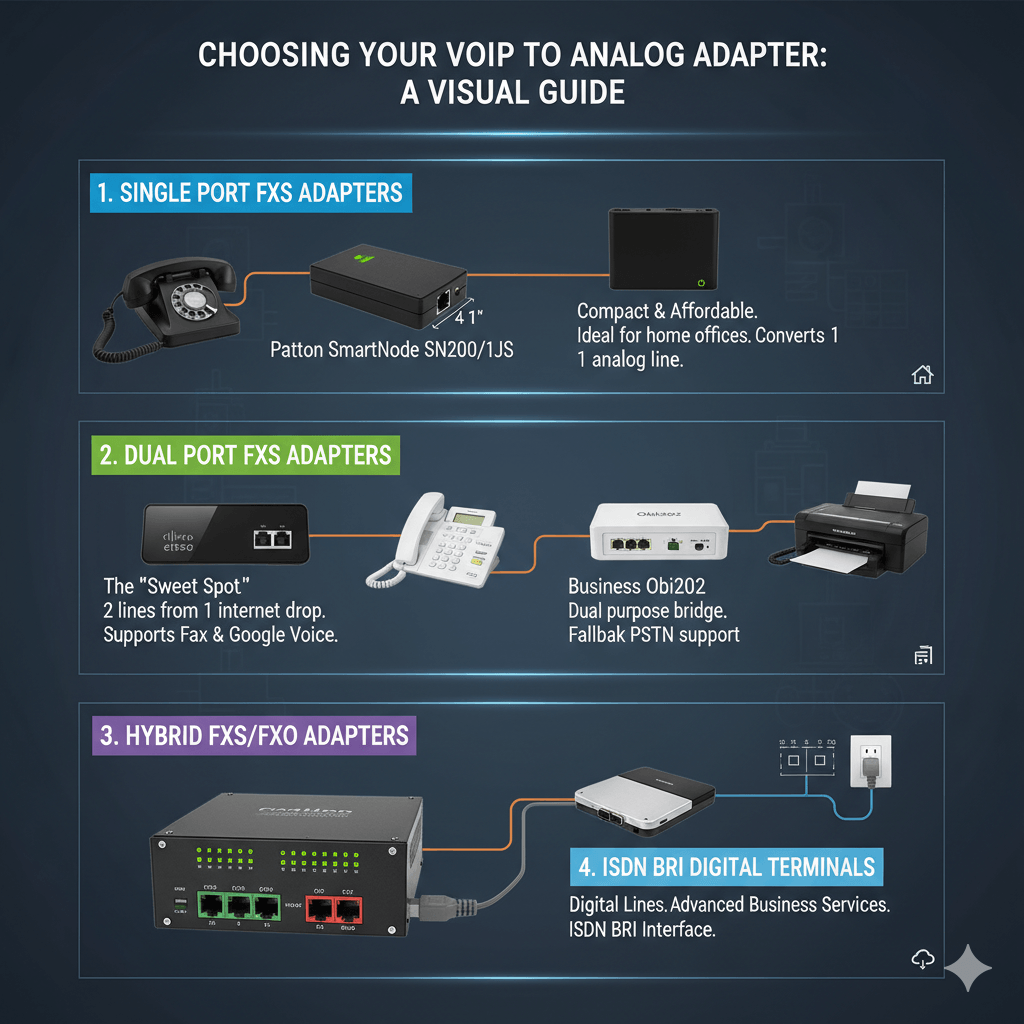
Choosing the right voip to analog adapter depends on how many lines and what type of connection you need.
Single Port FXS Adapters
If you only need to IP-enable a single end-point, a single FXS telephone adapter is the most affordable voip to pots converter. These devices are specifically engineered for home offices or solo workstations where a single reliable connection is paramount. Despite their small size, they pack the power of a full-scale voip converter, ensuring that your analog phone performs with the same clarity as a high-end digital system.
- Patton SmartNode SN200/1JS: The product offers secure, high-quality voice communication for a single workstation, featuring 3-way conferencing, a compact design under 4 inches, and a robust web interface.
- Port FXS Adapters: A dual FXS analog telephone adapter connects two analog telephony devices, such as phones or fax machines, to your IP network, providing a solution for those needing to connect multiple devices to their VoIP service.
The Best Dual FXS Adapters
In the world of telecommunications, a dual FXS analog telephone adapter is widely considered the “sweet spot” for both residential power users and small businesses. Unlike a single-port device, this voip telephone adapter allows for a voip to analog connection for two devices simultaneously, effectively turning one internet drop into two functional phone lines.
- Cisco SPA112: A legend in the industry. It provides world-class QoS (Quality of Service) and reliable faxing.
- Obihai OBi202: This is the “Swiss Army Knife” of voip phone adapters. It supports up to four SIP accounts and is famously compatible with Google Voice.
- Grandstream HT802: Known for its “failover” server support, ensuring your analog phone to voip converter stays online even if one server goes down.
FXS/FXO & ISDN BRI Adapters
For businesses with mission-critical communication needs, a standard voip to pots converter may not be enough. This is where FXS/FXO hybrid adapters come into play. These specialized units act as a dual-purpose bridge:
- Patton SmartNode SN4140: A high-end voip analog telephone adapter that offers fallback phone service if your SIP trunk fails.
- Patton SmartNode Digital Terminal (SN-DTA): Designed for ISDN BRI interfaces, supporting advanced services like CLIP and COLP.
VoIP Adapters with Built-In Routers
If you have a limited number of Ethernet ports at your workstation, or if you don’t have a dedicated router for your VoIP setup, you need an ip phone adapter that includes a built-in NAT router. This type of voip telephone adapter serves as a dual-purpose hub, allowing you to connect your analog phone to the internet while also providing an extra “Pass-Through” port for your computer or other IP devices.
- Obihai OBi302: Includes an integrated 2-port router and supports voip phone wireless adapter add-ons via USB.
- Cisco SPA122: A powerful digital to analog phone converter that handles data and voice simultaneously without lag.
- Grandstream HT814: Features four FXS ports and a Gigabit NAT router for high-speed environments.
Technical Specs: Protocols and Codecs
While a voip telephone adapter often feels like a “set it and forget it” device, the software running inside it is what determines whether your call sounds like a face-to-face conversation or a crackly radio broadcast from 1920. In 2026, the industry has standardized several “languages” (protocols) and “shorthand” (codecs) to make analog to voip conversion possible.
VoIP Protocols
A protocol is the “rulebook” for how data moves.
- SIP (Session Initiation Protocol): The universal standard. Most landline to voip adapters use this.
- SCCP (Skinny): Proprietary to Cisco.
- H.323/MGCP: Older standards rarely seen in 2026 but still supported by some old telephone conversion kit setups.
Voice Codecs (The Compression)
Codecs determine the balance between audio quality and data usage.
| Codec | Bandwidth | Quality |
| G.711 | 64 Kbps | High (Uncompressed) |
| G.729 | 8 Kbps | Low (High Compression) |
| iLBC | 15 Kbps | Robust against packet loss |
Why Businesses Love VoIP Adapters?
A voip adapter for analog phone isn’t just a budget tool; it’s a productivity booster. By transforming your legacy hardware into an internet-enabled node, you unlock a suite of enterprise-grade features that were previously reserved for giant corporations with massive IT budgets. In 2026, these adapters serve as the foundation for Unified Communications (UC), streamlining how you interact with customers and colleagues.
- Online Faxing: Use a voip fax adapter to send unlimited faxes without a dedicated phone line.
- Automated Systems: Use an ip to analog converter to link your old shop phone to an Auto-Attendant (“Press 1 for Sales”).
- Call Queuing: Manage high volumes of calls efficiently by routing them through a digital queue before they hit your analog handset.
Essential Accessories
To truly master your communication setup in 2026, you need more than just the base unit. The right accessories transform a simple voip telephone adapter into a robust, high-performance workstation that remains functional even when your hardware—or your floor plan—presents a challenge.
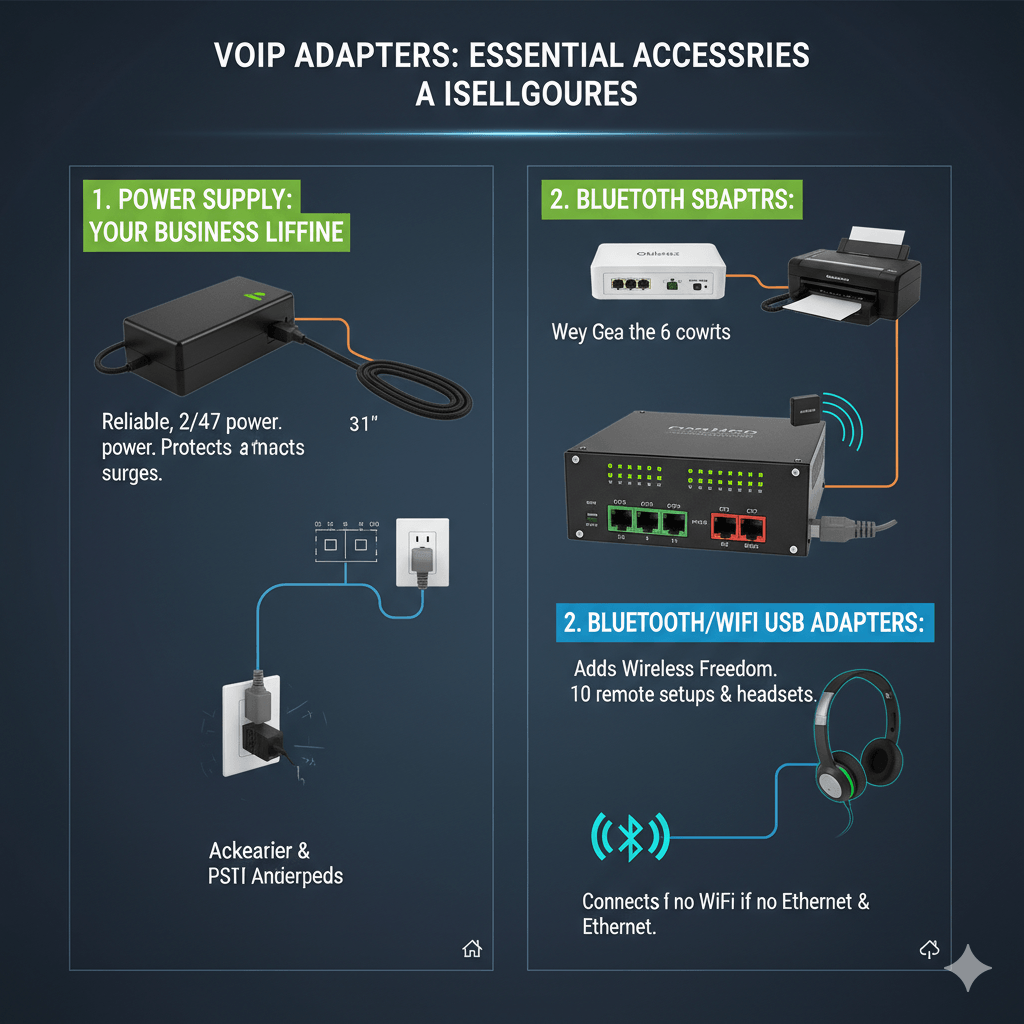
1. VoIP Adapter Power Supply: Your Business Lifeline
Never underestimate the importance of a high-quality adapter power supply. Because these devices are meant to run 24/7, the power brick is often the first component to fail due to heat or power surges.
2. Bluetooth/WiFi USB Adapters: Cutting the Cord
If your desk isn’t near an Ethernet jack, or if you prefer the mobility of a headset, a USB-equipped voip phone adapter (like the Obihai OBi202 or OBi302) is your best friend.
Read more: Internet Telephony: The Future of VoIP Telephony or IP Telephony
Is it Right for You? (The Verdict)
Choosing a voip adapter for beginner for analog phone is a strategic decision that balances nostalgia with cutting-edge utility. You should use a voip adapter if you are deeply attached to your current hardware, operating on a strict budget, or require a portable home phone that keeps your local number active anywhere in the world. It is the ultimate voip to pots converter for those who value the tactile reliability of a traditional desk phone without the high overhead of a full digital overhaul. However, you should skip the adapter and opt for a native IP phone if your workflow demands built-in video conferencing, high-resolution touchscreen apps, or deep, real-time CRM integration directly on the handset itself. While a voip telephone adapter is a powerful productivity booster and an excellent analog to digital phone converter, it serves as a bridge to the future rather than a replacement for high-end, feature-rich smart hardware.
Frequently Asked Questions (FAQs)
What is a VoIP adapter?
A VoIP adapter is a small hardware device that connects a standard analog phone to the internet, allowing for digital calling. It functions as a bridge by converting the analog sound signals from your handset into digital data packets for transmission over the web.
Is VoIP legal in Pakistan?
Yes, VoIP is legal in Pakistan for business and personal use, provided it is through PTA-authorized service providers. Using unauthorized gateways or “grey traffic” for international calling is strictly prohibited and can lead to legal penalties under telecommunication laws.
Can I plug a VoIP phone into my router?
A native VoIP phone plugs directly into a router; however, an analog phone requires a VoIP phone adapter to make that connection. Most modern routers also feature dedicated “Phone” ports (RJ-11) that act as built-in adapters for direct analog connection.
How to use a VoIP adapter?
Connect the adapter to your router via Ethernet, plug your phone into the adapter’s phone port, and activate it through your service provider. Once the status lights indicate a stable connection, you can pick up the receiver to hear a standard dial tone, confirming it is ready for use.