Ring Groups
A ring group is a business phone feature that routes an incoming call to multiple users or extensions within a predefined group. Depending on the phone system, group members may ring simultaneously or according to a configured ringing pattern. Ring groups are commonly used for departments such as Sales, Support, Billing, and Reception.
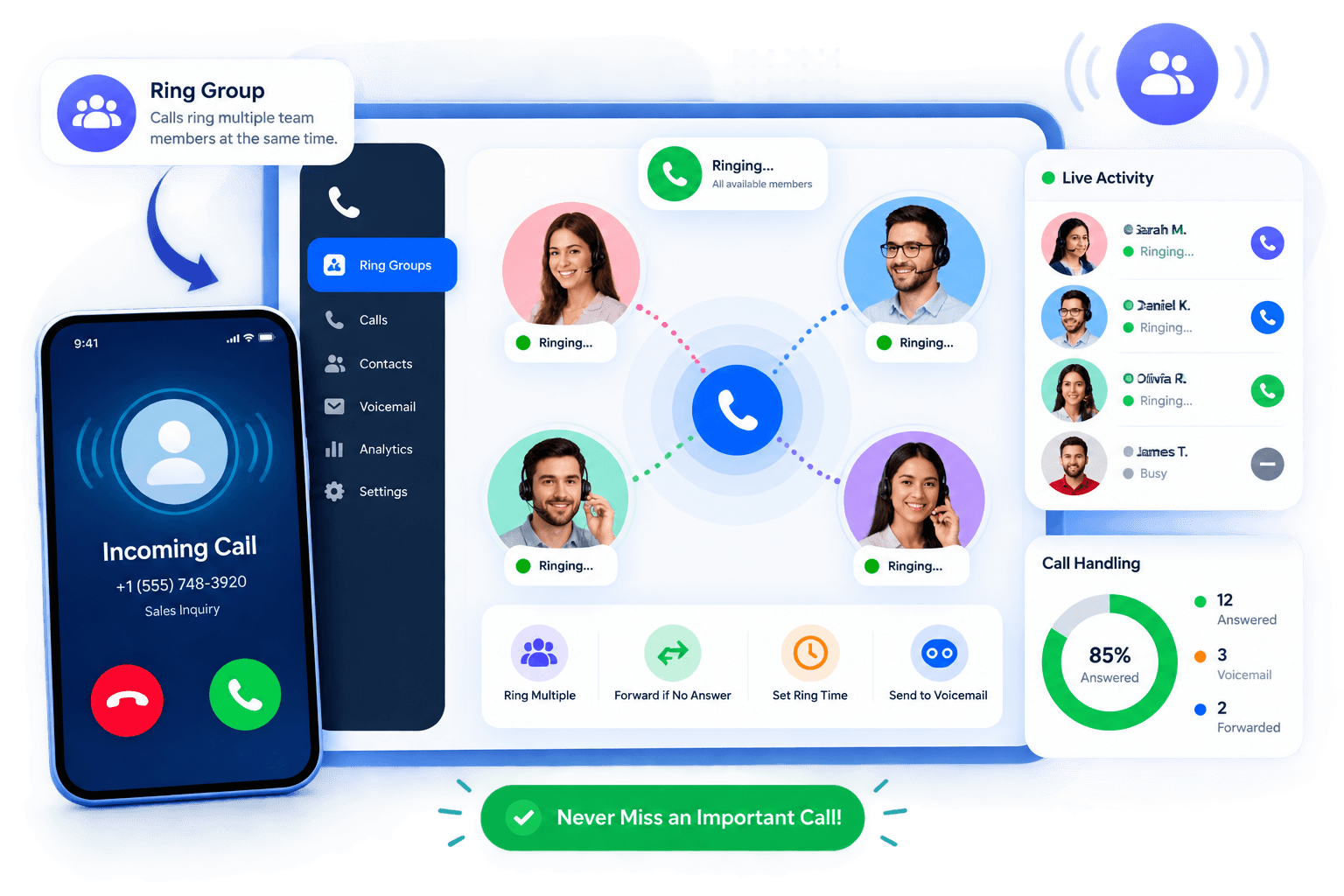
How Do Ring Groups Work?
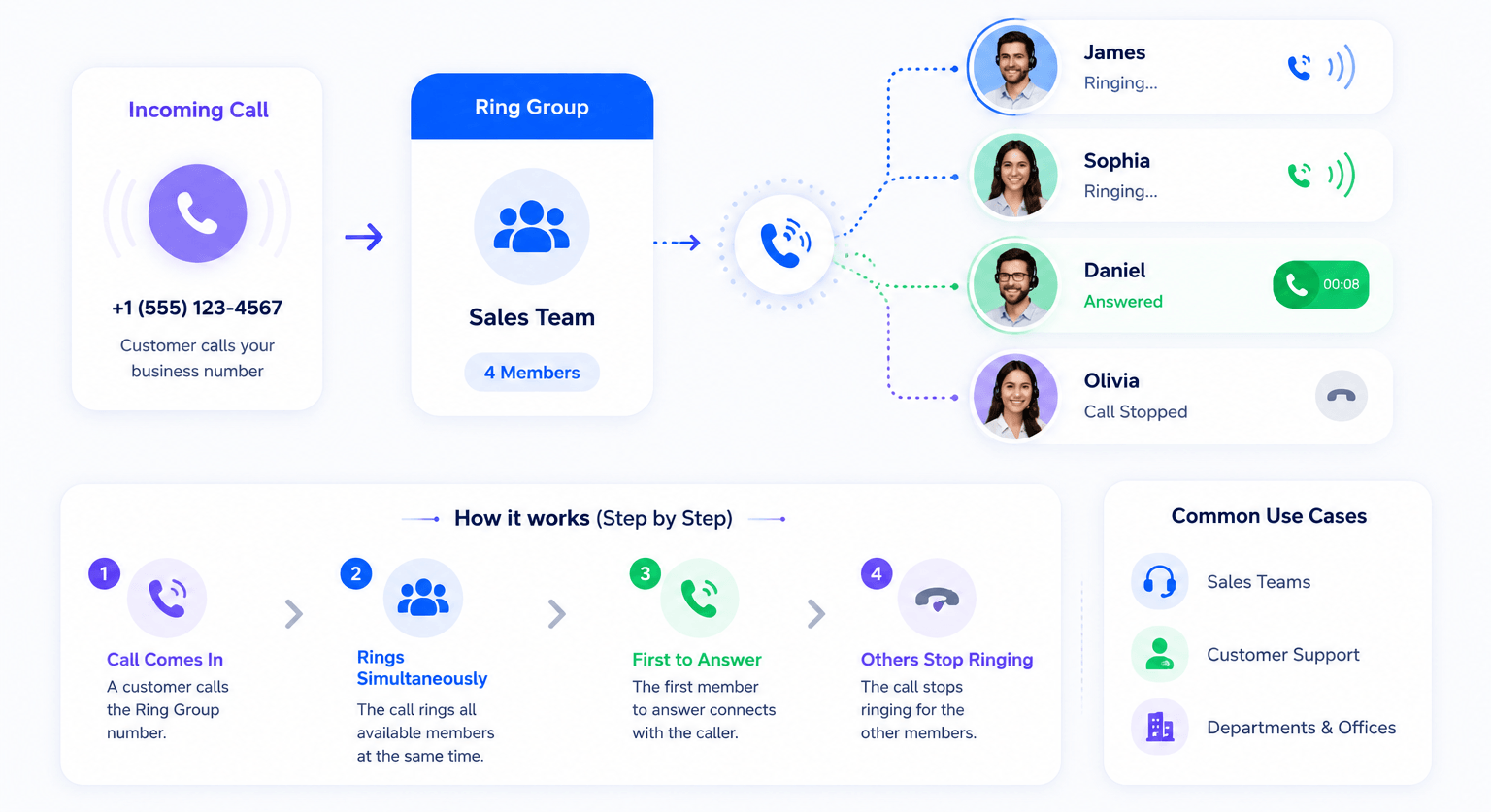
Ring Groups allow businesses to distribute inbound calls across specific departments or teams, ensuring that customer inquiries are handled quickly and efficiently. Instead of routing an incoming call to only one extension, a ring group sends the call to a predefined group of users. Depending on the configured ringing strategy, several phones may ring at the same time or in a particular order until someone answers.
Example:
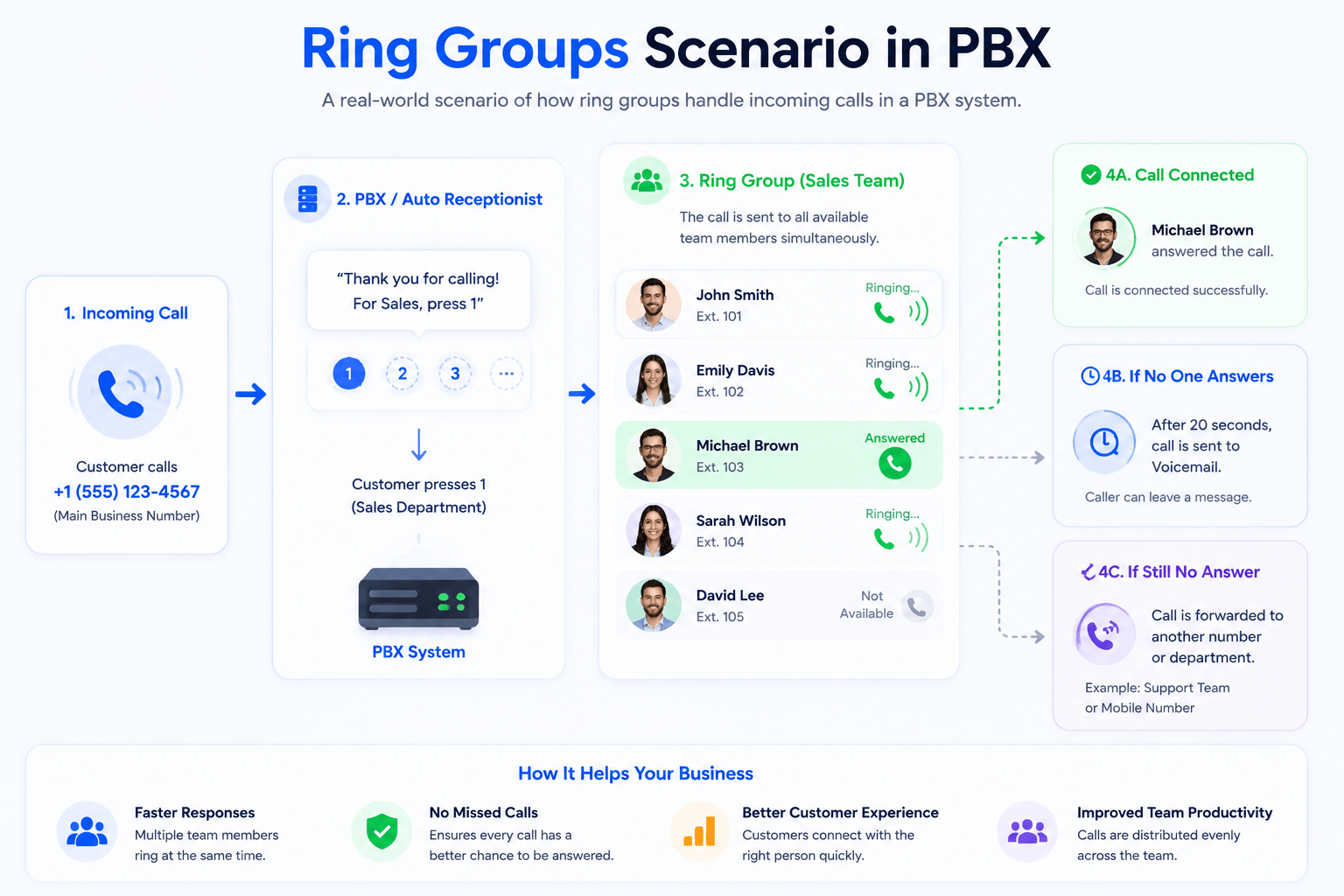
For example, a caller reaches your main business number and hears an IVR menu: “Press 1 for Sales, 2 for Support, or 3 for Billing.” If the caller selects Sales, the IVR can route the call to the Sales Ring Group. Depending on the group’s settings, several sales extensions may ring simultaneously or according to a predefined ringing order. The call connects when one of the group members answers.
Ring Groups Example in PBX
Suppose a business has four employees in its Sales department. Instead of publishing four separate phone numbers, the company can create one Sales Ring Group containing all four extensions.
When a customer calls the Sales number, the PBX follows the group’s configured ringing strategy. It might ring all four phones simultaneously or try them in a predefined order. If nobody answers within the configured time, the call can be sent to voicemail, another group, a call queue, or another destination depending on the phone system.
Ring Group Ringing Features
Simultaneous Ring
All selected extensions ring at the same time when a call enters the group. The call connects to the group member who answers first.
Sequential Ring
Extensions ring in a predefined order, such as Employee A first, Employee B second, and Employee C third. This can be useful when certain team members should receive calls before others.
Round-Robin Ring
Calls rotate between group members rather than always starting with the same person. This can help distribute incoming calls more evenly when the phone system supports round-robin routing.
Longest-Idle Routing
Some more advanced phone systems can send a call to the available user who has gone the longest without handling a call. This functionality is more commonly associated with call queues or advanced distribution systems than basic ring groups.
Ring Groups vs Call Queues
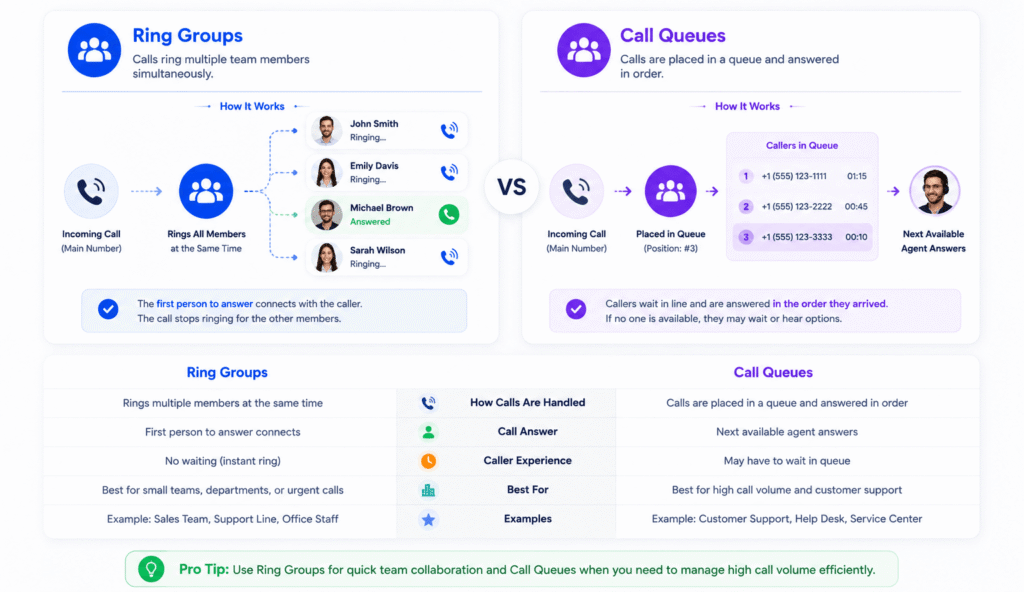
A ring group focuses on ringing a predefined set of users when a call arrives. A call queue can hold callers when agents are busy and distribute calls as agents become available. For businesses handling higher call volumes, a call queue usually provides more advanced call-distribution and waiting features.
| Feature | Ring Group | Call Queue |
|---|---|---|
| Main purpose | Ring multiple users for an incoming call | Hold and distribute incoming calls to agents |
| Caller waits in queue | Usually no | Yes |
| Multiple callers waiting | Limited compared with queues | Designed for this |
| Ringing strategies | Simultaneous, sequential, etc. | Agent-based distribution strategies |
| Queue position | No | Usually supported |
| Hold music/messages | Usually limited/not inherent | Commonly supported |
| Agent availability/status | Basic or provider-dependent | Usually more advanced |
| Best for | Small teams and departments | Higher-volume support/sales teams |
Benefits of the ring groups feature
Connect Multiple Extensions
Add multiple users or extensions to the same ring group so more than one team member can receive incoming calls. This reduces reliance on a single employee being available to answer.
Improve Team Efficiency
Organize extensions into departmental groups such as Sales, Support, Billing, or Reception. This makes it easier to route general incoming calls to the appropriate team rather than a single employee.
Choose a Ringing Pattern
Choose how incoming calls should reach group members. Depending on the phone system, options may include simultaneous, sequential, or round-robin ringing.
Efficient call distribution
Calls are distributed fairly among employees, avoiding overload on any single agent. It also helps in balancing workloads and ensuring customers aren’t left unattended.
Route Different Numbers to a Ring Group
Depending on your phone system, multiple business numbers or call flows may be routed to the same ring group. For example, different Sales numbers could all direct callers to the same Sales team.
FAQs: Ring Groups
What are Ring Groups in VoIP?
A ring group is a VoIP or PBX feature that groups multiple users or extensions together for incoming calls. When a call reaches the group, the system rings members according to a configured strategy, such as simultaneous or sequential ringing.
How do Ring Groups work?
When an incoming call is routed to a ring group, the phone system follows the group’s ringing rules and attempts to connect the call to one of its members. If nobody answers, a fallback action can be applied according to the configured settings.
What Happens When Nobody Answers a Ring Group?
Ring groups usually have a configured ring duration or timeout. If no group member answers before the timeout is reached, the phone system can apply a fallback rule. Depending on the provider, the call may be sent to voicemail, another extension, another ring group, a call queue, or an external number.
What is the difference between ring groups and hunt groups?
Ring Groups are very different from hunt groups. A hunt group help you managing how the call is being received while a in a ring group all the extensions ring simultaneously.
The terms are sometimes used interchangeably. Where a provider distinguishes them, hunt groups often emphasize trying extensions according to a defined sequence, while ring groups may support simultaneous or other ringing patterns. The exact definition varies by phone system.
What is the difference between Call Queue group and Ring Group?
A call queue is a group in which members pick up calls in queues. The call falls into a queue to be answered by the member who is available. In ring groups numbers are forwarded within an extension which then rings whenever a hosted extension rings.
A ring group attempts to connect an incoming call to a predefined group of users. A call queue can hold callers when agents are unavailable and distribute waiting calls as agents become available, making queues better suited to higher call volumes.
Can I create multiple ring groups?
Yes, you can create several ring groups according to your business requirement. There is no limit to the number of ring groups which are allowed on VoIPBusiness system.
What happens when a call to my ring group timeout?
In the case when there is an incoming call but no one in the ring group is available then you can direct the call to another extension or you can send it to the voicemail box of the ring group.
Ring Groups vs Hunt Groups
Ring groups and hunt groups are closely related terms, and some phone providers use them interchangeably. In systems that distinguish between them, a ring group may ring several extensions simultaneously, while a hunt group commonly tries extensions according to a predefined sequence or hunting pattern. Always check how your VoIP or PBX provider defines these features.
Ring Group vs IVR
An IVR can identify where the caller wants to go, while a ring group determines which phones within that destination should ring. For example, “Press 1 for Sales” can send the caller from the IVR to the Sales Ring Group.
| Feature | Ring Group | IVR |
|---|---|---|
| Purpose | Distribute calls among users | Let callers choose routing options |
| Caller interaction | Usually none | Menu/keypad or voice input |
| Example | Ring Sales team | “Press 1 for Sales” |
| Can work together? | Yes | Yes |